How to Choose the Right Tools for Different Kinds of Work | Zoom Head of Unified Communications
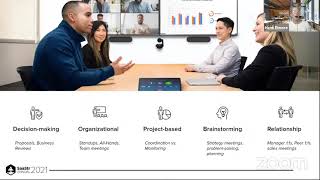
Heidi Elmore, Zoom's head of unified communications, maps five types of meetings (decision-making, brainstorming, relationship-building, and others) to the right tools. Chat and channels can replace some meetings entirely. She recommends setting clear outcomes, limiting attendee counts based on Bain's guidance, and hiding self-view to reduce fatigue.
Chapters
All right. Hello and welcome. My name is Heidi Elmore. I'm the head of Unified Communications at Zoom. What does that mean? Well, really, my job is to tell stories about technology. So today I'm going to talk to you about meetings, but also when it's possible to use other types of technology outside meetings. It might be a revolutionary topic for someone at Zoom to talk about more than meetings. But the reality is, as human beings, we communicate in many different ways. And platforms like Zoom also provide digital equivalence across other modalities like voice and chat. And this can apply to a bunch of different platforms. And I'll use Zoom as an example, but of course, this could apply to your communication platform of choice. So let's dive in to when to use different types of tools for different types of work in our brief time. Today, I'll talk about four different things. First, let's explore how different technical communication modalities can help us align with how we naturally want to interact with one another. We'll talk about different meeting types we typically see in our enterprises, small business, government agencies, et cetera, your organization of choice, or even our healthcare systems. Then we'll talk about how other technology modalities can help augment or even prevent the need to have certain types of meetings. And finally, if you do need that meeting, some tips and tricks to making sure you get the most out of your time. So let's get started. We have five major ways that we communicate with others, which I think is intuitive to most of us, but let's revisit it and repeat it. So first, verbal communication. So verbal communication occurs when we're engaged in speaking with others. And. And non Verbal communication is what happens with our body language, our eye contact, glancing, et cetera, Net. Net. Nonverbal is what we do while we speak. And often it can say more than the actual words. Of course, there's listening, visual communication, written communication, and communicating face to face is, of course, the richest of interactions. It enables us to combine both verbal and non verbal communication, body language, intonation, pitch, and more. And the technology that best represents this in digital form is, of course, video. I think most of you have become familiar with this over the last few years, so let's move on. The next is, of course, writing. So humans have communicated through writing and language for millennia. Many consider the printing press the dawn of the modern age. Why? Because words and ideas can be shared easily with the masses asynchronously. So that that meant that words were not just for the elite few in the corporate world. We were previously Most familiar with writing and formal documentation or formal communication. But in the 2000s, we started adapting to text based messages as an effective high velocity way of sending communication and taking quick action. So for most of us, channels and chat technology have become that digital equivalent. In this modern age, you have a quick question, you can get a quick answer with chat, and that's super powerful, right? And finally, there's voice. While not as rich as our face to face interactions, or our technical equivalent of video, voice still tells us a lot about who we're speaking to. Since its inception by Bell, VoicePake technology has enabled us to communicate with others across oceans, continents, and if you're a NASA geek, like to follow the NASA news outer space. So that single identifier of a phone number, no matter where you are, is unique to most individuals. So while only 80% of the world has a smartphone, close to 100% of the world still has access to at least one voice based device. Voice through technology like Zoom phone or your phone platform of choice still remains the most ubiquitous communication. Even in some part of the world. Cellular voice is available, but data is not. So relief organizations and NGOs still rely on bunch on voice. So if you add all these things together, you can see how communications technology can be the digital representation of real life. So knowing as humans that we communicate in so many different ways, it makes sense that video and meetings are not the only technology that can meet our communication needs. Or said differently, meetings are not the only tool in your toolbox. So today I'm going to give you some examples of technology that can help work to get done to augment and enhance your meeting time. And then if you do need a meeting, I have some best practices and suggestions to help you get started. And agendas are not the silver bullet. So first, let's start about all the reasons why meetings occur in the first place. There can be an infinite number of meeting types depending on your industry, your role, your organization's culture, culture, et cetera. But generally speaking, I like to group most meetings into the following categories. First is decision making meetings. So these are the most straightforward. You have a function of managing up and these types of meetings have the clearest outcome. Therefore the clearest set of attendees that might need to attend. You present a set of information, you ask for action and either as decision is made or or a next step is determined. So I usually lump business reviews, proposals or even like it troubleshooting meetings into these types of meetings. You have a question and a known set of individuals can help you drive an answer. Next are what I call organizational meetings. These are connection focused meetings and are more horizontal in nature. They can run the gamut from small team meetings to all hands. And on the smaller end, team meetings are an easy way to cross pollinate ideas, give updates. Many teams have embraced the stand up meeting as a way of sharing what you're working on, what you're planning, what you're blocked on. And on the larger end, organizational and departmental, all hands run by a subset of individuals, schedule the meeting and run it. And they run it with the intent of creating comradery, culture and connectedness. Next are project based meetings. So these types of meetings can fall into a few camps and is often where people can get stuck in what I call a project meeting quagmire. So there's coordination meetings where you're just trying to align and make sure that related stakeholders are aligned. But often project meetings can become monitoring meetings. And monitoring meetings have certainly earned their reputation as time wasters. So we'll talk about differentiating between the two and how additional technology tools can be used to make sure those meetings are more effective. Next are brainstorming meetings. So these are the types of meetings where you bring together a number of team members and constituents to solve a problem or create a strategy. You go into these meetings not necessarily knowing the solution. So inclusiveness in these types of meetings can drive the best result. So larger the better. But even brainstorming meetings have limits, which I'll talk about later. And finally, the last type of meeting is what I would call a relationship meeting. So they're one on ones between peers. Meetings intended to connect you with your customers, your partners, or meetings simply to update your manager. So because the relationships, discussions and information sharing is usually the outcome, these types of meetings are usually small. The biggest takeaway, we have a lot of meetings, but now that we have general names that we'll share for these types of meetings, I'm going to talk to you about how we can use other technologies to help you optimize your time. And they'll help you optimize your time because these modalities mimic other mechanisms for communication. First, let's talk about chat. Chat or messaging is certainly not a new technology. I know myself and many of my colleagues who've been around talk fondly about ICQ and early days of instant messaging and its most basic level, chat can help create connectivity. So chat can facilitate this communication in a matter of seconds. And let's talk about when you can use it to augment all those different types of meetings. So first relationship building meetings. When it comes to relationship building, the one on one and the one to few nature of chat is a great way to connect with both individuals you know and work with regularly, as well as people you might not know, but need quick answers. So with chat, and specifically asynchronous chat like Zoom, Slack, Microsoft, teams, et cetera, you can refer back to those communications and conversations you had in previous days, weeks. So there's nothing better than getting a quick answer over chat. And the other meeting types can all benefit from this rapid style of chat to help coordinate with people before, during and after meeting. So you might want to reach out to who has information, who makes the decision, who will have will need the information from a meeting that you might attend, or who's going to implement the decisions that are made in the meeting. So that's chat. Next, let's talk about other text based communications. So, and these are a little bit more organized. At Zoom, we call them channels. Microsoft calls them teams, Slack calls them channels. Channels are intended to bring people together that you know, both internally and externally, into a shared conversations. And these conversations could be organized by projects, by events, by organizations you're a part of. And keeping those conversations organized means that it's easy to get caught up and stay engaged without needing it to be real time. So in channels you can now post deliverables, you can collaborate on documents, you can co author on assets. And for new people that join the channel, they're able to quickly get up to speed. So these types of the types of meetings that channels can help can include the following. So for organizations, channels can help enhance organizational meetings, like all Hands. So for organizational channels, people can introduce new team members, post the latest deliveries, and deliverables create a sense of camaraderie and connection. One thing we do here at Zoom is that we pin important announcements to the channel. It's a great way to get everybody up to speed on something that's timely. That way, no matter if someone's on vacation or just starting, that message is persistent and prioritized. Now for project meetings, channels can be used to augment project meetings when you want to provide an update outside the meeting. So this could be for pre meeting work, a pre read, you could provide updates during the meeting conversation or a place to post meeting follow ups. So sometimes it's possible to avoid project update meetings altogether if there's discipline about providing updates in the channel. Personally, I like providing a visual progress in the channel. Red, yellow, green. On tasks that are important and an exception to having channels Be kind of a way to avoid meetings is if you identify blockers and then you sometimes just need to get together to virtually assign those next steps. Brainstorming meetings, these are my favorite. So the very nature of channels and asynchronous communication, it gives your team members time and space to be creative. Channels make it a natural place for brainstorming and iterating on ideas. So whether it's a document just through text based conversation, a whiteboard, brainstorming channels can help find solutions to problems that you might not be able to come up with in the moment in an actual meeting. And here at Zoom, we even have channels for getting work done together and special interest channels to build culture. For example, our Dogs of Zoom channel is one of the most active channels that we have. So chats and channels are certainly not without their own nuances. So once you start using these text based communications to add additional layers of interaction, there's some best practices to ensure you stay on top of it and on top of it all. So for Zoom, we have this concept of starring our favorites your top channels that there's similar concepts across other platforms and it brings your most important channels to your navigation bar. It helps you ensure that the content that's most important to you is right there without having to do a lot of scrolling. You also want to ensure that when action is required of you in those channels that you have your proper notifications set. So I like to personally use the RACI model and how I manage notifications. So for channels where I'm responsible or accountable, I like to make sure that I get an immediate pop up or if I'm at mentioned explicitly. But I don't necessarily look at all my notifications all the time. And of course I take the right action over time to make sure I'm only in the channels that mean the most to me. And I do that once every few weeks. Shift and talk and move away from these text based creatures communications to talk about another modality that's important to us, which is voice. So there's approximately 10 billion phone numbers in the world if you just look at the E164 numbers face. So that means for people you want to talk to around the globe, most people have at least one phone number. Now you could argue that the phone call is nothing more than a one on one meeting. But it has the added benefit of mostly being ad hoc and something you can initiate at any time using phone solutions. Whatever your voice platform of choice is like Zoom Phone, you can reach individuals inside your organization but externally as well. So this enables conversations with individuals like customers, partners, suppliers to be something you can use to augment meetings. Some voice providers like Zoom also have like sms, which has the added benefit of being both ubiquitous and asynchronous. And SMS is also open by 90% of recipients within receipt. So it's all part of that same kind of communication toolkit. So what if you really do need a meeting? You've done all you could. You've provided chat based updates. You're up to date in the channel, but you still do need to have those conversations. How do you get the most out of your time? Here's a few quick tips so agendas are not the panacea. First of all, agendas are always a good idea. But before an agenda is set, consider what type of meeting might be. Is it a relationship meeting? Is it a project meeting? And you should also take into account who you invite. Brainstorming meetings Typically bigger can be better, but Bain says that even brainstorming meetings lose their effectiveness beyond 18 people. Consider Project based meetings like keep them tight because participants beyond seven, Bain says add 10% to the meeting duration. You'll of course be happy to know that agendas are important, but more importantly is designing what the outcome of the meeting should be. So for different types of meetings you have different outcomes. Make sure you capture those outcomes up front. Like for example brainstorming meetings. You might want to walk away with X number of ideas if we're talking about running a great meeting. There's been so much content created over the last year on how to run effective meetings. So I'm not going to belabor the importance of staying on track on time, ensuring that follow ups and next steps are captured. One good way to drive those things and also driving consensus census is to enable meeting recording in your meetings platform so you can also use third party tools. I know we like Chorus AI Gong can provide coaching and help you track follow up. So the meeting recordings or at the very least meeting notes help ensure that individuals who couldn't attend are still in the know and post those in the channel have a channel associated with especially ongoing meetings or just link it in the body of the chat. So here's some additional tips to help you avoid I think that meeting fatigue. So first of all did you know that looking at yourself can cause meeting fatigue? So the folks at Stanford Human Interaction Lab did some great work in this area over the past year and they suggest turning off your video your own your own self view so you're not tempted to Stare at yourself. So in a Zoom meeting that's clicking your video tile and hide self view. Try it. See if it makes a difference in how you feel. Some meetings it also makes sense to only have the active speaker on video so that you limit the amount of cognitive load that you might have on yourself. Another thing that some other organizations are trying our core hours. So it's this notion of focused hours dedicated to just meetings. It could be a period of 10 to 2, 1 to 4 and that's on your calendar and that's when you meet. And so then you're ready to collaborate and engage with others. And the other time is meeting free and hopefully that's when you're doing your thinking and focus work. Thank you for joining me today to talk about all the different types of meetings and the ways that you can communicate and collaborate with your colleagues outside of a meeting. So there's lots of great content out there on this subject. A few that I might recommend. So the Science of Meetings out on Amazon. Super great read Deep studies across all different types of meetings, virtual and beyond. Gartner's of course, a great source for meeting related material. And if Zoom is your platform or it's not, you just want to learn more about how we look at the world, you can check out our Zoom blogs. So with that I will go ahead and open it up for any Q and A, but I believe my colleague Katrina has been answering that here in the chat. All right, well thank you all for your time today and I hope you enjoy the rest of the event. You learned a ton and I hope meetings and Zoom makes its way into your life. Thank you.