Sammy Taggett walks through enabling SoundCloud or Tidal in Serato DJ: go to Preferences, log in, search for tracks like Rufus del Sol, and drag them to Analyze to get BPM and key. He warns streaming should be a last resort and prefers local files.
Chapters
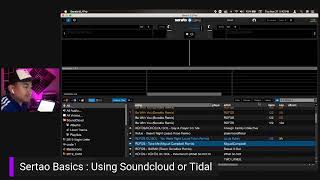
What is up, Danny? How you doing? And I keep referring to just Danny, but if anyone else sees this video, this is just a quick two minute. How do you set up using SoundCloud or title inside Serato? And here's how you do it. If you notice, here is my cursor right there. We are going to go right here to the DJ preferences. We're going to go to right here, my Serato and open that up and it will basically bring you to a couple different things I just wanted to show you first, you got the expansion pack and I haven't even used any of these because I always have lighting and rigs and stuff set up at my gigs already. So you don't necessarily need to use those. But here's wolfpack and Serato Flip. I'll do another lesson on both of those later. I do use Serato Flip every once in a while to do some samples and sampling and songs. But here is how you can set up using Tidal or SoundCloud when you are playing. So what you want to do is you want to go here and you want to go into Library and display and you can pick. Here you go, here's Title or soundcloud. Here is soundcloud.
And if you are not logged in, it will log you in here. I'm going to click on Loading Title and then we can go back to SoundClouds. Here we go. And it'll bring up and populate just a little window so it'll tell you what to do as you are playing. And the nice thing is you can kind of, you can toggle back and forth between either SoundCloud or Tidal when you're playing. So if you have a set list that is.
Already put together in SoundCloud, you can do that. And again, this is kind of last minute. So you don't want to always be using streaming services. In fact, you don't want to use them at all. And if you notice here is this little switch right here. This little guy right there will let you search inside Title. So if you want to switch it, you're going to go back up here to your gear. You're going to go to Library and Display and then you're going to go to SoundCloud, click on SoundCloud. And now you can search your music here in SoundCloud as well. Just makes it really easy to find some music. If somebody's actually asking you for a request and maybe you didn't download all the songs that they had asked for, you can actually go in here and find some of the songs inside SoundCloud. So a lot of times, like I wouldn't have a certain type or a certain specific song from like Rufus Del Sol. And so you can type in Rufus and If it's in SoundCloud, it'll be there. Sometimes they're not.
What a great example. Good job, Sammy. And then actually here's what happens. You got to hit this soundcloud, then you can type in Rufus and that will pull up any Rufus del Sol that can be found. So if you don't have that on and you type something in.
And that's not in this search bar for SoundCloud, it won't. You won't be able to see it until you hit that SoundCloud button. Does that make sense? So yeah, that's how simple that is. And I'll type in Rufus de Soul. But here we go. Boom. Look at all these. You're right. A bunch of these different ones and then you can put them in here and you are off and running. So that's how you do that. That is how you basically stream of the music from SoundCloud or title is pretty simple, pretty straightforward. But just remember, this is kind of the last line of defense. You should have all this music purchased and loaded and analyzed inside of your.
Serato before you do that. Cool. Alrighty. So lastly too, if you want to analyze these files, the same thing, you just drag them up here and it will analyze that one song. So you can see right now it's analyzing. You were right, the Lewis thoughts and mix. Let's do another one here too. So you can see how that works too. So if you just want to analyze one or two songs, the simple thing you can do is basically go in, take whatever song you're looking at. There you go. We're going to take this one. Rufus Take Me by Miguel Campbell Remix. Take it. Drag it to this analyze folder or the analyze file button. Just drop it right there and you'll see it start to move right here. And notice there's nothing right now. If this does this properly, it will populate your bpm and. And your key right here for you.
One second is just taking a minute to get done. And one thing to look at too, while that's exporting. There you go. Look at that. Now this one here is at 124BPMs. And that is in the key of 9B. And here's a couple cool things. You can also add any of these things that you want to see. I like to use genre as well that way you can see what. What kind of energy I'm working with. Right. So I don't know if it did that one, but let's just drop it in there one more time. See if there is.
Something that needs to analyze to give us which genre that's in. And usually genre is.
See here. Boom, boom.
Artist, song. And you can see some of these are really long. If you want to move these over, Daniel, you can. You can shorten these windows like so.
This one didn't tell me the genre up here. It did. I'm just lying. So it did. Tell me that is deep. And you can move these over if you want. So you can see this is an electro. This. You were right. Electro, house, Deep house, house. So it'll tell you exactly what that stuff is. I saw earlier too, Daniel, you were listening to some kind of more singer songwriter type of music. Let's see what happens if we do that too. Let me. I know you had a certain type. Let's see if the lumine.
All right, let's see if the lumineers. If it will tell us what kind of music that is. Right. So that is going to be. And we're going to put. I'm going to put this here. I'm going to move these over. Bpm, key, genre, dental, artist. That's what I like to do. Let's see what they say that genre is. If they do in fact tell you so that'll be a good little test for us here.
And it's just taking a second to render out. And let's see what it tells us. Let's see here.
And we got a little bit of a spinning wheel. So one second here.
Oh, snaps, crash.
Well, that's how you do that. Let's make sure that we stay aligned and keep on working on these lessons. And until then, I hope that helps you out a little bit, Danny. And I'll upload another one here real quick too, on how to start mixing with key and bpm.