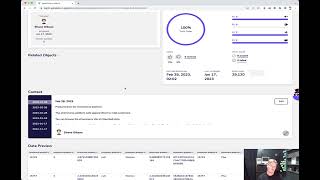
In this 60‑second Agile Data demo, the presenter walks through the Catalog area of the Agile Data platform, focusing on the Context feature. The demo shows how a catalog tile (e.g., “Ecommerce Product”) opens a detail view that displays technical metadata, trust rules, a data preview, and a central Context panel. The Context panel lets users add free‑text business descriptions to a data asset, capture the rationale behind the data, and record changes. Each edit creates a new version, with a full version history that can be inspected and reverted if needed. The presenter demonstrates editing the context to note the inclusion of Google Sheets data, saving the change, and then reverting to a prior version. The overall message is that Context provides a simple way to enrich technical metadata with business knowledge, ensuring that anyone using the data can see the relevant business context.
Chapters
Welcome to another Agile Data Gone in 60 Seconds. Today I want to have a little chat about a feature we've got in the Catalog area called Context. So if we have a look at the Agile Data Catalog, we can see we've got a bunch of tiles, a tile effectively being a table or a view of information that we want to use. And if we have a look, we've got some tiles at the top there. I'm going to go click on this one called Ecommerce Product, and that's going to drill me down from the View to what we call detail. So this is a detail about all the information that's sitting in this consume tile around our e-commerce products. So I can see some details about who queried it last, some details about the trust rules— can I trust the data or not? I can go down, I can get some data preview, and in the middle we've got this thing called context. So effectively it allows us to add text to describe some more things about this data. Typically we harvest and gather all the technical information about it, the number of columns, the type of data, but what we really want to do is be able to capture the business context, the things that people in the organization know about this data that anybody who's using it should also know. So at any time I can just expand this tile up and I can see the data text has been entered in there. Every time we edit it we get a new version of it, so I can go back in history and see what was done. If I wanted to, if I wanted to augment it, I can edit it. So I just go edit, go in there, maybe I can say, well, actually, you know, this data never included the Google Sheets stuff. Maybe we've done, you know, cool data collector from Google Sheets and that data is now available. And so I can say it's typed into Google Sheets and is included in this— included, see, live demo— in this data. And then once I'm happy with that, ah, spell checker, included, and update it. And so now that's got a new version. So I can see here's the version that I had before I did it, and here's the version that I had after I did it. So again, we're keeping a snapshot of all those pieces of context about the data. At any time if I wanted to, if somebody makes a mistake, I can go and click on a version and revert it, and that will effectively move me to that version. Retaining the old one, right? So effectively just keep switching them out so that if somebody's updated some stuff that we didn't like, we can go back and revert it. So that is a really simple way of adding context, right? Anybody that comes into the catalog can go through and augment our understanding of that data so anybody else who uses it can see it. So that was another Agile Data Gone in 60 Seconds, all today about context against the data that we hold. I hope everybody has a simply magical Magical day.