In this 60‑second demo, Shagility walks through the data catalog UI to illustrate how trust rules are defined, displayed, and automatically rolled up across catalog tiles. Starting from the landing page, she shows how each tile represents a table or view and how the data map and event matrix reveal the lineage of an "order shipment user" consumable tile, which is composed of order, shipment, and user concepts. She explains the visual categorisation of trust rule outcomes—errors (Dr. Bonefish), anomalies (piranha fish), and warnings—displayed on the consumable tile. By opening a detail tile (e.g., the user tile), she demonstrates how individual trust rules are attached to specific attributes (e.g., non‑null first name, valid email, non‑null state) via a simple UI, choosing severity levels for each rule. When these rules run on tile load, any violations are flagged. Finally, she shows that the catalog automatically aggregates the trust rule results from all constituent tiles up to the consumable tile, so users see a single trust status for the combined data. She notes ongoing work to expand the rule catalog with many more validation rules, emphasizing the goal of providing clear, actionable data‑trust signals to end‑users.
Chapters
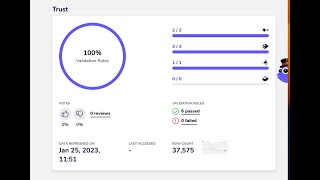
Welcome to another Agile Data Gone in 60 Seconds. Today I want to talk to you a little bit about trust rules and how we expose the results of those trust rules into the catalog tiles. So if we have a look, we're in the standard landing page where we come in, we see a bunch of tiles, each one tile being a table or a view of data. If we want to figure out how data moved into those tiles, we can look at the data map. So what we're able to see is there's a bunch of data came on the left, we move that data through to the right, the right being the consumable tiles, the ones that we query or report on and use for analytical models. And if I pick this one for order shipment users, so we ship an order to a user, and I look where that data came from, we've got some color coding so I can see very quickly that I've got some data coming out of the orders history area and also from the users area and I've I've got a bunch of concepts making up that event. So I've got some user, some shipment, and an order. Another quick way of looking at that is to go to the event matrix. So if I have a look down here, I have an event of order shipment user. So we've shipped an order to a user, and I can see here it's made up of a concept of an order, a shipment, and a user. And if I wanted to, I could quickly click on there, and I've been taken down to the consume tile. So this is the piece of data that we query when we want to use the data. So all the preview there. And if I have a quick look here, I can see there's a bunch of trust rules that have been run. So I can see that effectively 6 rules have been set, 6 of them have passed, none of them failed, and they've been broken into different categories. So Dr. Bonefish, which is that there's an error, something I should go and have a look at, and they've all passed. Rules I've classified as piranha fish, anomalies, things I need to worry about and go have a look because they just look a bit weird, and one warning. Which basically says, you know, there's something else there that maybe I'm worried about. So it's almost a hierarchy of red, green, and orange, and down the bottom here, anomaly fish, which I'll talk about in a minute. So where do those rules get set? Well, effectively, they get set— those trust rules, they get set against the tile. So if you remember, the, um, the shipment of an order to a cut to a user was made up of 3 core concepts, and they were order, shipment, and user. And if I have a quick look at the user tile, what I'll see is there's been a bunch of trust rules that have been set and executed against that tile. So again, 6 of them. And how do I see what those trust rules are? Well, that's relatively simple. If I go and click on the tile and bring up the menu and go trust rules, I can see the rules that have been set. So effectively, remember that a detailed tile is a bunch of attributes, a bunch of fields about something. So in this case, it's a bunch of information about the user. And I can see here I've got first name and there's a rule there saying if it's not null is what I'm looking for. So if it's null, give me a warning or an alert and give me a look, which is Dr. Bonefish. So you can see here for email, I always want to make sure that there's no nulls and also want to make sure it's a valid email. So how do we set that? Well, as always, we try and make it as simple as possible. So maybe I want to go through and set one on the state. I just click on that little icon, I get pulled back a set of rules. I can go and say, you know, the state should not be null. Do I want it to be a warning? Do I want it to be something stronger than a warning? Or do I want it to be an error? So I'm going to make it an error. And when I do that, that's now set up that trust rule. So whenever that tile is loaded by a rule and that data starts coming in, we'll actually go through and run all those trust rules and check that the data is fit for purpose and alert somebody if it's not. Uh, you can see that we had a small number of rules. Uh, we're now working on adding out to the catalog of rules, so we'll bring through a whole lot more, uh, trust or data validation rules that you can use as easy as clicking a button. And so the last piece of magic is we set these trust rules at each one of these tiles, and as we saw before, they make up the thing that we consume, this order shipment user. And so if I have a look at that, this is an aggregation of those rules. So when that consume tile is made up of many moving parts and we set rules at each of those moving parts, we then automagically aggregate those trust rules up to the consume so you don't have to do it. So effectively, if any of the moving parts have a problem with their data, that gets flagged up at the level that the people are actually using the data. So we think that's a great way of removing a lot of the dross. Around aggregating those trust rules up and giving visibility to people about whether they can trust the data or not. So that was another Gone in 60 Seconds all about trust rules on the catalog screen. I hope you have a simply magical day.