Shagility demos Agile Data's automatic data contracts and wildcard ingestion rules. Upload a file once, and the system creates rules that recognize future uploads with the same name but different suffixes (like dates), then validates, deduplicates, and ingests them without manual setup.
Chapters
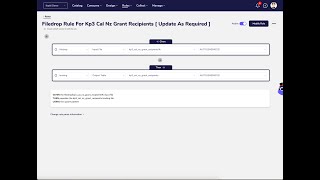
Welcome to another Agile Data Gone in 60 Seconds. Today I'm going to talk about wildcard rules that we can create automagically from file uploads or file drops. So let's quickly go over to the demo. First thing I'm going to do is I'm just going to go into the upload capability. I'm going to grab a file that I've got, some open data around funding. And I'm gonna upload that. So what that's gonna do is that's gonna take that file from my desktop and upload it to the platform. And it's come back and said, "Good, I'm happy with that, I'm gonna start that process." If you have a look, there's a certain format of name here. And so the scenario we're trying to deal with is somebody comes to you and says, "Hey, I've got a bit of data, can you analyse it for me?" You go, "Sure." So you do the file upload process, you analyse it, you create something from a consumable point of view, and they're really happy about that. And then what they say is, "Oh, okay, what I want you to do is automate that for me. So can you do that every day, every week, every month?" And what we know is that file that we're gonna get probably has some suffix or appendix on the end of it. So it's gonna have that file name and then a day, a month, a year, some kind of version 1, 2, 3. So same format, but different name with the same format schema, but different set of records. So we want to deal with that. So what we've done is we've dropped that file in. The first thing the platform's doing is giving us some notifications, and we'll keep an eye on those. So it says, yep, seeing that file, dropping it into the platform. Then what it does is it looks and sees, do we have any rules for that file? Have we seen that file before and already loaded it? Because if we have, we've got rules, we should apply them. In this case, we haven't. So what it says is, okay, new file, haven't seen it before, I'm going to create a data contract, so a schema and a set of rule things around it that we know about that data that we need to validate in next time, and I'm going to create a set of rules, and the rules will move it from file to landing and landing to history, and those rules are automatically created. So we can see here that data's come in, we've got a landing tile of 7,000 records, 7,602, and it's moved the data across to history. If I go into that history tile, I can see the records sitting in there, so preview of that, and as I said, bit of open data around funding. So if we go into the rules area and to change rules, what we'll see is it's actually created two rules for me. This first rule, uh, which says take a data drop from FileDrop and move it to landing, and you'll see here that it's got the file name but it's added a percentage. And what that means is in the future, any file I drop in with the same name and something on the end of it, it's going to go, hey, I already have a rule for that, I already have a contract. And it's going to apply this rule to it. So it's going to move that data from file drop to landing, and it's created a second rule which means it's moving the data from landing to history. So history being our, uh, tiles with immutable corporate memory of the data. So we insert all change records into there, we hold that forever, never delete it. It's the important bit of data to retain. So these rules have already actually been created for me, which means if I go back into upload files and I grab a second file and drop it in. This case, same file name but a year on the end of it, and upload that. So this file has new funding for the 2023 period. Go back to the catalog. What you're going to see is you're going to see a slightly different flow. So what it's doing is it's looking at that file, bringing and dropping to the platform, then looking to see if we've got some rules, which we do. It's then going to validate that data against the contract for that rule and say is it fit for purpose? If it's not, it's going to give us an error. If it is, it's then going to dedupe any records. So often what we see is you get given some data, but the data is supposedly new, but some of those records are being lifted from the previous load in terms of data you've been given. So it says, hey, we've already seen these records, don't need them, versus, oh, these are new records, we're going to insert it. Once it's done that, it's then going to insert that data into landing, which it's just done. And then move it to history and run all our trust rules, uh, if we've defined any new ones. So as you can see, we've now got 8,222 records of landing in history. Uh, effectively it's gone, figured out what the differences are between what we saw last time and what we've got this time, and inserted them as new records into the history tile. All done automagically using that wildcard rule. So you can go and edit that wildcard rule for any formatting that you want, um, or just work on the basis that First file has the title name, every file after that has a suffix or something on the end of it that versions it for us. So that was Agile Data— another Agile Data Gone in 60 Seconds, this time all around wildcard rules for file drop. I hope everybody has a simply magical day.