Shagility shows how to create an event rule in Agile Data that captures when a user places an order. The rule uses the orders table as a trigger, binds order and user IDs to existing concepts, then publishes to populate an event tile with every user-order pair and auto-generate a denormalized consume tile for reporting.
Chapters
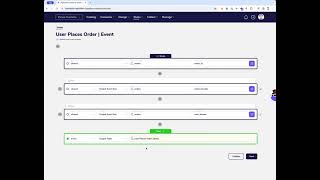
Welcome to another Agile Data Gone in 60 Seconds. Today we're going to have a quick look at how we create event rules. So previously we've created the concept and event tile of our topic canvas. We've then created some change rules that populate our concept and our detail tiles from our shared history data. We now want to create a rule that populates the event, and so what we want to understand is every time an order is placed, we which user placed that order. So we want to push that into our event tile. So we go into change rules and new rule. In this case, I tend to, uh, name my rules based on the event tile. So user places order, uh, and I mark it as an event so I can find it later. I go through and I want to pick up the history table that's driving this event happening. So what piece of data is telling me that a user placed an order? And in this in this case it's the orders table that will show me that that happens. And how do I know it happens? Well, every time a new order ID turns up, I should be triggering this event. Okay, so I see a new order turn up, I'm triggering the event. How do I bind all this data together? So what I'm going to do is instead of outputting the fields, I'm going to go through and output an event key. I'm going to go and say that's driven off the orders table tile, and I'm going to go into the wizard. And the wizard's going to say, okay, I need to relate some fields in this order table to some concepts that we have already defined. So reuse those core business concepts. So I want to say I have a concept of an order, and whenever I see a new order ID turn up in that table, that's telling me that that order ID relates to that order concept. Because this is a two-way event, this is user places order, I want to actually also grab another event key. I'm going to grab it off being driven from that same table. Uh, and in this case, I'm going to the wizard, I'm going to go and grab my user concept, and I'm going to bind it to the user ID in this table, right? So how do I know which user placed that order? This is telling me how I know that. Once I'm happy with that, I want to populate that tile. So I'm populating the event tile, and I've already created it as a draft in the topic canvas, so I'm happy with that. Next thing I'm going to do is next, it's going to validate the rule for me. It's going to run that query quickly, uh, gets a sample of the data and it's going to bring back an example of what's going to happen. So in that event table, I'm going to get a bunch of order IDs and a bunch of user IDs where there's a relationship between the user placing that order. So once I'm happy with that, I'm going to go through and publish that rule. And I can either run the rule from here just by going run rule. But again, I tend to like to do my rule running from the data map. It allows me to see what's happening. And I can see here that orders is driving this new tile called event. So what I'm going to do is run the rule up to this point and go to the data map. And then what that's going to do is submit that rule for me. And it's going to go through, update the concept and details if it needs to, and then it's going to populate that event tile. So if I go into the catalog, what I should see is once it's run, it's going through, it's updated the user does what, it's populated that tile. So if I go into that event tile, what I'm going to see now is every combination of a user placing an order. And then the other thing we do in the background, because that's just a bag of keys, right? Not so valuable. We then also automagically create the consume tile. So what we'll do is go through and look at that event, look at every concept that's inbound to that event, look at every detail about those concepts, and give you one denormalized consume tile that you can then go and report on, which shows you every order, every user, and details of both. One thing we can do quickly while we wait for that to run is we can go into the Design menu and we can look at the event matrix. And what that will do is show us these relationships. So it shows us this relationship of a user placing an order as the event and that the order and the user concept are bound to it. So if we've got lots of concepts across here and lots of events down the page, we can see these relationships visually very quickly by looking at where the dots are. But I can see here that that tile's been loaded. And so if I come in here, we've got the order tile. And if I wait for another 30 seconds, we should have the user places order tile come through. There we go. And if we go in there, I'm gonna rename that. So rename that to user places order. That's what we wanna call it. And then now what we've got is effectively a tile with all the order details and all the user details every time a user placed an order. So that's how we create events, which shows us the relationships across this data. That was another Agile Data Gone in 60 Seconds. I hope you have a simply magical day.