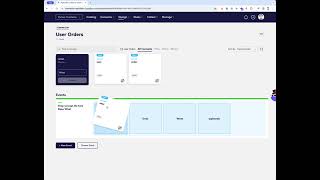
Shagility shows how to build a Topic Canvas by creating concept tiles for User and Order, then combining them into an event tile like "user places order." The next tutorial covers populating these tiles with rules.
Chapters
Welcome to another Agile Data Gone in 60 Seconds. Today we're going to have a quick look at how we create a topic canvas. So let's hop over to the app. Uh, topic canvases are effectively the way we create our conceptual data model before we create our physical data model. So if we go into Design, Topic Canvas, the first time we go in there will be blank because we haven't created any. So we're going to create a new canvas, and in this case I want to create a conceptual model for a user placing an order. So I'm going to call that User Orders, and I'm going to create that canvas, and I'm going to go to the topic canvas. Now the topic canvas name can be anything you want, so it could be a domain, it could be a business unit, it could be a core business process. Once we go in there, because we've done no conceptual modeling yet, we need to start from scratch. So the first thing we want to do is create a conceptual tile for, uh, the user. So that is, uh, a tile called User, and it's going to be a who. And once we create that, you'll notice that that tile, um, turns up as a draft. And we also want to create another one which is Order, uh, and that's going to be a what. And we're going to go create that. So that's created two, uh, draft tiles for concepts. So concepts are things we want to count, things we want to manage. So we want to count how many users we have, we want to count how many orders we have. And what we do then is we create those two concepts and we put them together into an event. So what I can do is grab user, drag it down, and grab order, and create an event called user orders. Uh, I want to say user places order, maybe. I like to use that. And that's effectively created a draft event tile. Alright, if we wanted to, we can go and go New Event and just create another event that goes on this canvas. In this case, I don't want to, I want one. So if I go back to the catalog now, you'll see that effectively I've got a draft concept tile, a draft order, and a draft event, right? So what we're going to do next is we're going to move on in the next video and populate those via rules. So that was another Agile Data Gone in 60 Seconds. I hope you have a simply magical day.