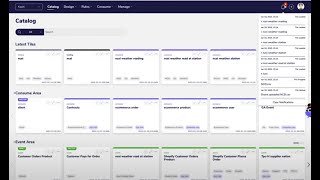
In this 60‑second demo, Shagility walks through the new notification alerts feature in the Agile Data platform. He shows how a user uploads a CSV file (US half‑hourly weather data) via the file‑upload menu, triggering a series of background processes that populate the data catalog. The catalog consists of tiles representing tables or views: a history tile that creates concepts (weather stations, readings) and events, and three consume tiles that store the processed records. As each step runs, a bell‑icon notification alert streams real‑time updates—showing who uploaded the file, when it’s dropped into the system, when each tile loads, and when each consume tile completes. The alerts update automatically without manual refresh, allowing the user to monitor progress and know when the data (26,000 rows) is ready for reporting. The demo emphasizes the immediacy and transparency provided by the notification alerts.
Chapters
Welcome to another Agile Data Gone in 60 Seconds. Today I want to have a quick chat about some new features we've added, one around notification alerts. So if we have a look at the Agile Data product, we can see here we've got the data catalog, so effectively a bunch of tiles, each tile being a table or a view of data. And what I'm going to do is I'm going to focus on this little icon at the top right here, little bell with some numbers, and that's our notification alerts. So if I pop over to the file upload menu, uh, and I'm just going to go grab a file off my desktop here and drag it on, effectively a CSV file, and I'm going to upload it. So that's taking that CSV file off my desktop, it's uploading it into Agile Data for me, uh, and basically telling me that it's been brought into the platform and now it's going to go through and be processed. So if I pop over to the catalog, what we're going to see is, uh, first couple of notifications popped up. So first thing it says is somebody uploaded a file, uh, and who did it. So that way, if there's multiple of us uploading the file, we know who's doing what. And the next thing it said is the file's being dropped into the system. So it's got from a PC up into Agile Data. So to give you an idea what's going to happen, this is weather data from the US. I've uploaded some other files before, so each file is effectively a, uh, a CSV file with half-hourly weather data for each station in the US. So if I go down, I've got this history tile here, and if I have a look at Run Forward, uh, that history tile is populating a concept of a weather station, a concept of the weather reading, so, uh, some temperature and wind data about that, and some detail about the station, some detail about the reading, and and the event of a weather station— well, weather reading at a station. And that'll go through onto the right there and create 3 consumes that I can use. So if I have a look now, it's come up with number 3. So it said, okay, is a tile being loaded? And if I go into the catalog, that will tell me that the history tile has been loaded. And you can see here that effectively the number is 26,000 rows, and we'll see the consume numbers go up to add those extra records as time goes on. So if I click on that now, you'll see that every time something runs, we get a notification that it's either running or it's been completed. And if I leave that open, it's effectively doing that in real time for me. So every time something completes, it's just gonna go update that alert. I don't need to go and refresh the alerts. It's effectively streaming that information through. So what I can do is just sit there and watch it, and what I'm waiting for is for the consume tiles to be finished. So normally takes a minute or two to run through and update all that data, and there we go, we can see that the first purple, second purple, and the third purple are done. So now if I go and refresh the catalog, I'm going to see that the consumed tiles have been refreshed and they've got 26,000 records in here, which has gone through and taken the additional records from that file I uploaded, moved it all the way through the system from history through to the concepts, the details, and the events, updated my consume, and now that's ready for reporting. The whole time it was sitting there and I could see in those alerts where the system was up to, so effectively giving me real-time updates every time a task had completed. So that was another Go On in 60 Seconds all about notification alerts. I hope you have a simply magical day.