Shagility shows how to duplicate a rule in Agile Data. Rules read from the History Layer and write to Detail Tiles, transforming raw data to match your business processes. The demo covers duplicating, renaming, editing, validating, and publishing the rule.
Chapters
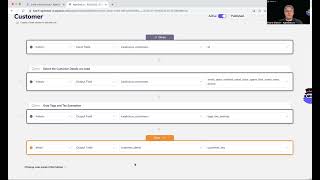
Welcome to another Agile Data Gone in 60 Seconds. Today I want to demo quickly how we can duplicate rules. So within Agile Data, the process we use is we go away and click the data and bring it into what we call our history layer. History being the immutable view of the data. It holds all changes over all time and we keep it forever so we can always rerun our rules and recreate some of the other layers. We also then go and design the data. So we look at the core business processes, the core business concepts, and design how the organization should behave in reality. So customer orders product, customer pays for order, store ships product, those kind of processes and concepts. The next thing we do is we create rules that take data from that history layer, from that, that system of capture, and changes it. To match that core business process or those core business concepts. So populate that design effectively. And then once we've done that, that data becomes consumable. We can grab our last mile tool, our dashboarding tool, our reporting tool, our machine learning tool, our analyst notebook tools, and connect to that data and consume it and use it any way we want to, to give value to our customers and our stakeholders. So when we look at rules, Effectively, what we're, we're doing is we've designed a low-code interface to take that data from that system of record or system of capture and change it to make it match reality to the way our organization behaves. And each rule is effectively built using a low-code environment, which we're iterating as we go. So if I have a look at this rule for customer, I will see a screen come back where we, we follow a form of natural language. So we say, given the data in the history table, so this is the tile I'm picking up from Isilicious customer, and then output these fields and also output these fields and then populate it into this detail tile. And if you remember in the catalog screen, we had different colors for the tile types. So I know gray is history, I know that orange is detail, so I can visually see I'm going from history to detail for that. So sometimes we, we wanna duplicate these rules, right? We have a rule that's almost what we want and we want another version of it. So as you'd expect, we make that relatively easy. So we just go into the little menu here. We go duplicate or duplicate, and then AD is gonna come back and saying, are you sure? And I'm gonna go yes. And now I'm gonna go to that duplicated rule. So that's effectively created a copy. Of that rule. If I hop back out, I will now see that I have customer and customer duplicate. So we've just added the word in there so you know what you're doing. And this is a draft rule. So once I'm happy with that, I can go in and, you know, I can change this and give it a new name. So maybe this is, you know, I don't know, maybe active customer. Bad typing day. Active customer details. I can go away and, and remove this line. I can go and add new lines, you know. I can change where the data is coming from. I can change what we're going to do with it. I can change the tile I'm picking up from. So, uh, change this rule, and then once I'm happy, I go next, validate it, and then, uh, publish it. And once it's published, that rule will run whenever new data turns up based on this input tile that's given. So duplicating rules, really, really simple, as you would expect. So that's another Agile Data Gone in 60 Seconds. I hope you have a simply magical day.