Shagility shows how to export and import rules in Agile Data as YAML files. Rules translate raw data into business logic, and you can move them between development, QA, and production tenancies, or distribute pre-built packages for faster onboarding. The import process includes a preview step before committing.
Chapters
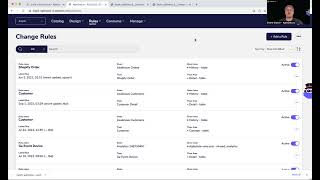
Welcome to another Agile Data Gone in 60 Seconds. Today I want to talk about importing and exporting rules. So if we look in the Agile Data product, you'll see that we've some menus at the top. So first thing is our catalog where we see all the tiles, the tables or views of data that we've already have available to us. Design, where we go through and actually design the data structures or the model based on our core business processes or our core business concepts. And rules, which is where we create the, effectively, the code that takes the data from that systems of capture and maps it to the way the organization behaves, the organizational reality. So customer orders product, customer pays for order, store ships product, those kind of core business processes. Last thing we do is we consume that data using our last mile tool. So our dashboarding, reporting, machine learning, or things like the analyst notebooks. If we look at our rules, this is effectively where we use our low-code environment to go and change the data and make it fit for purpose. And often we may want to import and export these rules. So now why would we want to do that? Well, one scenario is we may want to follow a fairly traditional development lifecycle. So we may have a build tenancy or a development tenancy. We may have a QA or a test or an assurance tenancy, and we may have a production tenancy. So we may go create rules in, in our build tenancy, and once we're happy with them, then export them and import them into our QA tenancy. Once everybody's gone through and, and done quality assurance on it, we can then again export and import into production, and they become live. Now, for us, we don't think that that lifecycle is the way we should behave anymore. We think through versioning of the rules and managing those changes and publishing them and being very careful around how we do that within the product, we can actually do the majority of our work within a production tenancy. But if you want that traditional lifecycle, this is one way you can do it. The other thing is we are publishing out magic books. So where we've worked with systems to capture before, like Shopify or Xero or QuickBooks or Google Analytics for other customers, we effectively publish those rules. So we export them out and make them really available for you so you can import them into your tenancy as a quick start to get you started, to, to do 80% of the work already, and then you just focus on what's unique for your So how do we do that? How do we do this import and export? Well, as you'd expect, it's relatively simple. I can go into this rule, which is basically creating some detail about a customer. So this is our low-code rule environment. So I'm taking some data given from a history tile. I'm grabbing a couple of sets of fields and I'm pushing that data out into our detail tile. So detail about the customer. If I wanted to export that, what I do is click on a little menu there, go export rule, and then it's downloaded a file to my desktop in a format we call YAML, which is a markup language, which is effectively the language we're using for the import export. Now normally if I open that up, it'll go into a tool called VS Code or Visual Studio Code. So for the interest of the Guided 60 Seconds, I've opened that file up already as a text file. So as you can see, it's got the name of the rule, which is customer. Basically it's saying pick up that rule from history and then grab these fields and then populate it out, right? So exactly the same flow of there, just in a different markup language. If I wanted to import that, then I'll just go back to the rule screen. I can go and say import a rule, go and pick up that file, and it's going to come back and give me a preview. So same markup language that we saw in that YAML text file. Once I'm happy with it, I'm going to import it. And now that's actually importing all that logic into my tenancy. So if you imagine that you can email or drop that file anywhere else, you can upload it to a Git repository if you want to, although we do version within the product. But now I've got another rule sitting here that is a copy, right, from the import/export process. The other thing we can do is we can actually go and export all the rules. So if I wanted to do that, I just go export all rules, and that's now taking every rule from my tenancy. Again, I've, I've taken a copy of that before and created it and put it into my browser. So you can see here there's the rule name and the given and then statements all the way through. So that's every rule that's within this tenancy, which again, I can put into a Git repository if I want to, or I can import all the rules into another tenancy. See. Uh, so up to me in terms of what I want to do with it. But again, really simple way of exporting and importing rules when you need to. So that was another Gone in 60 Seconds. I hope you have a simply magical day.