Shagility shows how Agile Data's new Natural Language Rules Output turns data transformation steps into readable Gherkin-style descriptions. You can copy these rules directly into Google Docs instead of exporting technical YAML, making it easier to document how data flows through your system.
Chapters
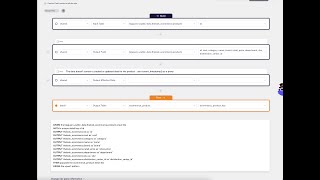
Welcome to another Agile Data Gone in 60 Seconds. Today I want to have a little bit of chat about a new feature we just added called Natural Language Rules Output. So let's have a quick look at Agile Data. If I go from the catalog where I can see all my tiles for data of tables or views, and I go into the rules screen where I can see a list of all the rules that have been transforming the data, I'm just going to scroll down and find this rule called eCommerce Product that's creating a detailed table for me. And so what I'm going to see here is our low-code environment for creating rules. So each one of these lines or rows is effectively a step in the rule. And if I scroll down, you can see here I've got a little new widget. This is the output of that rule in a form of natural language. So what we found was There's a natural language called Gherkin, which is really great at testing data. We actually found it's really good for transforming data as well. So under the covers, our rules engine uses a form of Gherkin to transform the data. And what this is saying is this is saying, given this input tile with this unique key, then output these fields, populate a detail tile. And then we have a bunch of technical patterns in terms of the way we change the data in that tile. And this one's telling me that it's selected the upsert pattern. So it's a form of natural language. We're going to iterate on it to get— try and get it even clearer. But what can I do with that? Well, I could do something really simple like pick up the rule name, go to a Google Docs, put that in there, come down, pick up that rule and copy it over. And now what I've got is a documentation of that rule in natural language. Ideally what we'd say is just invite your user to the Azure Data app it's no cost. They can see the natural language rules by doing exactly what I just did. We're going to go and iterate this, I think, a little bit. I've got a few backlog features. So one of the ones I want to do is if I think about the data map, if I think about the way we take data and collect it and effectively then go through and create a bunch of rules to create the concepts and the details and the events all the way through to the consume, What we'll do is we'll actually suck out the natural language rules for every one of those steps so we can create a document automagically that goes, here's the data coming in we collected, it's in history, here's all the rules that transformed it to our core business processes and concepts, here's the consume tiles that are actually consuming that, and here's the natural language text of what's happening to that data on all the way through. So that's one of the things I think we'll do. I've got some other ideas on how we can make that natural language incredibly useful for people when they want to see it. One of the cool things I love about this feature is it's been in my backlog for a while, but I was chatting to somebody last week and they were saying, hey, how do we get a copy of that rule out, out of the system easily? And you know, we've got the ability to export the rule, but you get a technical YAML file when you do that, not a natural language file. So kind of happy and like this feature, found it useful actually in more ways than I expected. So that was another Agile Data Gone in 60 Seconds. I hope you have a simply magical day.