Agile Data's low-code environment handles versioning automatically: editing a rule creates a draft while the published version stays live. Analysts can test changes with trust rules, then publish to archive the old version and promote the draft. The system keeps a clear history without requiring Git.
Chapters
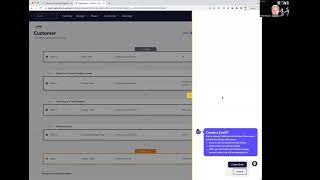
Welcome to another Agile Data Gone in 60 Seconds. Today I want to talk about versioning. So we treat Agile Data as a low-code environment, right? Our goal is to allow analysts to do work in a simply magical way and don't remove the need for a data engineer. And to do that, we're building an application that allows analysts to effectively use the product, and in the background we write the code for them. And when we talk to people about low-code environments, low-code tools, they typically come back with a comment around versioning. So they talk about, well, you're not using Git, you're not checking your code in, how do you keep versioning? And in the past, 10 years ago, those low-code tools, they didn't version, right? You made a change, it's stuck, you couldn't go back. But we follow an agile data way of working and we believe versioning what you do is really important and it should be magical. So let's have a quick look at our change rules, right? So this is a list of our rules and I've got a rule here called customer at the top. And if I click through and look at the details of that rule, you can see here that I've got a bunch of versions. This is the published version. This is the rule that's running in production right now. But if I flick back, I could see the rule that was valid up until that date. And I can go back again and see there was a previous version and that rule was valid up until that date. So how easy is it to create those versions, right? Do I have to git merge, pull, push, PR request me? Well, of course you don't, it's agile data. So what I do is I say there's a rule here, I have security, where I have authorization where I can change rules and I modify the rule. And AD is going to pop out and say, hey, we're going to create a draft, right? We talked to lots of people and it was like versioning, copies, duplicates, but what we're doing is a bit like WordPress, right? We're creating a draft. So I'm going and saying, hey, what are you gonna do to me? Yep, I'm happy with that. So I'm going to go create a draft. And that's now going to create a version of that rule, and I'm going to go to that draft. So what's happening is I've still got a rule in production, a published rule that's running, but now, as well as my published and my previous versions, I have a draft version. So I can go make a change. Maybe this column I'm not interested anymore, so I'm going to remove it. I'm then going to go away through and check the trust rules for that change. Do I need to change those, add some more or not? Because, you know, at Agile Data we believe we should always be writing trust rules or tests for our data, no matter what we do. And once I'm happy with that, I can publish that. And what that's going to do is it's going to version the old published rule as a previous version, and it's going to make this rule the new version, the published version. So now I can see I've got a published version and 3 other rule versions that were valid at a point in time. So versioning of rules, right? It should be done automatically. We shouldn't have to worry about it. We should definitely have that capability, and we do. So it's another way we make things easy for analysts. That was another Agile Data Gone in 60 Seconds. I hope you have a simply magical day.