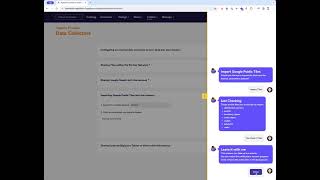
Load Google's Look Ecommerce dataset into Azure Data in 60 seconds. Open the app, go to Data Collectors, search for "The Look", and import it. The app connects to Google and shares each tile with your Azure tenancy.
Chapters
Welcome to another Agile Data Gold in 60 Seconds. Today I'm going to show you how to share or link to the Google public The Look e-commerce data. So over to the app, we go into the collect screen, data collectors. We break out this one, which is importing public data from Google into the tenancy, and we type in the name of what we're looking for, in this case The Look with no spaces. It's going to go away and search all the public datasets and bring back any Google public dataset that has that text in the name. In this case, the Look Ecommerce is what we're after. Once I'm happy with that, Adie's going to say, would you like to import the tiles? Yes, I would. And then she's going to come back and give me a list of the tiles that she's about to import just to check that those are the ones I want. Yes, it is. And what it's doing now in the background is it's going away, connecting to the Google public datasets and sharing each one of those datasets with your Azure Data tenancy. If you keep an eye up here, what you'll see is each of the tiles turn up when they've been shared and a notification each time it does it. Quick and easy way of getting some data into the Azure Data App so you can start playing with it in the next steps. That was another Azure Data Gone in 60 Seconds. I hope you have a simply magic Good day.