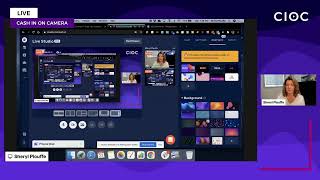
In this impromptu live video, Cheryl (Sheryl) Plouffe, a video strategist, walks viewers through a hands‑on process for creating custom live‑stream graphics using Canva and deploying them in Restream. She demonstrates how to set up a 16:9 presentation template in Canva, design brand‑consistent elements such as a live badge, show title, and logo, and export the graphics as transparent PNG files. She then shows how to upload these assets into Restream’s overlay manager, toggle their visibility, and customize additional features like countdown clocks, background colors, and guest panels. Throughout, she emphasizes the importance of established brand colors, fonts, and personality, cites resources (Canva tutorials, Restream join link), and promotes her weekly community training. The video blends practical step‑by‑step instruction with brief audience interaction and calls to action for further learning.
Chapters
Cheryl here. Thank you so much for joining me today. This is gonna be a really quick impromptu video. Because I've been getting a lot of questions about this platform, about Restream, and how we add these little— well, this little— see this little square thing on the bottom here? I'm trying to follow my finger. This up here, this up here. A lot of people are asking, how are you getting those graphics onto the screen? Sheryl Plouffe, your video strategist. I'm going to show you in this brief video today sort of behind the scenes so that you can get a sense of where I'm creating them. Of course, you could go out and you could ask a graphic designer. To make these for you and just say, I need an overlay for my live stream. Or in this case, if you're using Restream, which is a multi-stream platform, you know, I want to be able to uplevel my live streams. And so you can go to a graphic designer, you could go to Fiverr, you could go to Upwork, you could find graphic designers who are going to make these types of things for you. But if you are DIYing it, then here's how I would approach this. Please leave your comments as well in the chat if you are interested in asking questions. Connecting from Zimbabwe. Awesome. Great to have you here. So let me Um, let me show you how this would work and what I would do. So one of my favorite tools to use, and I have a lot of videos on my YouTube channel about Canva, I'm a big fan. Now listen, some of you use PicMonkey, some of you might use other platforms in which to create your graphics, but the thing I love about Canva is that it is a templated platform and it allows you to have that graphic design and that professional look and feel through templates. Than you would if you were just kind of trying to create it from scratch. And I don't know about you, but I'm not really a graphic designer per se. So what I have done is I have gone in and actually just created— I'll show you here on the screen in Canva. I have gone in and just created with a presentation template, like I created a design, a design in the presentation format, which is the one you're going to need for this format on Restream, which is 16:9, your typical landscape horizontal format aspect ratio. And what I did was I went in and I just took for the little bar at the bottom right-hand side, I just took two lines and I just put line, line, and then you can turn it into whatever color you want. It just happens to be that pink is one of my brand colors. On the top side, though, where it says live, there's a sort of a live bug. And then underneath it says Cash In On Camera, which is my weekly show and the name of my Facebook group and all of that. I've gone in and just created little boxes. So I put a little box and I put the text inside the box that says live. And then I put another box underneath it, line them up properly and put Cash In On Camera. I can change, of course, the, the, the color of those boxes to whatever brand colors are mine. And so I have purple and pink and I had a little bit of orange and a little bit of this and that. And so you could do something similar. So the question is, what are your brand colors? And could you also replicate something like this in order to uplevel your live streams? And the answer to that is yes. The answer to that is yes, you could, you could, you could accomplish something very similar. You know, when you look at even on the screen here, with me up here with the CIOC, the logo. It's the same concept. All I did was I took my logo into Canva, and when I exported my logo, I just export it with a transparent background. That's the trick. When you, when you download your image, your graphic from Canva, download it with a transparent background. So then you come into Restream And I don't know if I can show you this. I may be able to show you here. I actually, I think I can show you this. So let me share my screen, um, and I can show you what it looks like. Yeah, this should work. This should work. Okay, so I hope you're seeing— you're now seeing on the, on the screen sort of the background. Look at the right-hand side of the screen. This is the part you want to see. So what I would do then is go over to the logo section and then to the overlay section, and you hit the plus sign to upload those graphics into the template. You can see there's my CIOC. See, watch, it goes away. I'm hiding it. Now I'm making it visible. I'm hiding those overlays and I'm making them visible. So you could do something similar. Now, of course, when we look at Restream, there's a whole host of other cool things. You saw the countdown clock maybe at the beginning of this live stream. Also some background. So you're bringing in guests See how I have the purple in the background? I could change that to this blue. I could change that to this orange, whatever. So lots of really awesome branding things that you can do. But I'm just going to stop sharing the screen so that brings me back full screen. So I just wanted to jump in and share that. I've been getting a lot of questions recently about Restream. People know I've been using it every single week for my livestream training. I've been also using it on Tuesdays when I've been interviewing and having pop-up interviews. I use them I use this tool to do even private calls with people where I'm not going live. I'm actually using it as a tool to have discussions with people and share my screen and play videos. And so it does a whole host of things. If you're interested to know more about Restream, go to restream.com/join/cioc. In fact, I think I've got a caption that I can bring up on the screen for you for this. So you would just go to restream.io/join/cioc and you can start your free account there as well. I love it and I love this capability. I like the idea of being able to uplevel and really you are limited to just your own imagination on Canva or any tool that you're using to create your graphics in terms of what you want to put on the screen. You can upload literally anything that you want to the screen so you can get very, very creative with your branding and with text that you want to overlay on top of the screen. So really, it's, it's, It's just limited to your own imagination. So I want to jump in and just do that. Have a great rest of your day. This is a real quick one. I've got a coaching call that I have to do here quickly, but this was on my mind and I thought I'd just come in here and share it with you. So I want to make sure there aren't any additional questions. Let me just check those before we go. Hello. Hello. Hi, Wendy. Hi. Nice to see you. Rani is here. Awesome. Good, good. Canva is great once you have established branding. Yes, Wendy, you're absolutely right. So Wendy Barr is the CEO of Barcode Branding. What she does is she helps you determine what are those colors, what is the brand that you're trying to communicate, what is the emotion that you're trying to evoke with those choices. So if you don't have that dialed in, you know, Wendy's somebody that you can talk to. Wendy Barr. Um, once you know your brand, ultimately your brand colors, your brand fonts, your brand personality, you can rock Canva. Absolutely. Download as a PNG for transparent background. JPEG will always have a white background. True. Yes. Rani, this is— I am using Restream right now. Yes. Is that the same with your name? Yes, I did do that. Yes, it is. Nice to see you. Nice to see you. Awesome. Good, good, good. So having said that, you know, you can come in here. And also, I should mention, even the backgrounds, you can upload your own backgrounds. So if you have a specific— I don't know, there could be something that you wanted to have in the background versus what comes in stock with, with Restream. You can also do that as well. So it's really about how do you uplevel your live streams? It could be through some of these tools, through some of these strategies that we've been sharing with you today. Okay, so have a great rest of your day. I hope to see you on the Wednesday live. If you're not already a part of our community on Wednesdays at 3:00 PM, go to CherylPlouffe.com and you will be able to, let me just see it. Where is it here? I don't think I have, oh yes it is. No, it's not that one. Okay, you have to go to CherylPlouffe.com and on the top right-hand side, you'll see a big button that says free coaching. If you click that, we'll send you friendly reminders of the training I do on for free on Wednesdays. And you can join and just get some friendly reminders leading up to it. Okay, have a great rest of your day, and