A walkthrough of Switchboard Live for streaming to Facebook, YouTube, and Periscope simultaneously. The demo covers template setup, bandwidth trade-offs when simulcasting, and why account-manager support matters for getting started.
Chapters
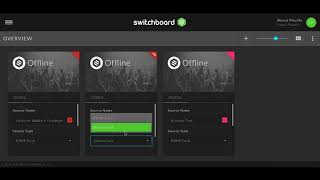
So this is Switchboard Live, the cloud version, and what we're really looking at here is inside the account. Now you'll see the little hamburger menu there in the top left, and when you click that, you'll actually see all of the various sources that you can hook up through this particular thing. Now there is a little bit of setup. I did have to get some help through the, one of the account managers from Switchboard Live to get this all set up. But their support is amazing. And once you have it set up, it's the kind of thing, it's like a set and forget type of thing. So you create a template for your particular live stream and you'll use that. You can have various templates. I only have one, but basically you set that up and then you have various sources. You click on the little link button here on the right-hand side and what you'll do is click the checkbox to say yes, go live, open the live stream for Facebook as well as, or rather YouTube and Periscope, and then yes, turn it on. Now I want to turn on the live stream for Facebook, and that's just how this is set up in my particular situation because I wanted to try to go and simulcast all three of them at the same time. So now Facebook's on, Periscope's on, and YouTube is on. And once all of that is on, basically it opens up the streams. At this point, what you're going to do then is you're going to go over to your Switcher Studio and you're going to actually start the live stream through that platform. So it's really kind of a two-step process. But what's exciting about this is that these two platforms work really well in tandem with one another, and they allow you to utilize your smartphone, utilize your iPad as camera sources. Once you have everything set up, it's a very seamless process to be able to simulcast your live stream to a variety of platforms all at the same time. Now, having said this, I do want to preface this by saying I am by no means an RTMP expert. I really needed help to set this up, and it was— it's just like any kind of process. Any kind of technical process. I personally am a person who learns by doing, and so the account manager in this case walked me through the process on the phone while I was on the computer, and that was very helpful because I'm the kind of person who, once I do something once or even twice, it's pretty much cemented into my brain. If you're not that kind of learner, what you could do is just create yourself a little you know, a little SOP, a little standard operating procedure that you could have next to your computer to know exactly, okay, I'm clicking here, I'm clicking there, I click that, then I click this. And then once you have that set up, you just repeat that process over and over again. So I do want to preface this by saying I'm not a— I'm not an expert in this. And there are, you know, quite a few little buttons in here, but that they have great support and that they have people who will help you to not only set it up, but also to walk you through the process. So that you truly do understand what it is you need to repeat, you know, day after day if you're doing a livestream every day, or week after week, or whatever your content editorial calendar is going to look like. But I'm really excited about this tool. I think it's a fabulous software. It does come at a cost, and there are various different levels of commitment in there. And so it's something to consider. The only thing, and I think I mentioned this earlier as well, is the bandwidth issue. So what I did notice, I've done a couple of tests, or a few tests actually, going to Facebook, YouTube, and Periscope at the same time, and you're in a high-speed network, you know, where I live, and it was still impacting the quality of the video. But suffice to say that for certain people this may be a great solution, especially if you are strapped for time. You know that your audience is on a variety of different platforms and you want to reach everyone at the same time. I feel like this is a great tool to maximize your time and leverage your time. And it may not be for everyone, but I was really excited about it when I discovered it. I've tested it a couple of times. Right now I'm still right now in the process of determining which package it is that I want to go and do, which is why my, my account is not currently right, right at this moment active as I'm recording this. But I'm looking at the different options, and once I make that determination, then I'm going to go forward. But at the very least, with Switcher Studio, it allows you to still do those live streams individually to different platforms. This tool, Switchboard Live, allows you to do a live stream to a variety of platforms at the same time and broadcast them in real time at the same time. And that's the only difference. So I hope that's helpful for you. I'm excited about it, and I hope you are too.