Learn to use Buffer to schedule and manage your social media posts across Twitter, Facebook, and other channels. Edit copy, drag posts to new times, and check analytics for comments, clicks, and reach. Goofy posts often outperform serious ones.
Chapters
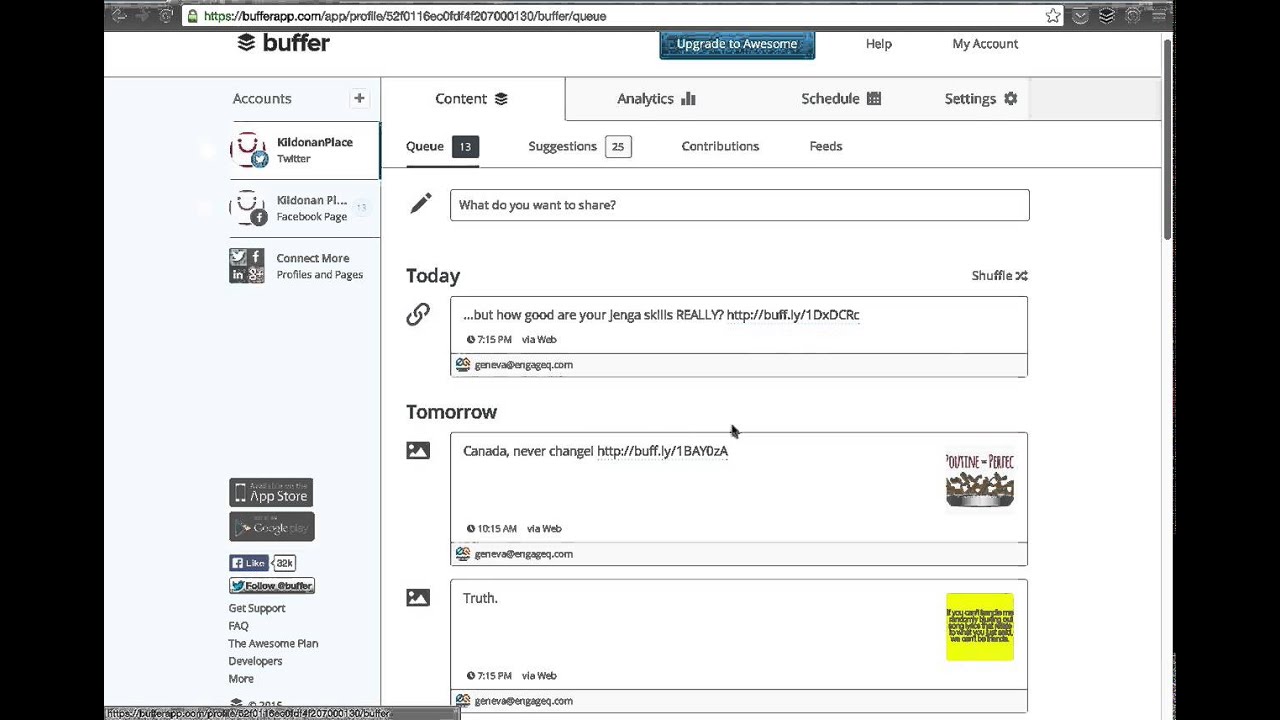
Hi, thanks for choosing EngageQ Digital as your digital marketing and social media agency. In this video, I'll show you how to use Buffer, which is the content tool we'll be using to post content onto your social media channels. It's really easy to use. Now, you do not have to ever log into Buffer if you don't want to, but it's there as an option to see what we've got lined up, and you can reschedule, edit, delete, move things around, or just tell us to. Either way. If you decide to— you wanna look ahead of time to see what we've got lined up for your channels, just go to this address: bufferapp.com and click Sign In with Email. We will have given you a special email address, most likely your brand name and then engageq.com. Type in the password and click Sign In. This is the main screen of the content management system. You don't have to worry about clicking any of these Upgrade to Awesome buttons. It's very straightforward. You'll see your content channels on the left. Here's Twitter, here's Killdoden Place's Facebook page, the one we're using as an example. If we have a Google+ account for you or other channels we're moderating, you'll see them down here on the left. So fairly easily, let's just look at the Twitter. As we scroll down, you'll be able to see what we have lined up ahead of time. Same thing with the Facebook page. I'll just click that and scroll down. This is based on a schedule. You may be familiar with tools like Hootsuite, which do let you schedule posts, but you have to manually schedule each one. In this case, we've gone through at the start of our, uh, contract with you and identified the most highly engaging times for your brand. The schedule, if you ever want to see it, is under this button at the top that says "Schedule." So you can see on the Facebook page, we're posting twice a day at 10:15 in the morning and 7:15. And on Twitter, we're posting at the same time for this example brand. Let's go back to content at the top here. So this is exactly what will be post. You can even see the team member assigned to you who actually put this post together if you want to contact them. But let's decide that you want to change something. Let's say that we want to change Canada never change to Canada please never change. Just click anywhere in there, make the change, and hit Save. You'll now notice that that change has been made. You can also, if you want, reschedule them by just hovering your mouse over them, and when you do, on the left-hand side here, you'll see those turn into four arrows. Let's say we want to move this Truth one up to today. Just grab it, hold down the mouse button, and drag it up to the top and let go under today. Everything is rescheduled automatically. I should say that most of our clients don't do this editing or rescheduling because they just leave this to us. But it is an option if you decide to. You can also delete them entirely by just hovering over and clicking the Delete button. That's really all you need to know. If you want to keep watching, I'll show you the analytics package which is built into this. If you want to see the analytics for your Twitter account, let's just go up to Analytics. Actually, we'll do the Facebook page, and then we can sort it by the type of success you're getting on the Facebook page. So by default it's showing you the most recent posts and what we've got from it. In this particular post that went out today, we've got 1 comment, 36 clicks— that would be a click to that link— and a reach of 518 people. Let's see what the most popular is as measured by the number of comments, and let's look back only 30 days. So in the last 30 days, this was the most busiest post when measured by comments. We can see how many comments it received and so on. We can change this to 90 days, and believe it or not, this post here, the "Hmm, what do you say?" with this image, even though it seems goofy, got the most number of comments by a factor of, it looks like, about 3 to 1, and a huge number of likes. Even though these memes may seem a little goofy, they are occasionally important to drop into social media streams for this very reason, that they get engagement. And for everyone who engages, especially on your Facebook page, they will see your brand's content more frequently in their newsfeed. So we do like to mix it up quite a bit. And that's it. If you have any questions, please don't hesitate to call us, and we're looking forward to working with you.