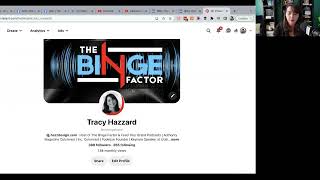
A brief instructional clip from Tracy Hazzard about using social media banners on Pinterest. Key points: Pinterest previously allowed animated GIF headers but no longer supports them; convert or recreate GIFs as static or alternative formats. Practical tips include viewing your public profile via the business hub to check the header, uploading existing images (YouTube-sized images are recommended because Pinterest will crop them appropriately), and requesting custom images via helpdot.com.
Chapters
You may also want to do it on Pinterest. There is a header on Pinterest. It used to be that we, you know that when I did it, I had a GIF running on, on Pinterest, but they stopped allowing that and now it no longer works. So I had to go back and have my GIF that I had created created into kind of a, a different style. And I'm going to show you what that looks like because you can have one created if you like. So on the, on the business hub, I simply go to view my public profile and you can see what it looks like here. So that's now what my image looks like. A little bit different than what I had before. So you can have that created as well. You can load up any, any of the other images. I highly recommend trying the YouTube size on Pinterest so you don't even have to recreate new. Try the YouTube size because it'll crop off in a, in the proper format for when you utilize it on Pinterest. So if that's a social profile, TikTok Instagram, they don't really have that use profile photos. You're more likely to use your cover art for those. But if you do want anything custom in the future, you just have to request that through helpdot. Com.