Executive Protocol final 52120 with Presenter Adrienne Barker, MAS
Adrienne Barker, MAS, walks through executive protocol for virtual meetings: how to set up your camera and audio, manage the chat, handle interruptions, and follow up after. She covers everything from lighting and backgrounds to when to stand up and how to mute a dominant speaker.
Chapters
And everybody's connecting to audio, so that'll take a second or two.
Okay, let's see.
Morning, everybody. Everybody is muted, and we're just going to keep it that way until until the program's over, and we're just going to wait a couple minutes to make sure that everybody is in the meeting. Some folks come a few, a few seconds late, but welcome, and Adrienne's here and we're ready to get started, so we'll get started in just a second. All right, we're going to get started and we'll admit folks as they come into the waiting room. Thanks for joining us this morning. I'm Leslie Layton. I work for the Port Orange South Daytona Chamber of Commerce, and welcome to Develop You: Executive Protocol in a Virtual World. This is a free webinar, and we thank our sponsor FPL. Adrienne Barker is with Promo Products Guru, powered by Halo Branded. She's also a mentor with SCORE Chapter 87, Volusia Flagler. Adrian's background includes executive training and professional education. Adrian's going to take your questions at the end of the program using the chat function. You can find that at the bottom of your control Zoom window, so just use your mouse and you'll find the chat. Just bring that up and it's very easy to, to put a question in there. You can do that anytime, and when we're done with Adrienne's presentation, we'll take your questions and have her answer them. Before we get started, some programs coming up that you might want to be aware of: Develop You: Marketing to Relaunch Your Business with panelists Ken Clark, Small Pond Advertising, Carol Court of East Coast Current Magazine, Chick Munhall, The Munhall Group, and Neil McGinnis of the Chamber. So that's coming up Thursday, May 28th. At 10 AM. Also, Develop You: Your Business Finances— What Should You Do Next? That's with Sonya Laney, CPA. She'll discuss financing your business to keep going after the impacts of COVID-19. That's Thursday, June 4th at 10 AM. Again, thank you sponsor FPL for underwriting these events. You can register online at pschamber.com. Or through the link in tomorrow's Seabreeze e-newsletter. Either way, please join us for those, for those events. I am now going to stop sharing my screen and let Adrienne take over and share her screen for her presentation. Adrienne, go ahead.
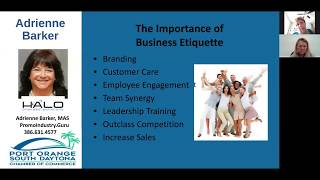
All right, beautiful, thank you. Good morning, everyone. I really appreciate the ability to be here this morning. And I want to remind everyone that I know I'm preaching to the choir. So let's look at today's presentation as more of a training presentation so you can train your employees and maybe some team members that you have that are not comfortable using any video platform. And I would love for us to think that way. And at the end, please share any suggestions and tips that you also have. I want to just share with you that I love SCORE, I love business, and I wanted to make sure that everyone knows the SCORE story because as business professionals, you may be asked what are some of the resources available to a business. At any stage of that business. So as you can see, that SCORE was formed in 1964 and we are a resource partner of the SBA. And we provide free business advice and mentoring. And I will tell you that we need more mentors. Our office has been very busy. Many people are looking for advice right now due to COVID-19 on how to how to deal with the issues that they're having, and also even how to close their business. And we have 10,000 volunteers, so please consider being a volunteer today. Our office is right here in Volusia County, and we have a great team, and we would love to have you come aboard. Free. I love that word, confidential business advice from expert advisors. I know many of you really are an expert advisor. Thank you so much. I love business etiquette, and the reason for it is because for years I didn't have it, I didn't understand it, I wasn't careful. I thought I was being funny. There's a little comedian inside of me always wanting to come out. So I had to be careful with that. But now it's so important for us. There's a lot of competition out there. And talking about the virtual world, what we have sometimes are just what we're showing on the video screen. And business etiquette is so important. It's part of a company's branding and the customer care, the employee engagement. So I want to make sure that we're always showing our best, and it matters. It matters when you're in a room and you are with other professionals. You will stand out by just how you are treating others. So let's get right down and dirty into this virtual networking. Because when we look at virtual networking, some of this is really just what we would do in real life networking. If you're going to go to an event and you're planning on going, register. And what I love to see is that you have the— on your calendar, take a minute and share that Zoom link on your own calendar. If you're inviting someone to attend your Zoom meeting, Take a minute in the invitation to put that Zoom link in there. What that does is, we all know when you're getting ready to sign on and all of a sudden you realize that Zoom link is buried in your email, how lovely is it that if you just clicked your calendar and there's the Zoom link and you can move forward? I see this often when people are late signing on. Because they'll say, oh, I couldn't find the Zoom link. Take a minute to double-check your computer and camera. Debbie and— Leslie and I got on 15 minutes early so that we can make sure that my computer, my camera's working. How is my sound? So take that minute. I know it's elementary, but we have to remember to do this. Did you know that if you sign in late, It can be harder for the host if the host is working on their own. So right now, if you're coming in late, Leslie can do it, and that's great. But if I was making the presentation and doing this myself, I would have to take a second and stop and go on. So thank you to many of you. I think there were 13 that came on early, and we really appreciate that. That helps to make the meeting smooth. Just like in real life, coming in early is very important. Make sure your sign-in detail on the computer has your full first and last name. Now I understand by phone it's hard, so if that happens, on the chat box note who you are, because how many times does that happen when all of a sudden the presenter— and especially if it's a board meeting or a committee meeting where you need to be noted for the minutes, someone will say, I see 3866314577. Whose number is that? So it really does make sense to put in the chat, hi, it's Adrienne Barker and I'm here. What is it with the mute button? I, I'm, I'm confused. I— how many meetings do we have where unless the host actually mutes everyone, it becomes chaotic. And it's not just a few meetings, it's actually every meeting unless it's a meeting like this that's being recorded and there's a host is able to mute everyone. So when you're asked to announce yourself, unmute and give your name and mute again, we know that we all do that. The problem is sometimes is that you may not, you don't understand where that mute button is, so take a second to know that. On the other end, if you're a host, give the person a second to unmute themselves because it does take a second to find your mute button, to click it, and to mute. Sometimes it just takes a second to hear your name and realize that you're up. So during some like fun quarantining networking events, I've noticed that— and not in this region, but I was on a quarantining call when all of a sudden, because the person wasn't quick enough, they got skipped over. So I think both sides, the host has to understand it takes a second, and the person has to, you know, make sure they do it as fast as they can. And we all know to mute when we're not the speaker. Yeah, I just, it is so surprising to me. So if you have any, I want to hear why people don't mute. I need, I want to understand why, because it's so interesting to me. That every single meeting someone is not muted. I was on a call the other day and the person introducing themself, you couldn't hear because of another person being muted. So just like in real life, mute. Learn how to use the video interface too before signing on. We're going to have more calls like this and we understand that in the beginning it was hard to know, but now this is why we're teaching this today. So that you can also be the trainer and teach others, it's important to understand the video interface. By the way, what I love about the video interface is that you can see a few different ways of doing it. So you can have the Brady Bunch view where you could see everyone in the room, and that's kind of fun, can be distracting. Or you can have it where the speaker is speaking pops up. Now what happens when the speaker is speaking and it pops up and you're not the speaker? You're the person that didn't mute themselves. Do you know that everyone can see that? So that's another reason to mute yourself is that you may not realize that everyone knows you're the one that has the toilet flushing in the background. So ask your questions in the chat box. You know, turn your video off if you have something you need to do. It's okay, life happens. You may need to step away, whatever it may be. Don't leave your camera on. Turn it off so it's not distracting. Most of the time in virtual networking, everyone has their video on, so the idea is to see everyone. What you wanna do is make sure if the host says you have a minute, just take your minute. If you have only 30 seconds, just take your 30 seconds. And I know that also sounds like, well, I do that. But the person that doesn't do that, you know what? Some people say, look, that like, it's kind of selfish. I'm just gonna lay it out there my candid way. It's not nice. It's not a nice representation of who you are if everyone speaks in the timeframe they have and you don't do that. And I know that we all don't want to present ourself in that way. So just really make sure you stay to that time limit. Use the chat feature to connect with other members or to showcase your business and website and email. I think that's really important. Make sure in the chat feature that you put down your email address, your phone number, and any other information, and make sure you're sending it to everyone. So if you're not familiar with the chat feature, take a minute to really look at it because you can send it to everyone, you can send it just directly to the host, and then the host can share the chat box later, which is nice. I've been to some meetings where everyone had the 30 seconds to speak there was actually 50 people on the Zoom, but what the, what the host did is allow us to actually put our information on the chat box, and then that was shared so that we can reconnect with everyone afterwards. As I said before, join a few minutes early. This is especially important during your board and committee meetings, and I know many of us are on boards and committee meetings. You really want to get early so that they know that you're there and the meeting can start on time. Just like it's embarrassing to walk into a meeting late in real life, it's really the same at a virtual meeting. And I'm just going to tell everyone, review the past minutes and agenda so that you can say yes and that you've actually had, had that time. And I say that to everyone because I know sometimes we get so busy, but it really is important to catch any mistakes. Again, only use video. So this is a question that I've had myself. Is everyone using video? Only half are using video? Does, does everyone want to see my face? I'm not looking great today. I don't want them to see my face. So I try to get a feeling for what that looks like. Later today I'll be on a call with our Halo VP, and you know, I know that it's fun for him to see everyone on the call. Again, if there's a— if I'm taking a sip of something or if I'm doing something I don't want everyone to see, I will turn my video off. I keep putting that mute yourself and be prepared to unmute because it's still not happening. It's important to find a quiet place to take the meeting, but not in the bathroom. And don't flush the toilet like what happened during one of the Supreme Court meetings. So find a quiet place. It may not be the best for you to be in the middle of your kitchen when people are coming in and out. I think it's really important because when you are unmuted and you're speaking, you still don't want your own family to interrupt. Always ask if the meeting will be recorded and if copies are sent. That's nice to know up front. You know what, if you are going to be late, it's okay to let the host know. That way that they'll anticipate that they're going to have someone a few minutes late. Follow all the guidelines for proper etiquette while on the meeting. It makes so much sense, but yet we don't see that. You don't want to be filing your nails. You don't want to be on your cell phone. One of the— I train myself, it sounds kind of weird, but I train myself to be focused so that I could sit in a meeting and I'm not— my phone's not calling me literally, or, you know, and I don't have this urge that I've got to check every message. And I'm not looking at the other person's phone next to me. I want to be focused so that I get the most out of every meeting and I get the most out of every virtual meeting. So those are the guidelines. So if you're unfocused, people will notice that you're unfocused. They'll see that you are, are not paying attention. I think it's better to have your video off if you are on the computer doing other things and you're not really paying attention. Just being on the video call, definitely just turn your video off. If you don't agree with me, please put that in the suggestions and the chat room. I am a hand raiser. If you know me, you'll know I raise my hand like a 5-year-old that has to go to the bathroom because I respect other people and I don't want to interrupt. And I raise my hand so that the person that's doing the presentation knows that I'm queued to speak next. And I love that virtual networking has the feature of raising your hands. I think it's brilliant. If you have to leave the meeting, put it in the chat box just in case someone needs you and all of a sudden they're, Adrienne, is Adrienne Barker still on the call? So it's nice that some of the, you know, hosts could say she left the room if you're really closing out. Well, I don't care if I look silly on a video call. No one will remember. Oh, let's talk about why you do not want to look silly or have an I don't care attitude on a video call. Well, because this is part of your branding, your professionalism. You want to be careful. I know I tend to wave and I like putting my fingers up, my thumbs up. My fingers up, my thumbs up. And towards the end— and if it's a silly, if it's a silly call, and if it's fun, and if they're in a quarantine happy hour, that's all fine. But if you really are on a business call, mute it down. Your goal is to be remembered and outclass your competition. You never know who's looking for you. If you don't own your own business and you are looking for work, it may be your next employer watching, and they may say, my gosh, she wasn't paying any attention, she was filing her nails, I'm not interested in hiring her. So using your executive protocol at all times will help define your success in business. I want to say that it is important— we have a lot of our up-and-coming next generation, so please share these tips with them. Again, I'm not preaching to the choir, but we really want to make sure that our high school students that are going to be looking for work and maybe doing their interviewing on video, that they have this information so they understand the importance of this. This could be the only impression that they're able to make. Now, how many times have you seen this? You're checking yourself out. Especially when you're talking, and the little primping and making sure your hair looks good and putting on your lip balm. I love all of that, and but if I'm going to do it, I'm going to turn my video off. Just be careful. Try not to primp. You know what, maybe you need to sit on your hands, and yes, I, I do sit on my hands so that they don't move. Don't apologize, by the way. I've seen this a few times too. Oh, my house is so messy. I'm so sorry. I, I, I couldn't find a place to sit. Don't apologize if your child interrupts you into your video conference. Don't shoo them out. Michael and I were talking about this. Michael Agri and I were talking about this. Life is life. We are here, we're working home. I have a 14-year-old. She is my love. She's not more important— she's more important than video conferencing. There's really nothing more important than my own family. They're always going to come first. So I'm not going to shoo her out of the room. I don't have this barrier wall, you know, you can't come in here, Alana. I, I, if she comes in, if she needs me, she understands that I'm on a call. I can put my hands up for a second. But if it's an emergency or if it's really urgent, that's okay too. Life goes that way. So just, you know, and you can let people know in the beginning of the call that you have a 2-year-old, that you're home watching the 2-year-old and still trying to work. I don't think that that interrupts your professionalism. It just makes you real and human and genuine. On the other hand, don't overexpose your life. You know, be careful of what is going on in the background. Don't all of a sudden, because you have the cutest little dog that looks like a bear, you know, put your bear on the camera so everyone could see your cute bear. Don't Flip your camera around so everyone can see your house. Just be careful of what you're doing. And by the way, don't forget to say goodbye. That is, you know, even myself sometimes it feels awkward when we're all doing the goodnight, Joe, goodnight, Joe. So, but it's okay to say goodbye. It's kind of a sweet part of it. And it's also nice in the chat box to thank the host and to say goodbye that way. Don't be wiggly. You're not in second grade. So I know I can be wiggly. And also, if you use the background, I know Zoom has some of those backgrounds that you can interface with that have you on the ocean and whatever it may be. Just know that you kind of can look funny if you're moving around a lot. It's really, really distracting. So be careful of that. We want to be careful of all distractions. Sometimes too much behind you. I may be looking at, oh, I have that book. I love that book. And next thing you know, in my mind, I stopped listening to you because I'm thinking about the book that you have. And don't avoid the camera either. You know what? You're going live. You're going to be on it. We're, we're all in this situation together. So embrace, embrace, embrace. And don't play with any filters too. I love filters myself, but don't play with them when you're on a video call. And important, don't forget service, um, security. So be very careful when we get our invitations. They're only for us. Do not allow other people to drop in. We have to be careful. Don't record on your end of it. And this is really about respect. This video is being recorded. We know that. That's great. But if it's not, don't hide and video yours and record it yourself. Really is important. And now, Leslie, we come to the chat box for questions. And I am going to stop this so you can see. Hi, everyone. Oh, I can't hear you, Leslie.
Mute. Oh, I'm not fast on the unmute button. I'm fast on the mute. I'm fast on the mute button. So I've been monitoring the chat, and we've had some very interesting comments. So any questions that you have right now, please put them in the chat box. One of the observations from, from Rob Ayers that I thought was interesting is is to use a branded, branded business coffee mug on your calls. Good idea.
First of all, Rob is an amazing professional, and I'm honored to be in the same industry as he is. He's got a fabulous reputation, and he's just a wonderful, wonderful man. Rob is absolutely right, and that is, we both love the promotional products industry. So Rob, you're 100% right. If you could brand yourself, you know what, even if you have some kind of badge or something in the background, I think that makes sense. So brilliant.
And another question that we've gotten is social media. You know, I want to let people know who I am, including my politics. Why should I stop being me on social media? What's your observation about that?
If you have enough business, if you don't need any more business, if you don't need any more friends, if you don't— if you really, you know, none of that makes a difference to you, then go ahead, share your politics, share all of that. I will tell you that myself, I will usually snooze someone, not even because of what their politic is, the fact that they think it's okay to do that. Because you wouldn't in a normal dinner meeting or a networking meeting go up to someone and tell them what your political preference is or what your religion is or your children's Social Security numbers. So don't do the things that you wouldn't do in real life in social media. People are watching and they could snooze you. You may think to yourself, look at this, that there are all these friends, but they're not even knowing what you're doing. So it really, at the end of the day, not only can it hurt your business that you lose one buyer, but that person has the ability to tell other people not to buy from you.
Good point. Michael Agri asks about— and you touched on this earlier— Michael Agri asks about pets making guest appearances on camera.
Well, I think sometimes— nice to put in the chat box— I have the cutest dog in the world. Would everyone like to see this dog? Especially if you're in a quarantini. So any of these networking events, because we have to remember board meetings and committee meetings are serious. There's no time for a dog. This is serious work. They have things that have to be accomplished during a presentation. You don't want to distract from the host, so you don't want to do anything that you wouldn't do in real life. But if we're all having a quarantini and holding our vodka up proudly, well, in that case, then sure, why not? Show off your little bear dog. They're so cute. And people will love that. But that's the only time that I think it would be appropriate.
Can you talk a little bit about lighting, headphones, you know, some of the appearance things that maybe are not, you know, what you're wearing, but how you're seen.
So very true. And I, I tell people I am a protocol etiquette consultant. I do not do like image wear. So for me, it just is difficult too. As a matter of fact, one day my husband rigged up all this crazy stuff for the lighting and I said no. So right now I do have a lamp next to me and I have the lighting. I'm in kind of a, a smaller area with just one piece of artwork Melanie Taylor camp, my favorite. And I, I, you know, I'm wearing something simple. You know, for women, it's all about distractions. That's at the end of the day, that's what it's about. If I'm showing my cleavage, I may be distracting you. If I'm showing crazy pair of glasses, I could be distracting you. So keep it simple. Just look in real life. One of the most distracting things on a speaker are dangling earrings, high, high heels. Like, so we think of all the things in real life that really could take you away from the focus of what you want to teach. And so what you want to do is— I don't think I'm like perfect right now with my lighting. Find someone or watch some YouTube videos to give you that best light. But I did see the other day someone was— you couldn't see them. So obviously if you have the sun behind you, that's not going to look great. So at least you want to be visible. Now, some people go really close up. They'll get really close up, which is kind of fun too, a few times. You know, I like— I think you want to be comfortable. So if that's not comfortable, I know— let's everyone go real close up. Which, by the way, if you're making a presentation and you want to make a point, there's no other point better than, see me, I'm telling you the truth. The other thing, Leslie, is where do we put our eyes? I would like to hear, could we have the suggestion? I love people, so I look at Leslie and I'm like, she's so beautiful, and I want to, I want to just like look at her. I know that etiquette says look at the camera, so could we have— I don't have a poll, but everyone throw in the chat box what you do. Are you looking at the camera? Are you looking at each of the participants? Tell us what you like to do.
All right, next question. Your recommendation to quiet a participant who's dominating a virtual meeting, how do you handle that?
I really think that the host has to set the ground rules from the beginning. It really is important to make sure that everyone feels that, that we're all on a level playing field. So if someone's taking a little bit more time, because in etiquette you don't cut someone off, you don't say Hey, you're doing that wrong. But I think many times when we look at things, when they go awry and they become chaotic, that probably we really— it comes back to the host. It has to, because the host is responsible for the meeting. So as a host, you really want to, you know, make sure that you are starting and presenting and doing everything correctly so that it's done on time. Don't— cutting someone off is incredibly rude, and I would never suggest that. Reminding someone, you know, you got 1 minute— some people in different meetings will have a time clock. That's distracting too. You don't want someone speaking and then trying to look at their time to make sure that they're on time. So just host— let the host take care of it. If it happens, just remember it's not the worst thing in the world. It's just how people will perceive you. You're going to be perceived as the video hog. Did I answer that correctly? I mean, not correctly, but did I answer the right question?
I think your whole point was be gentle, right? So Rob Ayers in the chat said, and this is I think a really interesting tip about, you know, camera attention, camera has a little green light. I have clients who told me they put a Post-it note on top beside the camera to keep their attention toward the camera. Not a bad idea to kind of focus yourself up there. And like, you know, you don't have to do it all the time, but if you do it, you know, if you mix in looking at the participants and looking at the camera, that's real, right?
Yeah, I like that a lot. Yep, I think that's really brilliant. I think what I'm lucky is that I'm wearing glasses and my eyes are kind of dark, so they're not so easy to see. But, you know, someone who has maybe blue eyes that you really notice, it's going to be very important to make sure where your eyes are. So another great a suggestion.
Yeah, so, um, in, in networking situations, um, the question is, if I really want someone's business, um, how do I let them know? What's the, what's the procedure for, for that direct connection when you're in a forum like this?
What I like to do is I, I write them a private chat. The only problem with that is that they may not see the chat. Not everyone knows where the chat is. I suggest that the host in the beginning of a meeting takes a minute, because we never should— we should never assume that everyone knows something. And if you say, everyone, you all know chat, nobody wants to be the person that says, I don't know what chat is. So take a minute to say, double-check the chat. It will pop up that you're getting a, like, a, you know, special note. And then make sure they understand how to open that. And then at the end of the meeting, what the host should do is make sure that those different chats get put into— well, actually, Michael, is Michael on the call? Because I need to know if that— if the host has the opportunity to actually see the chat to not everyone, but a special chat to someone else so that they can have that. Uh, Stacy Fowler in Tucson, when I was at her meeting, she was able to, after the meeting, give everyone who asked to be connected to someone that information afterwards. And that, that was really perfect.
I can unmute Michael and let Michael, since he, he's really a kind of a Zoom guru, he can kind of address what your, your point that you just made. Michael, go ahead.
Yes, the same rule applies to the host as it does all of the participants. So you can see the chat. In fact, typically when I'm hosting a call, I forget to look at it then 10 minutes later I realize that Leslie told me something really important that I forgot. So yes, you can.
So, so Michael, wait, so that means do not send a private message saying the host doesn't know what they're doing, or, you know, the host looks funny today. So now that we all know that, it's important to make sure that, you know, don't be critical because That's another thing too. Part of etiquette is making sure that we're not critical with each other. But thank you, Michael. That is really— that I— how many of us really knew that? Because I didn't know that.
All right, um, you know, one of the things that you and I talked about, uh, in preparing for this and that we discussed was how Zoom and these meeting forums online are being used for things like, even like court, and I shared with you what had happened in the Miami area with a judge who actually wrote a letter, an open letter to the attorneys that had been appearing via Zoom in his court for hearings, and what he had seen and what he was admonishing the lawyers for. You want to talk a little bit about your takeaways from, from that letter?
So when I read this and the judge— I would hope that— what my only thought is, is that it was in the beginning that someone didn't realize what they were doing. Because would you ever, as an attorney, take a phone call while you're still in bed? Would you ever take a phone call without your shirt on, male? Without your shirt on? Crazy, right? No. Would you ever take a call when you look all disheveled? Or in your bathing suit by the pool. So when I read this, I thought to myself, maybe they thought that the camera is just on their face and didn't realize that it's hitting everyone else. It's important to know your laptop, your desktop, your computer, your iPad, I don't care what it is, know what you're using for your platform and how much of your screen is So, I mean, it's so silly to read, but you could even hear the tone in this letter was pretty much disgust by the judge. He was really kind of like, don't do that again. And then we talk about the Supreme Court and one of the meetings that they had, someone flushed the toilet and they were able to figure out who it is because I've lost you.
I've lost your audio, Adrienne. I've lost your audio somehow. Somehow I've lost your audio. No. Can you hear me? No. Now I can hear you. Go ahead.
Oh, I couldn't hear you either. You have to be understanding too. This is going to happen where our feeds aren't going to be great. So don't expect 100% perfect when you're in a Zoom call, whether you're the host. I was sweating bullets this morning. I'm not afraid to speak, but the idea that the, the whole platform could be a mess scared me. Any other questions?
I think we're— I think we've wrapped up all the questions. Is there any other last-minute questions from anyone? Put them in the chat and we'll get—
Leslie, I would like to say a few things.
Sure.
What I've noticed, we're not able to shake hands. Don't, don't reach for someone to shake a hand or hug in this day and age unless they say, um, hug me. Otherwise, don't do it. What you could do is put your hand over heart, but one of the most important things that you could do is to stand up. If you are sitting down and you are approached, there's no excuse not to stand up unless, of course, you're unable to or you're stuck in a corner. But standing up is the number one way to show respect. And so it really— I see too many people aren't doing it. And I like to say, you're gonna— we're gonna be 6 feet away from each other. It's going to be a different atmosphere. How do you stand out? Now, Rob and I, Rob and I sell a wonderful line of antimicrobial products you may want to consider when you're handing out. Someone may not want to take your business card. Someone may not want to take something that you're giving them for the name. So, you know, the idea of how you remember yourself is really important. So that— and remember, remember, you'll remember yourself. How someone's going to remember you So be thoughtful with everything that you're going to do. Now's the time to send a thank you card. Thank you, Michael. He's great about cards. Take the card to, you know, send a note, send an email, do a reminder, follow up. All of that is going to help you set yourself aside. Do not run up to someone and hug them or do a handshake. It will make you look like you have no empathy and you're not caring. Thank you everyone for all your comments. I love that. This is beautiful.
One more thing from Rob that I think is, is an interesting way— when now we're talking about branding and setting yourself apart, um, he said Zoom virtual backgrounds are easy to make. If your company has social media headers or backgrounds, those can be tweaked to make a branded background. And Rob says his is actually a Twitter background. So great ideas all the way around. If there aren't any more questions I think we're gonna wrap it up. Adrienne, thank you so much.
Thank you so much. This is fun. Thank you.
And thank you everyone. And thank you again to our sponsor FP&L. And for those of you that came in late, let me just run through what's coming up, which is Develop You: Marketing to Relaunch Your Business with Ken Clark of Small Pond Advertising, Carol Cord of East Coast Current, Chick Munhall, The Munhall Group, Neil McGinnis of the Chamber. That's Thursday, May 28th at 10:00 AM. Develop You, Your Business Finances: What Should You Do Next? That's Sonya Laney, CPA. She's going to discuss financing your business to keep going after the impacts of COVID-19. That's Thursday, June 4th, 10 AM. Again, all sponsored by FP&L. You can easily register through the Sea Breeze that comes out tomorrow because of Memorial Day, or online at pschamber.com. So thanks everyone, have a great day. And Adrienne, again, thanks for being here.
Thank you. Bye everyone. Thank you.