Mutable Instruments Marbles tutorial, for humans
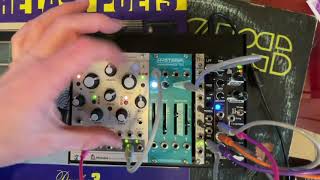
A hands-on YouTube tutorial explaining how to set up and play a small modular synth patch centered on the Mutable Instruments Marbles module. The speaker describes signal routing (oscillator → filter → amplifier → DSP effects), how to wire triggers/gates and sequencer outputs, then gives a detailed walkthrough of Marbles’ controls: clock/speed, jitter, scale selection, octave range, loop length, bias/spread, freeze and randomization behavior, plus brief notes on filter and DSP/effects. The tutorial emphasizes an exploratory workflow: letting Marbles roll probabilistic notes while the player tweaks parameters to find interesting patterns.
Chapters
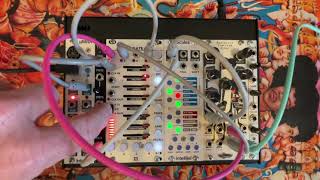
All right, let's take a look, see if we can make a little video on how to operate this little synth of ours. We have a sequencer, random probabilistic sequencer is maybe a good way to say it. An oscillator, a low frequency oscillator, which is basically something we can use to move the knobs for. So we're not going to use that because too many cables. This thing called LPF is a low pass filter. We get rid of the boring high end streaky stuff. That's the filter. A dsp, that means digital signal processor, that means effects. Digital ones like a reverb and a delay, etc. And then over here we have a module that combines two functions, an envelope. So when you hit a note, does it go tick, tick, tick, or D D, D or have some other amplitude envelope? This is called. And also an amplifier, just setting a volume for the music we're generating. Let's plug in some stuff. What we're gonna do is we're gonna have an oscillator, this guy over here, that outputs. And the output is gonna go into the filter. And then from the filter it's gonna come out and gonna go into the amplifier and the envelope generator. We'll call that the audio in. And then the audio is going to go back out into our effects module over here. And the input is right over here in. And then from the effects module, the signal is going to go out left and right to our sound system, UAD interface or whatever your mixer, whatever your sound source is. And I'm going to go plug that into my UAD and soon we're going to start hearing stuff maybe now. All right, we're not hearing anything yet. We have to. Let's take a look. What else do we need here to get signal? Maybe we should send some signal in here. The first thing we can do to test if everything is working is we can just send signal from our CV from our oscillator right into the input and we can turn off the effects. For now, that's working. We can make sure. Is this piece over here working? If we're going from. Let's take a look. From our filter straight into the input, we're going to go into the filter. Like that's still working. Filter here is working. That's good. Good. So everything is working. And let's go finish up what we call the signal path. Make sure everything is working correctly. We're going to send signal from the. We're gonna have a trigger signal that's this T2 thing over here that sets the frequency with which notes are being sent. We see it blinking over there. And that's going to go into our envelope generator. We'll call that. Let's use the gate for that. In. And the notes that are being generated by our sequencer, we're going to stick that into x2. And that note is going to go to the note input over here. Holy music's coming out. Let's follow the signal again. Our gate. You know, the ping that says make a note is going right here into the envelope generator. And then it's coming out. And then from here it's. It's gonna go. Something is not. Not plugged in correctly yet. From here, the out signal is going to go into the signal processor in. And. Great. And then my audio in is gonna go like this. Perfect. So let's take a look. I have an oscillator that's sending signal out into a filter. Filter does this. Then it's going out from the filter into my amplifier. And then from the amplifier it's going out. And then into my effects. Here comes the reverb. And then the envelope is being generated over here by the pink cable. And that's sending a trigger into the envelope generator. And the notes that the oscillator generates are being defined over here by our sequencer. And it's going into here. We're going to quantize this thing. So everything is on a note in a scale. We're going to pick a root note that we like and the sound that we like. All right, now we have a generally pleasant sound. And we're going to not need to change any of these cables. I mean, you can, right? I just did when I was testing the setup. But we're going to leave these cables. We're not going to use the LFO for this little video because it makes the setup slightly more complicated. And let's take a look at the most interesting piece, which is the marbles module. That's where the magic happens. The speed. Is set over by this knob. So that's a really important one. There's a knob called jitter. And that. How good is your drummer? Right over here, the drummer plays really steady. He plays exactly on the grid. You know, over here you have a. It's like a drunk drummer. You know, he's not really able to keep the beat really well. So that's what that is. I'm gonna keep this on the beat, but it might be fun. It's usually fun to have a Little bit of jitter in there adds a little bit of. Makes it feel more organic. So that's the beat that we are playing. It's over here. And we're using the T2 generator to keep things simple. You can make things more complicated if you want. So that's this half of the module. That's sort of all we need to know. We can speed it up. You can set the clock from some other device over here, all sorts of other stuff over here that we don't need to worry about too much today. The next thing we worry about is, hey, what kind of notes are we generating? And we have three or four knobs here. All of these knobs we're going to use for that, including this little button over here. We're not going to use this button, but we are going to use this button, the one over here. That's in green. See how it says plus two? That means we have a maximum two octave range that it's going to be playing notes in. We can change that. When we get to orange, it's plus or minus five octaves. So you're gonna start getting. You're gonna get a lot broader range of notes being played. And then this one is plus five. You're gonna have. You're gonna have not as many as in orange, but the notes that are going up into five octave range, but not down five more octaves in the other direction. So we're gonna go to green because that's a normal octave range of two octaves. So we'll probably want to leave that. Now we have these three big buttons that are going to be the main thing we play around with. Oh, there's one more. This thing over here, this button. If you want to get creative and very experimental, you can play all the way on the left of 12 o' clock. And you'll get a lot of slurry sounds that aren't even on a scale. They're like. It's kind of like playing the guitar. Guitar without worrying about your fret and sliding your fingers over the neck of the guitar. You have a lot of that. I like to stay over here in the middle or to the right. In the middle you're playing notes that are not in any kind of scale. And then as we move towards 12 o', clock, we have fewer and fewer notes. So over here I believe you're gonna have like eight. You know, when you're about 2:00 clock, you'll get eight notes out of the scale being played. And then over here, maybe you've got five. Maybe you still get like your root and your four and your five. And that's about all you're going to get. Over here at the 9 o' clock position, at 3 o' clock position. Sorry. And then little by little, as we go to the 5 o' clock position, 6 o' clock position, you'll only hear a note and the octave. Now over here I probably have three or four notes in the scale that are being played. Now the next question you have is like, well, what's my scale? And if you put your finger on this button from before and you hold it down for a few seconds, you'll start seeing that light blink. And that's going to tell you which of six scales that we are using. So right now I've got a. Let's take a look. What we have is it's an orange blinking light, right? But if we once it's blinking, I can click red, blinking green. Oh look, it's blinking faster now. Fast orange, fast red, slow green, slow orange. And if we look in the manual, I think slow orange is probably going to be our minor scale. Slow green is a major scale. And then slow red is the pentatonic scale. And then the fast blinking ones, those are more exotic scale. The Pelosi scale and the Rock Bhairav and Rock Shri scale. So you can try those out by holding down this button and then waiting for it to start blinking and then clicking through. Let me show you that one more time. Okay, we're slow orange. That means minor. If I click once. Well actually I. I didn't go fast enough. Watch this. Slow orange, slow red. Now I'm playing Gamaliel Rog Barov Rog 3. Here's my major scale. I don't want that. Take my finger off, wait two seconds, it stops blinking and I'm in my minor scale, which is where I want to be. Okay, so I'm in a minor scale. That's the, this button over there. And I'm playing three or four notes. Now the next thing I want to do is I have this knob called bias, right? This one over here. This is really annoying actually. Well, you know why? Because I'm playing the orange. Remember that in its normal state, that button, we want it to be green, right? Because that means two octaves, right? So what happened here is I accidentally fat fingered it and I ended up over here. You know, then you get too many octaves of notes and it's not fun, at least not to my ear. So I'm gonna keep clicking on this, but short clicks, not the long, long two second click. Now I'm back to two octave range. It's constantly recycling new notes into a loop. Right now the loop, and you're setting the loop over here, 60 notes, all the way down to one note on the counter clock. Let's make a loop of four notes over here. So it's four. So it plays these four notes and then it starts over again, right? And. And everything is a new chance. It's like rolling the dice. That's why they call marbles. And right now we've decided that it can play the notes from a minor scale and it can play about four notes that it can pick from and roll the dice with. And then over here we're just telling it, does it want to be neutral or does it want to skew towards the lower side of the scale and lower, lower range notes, or does it want to skew towards the higher range of the scale? You're going to almost only hear a higher note. So the second octave. And over here we're going to hear that first octave. I'm going to leave it in the middle for now. The other button that really matters is this one over here. And that one's labeled spread. And think of the thing rolling the dice and what is the place probabilities distribution that any given note pulls up, if we pull it all the way to counterclock, it's gonna play almost exclusively. Well, exclusively, actually the middle of the middle note among all my notes. If I have 12 notes in my eight notes in my scale, it's gonna play note five and only note five. If I go all the way over here on the clock position, it's gonna only play the extremes. They're only gonna play one note one, and plot and note 16. If I have two octaves, for example. So that's where you're going to hear a lot of very low notes and a lot of very high notes and nothing in between. If I put this thing in the middle, it's a curb distribution, right? A normal distribution. And every note, as you're closer to the center, you're going to have a greater likelihood of hearing that note. And then at 2 o', clock, right about here, every note is about equally likely to be played. So by jamming these three buttons, The tempo. So first I pick a scale, then I pick a note range over here on top, then I pick how many notes do I want to hear, Then I pick, do I want it to be biased towards the lower end notes or the higher notes? And what kind of distribution of notes do I want to hear? And what I usually do, my creative process here is to let it play for a while until I kind of like, oh, and also the length of my loop. Right now I'm playing six notes. Like it's every six notes. It starts over and it's rolling the dice every six notes. And I'm kind of waiting for something interesting to happen. And then when I like what I hear, click on this button over here that says X. And what happens now is it's just gonna loop this and not change anything. So now it's on repeat, but no changes coming in because this button over here says don't change anything. If I move this button to the left, it's gonna start bringing in new notes. I don't know, maybe like, every sixth note will be a new note and more and more new notes will come in. As I move this button, it's like it's starting to roll the dice again. I froze my loop, but then I roll the dice every now and then. That's what this thing is. I lock it again. If I go in this direction, the clockwise direction, I don't let in any new notes, but I scramble them up a little bit or a lot. Okay? So right now I have this, right? And then the way I start making a jam is I jam these knobs. Sam, 60 notes in my loop now. So even though this thing is frozen, we can still play these knobs and change those parameters, but everything else will stay the same. So now I've got a 16 note sequence. Tempo. Sam, If I wanted to organically change, let in some new notes a little bit over here, going a little bit clockwise, counterclockwise. So what I find is by jamming these knobs, just playing around for, I don't know, 10 minutes, I'll find something interesting, and then I can jam that and modulate that with my fingers, you know, and the combination of the machine making decisions and me making decisions is what makes it interesting. And then again over here, let's continue on. I keep this button pressed in so that all my notes are quantized. Here's where I pick my octave. Here's where I pick the root note. And these two sliders are the kind of waveform that I'm using. Then over here, the LFO we ignore. Over here, the filter. The filter is when we shave off the high notes and the resonance. The second one is how we add an accent right there at the point where we are shaving off the high notes at the cut off point, the attenuator. But we're not going to use right now because we don't have an lfo. Over here I can send my. I can shape my envelope. And then over here, my dsp. I have five different filters. I can click on this button here. Dry, wet is. How much of the thing do I want to hear? This is a, for example, delay. And these are. These are the variables. So you pick a color, you pick an effect, then how much of it you want. And then, then you play around with the two variables. I might go over here to play with the delays. There's a couple of different. There's three or four different places. Sam, as we play around with the interaction between the delay over here and the speed, we can have interesting rhythmic effects, right? Or we can just put a simple. A little bit of reverb. They feel a bit simpler. Right? Let's change our scale. It's blinking. I'm gonna go to one of the exotic scales. Oh, I went too slow. We gotta move fast on this one. Don't like that scale. Let's go back blinking back to my minor scale. Here we go. A little bit more high notes, a little bit less filter. In general, I tend to freeze this thing over here and just leave it and get the variations I want by jamming these three knobs over here. If you get bored, it'll just change a little bit, you know, just a little bit to the left of 12 o'. Clock. There you go.
More from Bart


Techno jam on Subsequent 25 & eurorack (2hp Turing Machine, Varigate, Intellijel Scales)