Make Your ServiceTitan Proposals BEAUTIFUL With Airship
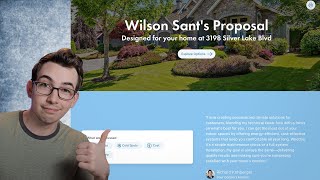
Richard Kohberger shows how Airship builds polished proposals that sync directly with ServiceTitan without duplicating your price book. Instead of breaking your inventory and reporting with separate pricing, Airship reads from ServiceTitan and turns signed proposals into fully populated opportunities in the same system.
I really like the aesthetics of Airship. I think if it's your goal to stand out from the crowd, the big stack of proposals, Airship's definitely one way to do it. And I really like how much data gets passed over to Service Titan. It really makes it feel more like an extension of ServiceTitan. What's going on, everybody? It's Richard Kohberger here, the blue collar nerd. And in this video I want to talk about equipment installation sales, specifically equipment installation sales in Service Titan. Specifically, specifically equipment installation sales using Service Titan, but also using some third party platform. So just to be clear, there is absolutely no need for any kind of third party platform in order to sell equipment and installs out of Service Titan. You can do that natively entirely in Service Titan. And in fact, most companies do, including some extremely successful companies. But some companies, and I'm mainly focusing on H Vac companies here, some companies get some sort of third party app involved for their equipment sales. And one reason commonly cited for doing that is that those companies are looking for a more visually aesthetic proposal that will help them stand out from the crowd. See, Service Titan by itself has a couple of ways that you can display estimates to customers. There is the presentation mode on the mobile side that's meant to be kind of like what the salesperson would be presenting there at the kitchen table. And then you can send your proposals to customers through either a PDF file or the online portal. The PDF file can be edited to your liking through the document template engine, but the online portal view is very limited in the ways that you can customize it. So companies who just aren't satisfied with that set of options might look elsewhere for a more esthetic and customizable proposal experience. Which is cool. But there's something you have to look out for. You see the way a lot of these third party proposal builder tools work. They is that they use a totally like duplicate separate price book from your Service Titan price book. And then over on the Service Titan side, there's just like one generic service that the description and price gets changed depending on whatever you sold over here on the third party app side. The problem with this is that you diminish the quality of the data you have over on the Service Titan side and you completely remove your capacity to use certain Service Titan features that you're paying for. For example, if I'm going to be placing purchase orders through Service Titan, then I need to know the exact pieces of material and equipment that were used and that happens through the Service Titan side price book. But if all we have on the Service Titan side is one line item that we always use for every install, regardless of what it is, and just the description changes, well, then we don't have that data. That also means we can't use the inventory features. That's also going to very much limit the ways in which we can use the payroll features, because we only have that one line item to work with. So if we wanted to pay some sort of piecemeal bonus or something, we can't do that anymore. See, think of Servicetitan like a series of tubes, if you will, and data moves through these tubes from one end to the other. In order for the features that are on the lower end of the tube to be useful, we need to make sure that all of the data has flowed through from the top. So if there's any kind of break in the line, that causes some issues. So when you're replacing your entire sales workflow in a third party app and only sending over a little bit of data, that one line item over to Service Titan with a description, you're removing one of the pipes. And then a little bit of the data still drips through to the other side, but a lot of it just spills on the floor now. So if you're looking around for one of these apps, it makes sense in my opinion to look for something that has the deepest integration possible, meaning it's sending over as much data as it possibly can. So today I wanted to put the spotlight on one particular app that does have a very deep integration, meaning it is sending over all of the data that you need back to ServiceTitan. It's kind of a new kid on the block as I'm recording this video. It's called Airship. So I've got Airship pulled up on my iPad here. This is the like building area. And if I tap on this add more to system button to get into my price book, this is just my Service Titan price book. So when I'm building a proposal over here in Airship, an exactly identical proposal with all of the material items for my price book, all of the equipment items from my price book, and all of the service line items for my price book is going to be created on the Service Titan side as if I just built it there. So my reporting is still good, I can still use purchasing and inventory features, I can still use all of the payroll features. We're all good. These categories with no pictures, by the way, is because I don't have any pictures uploaded for those, not because they're not loading in or something. So let me go to the top here and hit View presentation. And this is what proposals in Airship look like. So I'll just give you a quick scroll through here so you can get a feel for it. But we'll dive deeper into these sections here in a second. So there at the top, we've got this header, this banner that we can use a photo with. A lot of people have been using the photo of the house here, which is what I'm showing in this example. But there's also some stock photos you could choose from. Under there, we've got a bio from our Comfort Advisor, and we have this little banner telling us that the cost of our proposal could likely rise soon. So I can tap view your price forecast there to get a breakdown of what that means. But this is basically estimating potential price increases depending on macroeconomic factors like tariffs. So that can create a bit of urgency there. Okay. And then under that we have our options. So I built out a platinum, gold and silver plan here, and we're getting that financing price. We have settings for what we want to show there for the pricing. And if I said explore all options, we can dive deeper into every individual option. This at a glance area, by the way, is AI generated based on the contents of this estimate. So I didn't have to come up with any of that. Under that, we have a rebate section for any rebates we may qualify for. And then an estimate breakdown. This one's pretty simple. It's just one line item warranty and an area for upgrades. So we'll see upgrades on the main proposal page too, after I back out. But basically these are things that we can offer to the customer even after they've signed. And they can choose to add that onto their install if they want. And they're able to do that totally by themselves without involving you. Okay, let's back up here. So under our main options, we've got this little section specifically for our rebates. It shows us which of our options there qualify for the rebates. Under that is the upgrade section. Like I was saying, a customer could choose an upgrade here and add it to their estimate on their own. And then under there, photos of their existing equipment. We can tap into that and show show more pictures. And these photos, by the way, are synced with Service Titan. Under there we have a section for our company core values, if we've put any in. And finally, a frequently asked questions section where a customer can expand these FAQs. And at the very bottom, there are Links to contact our Comfort Advisor. Now, if I scroll back to the top, we see here I have a share button and a print button. So there is a print version of this presentation. If you have customers that are older and you're worried they're not going to be able to navigate something like this, you can just print it out. I would even maybe put it in a binder to make it feel even better, more premium. But here, under our share button, this is where we can email the presentation to our customer. We can put in a little personal message there with it. And you have AI tools at your disposal there to help you write that. But then over in the right hand corner, you have a QR code that will take the customer directly to your presentation. So imagine we're sitting at the kitchen table. I'm about to go over their options with them. I can just show them this QR code and then they can follow along on their own device. They can pull out their own phone or their own iPad so that we don't have to be sitting shoulder to shoulder. Some customers don't like that. So that's been a pretty popular use of that QR code. So let me go back here. So now I'm back again in the presentation builder. And at the top of the screen here, I have two buttons, Toolkit and Theme Editor. So we'll start with Toolkit. This is where I can attach any photos and videos. So those pictures of the old equipment, that's where these came from. We can attach notes. We can do this home experience survey. So this is handy as a beginning of your presentation. You can kind of go through the customer and follow through with this survey. What are their concerns? Oh, they've got allergies and. And they've got some cold spots. Maybe their priorities are cost and even temperature. Okay, now we've added some customer concerns to our presentation. So if we go back to view our presentation, we get this little section on the proposal showing those areas that we talked about just to give the customer some extra confidence that all of that stuff is being taken into account with these options. All right, let me back out again. So we've also got a rebate survey to see if the customer qualifies for certain rebates. And we can edit our financing options for this particular proposal as well. Okay, so that was Toolkit. Now, Theme Editor, this is where you go to edit what your presentation is going to look like. So if you don't like the default headline and sub headline, you can change it here. Change whether you're showing full pricing or financing pricing. First selecting if you want to show financing pricing or full pricing in the proposal summary, you can adjust how they're sorted. So do you want your options to be most premium to least premium or vice versa? We can choose different theme colors and we can also adjust our cover photo from here. So now let's view our presentation as if we were the customer. So let's say I'm interested in this filter cabinet upgrade, so I'm going to add that item to my estimate, actually. And then I think I'm going to go with this gold option. So I can just sign to accept. And there it is. I get my confetti. Congratulations, you've successfully accepted this proposal again, links to contact my comfort advisor, a button to download the signed agreement, and a button to go back to the proposal. And just to prove the point, here is that opportunity on the Service Titan side that is generated off of the proposal that we just built in Airship. So we've got all three of our options there identically built out in Service Titan. This is the gold option. I'll click edit on that. And as you can see here, these services, equipment and materials associated with that estimate are all built out over here identically in Service Titan. So we have all of that data. And by the way, there is an option whether or not you want the Service Titan proposal to also be automatically signed when you sign it over on the Airship side, or if you want to close that out manually so that you still have the opportunity to make any changes in case you need to. I really like the aesthetics of Airship. I think if it's your goal to stand out from the crowd, the big stack of proposals, Airship's definitely one way to do it. And I really like how much data gets passed over to Service Titan. It really makes it feel more like an extension of Service Titan because everything still shows up on the Service Titan side just as if I had done it all over there. Now, to be clear, I do have an affiliate relationship with Airship. Basically, that means if you decided to sign up for Airship, they're going to ask you, how'd you find out about us? And if you say blue collar nerd, I'm going to get kicked a little bit of a commission for that. I'm really picky about the companies I affiliate with. There's not many of them. And the ones I do affiliate with are always something that I either have used or would use in my company where I still operate. But, you know, always want to be clear about that sort of stuff. But if you do happen to be interested in Airship, I'll put a link in the description box down below to book a demo. And I hope you have a lovely rest of your day. Appreciate it. Peace.
More from Bill



Capturing the 80%: How SmartAC’s Gen-2 Targets Non-Membership Homeowners | Podcast Ep. 296

Build better customer data with every booking in ServiceTitan | TAD Tune-Up Series

The Biggest Change for Roofers Coming From Other Roofing Software to #ServiceTitan?


