Training video demonstrating how to integrate GPS providers (example: Fleetmatics) with ServiceTitan. Shows using the dispatch board map and technician pictures, configuring GPS under Settings → Integrations, reviewing Fleetmatics devices and pings, and explains an auto-arrive feature that marks technician arrival based on GPS. References additional setup steps available on academy.servicetitan.com.
Questions this video answers
10 technicians.
Fleetmatics.
academy.servicetitan.com.
The auto-arrive feature (ServiceTitan Mobile detects arrival based on GPS).
Welcome to Servicetitan Training. In this video, we'll explore how to integrate GPS tracking solutions such as Fleetmatics into Servicetitan.
Servicetitan integrates with many GPS solutions, including those listed below. For any GPS provider not listed, we have a GPS API available for use.
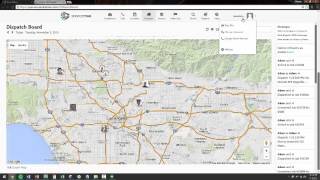
As you can see on my dispatch board, I've got 10 technicians who are working today. What if we want to see where the technicians are geographically located? Right now if you scroll down on the dispatch board itself, you can see pictures of each tech based on their current GPS location. So if we have a new job and we want to dispatch the closest technician, we can simply look at the map instead of having to send out a broadcast to the technicians.
Note that Service Titan can be configured so that technicians are assigned to geographic areas based on their GPS position. For more information, consult academy.servicetitan.com now how.
Do we set this up? If we simply go up to the menu and go to Settings, you'll notice under Integrations that there is a GPS option. As you can see, I currently have an integration configured with Fleetmatics. If I click the Add a pencil I I can review the Fleetmatics integration and add each technician's device, as well as view the pings that each device is providing on a regular basis. Note that there are some specific steps necessary to configure GPS integrations. Those steps are available at academy.servicetitan.com One other feature of the GPS integration is using Servicetitan Mobile, we can track when the technician arrives automatically based on the GPS location. With this feature enabled, instead of having to click the Arrive button when we are close to the customer's location, GPS integration will detect that the technician has arrived automatically. Thank you for viewing this Service Titan training video on GPS integrations such as Fleetmatics.