Can MS 365 replace LPMS?
Catherine Sanders Reach compares Microsoft 365 Business Standard to dedicated law practice management software. MS 365 cannot fully replace LPMS due to gaps in native reporting, real-time billing, trust accounting, conflict checking, and client portals. Hybrid solutions like Cura 365 and Matter365 layer law-specific features on top of MS 365 for $12.50 to $22 per user.
Chapters
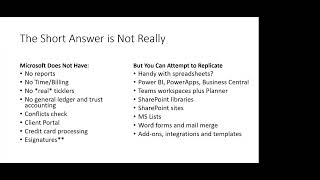
All right. So welcome everybody to today's learning objectives program. And today we are going to attempt to answer the question, can Microsoft 365 replace law practice management software? And, um, I thought I would answer the question to begin with, and the short answer is not really. Um, So kind of looking through, we're going to dive a little bit into what Microsoft 365 has to offer versus what a typical private practice, law practice management software has to offer. And I say software, but really they're more applications at this point. The software packages like TimeMatters and PC Law and things like that are going the way of the dodo. It's more often that you're going to find something that's purely in a browser or some sort of hybrid browser and install mix. The Microsoft Office suite is a browser-based plus installed application mix as well. But the things that Microsoft 365 doesn't have out of the box are things like reports. So it's very difficult to run a report across a client matter database the way that you can in a law practice management system. There's no real time and billing built into the system. So the typical law practice management product has the ability to click on a little button, start billing for the client, generate invoices, and get the bills out. The other thing, if you struggled with ticklers that back up in something like the Outlook calendar, it's, it's reminder, you can set one reminder per event. You can't set multiple reminders per event. So that's, that's a failure on the part for especially litigators who need a lot of reminders about upcoming deadlines and things like that. You keep having to reset them. There's no general ledger and business accounting built into the Microsoft 365 suite, and there's no real way to manage a trust account natively through the product. In terms of conflicts checking, if you're trying to use Outlook contacts as a conflicts check portal, you've probably realized that that fails pretty quickly unless you start adding custom fields and things like that. And really, you would have to build a spreadsheet or something that you could search through, and then the search doesn't do the fuzzy search. You know, it's limited in terms of getting getting a robust conflicts check, and not everybody needs a robust conflict check. In fact, not everybody needs any of these things that are lacking in the 365 suite, which is why it's an interesting question. Again, if you're in-house, if you're a municipal attorney, if you have a practice that really doesn't anticipate the need for robust conflicts checks, or sole practitioner and feel like you can kind of minimally remember slash, uh, document. Other things, it doesn't have client portals. So a client portal, um, while you can do some things with the Microsoft 365 Suite to emulate a kind of client portal, it's not something that's kind of pre-built for you. You also don't get credit card processing directly in the suite. And then e-signatures. E-signatures is not a feature in every practice management application, but a lot of them are starting to build them in. And so that's another thing that's not built directly into any of the Microsoft 365 Business Standard suite. And when we're talking about the comparison, I am gonna be focusing on the Microsoft 365 Business Standard suite. There is the Business Premium suite, but that typically adds more litigation hold, some more security bells and whistles and things like that. It's not really going to add additional things until you start getting into the enterprise level, like the E3, things like that. So can you attempt to replicate some of the things that are on the list that Microsoft doesn't have? Yeah. So there are plenty of firms that use Microsoft 365 and QuickBooks and call it a day. You can also do a whole lot with spreadsheets, and then there's a new product built into the 365 suite called Lists, which is kind of a hybrid spreadsheet database. But the big issue here is that it's a build versus buy thing. With the practice management applications, you've got that natively available to you. But with the Microsoft suite, some of these things like time and billing and reporting, the business accounting, you can attempt to do it on spreadsheets, but that's a lot of spreadsheets. I know that some firms do their task tracking through spreadsheets. In the Microsoft suite, there's actually a better way to do that now. Then there's add-ons or expansions to the Microsoft 365 Business Suite. So we're talking my money, my money, my money. So you've got Power BI for analytics, you've got Power Apps if you want to build your own app. Business Central is actually an accounting package, but it is not something that I see any— I've never met a law firm that is using Business Central for accounting. You can tweak out Teams workspace— workplaces and add Planner to it. To get a quasi-client matter-centric organizational scheme. But typically, it's— that's going to be something that you have to ponder. You know, are you the kind of firm that has a few clients with a lot of matters, or do you have a lot of clients with one or maybe two matters? And thinking about how you would set that up to be the right right fit. You can also create SharePoint libraries for shared documents, and you can create template libraries and all sorts of other things. And we are actually— the next program I'm doing next month is going to be all about SharePoint. SharePoint is very powerful, but it is not for the faint of heart. So one thing to be aware of is that while SharePoint is extremely extensible and powerful, it, I would find someone who has skill sets with development, um, because it's, it's the permissioning is really key and you can make all sorts of mistakes with it and also just get frustrated and waste a lot of time when you can buy something that's more custom designed for a law firm out of the box. Um, I mentioned Microsoft Lists, which again, it's They're easier to build with the if and then conditionals and a little bit more database-oriented. But in terms of getting reporting out of it, not, not so straightforward. You can do a lot of filtering, but not a lot of reporting. You can get better reports out of a spreadsheet if you're good with a pivot table. But again, there's not as— I haven't met a ton of lawyers who are like super, super skilled with spreadsheets. And then the Word forms and mail merge, you can use that for document, a simple document assembly. And that's actually the basis of a lot of the document assembly tools that are built into the practice management applications. The big difference is in a practice management application, you're going in and you're putting all the information about the client. So all of those fields are ready to import into a Word form that you can build through the system versus having to create some sort of database or a spreadsheet and then merge that data over from, um, that into Word. It can be done. Again, it just depends. And then A lot of the law practice management systems have extensive APIs with other companies and other products. So you've got integrations. Not all integrations are built the same. In some cases, they'll have an integration, but it's, it's not bidirectional synchronization. An example of that is QuickBooks. Most of the practice management applications will say, you know, we integrate with QuickBooks, but it's a you need directional sync. You put the information in the practice management application and it synchronizes over to QuickBooks. But if you change something in QuickBooks, it does not necessarily go back and change all the fields in the law practice management system. So that's a nuance that you need to understand what, what's going back and forth. Similarly with the integrations with the Microsoft suite, it's not 100% complete. So you need to test out and make sure everything works the way you anticipate it will. Microsoft also has a ton of add-ons and templates, and so it makes quicker work of doing things to make up for a lack of certain features. One of the things with the add-ons, there's a lot of great add-ons. However, you want to make sure that you can't do it natively in, in the Microsoft suite before you go and get a third-party add-on that basically duplicates functionality that's already built in. So at this point, does anyone have any questions? Real quick, Katherine, when you say add-ons and templates, are those— because I don't go out on the browser edition— are those already built into the browser edition, or where would you be looking for those? So that's a really good question. There are some add-ons that have been around for so long that they're actually, installs into the software. So for instance, in Outlook, I have used an add-on forever and ever called SimplyFile. SimplyFile is installed into the software itself. It is not something that I can get through the browser version of Outlook. And I will tell you, my use case for the Microsoft 365 suite is I still have all the software installed. I still open up Outlook. Software. The nice thing is I also have an app for my phone, or if I'm not at my computer for some reason, I need to log in and see my email, I can go into the browser version, but I use the software. So my SimplyFile lives just in the Outlook software on my computer. It's not in my phone because it doesn't extend over into the app. So that's one kind of add-on. And then the newer add-ons that you can get through the Microsoft 365 suite, um, through their app store. Often do appear in the mobile versions and the browser versions. So for instance, there's a, there's an add-on called Templates for Outlook. Templates is, I don't have it on my phone, but I do have it on the browser version. I do have it in the install. And that's just, you know, basically little snippets or fast responses to email and stuff that I, I got a whole collection of templates that I can just drop text into and that makes my life much easier. Integrations is when you're sharing information between the two applications. And again, there's some limitations to that. And then the templates are generally just, for instance, if you were going to look at using Power Automate, there's a whole lot of prebuilt automations and you can kind of look through them and see, is there an automation that I can use or is that— is there some sort of template for a letter or a template for a spreadsheet. And those are— I don't think there's a whole lot of— there are some templates in the practice management applications in terms of practice-specific. So you can go in and say, I've got a personal injury practice, so I want to tweak this out with the, the kind of personal injury use case scenario. But that's not as common, whereas the Microsoft products do have a lot of templates you can take advantage of and then tweak to your needs. If you kind of look at this in a big picture perspective, we're talking about a database. The law practice management system is our database and then an office suite. And in my mind, one of the, the big advantages of having a database is that all the information is stored in one location and It talks to each other. It's, it shares information. It doesn't duplicate functionality, and it's a little bit more simple to use. They have apps, they have browser versions, some of them have installed versions, but it's all kind of in one place. With the Microsoft Office suite, you've got a bunch of different applications, some of which talk to each other in a limited way, you can set up more of those kind of automations and more of that sharing data amongst the products. But there— we're literally looking at multiple products. With the Microsoft 365 suite, you get Word, Outlook, Excel, PowerPoint, Outlook, the installed software. Then those are synchronizing through 2 server products that are also hosted for you and set up for you, that being SharePoint and, um, uh, Exchange. Then you have document storage through OneDrive and SharePoint, and then you have all these other things, all these other little tools, some of which are duplicative, some of which you will be going, well, why would I use that when there's this, all that kind of stuff. And it, it gets confusing. So that's because of the nature of the fact that the Office Suite is a whole bunch of different products versus a law practice management system that tends to be one database, possibly with integrations to other products, but it's a little bit more streamlined and all of a piece. So any questions about that? Okey doke. So let's first look at kind of basic overview of law practice management systems just to get a sense of what the benefits of those are and what they typically come with. So typically benefits of law practice management systems, and I am really focusing on some of the, um, The newer ones, the PracticePanthers and the Cleos and the MyCases and the Centerbase and ActionStep, and there's like a whole lot of them, which makes it really confusing. So I'm gonna try to break it down a little bit more, but generally they're gonna help you track your trust account balances, um, track communications. So for instance, in Microsoft 365, where are you gonna keep phone notes? You know, where are you going to keep notes from conversations that you had with the client? It's not that it's an impossibility. It's just not— you have to pick which tool you're going to use to do that, whereas this typically is just built into the law practice management systems, which are designed by default with a client matter organizational system. So you find the client and you look at the matters And you see all, all of the things that have to do with that particular matter, the client contact information, the other parties involved, the documents, the communication, the notes, the bills, all of it in one place. You can run reports across this thing, which to me is a huge, huge failure on the part of what comes out of the box with Microsoft 365 Business Standard. It's really impossible to run a report. In terms of getting any, any information all in one place. So with a law practice management system, if someone calls up and says, what's going on with my matter? That's a fairly easy thing to figure out quickly, um, versus the Microsoft where you're gonna have to piece it together. Um, it, it doesn't have as much redundancy, um, and feature overlap that the Microsoft suite has, and you're not rekeying information trying to, uh, rekey in one place and then put it in another. It typically, you know, has shared— because of the database structure, it has shared fields so that information flows throughout. It's also streamlined for law practice. So you're not spending time creating things. It's kind of already out there. They also build in a lot of the automation that you would have to set up in Microsoft. And while Microsoft certainly has the ability to share and organize information, that is a lot of DIY, whereas again, the law practice management systems tend to out of the box imagine the, the structure that is most beneficial to how especially private practices work. Any questions on that? Anyone currently using an installed law practice management system like TimeMatters or PC Law or ProLaw or something like that and thinking about, I want to move to the cloud and should I move to another law practice management system or can I just use 365? So one person that says they're using a version of Amicus Cloud, and I've— my understanding is Amicus Cloud is not, not what it's cracked up to be. It may work for some people, but it's, it's one of those things where I'm seeing a lot of people who have installed products looking to move over to the cloud. And then I've got another person. Yeah, couple of people here who are using the installed products, which your only option with many of them is to host them on the cloud. And sometimes that can get clunky and not work as well as expected. And yes, thinking about moving, still learning. Okay, perfect. All right, so next thing to think about is again, the reporting. And that to me is one of the major strengths and something when you're shopping for these things, really dig into what kind of reports you can get out of the box or what kind of reports can be easily built. Because this is something that if you want to contemplate types of reports to get, because it's a database, it's a lot easier to write. It's— to write, well, for one thing, to get Power BI is a separate application. Then you have to get it set up. Then you have to learn how to write the reports. Whereas a lot of the law practice management systems have reports built already available to you. She said we have another law practice management expert with us today. I'll, I'll call her out, Peggy Turner, fantastic resource for North Carolina Bar members. And she says, look at the reports that you're using now and see if the program that you're looking to shop to can reproduce them. So that's especially good advice if you're looking to moving from an installed product to the cloud. What kind of reports are you using now and can they be reproduced? Because not all databases are built the same. So on the screen, what you're seeing is an active matter report from Rocket Matter. And this is the kind of thing that is gold for business continuity and succession planning, because if something happened and somebody needed to come in and help you, move off clients because you, you know, decide you're going to close your practice or you need to take a break for a while or whatever, you can run this open matters report and show all the open matters, if there's any statute of limitations, so you can kind of triage the list based on timing. If there's any money in the trust account that needs to be returned to the client when you give them the option of moving on. And then, you know, the client contact information. So this is actually not a report that's built into all of the systems, but this is the kind of information you want to see. How would I write this report? Is it possible? Usually the answer is yes, but not necessarily out of the box. A lot of times you can get the report written and save the report so you only have to do it once. Another example is, um, the financials. So this is an empty Clio report, but you can see that you could run a financial statement in terms of works in progress, the outstanding balance, what's outstanding for this contact and her trust balance and all that kind of stuff. Here's another report. This one's from Cosmolex, and this is, you know, trust retainers and types. And, you know, you're— you can— some of the products have really, really flexible reporting and really, really flexible screens so that you can add fields, add columns, things like that, show more on the screen, show less on the screen. So they're not all the same, but they tend to have similar features across the different products. And that's where coming up with what you want to be able to do is important as you're shopping for these kinds of things. Common features that we see across most of the private firm-focused practice management applications: appointments and events, so a shared calendar for the firm and possible multiple calendars; task and ticklers, much more robust than what you find in a, a Microsoft Outlook; and also some of them have add-ons extensions or upgrades to rules-based calendaring. So for those who are filing with a court based on court rules and deadlines, those are built in for you and can calculate those dates. Obviously, you still want to double-check everything, but they're jurisdictionally based and they update those rule sets so that it makes life easier in terms of trying to calculate. I've talked to firms that are doing their calculations using like World Clock and stuff like that. You know, there is an easier way. Contacts and conflicts are much more robust than what's in, say, Outlook's contacts. Now, you could build a spreadsheet or use a Microsoft List for your contacts and conflicts, but again, they're not really talking to other things, other parts of the, the client matter. So this is all in one database. Document management, Um, most of the law practice management systems have what I call rudimentary document management. It's really associating the document with the client matter and not necessarily what you're looking at in more robust document management, um, applications like a NetDocuments or a RollDocs. Um, when you're looking for things like that, that's when SharePoint actually has, um, some nice features. And it's not that you can't use the Microsoft 365 suite and a law practice management system. So if you replace your server with a SharePoint library, you can check documents in and out. You can have version control, not, not at the level that you would with a legal-specific document management application, but it's there. And then the document assembly, some of the law practice management products are starting to get much more robust document assembly so that it goes beyond just filling in blank fields from the database, but also can do conditionals, subject-verb agreement, changing verbs by pronouns, things like that. So those are starting to get more common. But right now, when it says document assembly, it's really not a whole lot more than mail merge. But since it's in the system and already sharing the information, it's a, lot more convenient. Time capture is a big part of all of these applications. There's little ways to start a timer, add your time. There's a lot, you know, depending on how you bill, if you do split fee, contingent fee, hourly billing, alternative fee agreements, subscription fees, make sure that whatever products you're using will cover all the bases that you think you have now and might have later. For the firms that are working with outside clients in the corporate sector, you may also need things like leads billing, e-billing, and UTBMS codes, the Uniform Task-Based Billing codes. See if you can upload code sets or get those things built in. So time capture and billing can actually get pretty complex depending on the type of client you help. Research, FastCase has some integrations with some of the practice management applications so you can save your research into the client matter, notes from your discussions with the client. So you pull up the client matter and you add notes when you have a conversation with them on the phone. You can track your communication with them. So if the client ever complained to the bar and said, you know, well, I haven't heard from my law firm, for a while now, you know, what goes, you can actually track the calls that you've made and the emails that you've made. Some have integrations with some of the voice over IP products, so it's really easy. Some have the ability to track activity on your phone so that you can see, I called this client, and it makes a note, I called this client on this day from my phone. And then finally, the thing that I absolutely love about a lot of the practice management applications is just out-of-the-box client portals. And so I was schooled by a young attorney when I was trying to explain what client portals are and the benefits of them. And she said, well, it sounds like it's just MyChart for law firms. I was like, that's it. That's exactly what it is. So it's the ability to give your client a unique login, and they can access documents, they can upload documents. Some of them have secure communication with the client, so you don't have to worry about encrypting email and things like that. Um, you can put, um, obviously invoices and let them pay the bill online if you have. And, and a lot of them are now building in, um, payment processors as well, so somebody can go into the client portal and pay their bill just like you do with MyChart from the hospital. They can set up appointments, they can view appointments, all sorts of stuff, and some have more robust client portals than others. Yes, it does require the client to create a username and password, but that is not an unusual circumstance in today's times, and they, you know, they have the ability to kind of— I don't want to say self-help, but they don't have to constantly ask you what's going on with my matter. They, they can see things. And again, it makes— maintains security, reduces your reliance on email, all that kind of good stuff. So any questions thus far? So breaking down types of practice management applications, We've got stuff that does— has a focus on the front office where they may not have time and billing, which is very unusual at this point. But there are still some products that, like, for instance, you know, trying to think of one that doesn't have time and billing. There aren't a lot. Well, for instance, PracticeMaster. PracticeMaster is a standalone practice management application, but in order to get the time billing and trust account management, you need to have the Companion Tabs 3-piece, and those are installed products, but you can have them hosted. And so they, they focus on the, you know, documents, communication, notes, all that kind of stuff. Peggy notes that most people don't use the accounting part of ActionStep, and ActionStep is yet one more— a very robust and customizable practice management product, but not, you know, they're not using the accounting piece, but the front office is kind of all the contacts, calendaring, communication, but not so much the time billing, trust accounting. One piece that gets left out of a lot of the practice management applications is general ledger accounting/business accounting. Payroll, things like that. And a lot of firms choose to use QuickBooks for that. We are seeing more products integrating business accounting into the product. So in the past, ProLaw, PerfectLaw, PC Law, TimeMatters, and Amicus with their finance packages would all give you that full, full suite of products. Everything front office, middle, the middle office, that time billing and accounting and trust management, and then the general ledger accounting. Now we're seeing more of the cloud products bringing that to the fore, and I guess the, the big thing there is that you don't need QuickBooks. So if you're a firm that has not been using QuickBooks, you may not want to go to QuickBooks because it is not out-of-the-box law firm ready. It takes some customization and, and implementation to get it prepared to, to do law firm finances that feels natural. So the all-in-one, we've got products like Cosmolax, um, uh, Cinerbase. MyCase just integrated a product that they bought called Saluno, and so now they have a tier that includes accounting. SoloSuite has accounting. And then when you get into bigger practices, you start seeing more products like the Elite Suite and things like that that have more accounting built in. And then there's the practice area specific. So that's when we get into the in-house counsel, the municipal attorneys, the personal injury firms, immigration, real estate. And so if you're in a particular setting or you have a very deep focus on a particular practice area, you may be able to find products that are more suited to your needs that don't have some of the other more generic stuff that comes out of the box. That said, there are limitations, like for instance, with some of the practice area-specific stuff like immigration. Or real estate or trusts and estates, a big part of that is form filling. Something that does a great job with form filling and is appropriate for multiple practice areas is something like Smokeball. But Smokeball is— while it is quasi-browser-based, it still requires that you have Windows and Microsoft Office. Whereas a lot of these other ones now, you could be using Linux and, you know, a Chromium-based browser and be fine. So, you know, it's not one size fits all. There's a lot of products on the market. Again, I'm always happy to sit down and kind of walk through what you've got, what you need, where you want to be, and all that kind of stuff. Another kind of version of this stuff, if you go, well, I don't necessarily— I think I can handle all the calendaring and communications and document generation, all that stuff with the Microsoft suite, but I really need the time and billing and trust management, then you can start looking at things that just focus on time and billing. So again, for installs, that's things like Tabs3. Or in the cloud, there's TimeSolve, there's Bill4Time, there's— oh golly, a ton that just focus on helping you track time, generate invoices, manage your trust account. And when I say manage your trust account, it's not going to do the reconciliation. Some of them do checks, some of them don't. But it does mean that you're able to track your time more effectively and generate the bills more efficiently. And I still talk to firms that are tracking either by hand and then submitting them to a person who then goes and puts it all into QuickBooks and generates the pre-bill, and then the pre-bill goes back to the attorneys, they review it, they edit it, and it will slowdown/grinding halt a lot of activity in the firm. So this kind of stuff helps you keep up with your time more effectively. If, if you don't keep your time as it happens, which is more and more something that you can do if you're working primarily on a computer and you've got the right tools to do it, at least go try to put it in every day. And I have an article on, um, standardizing your descriptions so that you can start adding kind of dropdown descriptions for particular types of work that show value to the client and can be consistent across the firm. And the time and billing software is particularly useful for applying that kind of thing. Then the accounting software, sometimes it's built into law practice management systems, sometimes it's not. This is where you can track your expenses, salaries, profit margins, integrate with the time and billing products, integrate with your banks. Often this is QuickBooks, but again, we're seeing more of the law practice management systems also offering more of the accounting. And then rules-based calendaring I mentioned before, this is something that in law practice management applications, it's either an add-on or it's something that is built into the system, but usually at a higher tier. So if you were dealing with a tiered product that has, you know, 3 different tiered pricing and you're a litigator and you want rules-based calendaring, make sure that is part of the tier that you're purchasing. So switching over to 365, How does it compare? Well, from a pricing perspective, for the Business Standard, it's still $12.50 a month. They updated— or this has not been updated— the pricing for Business Premium is now $22 a month, and everything but the Business Standard went up a dollar or so. With a whole lot of users and over time, that actually starts adding up. But I still feel like Business Standard for most private practices is the right tier to go. Then when you look at all the products that you get with the Microsoft 365 Business Standard, we've got Bookings. So you can do those, you know, people can book time on your calendar based on availability in your calendar. This has a lot of features, Bookings does. Like the paid versions of Calendly and Acuity and some of the practice management are integrating with those products, but I'm not seeing a ton of, um, the, uh, practice management products having this kind of feature set. Um, although they are starting to incorporate more and more from what you would typically see in a practice man— or the Microsoft Business Suite, obviously calendar, Contacts, Outlook, all those things, PowerPoint, Word, all the things you're used to. You also get Forms, Lists, which I mentioned, Power Apps to build web apps and mobile apps, Power Automate for automations. But these, these require A, kind of having a sense of what you want to do, B, taking the time to figure it out and get it set up effectively. And may require some help. Then you've got SharePoint, which definitely requires some help unless you happen to have taken some SharePoint training classes along the way, which I did, and I still find SharePoint pretty confounding for anything beyond just the simplest applications. Teams is worth delving into. It's, it's pretty straightforward. Teams basically gives you video conferencing, internal chat, and then workspaces where you can create a, a project or matter-centered organizational scheme. So out of everything that I've seen, the two products that are with 365 Business Standard that you could start emulating a practice management application is using Teams and setting it up appropriately. There's also a lot of integrations. And so when I said you can run both practice management applications and Microsoft 365 Business Standard, there's integrations between Clio in my case and Rocket Matter and your Microsoft 365. So you're not constantly trying to move information from one to another. It, it can travel over as long as you set up, if you've got a subscription to both of them, you can set up some nice integrations and also some add-ons. There are add-ons for time and billing for the Microsoft 365 suite. I know of none that are free and functional for a firm, but I'm happy to have somebody tell me what they're using. One question I just got is, can you set up teams for each individual client? You can. It's completely extensible how you set it up. And again, thinking about, do I tend to have— do I want to set this up by practice type? So if you have a firm that does real estate, estate planning, and DUI defense, you know, I might start out with those big buckets and then organize them by client and then matter. Somebody asked, do I recommend OneNote at all? Absolutely. So that's the next slide. And yes, I will be sending you the slides, the recording, and a bunch of articles that I've written to help you sort all this out in your head. This is obviously a big overview. With Microsoft OneNote, that's another option for you. To kind of create one landing space. And I have an article on Microsoft OneNote. I have not done a video deep dive since I started NCBA on OneNote, so I'll add that to my list of webinars to do. But the nice thing about OneNote is it talks to the other applications. You can link or embed documents. You can create a— a matter or a client, it's completely extensible. So in this particular example, I've got this client's estate plan. We've got tabs for onboarding, the will, the trust, the power of attorney. And then within each of these tabs, you can have separate pages. And in each one of these, you can have task lists, you can have notes, you can link to research. You can copy and paste things from the web. You can add in upcoming meetings. It's very, very fluid. It's, it's almost as if I usually compare it to if you had a 3-ring binder and you put notebooks in the binder, and then each of those notebooks had those little pockets that you could stick random pieces of paper in. And so how you organize it is probably one of the most important things in terms of how, how you want to keep all of the information corralled into one place. There's integrations between, like, for instance, you see this Outlook task. If you create a task in Outlook, you can make it appear in Outlook and OneNote. You can add to-dos, you can add tags, so you can search across tags. It's completely searchable. You can dictate into it. You can send emails into OneNote. It's a really, really, really powerful product. And of course, because it's part of the 365 suite, you can share across the organization or the firm. Somebody just said sometimes we get corrupted OneNotes when multiple people are working in the same OneNote at the same time. And they were concerned with data loss with using OneNote too much for LPM for that reason. And I think that's a really good point. I think Teams, Teams was designed for multiple users. OneNote was not. It is a great thing that you can use as part of Teams. You can integrate OneNote notebooks into Teams. And somebody said it's great for taking notes and not having to scan them. So OneNote on an iPad or a tablet or your phone and being able to take quick notes and integrate them into Teams, I think is a better use case at this point with Teams than trying to use OneNote to create all this stuff because again, it is not as good with the multi-user interface. You get OneDrive with Microsoft 365. You can see what I think is interesting with my OneDrive, which is the me drive, but I can share files through it with other people, is if I email a link to this document from my OneDrive, I can actually see the conversation in Outlook just by mousing over the document. So it does give you kind of who I've shared it with, who's viewed it, what the conversations have been about. So there's a lot of intelligence being shared across the Microsoft 365 suite, but it's still not doing all what a practice management application can do. But you can share a folder in OneDrive with a client and give them the ability to upload files into it. If you send a link to request files to somebody, They can't actually see the folder. They can only upload files. With Teams, and I've, I've done entire, I've got two lengthy Teams videos that I can send you because it's too much to kind of COVID right now. But again, this is to me as close as you're going to get out of the box with 365 because you can create workspaces. It also has video conferencing and chat, so you can have internal chat, so you're not emailing everybody back and forth about things. And then this is the really the meat of what it is. You've got these workspaces, so you can set up different workspaces. Each workspace has individual channels that you can create, and then within each channel you can have Conversations about that particular channel. So if this orientation was instead of CPN admin, we'll say real estate. And then this workspace was the Jones real estate matter. And then we can have conversations about that. We can have planning notes. We can have a file library. Then you can start adding additional things. So you can add a OneNote notebook and you can add a planner. So Planner is another tool that comes with the Microsoft 365 where you can create task management boards or lists in a project plan. So again, you're starting to create these corralled areas for all the information, communications, documents, and everything around a client matter. All that said, we're still missing time and billing, right? So for those in-house who are municipal attorneys or government attorneys who may not be billing for time in the same way, you can add a spreadsheet link to this or a list. You can track your time or you can track your spend. But if you don't need a timer and that— the ability to send out invoices, with trust account balances being monitored and all that kind of stuff, you can start seeing where this would really be a pretty good replication. And yes, for the person who asked about the 2 videos on deep dive into Teams, I will send you all the stuff that I can muster up for you to help you get a deeper understanding of any of the things that we're talking about. SharePoint's another thing that comes with Microsoft 365. Like I said, typical use case is gonna be a document library. It looks a lot like your File Explorer. You can use it instead of a Dropbox or Google Drive or something like that. It does have the ability to check in and check out documents. You can add tags for additional contacts for things, and SharePoint libraries are pretty simple. When you go beyond that, there's apps. You can create task lists, you can create forms, libraries, wikis, notes. You can even create a SharePoint portal for your clients. But when we get to the, When we get to the point where we're sharing outside of the firm with something like a SharePoint, that's when permissioning gets really tricky, and it's not my recommended use at this time unless you're working with a developer who has a proven skill set. This is just an example. Remember when I talked about lists? This is just an example of the creation of a list. I created a client ticketing list. So say you were Receptionist assigns calls to people. So you can see, she says, you know, Sally wants her trust balance. I've assigned it to this person. This is the due date. This is a current client. You can add multiple columns. You can have information appear based on what you've added in the dropdown. They're not very hard to set up. I have a video that I will send you that shows you how to set these up. And for conflicts checks, You could build something out, client ticketing. There's some folks who are doing litigation management through these. So again, it's more about getting creative and learning how to use the tool and figuring out what you need it for, whereas the law practice management stuff tends to be a little less extensible but already built contemplating how a law firm might use it. This is another example of a SharePoint portal. So in this case, we've got, you know, templates and brand guidelines. This is actual from NCBA. You can create forms. The forms are not that great. I'll be honest with you. One thing is that the forms are almost built more for internal use than external use, which in a law firm is Um, hardly ever the case. There is a, um, a task management tool called To Do. It's great for your personal to-dos, whether you've been assigned from a Planner, um, plan, or you flagged an email, or anywhere that you get assigned anything, even if it's from Outlook tasks, it will appear in your to-do list. And I have, um, I have a video that kind of breaks down all the task management tools that are in, um, 365. Power Automate, I mentioned you've got flows that you can create. So, you know, when a new item is created in the SharePoint, send an email to this person, things like that. So mostly a lot of heads up and moving things around. There's all sorts of little what I call recipes. That's what If This Then That call them. But basically you can go through and look at, for Outlook, what kind of Power Automate automations have been created and get an idea of what's possible. Planner, again, I've, I go into this in more detail, but Planner is, you know, something that you can use on its own or you can use it embedded into Teams, which is my favorite usage of it. And you look at it, You know, you can create different types of orientations on the board, task cards, assignments. Big, big deal here is charts. You can see who's working on what, what hasn't since started, what has been started, what, what is in jeopardy, and contact the person. Everybody who gets assigned something in this gets an email notification that they have an upcoming deadline due, and then it will bug the ever-loving heck out of you if you don't do the task. So you don't have to sit on top of people or ask them where they are with tasks. They can, you can get an at-a-glance. But again, this is primarily for task management and project management versus, um, did we get the bills out? Did you know that kind of stuff? I mean, you can add, put that in here, but it's going to be a separate product that you're going to need to use to do that. So last thing real quick is some hybrid options. So if you're thinking, okay, I really haven't found a practice management application that fits my needs, um, and I have Microsoft 365 and we're really interested in learning how to use that, um, to the best of its ability, there are some products on the market that have already figured that out for you. Um, so one is Curo 365 and it's basically taken Microsoft Dynamics platform and probably some SharePoint and Power BI and all these other products that are pretty, pretty expensive and pretty more sophisticated for businesses and built a practice management application on top of it. So your data is stored in the Microsoft cloud. And they've created this kind of skin on top of it. And so they're leveraging a lot of these things. So you do have practice dashboards, time management and tracking, task management, workflow, trust accounting, invoicing, all built on top of the Microsoft cloud. So if you're thinking, well, I could— I don't have time to figure out how to use the Microsoft cloud effectively to build out a practice management application, There's tools like CURA. CURA is not cheap. I'm going to be honest with you because they are leveraging some of these more expensive products under the hood. But it is, it is pretty sophisticated. If you're looking for something that's a little less expensive and a little less extensive for a slightly smaller firm, there's a, what I call a skin for attorneys called Matter365. They're out of Canada. It's about $35 per user. And basically it again uses the Microsoft 365 as the basis and creates a client matter-centric organizational scheme on top of it. They also add— oh, and the other part is if you're using Microsoft 365 and QuickBooks, you are a great candidate for something like Matter365 because it basically turns all of those things, all the data is still stored there, but you're turning the, the initial dashboard is through Matter365, but it's pulling all that information in from those two places, 365 and QuickBooks. They add the one thing that's unique that they add to this is time tracking and bill. And so Matter 365, again, at $35 per user. If you've already running QuickBooks and Microsoft 365, this might be something to take a look at. And then finally, Law Toolbox, which is, it, it started out as a rules-based calendaring product that integrated with most every practice management application plus natively into Outlook. And then they just started doing what these other companies are doing is extending it out to creating Matter-centric organizational systems within, um, uh, Microsoft 365. I don't think that their time and billing is as strong here, um, but for firms that are not obsessively tracking time because you use a lot of AFAs, or you're in an organization or setting where, um, you're not tracking time, this may be a good thing. Now One of the things this does bring to the table is that rules-based calendaring. And it starts at $29 per user for 2 to 9 users. As you move up, the cost goes down. So the more users you have, the lower, the lower the cost. If you go, well, I really need that rules-based calendaring, but I don't even have 2 users, you can still get LawToolbox as an add-on for Outlook. Um, but really one of the things is the more people you have, um, the more this stuff becomes advantageous. Whereas with law practice management, even a solo practitioner can get a lot of advantage out of a product like a Clio, or in my case, or a PracticePanther, just helping you get set up for success versus trying to kind of DIY build it. There's obviously a ton more products on the market for firms. Some are built into practice management, some are light versions in the practice management. So we're starting to see customer relationship management and document assembly and document management, um, as feature sets. The products that are standalone tend to be more robust for any of these things. And then of course, if you're in litigation, you've got, um, a whole slew of products, uh, specific for your needs, mostly around, um, tracking the litigation and eDiscovery, docket management, that kind of stuff, and then practice management. So, um, that's what I've got. I don't wanna keep you over too long. I'm happy to entertain any questions, and I will send you the slides, the recording, and all the videos and things that I have for this. And I guess my last question to you is, did I answer your question? Or the question that I posed? Okay, yay, I see yes. I'll stop the recording. And again, next month, Third Wednesday, we will be doing a deep dive with, um, an engineer from Dynamic Quest on SharePoint.