Identify and Thwart Phishing Attempts
Catherine Sanders Reach teaches lawyers how phishing, vishing, and ransomware attacks work and how to stop them. Email is the most dangerous tool in a law office. Watch for suspicious sender domains, urgent language, and mismatched links. If you get hit, isolate the device immediately and contact IT.
Chapters
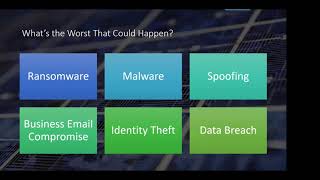
So welcome everyone to today's learning objectives, and this is a webinar series that is put on by the Center for Practice Management at the North Carolina Bar Association, and we do these once a month on the third Wednesday, um, more or less, and they're not for CLE credit. They're more for your information. We have a web archive that you can access if you miss one or want to go back and watch another one. Um, I will send you the recording directly today. But we are going to talk about how to identify phishing and thwart it. And it goes a little bit beyond phishing because we've got phishing, vishing, smishing, spear phishing, whaling, business email compromise, and all sorts of other things. And when I do the Professionalism for New Attorneys program, I remind the, the new attorneys that email is the most dangerous tool that you use every single day. It is the attack vector for most ransomware, phishing, Trojans, hackers, and other things because we are all using it all the time. The other kind of danger with email is something that is actually slightly more prevalent, at least by the ICO statistics for legal sector breaches in the UK, that there is a greater confidentiality of GDPR risk, breach risk, than malware, ransomware, phishing, and unauthorized access combined, and that is sending an email or an attachment to the wrong person. So in addition to having to be very, very careful about what you're receiving, you also can be the instigator of sending an email to an unintended person or sending an attachment to an unintended person, and it happens all the time. It's very, very easy to do. So just a couple of things to keep in mind when you are sending email out is that when you start typing in the to line, in most email applications, it very conveniently fills in the information for you, and it— and sometimes it pulls down a dropdown list and you pick from it, and it's really, really easy to pick the wrong one. There's a couple of different ways you can address this issue. The other one is the reply versus reply all. I don't know how many of you use Gmail as your email interface, but I really, really don't like how Gmail threads because it's, it mixes everything in. It's really hard to see who's involved. And so there's a way, and I can send you an article that will actually list it all out. It's, the threading is convenient, it keeps it compact, but it's also really hard to tell if you're replying or replying all, if somebody else got into to the thread and you responded to them directly. And then anyway, it's something to be a little bit, you know, wary of. And then of course the BCC, I know a lot of attorneys will BCC their clients on an email thread, just forward it. If your client hits reply all and doesn't realize they were BCC'd, then it goes back to all the other parties. So you want to avoid doing that. Also, it's really easy to make mistakes because we're emailing from mobile devices. And because of the small screen and usually because you're kind of on the go or on the move, it's, you know, sometimes if it's high stakes or you need to be able to take the time to pay attention, just wait till you're back in front of a larger screen. Then of course we've got the people who email things they regret later, and hopefully we're not doing that too much anymore. The e-discovery thing is just as a reminder, everything that is sent, not just through email at this point, but text, voicemails that are saved as audio files and everything else, those are all subject to discovery. There was a situation a couple of years ago at a large firm where a client sued for fees, or rather, sorry, the client wasn't paying, the firm sued for fees, the client countersued, and Through the course of discovery, a number of emails were pulled to light from the firm where they were emailing and chortling, "Churn that bill, baby, churn." Of course, that was the headline that everybody got out of it. So, you know, email is a record, and it's worth thinking, you know, do we need to move this out of email? And then finally, the thing that we're going to focus mostly on today is the spoofing, phishing, having your email intercepted, all the kind of things that we can't control. So in terms of trying to reduce the, the risk of sending an email to the wrong person, you can turn off autocomplete in Outlook. It's much more difficult to do in Gmail. In fact, it's near impossible to turn off autocomplete, but in Outlook you can go into the File Options and under Send Messages, uncheck the box that says Use Autocomplete. That does mean that you'll have to type in the person's email address or pick them from your contacts list, but it'll, it'll slow you down and hopefully reduce that, that just too easy option of emailing the wrong person. And it's always the most— it's always the worst case scenario that you, you email the wrong person. Usually tend to realize that you've done it very, very quickly. So one of the things I suggest is that you write a rule or a filter that puts the email into, um, your sent messages and help holds it for like 10 minutes. So it'll hold it in your, um, your outbox and have it held there for like 10 minutes. Um, one of the things That's kind of the unpleasant part of that is that we sometimes we're going back and forth with email like it's a chat. And so if, if there's a 10-minute hold, people like, what happened? But ultimately it's, you know, something to think about. The other thing is in both Gmail and Outlook, there's this ability to undo or recall. And at this point with the Microsoft Outlook recall, the only thing that happens is they get an email message that says, I want to recall the one I just sent you, and that you'll be sure that they're going to open it now. In fact, yesterday I got an email with— from a listserv that I'm on, and it said, our apologies. So of course I opened it, and turns out that they had sent an email with a subject line that was— had a bit of a typo, and It was, it was funny, but again, it drew my attention to it. I hadn't even read the one before or even noticed that the typo that was a 4-letter word. So the Outlook recall internally on your own Exchange server works. Externally, there's no guarantee that it will work. Similarly with the Gmail undo, I think you get up to 30 seconds to undo it. And if you send it and go on your way, it's usually a little too late to go figure out how to click the undo button. So those are not necessarily things that you want to rely on. I mentioned with BCC, just forward the message rather than BCCing, because if somebody does hit reply all, it's going to go to everybody and expose things that you may not want to be exposed. So now we're into the phishing stuff, and the reason that phishing works is because we are friendly people and we want to help. And so somebody falls for it, just like spam. The reason that spammers continue to spam us is because someone is probably going to click on it and buy something from spam. And, you know, if it's 1 out of a million, it's better than zero. So they keep spamming us. But the other thing is now it's more prevalent to get phishing than spam. And It all kind of falls under the umbrella of social engineering, and they're trying to trick you into doing something. Usually your phishing messages are either, you know, you've probably all gotten the one that says, I have a video about you, I'm going to release it unless you, you know, click here. They're trying to scare you into opening it. Or you get an email that says, change your password immediately, click here. All of those things are trying to, evokes some sort of sense of fear. Or, um, in the past, they— there have been more of the salacious type of things, you know, um, Britney Spears, uh, you know, release videos or whatever. So, um, there's a lot of stuff that they, they do, but it's gotten— they're getting much more sophisticated. And so we're going to look at some examples But, you know, thinking, okay, well, what's the worst that can happen? If I open up a phishing email and I click on it, what are the likely outcomes? And so probably the top on the list for the fear factor is the ransomware. And now we have two varieties of ransomware. We have ransomware where they say, we've encrypted all your data and you have to pay us a ransom to decrypt it. Well, if you have good backup, that's not that scary. You go, fine, I've got all my stuff backed up. I'll restore it. And, you know, this— the stuff that you've encrypted, we'll get over it. The scarier one is the exfiltration ransomware, and that's the more prevalent kind at this point. And that's where you get ransomware that basically says, we've stolen your files and we are going to release them onto the dark web. Or put them on the public web and, you know, pay us or you've got 3 days to make a decision and then we're going to release these. That is data breach. If you have anything that's considered PII in your files, that's going to be problematic and expensive. And the last organization that I— heard about that got ransomware that really wasn't prepared from an IT perspective was the State Bar of Georgia. To my knowledge, they're still down. So in addition to ransomware, you know, being either a data breach threat or encrypting all your stuff so you can't do anything, it can also just shut you down. And so State Bar of Georgia was— they couldn't email, they couldn't— their website was compromised. Compromised. They couldn't do anything. And so they put up a temporary website that basically gave the phone numbers of all their staff. That, that was how they were dealing with stuff. They couldn't get into their files. So obviously that's a problem. But large law firms have, have had ransomware attacks. The other things are, you know, malware where you click on something and you, you get a little piece of software that runs on your computer and messes it up in some way. Spoofing to me is, is very difficult and kind of scary, where someone basically is sending out emails from your account or from what appears to be your account, and it's hard to tell what the end result is other than it's likely that they're using your email account to send out phishing emails, and there could be a payload for people. And so that, that— I get calls probably once every couple of months from someone who says their, their email's being spoofed. And, um, this is where the professionals get to get called in. Similarly with business email compromise, this is where you get a piece of malware, um, or a Trojan that sits on your servers and these people are actually watching you discuss things until they can get in the middle. This is typical of the kind of thing where someone emails, and you've probably, especially if you're in real estate, you've heard of this before, but they'll spoof your email and butt in and basically tell someone to wire money to a different place. So to me, again, business email compromise is a very scary proposition for law firms. Identity theft. This is not so much from a business perspective, but from a personal perspective. It's the end result of possibly ransomware or malware. And if you're on your home computer and using, you know, Gmail or whatever, and you click on something and you very kindly go and fill out the information, or, you know, somebody says your Gmail's been compromised, so you put in your login information. Then they can actually go change your passwords on other applications and start, you know, get into your bank account, things like that. So identity theft is a huge mess to try to clean up and sometimes can take years. And then of course, if whatever someone has gotten access to is tantamount to data breach, then you have to go through the data breach notification protocols to notify your clients, to clean up the mess, to figure out what was exposed. You'll probably notice that a lot of the data breaches, the notification to you that something's happened doesn't come for months. Because a lot of times, especially in a huge corporate environment, they don't know that they've had a breach because these people don't want to let you know. They want to sit there and mine as much information as they can until an IT person kind of realizes, oh, we didn't check the log files from, you know, 3 weeks ago, and it looks like there's some sort of you know, mining technology that's been looking at the traffic on our network and accessing files and things like that. So all of this is scary stuff. The ABA does a legal technology survey report every year, and from 2021, about 25% of law firms have suffered a data breach. And I think they have about 1,800 responses. So that's a pretty big number. Only 34% of the respondents to the technology survey have an incident response plan. So we're going to talk about incident response plans. And then 36% of the firms that had suffered a data breach or infected with viruses or malware reported a loss of billable hours from security incidents. So for all these reasons, we want to avoid this as much as humanly possible. So first one we're going to talk about is phishing. And the phishing, you know, you get email. The most popular email phishing subjects in 2021 were vacation policy updates, password check required immediately, important dress code changes, acknowledge your appraisal or remote working satisfaction survey. All of these would come in through a, you know, corporate network, business network, and people would click on the vacation policy update or the remote working satisfaction survey. So phishing has gotten a lot more targeted, a lot more sophisticated. They know what networks they're hitting. They know what's going to get people to open them. And so we're going to look at some examples and how to identify as much as possible how you know whether it's a phishing email or a, you know, normal email. So this, this is kind of an example from, um, back in the day, and some of this stuff is still things that are ways to identify it. When you look at the, the From line, you'll see this one is Management, and this is actually a Canadian example, but it's Maison Canada, not Amazon Canada. So that's one way you can Notice then the other thing is under the subject suspension, which, you know, again, that's something that's a little scary. Then you've got an impersonal greeting. It could be dear client, it could be dear customer, it could be dear and your email address because obviously they have your email address, but they may not have your name. And then something just scary. We have strong reason to believe your account's been used by someone else. You have 36 hours to verify. So in addition to being scary, We've locked your account, you have, you know, the clock is ticking, or we're going to terminate it. And then, you know, this looks like, and this is a technology thing, if you've ever coded in HTML or inserted a hyperlink, you know that you can insert a hyperlink and there's two ways of doing it. You can select text and basically have text and there's a hyperlink underlying it. Then there's the, the way where you have something that is actually a link. So in this particular case, if you hover over this link, then what you see is that it's not going to amazon.com, it's actually going to redirect dot various, you know, letters dot com. One thing you always want to do is hover over anything that appears to be a link, um, and that includes click here buttons and things like that, and see where it's going. If it's not the same place, um, or if it's at all suspicious, just ignore it. If you are worried about this, all you have to do is go to your browser, go to your Amazon account, and double-check I tend to change my password when I get stuff like this. There was this kind of advice from the cybersecurity people that you needed to change all your passwords every, you know, 6 weeks or quarterly or whatever. They kind of backed off on that need to change your passwords with that level of frequency, mostly because people tend to use the same passwords over and over with some variation on a theme, so it doesn't really work. That well, but if you do have some reason to believe that you've had a compromise or you get one of these email phishing attempts, you may want to consider just changing your password as a good measure. So this is another example. Someone's just used your password to sign into your Google account. It looks very official. If you mouse over that change password, that's where you may see that it's not going to Google. The other thing is sometimes it's as minute as the brand name is not spelled correctly and things like that. So you just have to be really suspicious. But if they're trying to— if basically if you get an email that's trying to scare you into doing something, be suspicious. So this is a series of emails. These are all actual phishing emails that I've gotten. So, you know, it looks fairly legit except that it's— when I mouse over verify your email address, you can see that this is going nowhere that I want to follow. So, You know, this is another tell. Do not ignore this email. It's very important you verify your email address as requested for better services. So of course, that, that's a pretty easy one. This is another one that I got. And, you know, I feel like I get these, and we have good spam filters, which is why, I mean, this stuff filters through because spam filters can only go so far. So, you know, This is stuff that I'm getting despite a whole lot of protections that we have. So urgent email security notification, that's already a good sign. Again, this is, you know, making it look like we have something dangerous that we're worried about. When I mouse over, click here to retrieve pending messages, then I can see again it's going to a Google API. And a webpage and also, you know, with tracking and all that kind of stuff. Source NCBI— NCBI.org support. None of this looks right. And so again, if you really think that you need to notify your IT department or your ISP about emails that might be unreceived, you can go and verify it some other way. This one I just got recently. It— this is a little scary because it looks pretty legit. It— this person shared folders with me. It's a legitimate email address. It's, it's, you know, it's to someone else. So I'm BCC'd on this. That's also kind of something to be suspicious of. You know, please advise, click here. Um, so I don't know who this person is or why they would send it to me, but this person has been spoofed and this is probably something that I do not want to click on. Um, so I didn't. And this one I just got recently, and you know, bill paid. One of the things to recognize is that attachments can carry payloads. And so if you don't keep your Adobe Acrobat Reader or Adobe Acrobat or the Reader or Microsoft Office software up to date, um, you can actually get infected by opening a file like this. So if I open this file and I had an older version of, um, the Acrobat Reader or Acrobat and it, it can actually inject a little piece of code. Um, so you do not want to open these attachments. And if you get someone who sends you an attachment and you don't know what it's for, just pick up the phone and call them or send an email. Don't reply to the email, but send an email separately to that person and say, um, did you just send me a file? Um, so we're going to talk about why you have to keep all your, your software up to date. This is another one. And again, you know, you've received a secure message. When I mouse over the read message button, it obviously is not going anywhere that I would want to follow. This message is marked— and this is the other thing, remember, oftentimes these are coming from places that English is not their first language. This message is marked as high importance with SharePoint, comma, we're here to, we're here to help. Obviously, you, you, but the thing is, the reason this works is because we're in a hurry, we're not paying attention, and if you're caught off guard, um, you click on it. The other thing in this message is where it says important protected information for Microsoft Office 365 with a little trademark. Um, that's cute. The product is not Microsoft Office 365, it's Microsoft 365. So that's another thing you can, you can kind of look out for is that they're not using the correct brand name or the, the logo that might be on the email is an old logo. Would you know this off the top of your head? Probably not. That's why it works. This is another one. So I got an email with a greeting and a GIF from Blue Mountain. Blue Mountain has been around a long time.. It's one of the first e-card products on the market. And, you know, Nancy sent me a gift card and e-card. Well, I wasn't about to click on this, but I— and so I just, I just deleted it, moved on. Well, the funny thing is Nancy emailed me a week later and she said, I just wanted to double-check that you got that e-card because you might have thought it was phishing. And she did actually send me a gift card for helping her with something. So If you are going to send something like this, um, you might see if there's a way to get a link and send an email with a link to it so it's a little bit more personal, or tell the person to expect it, or maybe just figure out a different way to, uh, send a gift card. And the video attached to this thing was pretty hilarious. Um, all right, we already have that example. This is another one that I get, I, for about 2 weeks, I think I got something like this every other day. And again, it's making it through our spam filters. And First American Title sent you a secure message from Zix Corp. Um, attached prelim CD and closing documents. This all looks very official. It's coming from, um, real estate companies, law firms, um, title companies. I was getting them from everybody for everything. Uh, needless to say, The first couple I actually call, I mean, these were coming from legitimate businesses. And I was calling and I said, you know, did you send this? Because I was actually worried because I had just closed on a house that, because especially in real estate, so much of that stuff is public record, that is very easy for man-in-the-middle attacks to come in. I'm always worried that someone's going to get my information and you know, try to get a mortgage through my credit. So I did double-check to make sure that this was, um, phishing, and it was. And after I got about 6 of them, I just quit trying to verify what was going on. But again, this is the kind of stuff where, um, you're like, what is this? Don't click on it. This is one I got a couple of years ago, um, And so of course I'm like, it's from a phone number, it, you know, VZW Pics, there's no subject, I don't know what this is. So I didn't click on it. Well, then I started getting responses to it. And there is a way that you can email, or rather text an email. And so one of my colleagues when I was at the Chicago Bar had, she didn't have my cell phone number, so she emailed me her vacation pictures from her cell phone. So I guess better to be safe than sorry. And so I didn't click on it, but it turned out it was fine. This was another one. I called the attorney to say, you know, did you send me a DocuSign? But this is another thing that you're seeing, you're seeing a lot of is false, false DocuSign messages. So again, if you're not anticipating getting something through DocuSign, or if it seems weird, then like in this particular case, if you mouse over the review documents, you can see that it's.com.br. That's coming from a foreign top-level domain, and that's an extension, so I'm definitely not going to click on that. And this one, again, this is something that I got fairly recently. You'll notice that in this screenshot, right-click to here to download pictures. I don't do that. I have Outlook open email without pictures, and you can do this in Gmail too. So until I can verify that this is in fact a specific, um, it's an email that I trust. I'm not going to download the pictures because when you have attached things to an email and the email is rendering in HTML, that can actually run code on your computer if it's not well patched and well updated. So I don't, I don't actually download the pictures until I know I can trust the sender. So if, you know, if you get an email newsletter from the eBAR from North Carolina Bar Association and all looks legit and you want to see the graphics, then download it. But I— you can set it up to where that doesn't happen, so you don't accidentally get something downloaded on a computer you don't want. This particular one, I do have LastPass, so So far so good. It says update master password. We've revoked all your trusted devices, you know, blah, blah, blah. I didn't even have to mouse over anything here. I mean, it's, it's just too scary to believe. So if I were worried about it, I would go and log into LastPass separately and ignore this email entirely. This is one that we're seeing a lot of is, you know, now that it's easy to share file through Dropbox or OneDrive or say share file or something like this, that this is being spoofed. So this actually, everybody in our office got this email. This person shared a file forward from Jason Hensley. Jason's our executive director. So, you know, they knew enough to use some keywords that might get staff to open it, but of course, Fortunately, no one did, because you need to be suspicious of stuff like this. Um, then you get into the kind of spearfishing and whaling, and this is where, um, and this is a, an example from quite a number of years ago, but just to give you a sense of how they will actually do enough research into your firm or your company to get people to react. So in this particular case, it was sent to a C-level executive in San Diego, and everything is issued to— had his phone number, his name, case number, the correct logo for the district courts. And, you know, it's a subpoena, so of course people are very worried when they get a subpoena notice. And so You know, click here. And it doesn't even say click here. I mean, it's not even obvious, but you would click over subpoena in a civil case to open it. The big tell in this particular email is that it comes from subpoena@uscourts.com. If it was from U.S. Courts, it would be uscourts.gov. But other than that, there's not a lot to suggest that there's anything but a legitimate email coming from the court. It's got the date and time, it's got the room, it's got, you know, it's got all this stuff. So it's sometimes, especially with the spearfishing, which is, you know, fishing with a target, or whaling, which is looking for the big fish, things like this, again, you verify separately. So a couple of different things to think about. Don't click on links, photos, attachments. From anyone you don't know or a transaction you didn't make. Even if it appears harmless, don't go click on it to find out what it is. If you do have IT help, forward the email to your IT department to get their opinion on it. Just call the sender. And then if you do open an attachment, a zip file, or click on a box, stop, close out of the email, and we're going to talk about some other steps you can do. Other things to realize, if there are files attached, like I said, back in the day, you could— I mean, this is still true. If you see a file that's a.bat or an.exe or any of these file extensions, or if it's got two extensions, a VBS is a script. An.exe is an executable. A.bat is a batch file script. All of these are little scripting languages..com goes to a webpage that will download and HTML code onto a page that may have some sort of payload. All of this stuff just to be extremely careful of. So any questions at this point? You almost want to go back to phone calls. You know, I like XAMN and phone calls. Unfortunately, we're not going to be able to stop emailing, but it is, you know, and again, you get to the point where you've gotten careful enough to where you're not getting caught. The newer versions of this stuff are vishing and smishing. And vishing is voicemail that gets you to react. Obviously, if you're listening to a voicemail, you can't click on a link. But what they're trying to do is get you to call. And you know that if you answer a, you answer a call from some sort of a scammy thing, they'll often try to get you to say yes or answer a question, say yes or no. Never, ever, ever answer. Don't verify. If it says click, you know, 1 to do whatever, don't do it. Just hang up the phone. They're using things like phony order receipts, you know, we received your order from Amazon, click here to verify the shipping address, something like that. It may sound legitimate because you— it may be being tracked. If it says to contact customer service, if it says, you know, it's harder to tell with the vishing because it's voicemail. I have— and I'm obviously going to give you all the slide deck. There's a bunch of different examples. One of the things to be aware of is that this kind of stuff is being perpetrated against the elderly. And in some cases it is being perpetrated against businesses. The Proofpoint State of the Phish report found that 69% of organizations have seen an increase in phishing attacks. So it's not just individuals, but that was their original target was elderly, where they would call and, you know, say that your bank or credit card's been exposed or compromised, the, you know, take out a loan, Medicare and Social Security scams, IRS scams. I get— I feel like I get one of these probably once a month. So a couple of things you can do. You can't necessarily trust caller ID. It can be faked. If you suspect that something's weird going on, just hang up. Don't press any buttons. Don't use the callback number. If there's a number left for you to call back and it sounds like it might be legit, just Go Google the name of the business and get the legitimate business. Don't use the callback number they left you, or at least verify that the number they left you is the same number that's listed on their website or whatever. So these are some things you can do. I read where it says join the National Do Not Call Registry. That's a joke. Quite honestly, I mean, you can do it, but The reality is your cell phone isn't on the Do Not Call Registry, so you can do it for your home phone line. But business, I don't think you can do a Do Not Call Registry for your business. And that doesn't, you know, and so what I ended up doing was get the— I got an app for my phone. I have T-Mobile and I got this scan. Basically, it's a little app called ScamShield, and the free version doesn't let you do much. It just basically blocks calls completely. So if the caller has a legitimate caller ID or is in your contacts, then the call comes through. If it's not, it just blocks it. They don't even— they don't even go to voicemail. You can pay for the app and it'll be sent to voicemail. So for lawyers and businesses or making their phone number available to everybody, you know, you can get something that kind of helps identify legit calls and then sends the scammers to voicemail or whatever so you can hear it just in case it's legit. This is an example of a vishing, or smishing rather. Smishing is SMS phishing. It's basically going from email and instead using SMS or text messaging to send you stuff. So this one my husband received 2 days ago, and I said, oh honey, take a screenshot of this so I, I could show people. And this is the stuff that you probably see a good bit now. You know, we've restricted your debit card to unusual, you know, activity, click here. Obviously, you wouldn't fall for this any more than you would for an email, but if you actually used Fifth Third Bank, it may make you nervous. We don't, so we didn't think twice about it, but again, if it came from a bank that you're using, you do think about it. The more typical smishing hackers use things like, thank you for your payment, here's your USPS package tracking. Frighteningly enough, verify your vaccination status. You can forward any of these phishing attempts to the FTC, and you forward it to spam, which is 7726. So you can report this, this stuff to the FTC. One of the things to be aware of is that, that same survey that I mentioned before from Proofpoint, they found that only 26% of organizations include smishing in their cybersecurity training. I am going to give y'all the content and some links and some other things. Feel free to share it with your team because I think the biggest deal here is awareness. Um, so also another place that they'll get you is social media, if you're using social media because you have a firm Facebook page or something like that, but also just personal use. So this, this, you know, this kind of spans two different areas of your life. You've got your law practice, but you've also just got your personal life, and they're trying to get you at every angle. So if you are active on social media, one thing to be aware of is that these things that— this is the newest one— you upload your photograph to this website and it turns your picture into some artistic rendering. It turns out that— and then there was all this, this is a Russian hacker and you're uploading your picture and they're using it for facial recognition, blah, blah, blah. It turns out this app is actually legit, but this is the kind of stuff, just don't do it. It feels benign, but you never know, and you just gave your picture to someone and you don't know how they're going to use it. The other thing is always read the terms of service, you know, before you go and repeat misinformation about Facebook is going to, you know, claim ownership to all the photographs you've uploaded to it unless you post something on Facebook that says I do not give permission to use it. Stuff like that makes me crazy. And I've seen very smart lawyers fall for this kind of stuff. But, you know, understand the terms of service for these services that you're using. Don't repeat misinformation. We all play a part in this. Other things, you know, it's not the scary hacker sitting there with multiple monitors and, you know, cracking the code and, decrypting things and getting it. It's because they're using social engineering to get us to give them the information. We're giving them information about our first car. Okay, so if you think about those security questions that are supposed to keep us extra safe when you sign up for an account and they ask you a bunch of security questions, who's your favorite artist? What was the first car you drove? So when you're logged in to a social network and you're providing what seems to be cutesy information, um, about your likes or dislikes or other information, this is all being collected and used against you and sold. Um, not to make you paranoid, but this is, you know, just don't participate in this stuff. Other things that, uh, you, you know Nothing in this life is free. You're not going to get 2 free Disneyland theme park tickets, especially if it says share this to 3 different people and get them to share it too. Because what ends up happening is, you know, get 2 free Disneyland theme park tickets, claim your free tickets, Disneyland for you, dot XYZ. Guess what? I don't think you're going to Disneyland. But again, I see people fall for this stuff. You're not going to win a trip to Bali. It basically is mining all your contact information and gathering it up on you. So two sites if you want to double-check whether these things are legit or not, there's called— it's hoax-slayer.net and then Oh, what's the other one? Um, Snopes. Snopes itself is not a scam. It's, it's, it's bipartisan. I've had one person say that Snopes was, um, it in itself was a plot. It's not. Both of these sites are just trying to do research and verify whether these are legitimate or not, and they're both good places to do your homework. And then this, I have a friend who is on Twitter and she uses Twitter for professional purposes. And all of a sudden she starts posting about her prowess in Plant 3 Pumpkin Patches. And it was really weird until I said, what's going on with this game you're playing that's tweeting out all this stuff? Well, it turns out that she was sharing her iPad with her kid. Her kid downloaded a game. And when the kid installed the iPad app, it said, can, you know, can we have permission to hook up with your Twitter account? And so of course he said yes. And so every time he reached a new level, it would tweet under her account. And so this is one of those things where I've, I've talked to attorneys, especially in smaller solo firms, who use their personal devices and their family has access to them and their family can use them. And really, you need a dedicated machine or machines for your work. Don't let your family play on your work computer. They can, they can do things inadvertently that you don't want to have happen. And I know that's hard, especially after COVID when, you know, everyone was together and probably mixing devices more than usual, but it's just something to be aware of. At least have a separate login for guests on a computer or an iPad. And then this other screenshot was You know, a lot of the stuff is tracking where you are on your phones and your iPads, anything that has GPS built in, and you can actually go see your travels based on GPS. And so it's again something to be aware of is how much information you're putting out there. Just recently, for those of us in the Chapel Hill-Raleigh Durham area, there's a very popular Facebook group called Chapel Hill Carver Foodies. And I think there's, I mean, there's thousands and thousands of people on this, this Facebook. And Facebook, of course, is tied to Instagram. So my sister got an Instagram message from one of her friends who said, I've been hacked. I'm, I'm gonna forward you a code on your text message. Will you, will you give it to me when you get it? Fortunately, my sister has me to be paranoid for her. So she said, that's weird. And I said, what is it? And she told me. And I said, oh, good grief. So what's happening with that is one of her friends was hacked. The person sent the Instagram message to my sister, um, then assumptively they are going to attempt to crack into her Instagram, um, or Facebook account with her credentials. And the only thing saving her is that two-factor authentication where you'd get a text message with an additional code. And so if they did have her username and password all they need to get into her account is that code. And that's what they were trying to do, is basically trigger the code to be sent to her device so that she would read it off to them or give it to them, and then they could get into her account. It's pretty scary stuff. It was pretty sophisticated. There were a number of restaurants in the area that got hacked. They were being spoofed. They were, you know, sending out messages to everybody in those contacts trying to perpetrate this all to gather information and disrupt. So if you get any messages on Facebook Messenger, Twitter direct message, Instagram messages, be aware that if somebody's been hacked, they're now using this to try to trick you into providing credentials. So You can turn this stuff off. You can block it. I, I will tell you that I'm so paranoid about Instagram at this point that I just deleted my account and got off of it because it seems to be, um, kind of dangerous place despite how much fun it is. So what do we do about this? Starting off, long, strong, unique passwords. Do not use the same password for every account. The other thing is multi-factor authentication. I would love to know how many of you are using some sort of two-factor authentication on everything. You can— I think you can raise your hand and I can see. Okay. A couple of you are using it. Not enough. So I will tell you, it, it's a pain to set it up to begin with. And then once you've done it, you won't have to think about it because you can trust your devices like your phone and your computer. And it's, it's just an easy way to, if somebody did get your username and password, keep people out of your accounts. I took my sister's phone and set up multi-factor authentication on all of her logins in about 10 minutes. So take the time to do this. This is— all best practices and best advice for this kind of stuff suggests that long, strong, unique passwords and multi-factor authentication are the two main lines of defense for your firm. You can get password managers that have both the multi-factor authentication and keep you in the business of having long, strong, and unique passwords. At the bar, we use Keeper. There's also LastPass. There's also 1Password. There's a whole bunch of them out there, and there are corporate or business versions where you have administrative rights. You can change people's passwords. So somebody says, I think I, Oh, I clicked on a, you know, a link that I shouldn't have. You can go change all their passwords really, really quickly. And then with the multifactor, best practices these days is to use an authenticator like Google Authenticator or Microsoft Authenticator or Authy. Keeper and LastPass both have their own authenticators. So you're not getting a text message because the text message is now exploitable. But it is better than nothing. So I will send y'all some articles about how to get that set up and some videos on how to set it up if you haven't already. But that is really, really, really something that you should do. The other is a long list of things that you should be doing. And so spam filters, again, something that you, you want to have a spam filter at the server or email gateway level. So it's not that, the spam filter that comes with Outlook. It's actually something, a third-party tool like AppRiver or Zix or Barracuda, that filter spam before it ever even hits your inbox. And you'll get a daily email with what it's caught. In some cases, you'll see that things are getting caught that shouldn't be, and then you can release them, which is what, what was probably happening with the firms that we were talking about at first where they found out that they were being blocked because it's being blocked by some third-party spam filter, which is another good thing to figure out is who's filtering out our email, what, what spam filter are they using. But the other thing is if you're using an Exchange server or a server that you have the ability to get into the administrative side, you can set it up to where it provides a notice that this message is coming from outside the organization. So if you get an email from— that purports to be from somebody inside the firm but is actually coming from outside, then you immediately know because it says external. So that's a filter, or rather setting, on the Exchange server. Endpoint protection, things like Proofpoint, and again Zix and Barracuda and AppRiver, all they have these things that you can apply basically at the port level. We at the bar use this thing called EdgePilot. EdgePilot went nuts the other day and they had to turn it off for a little while, but it's better than— most of the time it works fine. And what happens is when I get an email, if I click on a link, it actually basically scans to make sure that where I'm going is legit. And if it thinks that it's not legit, it won't let me go there. When it went berserk, it thought that all things were bad. And they fixed it. But keeping software up to date, don't run old versions of Microsoft Office or anything that you use with frequency, like, Things that read PDFs, keep all of that stuff up to date. You probably saw the news that you're— anything that has a macro embedded in a Word document is likely being blocked these days because that is a way— if you open up a Word document and it says, can I run this macro, that's a piece of— that's a little piece of code that's running on a computer. So you have to be very, very wary of that. Most, most people are blocking that now. I have the, the call blocker from your carriers. Contact, you know, T-Mobile, Verizon, AT&T, and see if they have some way to block spam calls from your phone. I have an article I just wrote on good backup. Good backup will save you from certain types of ransomware and will certainly be something that you'll rely on if something happens. So having good backup that you test is important. We can't discount antivirus and anti-malware at this point. So you should be running it. People ask me if the— what comes with Microsoft is good enough. And yeah, just make sure the definitions are updated. I like Malwarebytes for an additional layer of protection. Pay for it so that it is providing real-time information or updates and protection. Don't log into your computer as administrator if you can help it. Basically, if you can go and download an executable without having to do anything special on your computer, that means that if you clicked on something that came in via email, it could run the file. If you create two logins for your computer, one as administrator and one as user, and you can get your IT person to help you get this set up. Then if the user has fewer permissions, then you're less likely to get some sort of nasty payload because you can't actually run an executable file on a computer. You can report the stuff to the FBI, the FTC, if you feel so inclined. And then train your staff. And I've got a whole list of other things I'm going to send you that you can do. But one of the things about the staff training, does anyone use a product like KnowBe4 or what are some others, Phishing Box, where you send out fake spam email or phishing emails to your staff and if they click on it, they have to go through mandatory training? Does anyone use that? Okay, I'm not seeing any hands raised. So this is, this is a pretty easy one. They don't cost a lot of money, but it's a constant kind of awareness because you don't— your staff is, you know, they don't know when it's going to happen. And I will give you a true story. I— we used KnowBe4 at work, and at the beginning of the pandemic, I got an email that said I had a message in WhatsApp and to click here to access it. And I did. Well, if I were thinking, I would realize that I don't have my WhatsApp account tied to my work email, and I would never have gotten that. And in fact, it was a fake phishing attempt, and I had to go through mandatory training. But I guarantee you, once you do that, you'll never forget, and you'll be even more paranoid than before. Um, if you do get hacked, Having an incident response plan or some, some idea of what to do is really important. So first thing you want to do is turn off the computer and remove it from the network to try to keep it from spreading. If you have cyber liability insurance, contact your carrier. You can call your IT for help or forensics computer specialist to determine if there was a data breach. Check your passwords, change your passwords, check your credit reports if it's something that's happened on your home computer. If you think your Facebook has been hacked or your email, notify your contacts that, that, that if some— if you find out someone's spoofing you or you find out someone is impersonating you, notify your contacts. Don't send out a data breach notification or something that would scare your clients until you confirm that there was a data breach. But then you will have to follow the, um, the, the law. But you want to make sure before you do that. And then if you have ransomware or, um, data breach, you also should probably notify the FBI. So I have a whole bunch of resources that I'm going to send you, including the slides with my notes, a bunch of articles, a bunch of places you can get training. Um, and at this point, again, you're welcome to email me, um, call me. I'm going to stop the recording and let y'all ask questions without, um, being recorded. But I appreciate your time, and hopefully see you next month.