Learning from the Cybersecurity Reports
In this 2023 Technology Associates webinar, host Carolyn Jordan introduces President Eric Hobbs, who walks law‑firm leaders through the most reliable breach data – the 2021 FBI IC3 report and the 2021 Verizon Data Breach Investigation Report (DBIR). Hobbs distills the data into four actionable insights: (1) the three attack vectors that account for roughly 75‑80% of incidents – social engineering/phishing, web‑application (cloud) compromises, and system intrusion (malware/ransomware); (2) the financial impact is dominated by Business Email Compromise (BEC), which caused $2.4 billion in losses in 2021 versus $49 million from ransomware; (3) real‑world case studies show how BEC and phishing exploit trusted email channels, even in Office 365 environments; and (4) concrete mitigation steps for small‑to‑mid‑size law firms, including mandatory multi‑factor authentication, outbound verification policies, AI‑driven anti‑phishing tools (e.g., Graphus), modern endpoint protection (CrowdStrike), and ongoing security awareness training. Hobbs also warns about common misconceptions in cybersecurity insurance, emphasizing the need to understand coverage definitions, attestations, and forensic costs. The webinar ends with a Q&A invitation.
Chapters
Okay, so welcome everyone to today's learning objectives webinar. We are going to be hearing from Eric Hobbs, who's the president of Technology Associates, and he's going to kind of break down what, what the learning objectives are from some of the big breach reports that come out every year. Caroline Jordan is also with us from Technology Associates. I was going to let her introduce Eric. Thank you so much, Katherine. Hi, my name is Carolyn Jordan. I'm Director of Marketing for Technology Associates, a Raleigh-headquartered full-service technology solutions firm specializing in providing IT services, strategy guidance, and support for small to medium-sized law firms for the past 25 years. Our unique process centers around improving business efficiency, lowering capital costs, and identifying and mitigating risk. Today we will focus on understanding the cybersecurity reports, as Katherine mentioned, and also talk about some strategy and best practices for law firms. I'm pleased to introduce our president, Eric Hobbs, who will lead us through today's webinar. And as Katherine said, if you have any questions, please drop them in the chat box and we'll be happy to answer them at the end of the presentation.
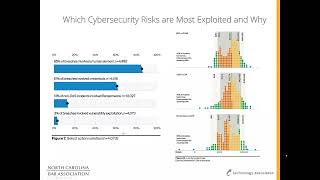
Awesome. Thank you, Caroline. So, uh, Cybersecurity, a big, big, big topic. The reason we put this presentation together is we, obviously we see a lot of this stuff, both from our clients and the research that we do and being in touch with the industry. And we see a lot of information around cybersecurity. Unfortunately, a lot of it seems to be much more hype than fact. So we put together this presentation to really cover a couple of 3 really key pieces. Number 1, which risks are most exploited and why? And this is not just us grasping at what we're seeing. We did a lot of legwork to find out really the best reports that were out there that we could rely on actual data from actual breaches and distill that down to actionable information. Number 2, highlight the risks that you and your firm should really be worried about. There's a bazillion things when it comes to cybersecurity, but if you look at the breach data, it really comes down to just a couple of key things. And then number 3, give you some action steps to take to protect your firm. So which cybersecurity risks are exploited and why? And this is the information that we used. The 2021 FBI IC3 report, and this came out in May of last year, so we expect another one to come out here pretty soon. In the 2021 Verizon Data Breach Investigation Report, or DBIR, and the most recent one came out just a couple months ago, and we've taken a look at that. No big, huge changes. But we may kind of highlight a couple of things that is a little different there. So basically, my purpose in this is I refuse to repeat any dramatic headlines designed to scare you or cast a wide net regarding all things cybersecurity related. Our goal, like I said, was really to use real data, highlight where your biggest risks are so you can be better focused, so you can really better focus your efforts. It's unfortunately excruciatingly hard to get reliable data on cybersecurity trends. Specific to small business, the small business environment. Most of the info that we see out there is, you know, kind of thinly veiled sales pitches aimed at selling a specific product or solution, or shallow clickbait hype like, you know, 80 eye-popping cybersecurity stats, or outdated. And for me, basically anything over 2 years old is outdated. So I believe that Data about small business cybersecurity incidents is pretty significantly underreported, and there's a couple of reasons why. Number one, it's embarrassing to share that you've been hacked. Most people kind of want to keep it under wraps, and there's really no one recognized central reporting authority, although FBI's ICC is gaining traction and is becoming kind of the de facto place to report these type of breaches. And then lastly, small business cybersecurity incidents are underreported because they're— a couple of industries aside, there's a lack of reporting requirements. And we did some other information specific to law firms about kind of the reporting requirements for breaches. There's going to be more and more requirements to report this stuff and not be able to hide it. As we go along. So where do we get the facts from? Again, 2021 FBI C3, we'll put the links in, in this presentation so you can get to it, and the 2021 DBIR. And again, yes, it's Verizon. Indeed, they are selling cybersecurity services, but I found that their report was very thorough, unbiased, well-written, and it includes data from like 75 different data sources, different companies. 60, the majority of which are really outside of Verizon, so not their, their data. So, um, let's get into it. So breaches, uh, what's an incident? What's a breach? Breaches, that's social engineering, which is, you know, tricking a user into giving up credentials or downloading software, uh, web application attacks, which are compromising a cloud app, And that is typically email-based cloud, and that's also very typically Office 365. That's the majority of what these things are. And then lastly, system intrusion, and that is inclusive of malware, hacking, ransomware, all of those typical things that you would think of in a breach. So together, 80% of breaches are just those 3 pieces: social engineering, web application, and system intrusion. And the social piece is big. I mean, that's 35% of all the patterns of breach, and that's tricking someone into doing something. That's where a lot of this stuff comes from. So incidents, couple of big ones, denial of service, and typically outside attacks aimed at bringing down a network through overloading it with traffic is historically is what's been a denial of service. But the way Verizon categorizes this is basically any lack of access to your systems is a denial of service. So even if your passwords are changed or you get ransomware, that is classified in this as a denial of service attack. Web application attacks, again, compromising cloud apps, Office 365, email compromises, and then social engineering, again, tricking a user into doing something. So together, those top 3 are 75% of the incidences, and denial of service is almost 50%. So what, what is this? What does this tell us? It tells us a couple of, a couple of key things here. Number 1, the majority of issues aimed— the majority of issues, rather, are aimed to trick users and compromise web-based applications, otherwise known as the cloud. So disavow yourself of the myth that because your applications are on the cloud or you're using Office 365 or whatever, don't think that you're not a vector of attack here because that is exactly the opposite. And we've seen it. We have various different access policies for Office 365 users, and we see companies that migrate to Office 365 being attacked the very next day. So this is not something that is— your ability to hide in cloud services like Office 365 is nil. So what risks are most exploited and why? So action varieties, 85% is people and 61% of credentials, most of which come from people. 3% is vulnerability exploit. But despite this, many businesses are like uber-focused on patching as kind of their first step in proper security when ransomware is the biggest threat, and that doesn't rely on patches or vulnerabilities to infect your network. When we hear from, you know, people out who are not customers or prospective customers or whatever, about security, the number one question we get asked is, you know, can you run a pen test? What they really mean is a vulnerability scan. A real pen test can take months, and it's an active person trying to exploit your systems. They're not trying to hack through the firewalls, they're trying to get your users to give up credentials. That's a whole heck of a lot easier than hacking a firewall. We had a call, I don't know, a couple weeks ago at this point, a couple months ago at this point, from a medical practice, and they wanted a pen test so they could, quote, check up on their current IT company. They said they had done one in 2019 and it was time to do it again. And I was just, I was shocked by that. When asked why they didn't do it in 2020 and 2021, they said, well, it was too expensive. So pen tests, you can do them for free. There are a lot of great sites out there that, you know, are at least darn near free, and that's about what they're worth. Okay, all they're going to do is the vulnerability scans to show you really very common vulnerabilities in systems that at the end of the day hackers are not exploiting because it's so much easier to trick a user into giving up credentials. So let's, um, let's talk about money. Everybody's favorite subject. So business email compromises, and we'll get a little further into kind of what those are, 58% resulted in the loss of funds, which is just staggering to me. Computer data breaches, 24% resulted in a loss of funds. And ransomware, only 10% resulted in a loss of funds. But what do you hear about all the time? You hear about ransomware. Is getting to the point that with good backup systems, ransomware isn't a thing anymore. But here's the shift that we've seen, and you're starting to see it in the data. It used to be that the hackers would put ransomware on, immediately lock your systems, and then demand money to unlock them. When that really kind of ramped up. A lot of, of businesses were super focused on getting their backup and disaster recovery systems lined out right so they could say, no, we're not going to pay you, splash the systems, put it back the way it was a week ago, and we're happy. And so we started seeing the effectiveness of ransomware go down. But then what the hackers are doing now is, is they drop command and control software on a network. They're poking around in it for sometimes months, they find out what the deal is with your backups. Sometimes they'll disable them, and if you're not monitoring that stuff, you won't even notice. And then past that, they'll download your data. So then when they do lock your systems, it's okay, you don't want to pay us, uh, ha, you know, you got to go back 2 months because you didn't notice we turned your backup off, or if you don't pay us, we'll release your data. And we're starting to see more of that. But that's really where, you know, a lot of the hype is. But it's business email compromises from a money standpoint and computer data breaches from a money standpoint that ransomware just pales in comparison there. So it's fairly evenly distributed dollar-wise as far as the payout goes with the cost to businesses is. But remember that only 10% of the ransomware resulted in a financial loss while almost 60% of the business email compromises did. So, you know, that's, that's where you should be focusing your time and your attention. So, um, and I think this kind of really drives it home, uh, from the, um, uh, FBI, FBI stats and FBI reports. Um, number one, in 2021, IC3, which is the FBI, was 3,700 complaints of ransomware, and they paid out $49.2 million. Ransomware, obviously you know what it is. Now, that seems like a lot, right? The same year, business email compromises, 20,000 compromises, $2.4 billion in losses. So if anything, I'm just going to try to drive home the point of where you should be focusing your time and attention with respect to protecting yourselves against these, against these threats. Let's see here. All right. So what should your firm really be worried about? You should be a lot less concerned about whether or not your systems are patched and a whole lot more concerned about what the person at the front desk real or virtual, in your office or at home, is clicking on. And I've made the comment kind of tongue-in-cheek, you know, if you had to pick between a firewall and training for your users about cyber liability, I'd rather do the training. We just don't see networks being hacked the way they used to be when it's so much easier to get somebody to give up their credentials. So here are the kind of the— in looking at the, the two different reports and boiling down both the attack vectors, who's involved, and what happens, these are, these are the four, these are the four biggies. An employee is tricked into transferring funds to a hacker or improperly changing routing information of a legitimate transfer. This is by far what the majority of these business email compromises are, or what we call pretexting, as far as money loss goes. Number 2, an employee is tricked into giving up their credentials via a phishing attempt, and we'll show you some examples of that. We see this a lot where an email comes in, says, hey, it's time to update your, you know, your W-2 information, you know, click here, put in your login to get to it, and they freely give up their credentials. Number 3, An employee is tricked into opening an email attachment, allowing C2, which is command and control, or ransomware to be installed. Often someone will open an email, open an attachment, go, oh, I shouldn't have done that, nothing happens, and they think they're okay, when in fact they've installed command and control and hacker is sitting there commanding, you know, controlling the workstation. Or lastly, password policies and lack of multi-factor lead to cross-platform password breaches. This is when, you know, Domino's Pizza gets hacked, they really don't have to report it, and you use the same email and password for Domino's Pizza as you do for your corporate network, and it's a fairly easy task for the hackers to, you know, try those breached passwords on, say, Office 365 or whatever to try to get into your systems. Again, that is very, very easy, especially given the lack of implementation of multifactor nowadays, which really should not be the case. I'll give you a couple of examples that we've seen. Number 1, there was a home builder here in Raleigh. Again, we won't name names to protect the innocent, but funds were rerouted on 2 separate closings over a 1-week period of time. Hackers had access to their email accounts and emailed the purchaser, the home purchaser, to update account info just prior to the transfer. So they were watching emails going back and forth. They could see that this purchase was going on, and right at the last minute, oh wait, wait, you know, we changed our banking information. Here's updated banking information, you know, send the funds there. In the process, the hackers created a rule to forward email from the purchaser to a special folder, so only the hacker saw the responses and was able to communicate back and forth with the purchaser while the hacked account was none the wiser. This was not a customer of ours. They did have an IT guy. They brought us in to kind of take a look at things, and it was kind of odd because the IT guy thought it was impossible to be hacked because, quote, "We're using Office 365," unquote. So again, don't think that you can hide from, from the meanies when you're on the most widely used email platform in the world. Number 2, it was a manufacturer in Raleigh, again, not a customer of ours. They regularly purchased semi-trailers from a vendor down the street. They purchased, you know, 1 or 2 a year. They've been working with this vendor for 15 years, and not clear which side the hack was on, but hackers rerouted purchase information for semi-trailers versus— or using the business email compromise and and stole a lot of money that was never able to be recovered. There was a distributor in Charlotte that was our customer. Their supplier— they were a reseller— their supplier's AP person had their email account compromised, and hackers rerouted nearly half a million dollars in payments that we know of. So that was a biggie. And then lastly, and this kind of shows how sophisticated things are getting, It was a technology company in Raleigh. Hackers purchased a domain name just one letter off from their domain, and they emailed a document purportedly from the company to a customer who was featured on their website and told them, hey, we're updating our banking information. A customer misdirected about $200,000 in funds to an incorrect bank account. Now the crazy thing is, is now think about this— whose email system were they on to put the pieces together on this? It just wasn't a lucky guess. They either hacked the vendor's email system or the customer's email system. You never know. Also, it's very, very important if you are exposed to something like this and you do have something like this happen, you can tell in the email headers where the mail came from, and you want to make darn certain it didn't come from your actual system. And if it did, you know somebody's in there and has been in there and probably still is in there. So, and we're seeing a lot more of that. We saw it just about a month ago. We saw that same type of approach where a business has their email, their email came in, the user clicked on it and gave up their credentials thinking they were logging into Office 365 when they were not. The hacker had their credentials, logged into their email system, purchased a different domain, one letter off from the customer's actual domain name, using the email system, they could see all the customers and the information coming back and forth to customers, and they're emailing that company's customers and trying to get them to change where they were sending payments to. So we see, we see that more often than we should. All right, so these are the emails that hackers are using to get people to download software, or give up their credentials. A lot of it is corporate emails, so they look like they're from your company, from your employer. They look very official. Things like, you know, mailbox full notifications, spam quarantines, benefit enrollment messages, HR documents, etc. Here's one, you know, hey, income transition salary review time, click here to look at your wage review. This is spam, not us, didn't come from us. Hey, click here, you got a voicemail. That's a very old— an oldie but a goodie, but it still works really, really well. And we got this one today from a customer. Friendly reminder to complete your open benefits enrollment by tomorrow. "Click on the accompanying document to find out more." You click on the document, you got command and control or worse, ransomware. And this one from today also, "Hey, you got a voicemail, click here." Even the best spam systems in the world are not gonna prevent this stuff from getting through. And you hear that from people, "Hey, well, why don't you just blacklist this mail?" address? Well, because this is the only time they're going to use it. They're going to move on to another email address that's going to completely circumvent a blacklist. Well, why can't you fine-tune the spam systems to prevent this stuff? Well, we can, and then knock out 50% of the real mail. You got to understand that the spammers, that the people who are doing these attacks, have access to the same anti-spam tools that we have. Now, we are making inroads in artificial intelligence or AI-based spam systems that that train and they look at who you commonly send and receive email from, and they kind of weight those a little more positively. And then they do a really good job of highlighting when things look like they come from your organization but actually came from outside. So it's getting better, but still stuff is going to come through. Uh, cloud emails. So these are typically business-related emails referencing cloud services like Dropbox download or reset your password, those type of things. So this is a, you know, here's, you got a new Dropbox message. Here's a file somebody shared with you on Dropbox. Citrix ShareFile, which I don't think is around anymore, but regardless, same type of thing. Microsoft Azure. This is something, you know, they're getting the exact same HTML template that the company, the real company is using because they probably got this message themselves and repurposing it. Hey, prevent the shutdown of the VM, do this. Okay, yeah, here you go. You know, you click on that and you're in trouble. And then your email needs upgrading, click here, do this, do that, that type of thing. Some of these are easy, you know, they, you know, you can tell this is a domain that probably isn't right. But as we've tried to explain to a lot of people, there's no, there's no there's no back checking what this is. I mean, you could send it from, you know, helpdesk@microsoft.com, and it would display this when it actually came from somewhere else. So this, looking at this stuff, is not as effective as it used to be because obviously hackers have kind of learned the trick and got around that. Commercial emails, business emails from well-known businesses, these are really easy to fake. 'cause all they have to do is get the email themselves and use the HTML, just copy and paste it into a mail, and it looks exactly like the original. It is exactly like the original. This is typically shipping confirmations, wire transfers, password resets, yada yada yada. DHL shipment verification, another oldie but a goodie. FedEx, here come print your receipt. If you actually sent something from FedEx, I think it's very easy to click on this and think that you're doing the right thing. LinkedIn account was suspended, click here to unlock it. TD Ameritrade or TD Commercial Banking, you know, download these protected documents. And I think the original, the original, original one, at least the first one I remember that wasn't the, the, the prince looking to move money around, was UPS. You click here for the shipping label. And then what is becoming more and more prevalent is consumer emails. So these are emails that the general public would get, not necessarily maybe business-related. And a good example is Amazon, Netflix account resets or verifications. And the reason is, is most people nowadays— well, I say this anecdotally, I believe this is true— many, many people nowadays just use their work email address for most of their stuff. So to get an Amazon alert or Netflix alert at work from your email address is not, you know, maybe surprising, you know, something you probably would expect. Amazon, you were double charged for your last order, refund being processed, you know, click here. eBay, password is required. Netflix, I love these because if someone gets the notification their Netflix is getting ready to get turned off, you know they're jumping right on that. They're going to take care of it right away. Nobody wants to be without their Netflix. And again, this one seems— comes back every year around this time. The IRS notification of your tax online. The IRS is not going to send you notification via email that you have a refund due. So please just delete this and move on. Hilton Honors is another good one. So why email hacking and phishing attacks? Work. They prey on a sense of urgency. You notice in a lot of those examples it was, you know, important, urgent, do it by such and such a date, and people just jump into action without really thinking. They prey on a sense of fear. Words like, you know, you've been breached, your, you know, your LinkedIn password has been suspended for spam, Dropbox download, reset your password. Oh, I got to do that, you know, or I'm not going to be able to get access to my stuff. And they often prey on a sense of familiarity. They spoof well-known real email alerts like LinkedIn, Dropbox, Amazon, Office 365. They spoof common internal emails that you would guess a company would have, like administrator, HR, help desk. Or they spoof actual individuals in the case of business email compromise, spear phishing, or pretexting. There's a bunch of different words for this. But basically it's, you know, pretending to actively have an active conversation with somebody pretending to be somebody you're not. So let's talk a little bit about business email compromises and spear phishing. It's faking an email from a known or trusted sender, typically a CEO, CFO, something like that. It's highly targeted. In many cases, they visited your website or they visited your LinkedIn site. They know that you just hired somebody. They know who you are. They're looking at your social media presence and they're cashing in on that. This is a great example of one. This is somebody who works for us, hired last March, and it didn't take, you know, 2 months before she was getting emails. Hey, you know, can you do this for me? Can you do that for me? And if you're new and, you know, the president of your company emails you and says, hey, I need you to help me do something, again, it preys on that sense of fear or sense of urgency. It's like, yeah, yeah, I'll jump right on it. Let me do something good, when in fact you're falling victim to an attack. So let's talk a little about cybersecurity insurance. Hot topic, a lot of good information out there. We did a a webinar with OVD Insurance that went over this. Maybe, Caroline, if you can think about it, maybe post a link to that in the chat if that's out there. That might be helpful for people to look back on. But recommendations here: really know what constitutes a loss or a claim, really know what is covered by a claim and what isn't, and understand your obligations The last one is more and more impactful. So oftentimes people say, yeah, I've got cybersecurity insurance, or they may have data breach insurance. Data breach insurance, you know, a lot of those policies do not consider ransomware a breach because a data breach is defined as moving data offsite. You know, somebody accessed your data. And we've seen companies that have data breach insurance have something like ransomware and the company refused to pay because it didn't constitute a loss. It's really tricky because, you know, you have fire insurance, you know what constitutes that, you know what triggers it, and you know what it covers. Cybersecurity is kind of a gray area. Know what is covered by a claim and what isn't. People often assume that loss of business revenue is covered in the cybersecurity policies when The majority of the time it is not. That's a special add-on. And more and more now, understanding your obligations. You know, they're going to send you an app. These apps are getting more and more and more detailed. And if you say, you know, a common question, do you have multi-factor? And if you check yes and you have a claim and they are going to send somebody in. And if they find out you did not, then they will refuse to cover it. And I forget the term my insurance buddy called this. It's an attestation or guarantor or whatever. But basically you're telling the company that you've done something, they're rating you based on that. And if they find out it's different, then, you know, all bets are off. So call your commercial agent, run through a nightmare scenario. Make sure that they understand it. I used to try to sit down and understand my policy, but I don't know. The lawyers on the call are probably a lot smarter at this stuff than I am. I can't figure it out. So I just call my insurance agent and we just run through it. You know, what if this happens? What if this happens? What if this happens? And, you know, I can kind of firm up in my mind that I feel like the coverage is right. And here's a good example right here from our home state. It was a medical practice in Wilmington. Called Wilmington Surgical Center. They fell for a ransomware attack, probably somebody clicking on an email, giving up their credentials, yada yada, just what we talked about. Hackers demanded a ransom and stole 3,700 files and 201 folders, just like I explained earlier. They stole this data before encrypting the network and demanding payment, so they'd been sitting there in the network grabbing data. They released files, and here's some examples: admin scans, doctor pictures, forms, Medicare vascular labs, blah, blah, blah. The surgical center had to notify their 115,000 patients just before Christmas of 2020 that all their personal data, including Social Security numbers, had been stolen at the hands of hackers. I'm sure that was very, very embarrassing. Patients have since accused the medical practice of negligence. And have put together a lawsuit about this. So this is getting more and more serious that people are not accepting the fact that their data got stolen and just saying, oh well. They're taking action now. It's getting more and more serious. So a couple things to consider on what gets paid. Ransomware, if it needs to get paid, you know, obviously people are discouraged from paying this, but, you know, know where that falls. Very, very important is forensic costs. Be sure you aren't still open, and we've seen this before where company gets hacked, they put their systems back together again, but they don't realize that the hacker's still in their network using command and control, and they get whacked again in another month. Loss of business costs, loss of funds costs. If you transfer money, is— are they going to pay it back? Cost of credit protection for any personal identifying information. So very, very, very important stuff there. So action steps. Here's what we advise you to do. Multi-factor. It's time. It's done. It's not a sales pitch. It's not an argument anymore. You gotta have it. It's like back in the days when antivirus, you had to argue with somebody whether or not they needed antivirus until they got something that whacked their network. Just get multifactor. It's easy. It's cheap. It's way past time. Institute policies for outbound verbal communication of all account changes. So I know a lot of your firms have escrow accounts and you're involved in moving money back and forth. Just make it a practice where if any change happens, you're going to call and verbally confirm that this change really needs to take place. A real AI-based anti-phishing technology. We use something called— we're actually in the process of migrating to something called Graphus. If you're on Office 365, they have something called Advanced Threat Protection. Anything that's kind of next-level anti-spam needs to be there. Real endpoint security with threat intelligence systems. So, you know, Webroot ain't cutting it anymore. So if you're using kind of traditional, you know, Symantec or Webroot or any of those antivirus systems that were, you know, indispensable 10 years ago, they don't work. Not against the stuff that's out there today. Kind of the, the crème de la crème right now is CrowdStrike. Does an outstanding job of looking at systems and what's running on PCs and how data is moving across and all that stuff. So it's well, well worth the money. And then ongoing training and education. And this is something that's actually a rock for us this quarter, the company, to, you know, push and push and push our customers and make sure that all their users are doing the security awareness training because we know That's probably the best money, best time spent based on what's actually going out, going on out there in the world. All right, questions? Carolyn, any questions?
I'm not seeing any just yet, but I will continue to stand by.
Somebody's got to have a question.
This is Katherine. I will stop the recording so that if any of you are shy because you don't want to be recorded asking a question, I will stop the recording. And then I have a few questions. Cool. So thank you very much, Erik, and we'll be back next month talking about virtual law practice.