Legal Practice Risk Assessment
Cybersecurity experts Jacqueline Jenkins, Anthony Bolin, and Mark Wiener walk through how law firms get breached and what stops it. Weak passwords and unpatched systems are the most common entry points. One firm ignored multi-factor authentication and got hit by ransomware repeatedly.
Chapters
Okay, so welcome everybody to today's learning objectives webinar, and it is on legal practice risk assessment. Today, Jacqueline Jenkins is with Tangible Security, and I met her. We had a discussion about some of the things we think lawyers need to know about keeping their practices safe and secure, and she has invited some guests to help us understand that. So Jacqueline, take it away.
Yes, thank you so much, Kathryn. I really appreciate it. Overall today, we hope that the understanding of risky behaviors, what that looks like, why poor policy implications are the, the cause of that, and what shadow IT is and how to avoid that. Hopefully you'll be able to leave this webinar with 5 things that all of your staff should be trained on. And we're really excited to get started today. But overall, our agenda, we're going to keep it super casual. And like I said, we hope that you'll be able to leave this webinar with some, some tips and tricks. Please ask any questions. We'll also leave our contact information at the end. Like Katherine said, I'm with Tangible Security. We are a local cybersecurity firm that is veteran and privately owned. We have ethical hackers on board, and very simply put, we focus on the hard stuff when it comes to, to IT— I mean, cybersecurity. Otherwise, we have Mark Wiener here from BizCom Global, and Mark has 30 years of helping others be productive and safe. Anthony Bolin, our senior security engineer, is with us as well, and Anthony has 15 years as an ethical hacker, um, who enjoys hacking things to make them better. Thank you guys for joining us, and again, thank you, Katherine, for having us all. First and foremost, we're going to get started with, uh, some story time. Anthony, you want to take it over from here?
Yep, absolutely. So as we all hear in the news, cybersecurity breaches are unfortunately everywhere. Just this year, Facebook, LinkedIn, Instagram all hacked massive amounts of user data off of the social media sites. But then beyond that, more sensitive breaches. In my home state of Nebraska, Nebraska Medicine had a large-scale breach as well, and so massive amounts of health data were lost. Kroger supermarkets, US Cellular, all of these organizations just this year have had major breaches. And then of course, over the past couple years, we've had Experian, Equifax credit data exposed, Home Depot, all of the shopping records, Target, these massive breaches, these big names of these companies. And it's not just them. There are numerous smaller organizations that have these issues as well. There was, in this case, a fairly sizable law firm that hit, as it says here, back in July with a significant ransomware attack, had massive amounts of their data encrypted. And again, in terms of other ransomware attacks, Colonial Pipeline, which that name was in the news for multiple weeks, so the massive ransomware attacks, having to pay ransoms to gain data back. A few years ago, I worked for a university, and we had a fairly large-scale event of our own where there had been a project to migrate student information away from using Social Security numbers. As you may remember, like, even back in the days where, you know, if you, you know, like high school or college, you know, you have your grades all posted on the wall with your Social Security number. You know, obviously security was advancing. You know, in this case, this was, you know, early to mid-2000s, they're getting away from that. But a lot of that data was left on servers, including all of the Social Security numbers for those students. And so that was left out, exposed, where pretty much anyone could get to it. And after one of my fellow IT staff alerted me to this, the way I identified that that information was valid was I found my own Social Security number in it. And we found that people had been trying to access it. And so we had to work to clean all that data up, alert people, let them know what was going on. And so I guess my point out of this is that it can and does happen to anyone. It's not just the big names. It's not necessarily just firms or organizations that are going to be those high-profile targets. Anyone can receive a phishing email. Anyone can click on it. And everyone does have some measure of risk as a result of that. You know, we keep ourselves safe when we can all pay attention, and we are only as strong as our weakest link. So we want to shore everybody up, teach and train everybody in order to, you know, be as strong as they can in cybersecurity.
Thanks, Anthony.
Absolutely.
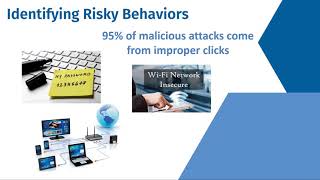
You know, no one is safe unless we all pay attention. And with that being said, great intro into our next slide, you know, identifying those risky behaviors and discussing, you know, how do these hacks happen?
So it's actually really interesting. A lot of things are back to basics. Just like with in the law, there are some really basic things that need to be done all the time and the clauses that need to be included in contracts. There are some really basic principles that people, and unfortunately some of my own legal clients, that break every day. I've walked into law offices and there are passwords on people's keyboards or taped to their monitor, especially when somebody works part-time and they put the password there so someone else can get in. Well, that's a problem. And then our passwords aren't complex. There was a study recently that showed the top 100 passwords that are breached today are not all that different than what they were 5 years ago. People are still using QWERTY and password123 and all sorts of other things. So using simple, non-complex passwords is probably the biggest risk. And what you're going to see over time, password lengths are going to grow. Yes, we've already started adding complexity with symbols and numbers and capitals and lowercases, and it makes things harder to remember. But then you go into, so I'll just write it down. Well, you're opening up the risk. Every time I walk into a— not so much recently, but I walk into a hotel lobby or a a Starbucks or any of those others, there are people sitting there transacting business on their Wi-Fi. It is innately insecure. There are things you can do to help improve that. It is— so there are a lot of things that can happen. You can put VPNs and other tools in place to help that. One of the questions that just popped up was about passwordless logins. And what I would— I would say to that is it is good and bad at the same time. It is good in that the actual passwords do not reside over the internet. They're actually sitting on the local machines, whether it's using fingerprints or biometrics or facial recognition. So it is a big help. The problem is at some point, if you forget your— if you're wearing a mask on your face and your computer doesn't recognize you, it starts to then ask for a password. Where if you forget your PIN, it then asks for a password. And so you still have the need for a backend complex password. The issue that comes up with that often is people then don't remember their passwords at all. And so simplicity for every day can actually open up a security problem. One of the most interesting things I see recently is I hear clients, oh, I got this email. I don't know that it's safe. Let me send it to 3 of my buddies and see what they think. And the problem is, buddy doesn't necessarily— the person next to you didn't look to see that the first 4 lines of your email and say, what do you think of this email? It looks fishy. They all of a sudden click on the link. And so you've aided the methodology of allowing someone to potentially get in. Um, and, and, and so one, one of the things I start with is, is, is the idea that you just forward things around. Um, first of all, if you didn't expect it in the first place, you shouldn't be opening it. Um, you know, if, if it's from a regular client in your case or a vendor, maybe a confirmation that they really sent it would make sense and is something that was intended for you. Because they can clearly be infiltrated already. Not keeping your machines up to date. If I could do a show of hands, which I can't, I'd ask how many people know that their computer was patched in the last 2 weeks? And, well, there you go.
I'm an exception. Thank you.
But my guess is, if we looked at all the lawyers and staff, across North Carolina, my guess is you're going to find less than 15% have had every machine in their organization patched in the last 2 weeks. And then leading on the other side of that is— I'm really picking on attorneys on this one— is it is not uncommon that I see people running around with their laptop and they're using Windows Home, which means their hard drive is not encrypted, and they're— and, and, and they don't have the basic tools to keep them safe. And, and so it's— and this list can go on and on and on. So I think, um, this is just a starting point of a conversation. I'm sure we'll end up more as we go out and go on.
Yep, absolutely. And I mean, yeah, the password thing— or excuse me, not passwords, uh, patching thing I mean, I see it everywhere, you know. Again, um, you know, a lot of what I do is penetration testing, ethical hacking, and it is one of the biggest things we see are organizations with systems that just aren't kept up to date. Um, you know, I've, I've had clients in a diverse range of fields— healthcare, entertainment, uh, manufacturing, you name it, you know, law as well, of course— and they, yeah, they aren't keeping these things up to date. And so Yeah, we'll dive into that a little more as we go on, but yeah, I just want to emphasize Mark's point.
It's—
we see it everywhere. And so in terms of, you know, mitigating, you know, these risky behaviors, these things that, you know, come up all the time that we see, the biggest thing is going to be awareness training for your staff. You know, what to expect when you're expecting, as we have nicely there. But just that base knowledge. And I was actually— I was talking about this with my wife a little bit last night too. Was how people don't generally see it necessarily as their job to say something. I was talking about how on some of our penetration tests, we've been able to walk through buildings, plug devices in, set things up that way to get into a network. And she's like, well, yeah, it's— and she comes from a medical background, so it's like, yeah, it's not an X-ray tech's job to stop you in the hall if they see you there. And well, in a way it is.. But at the very least, they should be aware of what someone who's suspicious might look like, the types of things those people might do. Do they have identification on them? And if you don't feel comfortable approaching, you should at least know who you can talk to. How do I report the suspicious email that I just got? If I see someone walking through these offices that I don't know and who I think may not be there, who should I tell about that? Just at least that basic knowledge so that you can take some action to further defend things, keep yourself and everybody else around you safe. So while it may not necessarily be everybody's job to, you know, say, stop right there, you know, that type of thing, act, you know, like some, you know, big buff security guard, you should at least know what you should do to, you know, to report that, to keep people safe around you in that way. And, you know, it does— it keeps the organization safe, it keeps you safe.
You truly are only as strong as your weakest link, right?
Absolutely. And so something as simple as just knowing who to report something unusual to can often be enough. You know, in the case of that phishing email, knowing what the signs are, you know, knowing what someone who's walking around, what's suspicious versus what is normal, those things like that. And so having that strong program is very beneficial. Multi-factor authentication on our next piece. Most people have cell phones these days. Um, it's weird how it blurs that, uh, shows me fine but blurs the phone. Uh, that's kind of weird. But, um, but yes, that was a cell phone, um, as opposed to a weird BlackBrick. Um, and so, um, fortunately we have these these days, and that kind of ties back into the passwordless login piece too. There is benefit to that in that these companies are able, um, weirdly with all of the surveillance a lot of the places like Facebook and Google have done on us, they can use a lot of that data for our security to look at our common locations, places where we're logging in from, the devices that we're logging in from, to make that a little more, uh, a little easier for us to log in. I've seen like on PayPal recently they've started to offer, well, we can just send you a quick code to your device. We know that this is your device and we know where you're coming from, so we don't need you to put in your password. And so that's great. They're using these multiple factors. They're looking at the location, they're looking at the device, they're looking at this text message to allow us in without that password. But where this is mostly used is in combination with a password. You'll have a password that you're typing in as well as a text message. And so there's multiple points. So, you know, I, as, you know, Mr. Hacker Man here, can't just get into all this critical information just by having compromised your password from a phishing email. Issues with using SMS as a second factor. Um, well, there's a couple of pieces, and that's a very good point too. And I remember, uh, when that was starting to become very common, um, NIST flat out said you shouldn't do this, we don't like this idea, it's a bad idea, because, you know, those messages can be transmitted in the clear in many cases, although that's been improving over time. Um, oh, I'm sorry, yes, um, the National Institute of Standards and Technology, they're a big organization that, um, releases security standards primarily for the federal government, but a lot of organizations make use of their guidelines as well. They're kind of the de facto things that you should be following to keep your organization safe. And so when they came out and said, we don't think anybody should be doing this, people took heed for a little while, but it's so convenient that organizations, all these services, again, places like Facebook and PayPal kept doing it. And so there have been some additional safety measures coming on with this. But for example, one thing that if your phone doesn't do by default that you may want to look at is not having it display, say, the contents of your text messages on your phone's lock screen. Because if it's showing that there, someone who's walking by might be able to see that code and use it. Or someone who has been able to steal your phone and knows your password doesn't have to get into your phone. They can send that message and still get that code. So there are some places where you do have to be a little more careful with that. I'm generally not personally still a fan of using either email or text as that second factor. I'd prefer to see like a dedicated app on your phone, or in some cases even a hardware token, although those can be a little cumbersome. But I'm a little old school in that way, that that's kind of the way I'm still seeing things. But as passwordless authentication methods improve, As we do better, you know, better ways of identifying people through, you know, biometrics, through location, things like that, I think that will change, but I don't feel that we're there yet. Um, and then, so yeah, moving on from multi-factor, another piece that's very common, especially in smaller organizations, you know, smaller law firms, file access permissions, especially in cloud services, something like a Dropbox, you know. Someone might accidentally share a link with the world out there, and if it gets into someone else's hands, well, they have just as much access to that legal document as anyone else. Or if someone's browsing around, poking around, doing what are known as, in quotes, Google dorks, as the term that gets used, but poking around at Google to look for things that are shared out there that Google may have found. If that link's out there and it's open, and Google may have been like, oh, hey, there's a file here, someone else could get into it. But also even just locally, just making sure that only the people within your practice have access to the things they need to do their job, but not anything else. I mean, if you've got human resources, you know, on site with you, you don't, you know, not everybody in your organization needs access to all the payroll data, things like that. So just keeping that information, you know, compartmentalized. Separation of duties and the principle of least privilege, or how we refer to that in the, you know, in the security practice, just making sure that people are doing what they can for their job. Yep, and absolutely, as this, uh, you know, comment here says, yep, searching Google, restricting it to Word docs or Excel spreadsheets, PDFs. Um, yep, you can search by file type, and, uh, you know, and that's something that, you know, we do on our penetration tests too, is look for documents that are out there when we're doing our our external assessments of an organization to see where that risk is so that we can help them close that down and limit it. And then tools for identifying secure Wi-Fi networks. Fortunately, phones are becoming better at this than they used to be, but you should always be very careful with any open Wi-Fi network, especially, you know, in somewhere like a Starbucks or a hotel. VPN clients, virtual private networks, are a good way to work with that because it's taking all of your data and, uh, that anything that you're sending out into the world, and it's securing it in a— in what we refer to as a tunnel. Um, so all of that's— all that good juicy stuff is now in this secure tunnel. Um, as it's being sent, it's being encrypted. Um, and while that can slow that, that, that flow of traffic down a little bit, um, your connection might feel a little slower in some cases, you're much more safe. And in general, in most cases these days, it's not going to impact you enough to be a huge issue. Issue, and it will keep you much safer. Um, if everyone's working remote, it is a little harder to control their access. Um, one of the things that can be done, um, if you're working on, uh, if they're accessing resources that are inside your practice, um, again, using a secure VPN to get inside is a good way to go. Um, if they're using cloud services, um, again, use of multi-factor authentication will help. Because even if someone is sitting there on that network and they're looking at that data that's being sent, you know, they're like, oh, I'm going to capture this person's password, that type of thing. If you have multi-factor, they'd also have to get their phone, they'd have to get whatever other device there is in order to actually get in and do something with it. But using a VPN in general is still going to be a good idea if they're on an open network. If they're at home, they're going to be at least a little bit safer in that regard. I mean, you can't really control everybody's home network. That's not really feasible. But if they're using a corporate device, you can again require them to use a VPN if they're connecting into stuff that's inside your practice. Make sure that they have strong antivirus on their computers and make sure that their computers are up to date, they're patched. Those would be the main things I would recommend to help mitigate that risk.
To jump in for one second, of course, for a lot of our clients, we're starting to do more and more cloud desktops, which are, which is taking things off of the premises, um, and, and a lot of the antiquated infrastructure and moving them into confined tunnels, if you will, but also designed where the data never actually leaves the environment, um, that people are going to the environment instead of the data coming out of the environment. If as a very simple explanation anyway. So, so, so ways to keep all the tools together and, and, and, um, um, and not have to give people more access and open things up.
Yep, absolutely. And then the main thing is just on those, making sure that you are securing, uh, the front, the front of that, because that's something that we do run into a lot as well with, uh, say Citrix. I'll just use that as an example. They provide a lot of that type of technology making sure that, again, you're using multi-factor authentication to access that, because otherwise you've, you're giving every, you're giving someone that entire environment, that box, with just that password, and that can be just as dangerous in some ways. So make sure you secure that technology as well if you want to go that route. But it's a very effective, simple way to do it, because then it doesn't matter so much what device that person is using, if it's a personal device or the like. Then you're good to go. Or, well, you're that much more secure, I should say. Should one have antivirus software in addition to Windows? The built-in Windows Defender antivirus these days is actually pretty good. If you would have asked me that, oh, you know, when I was kind of starting my career about 15 years ago, I would have told you it was terrible because it was. But Microsoft has made some very good strides at that. But I would still recommend in general having additional antivirus beyond that. And what you're go— what I would recommend is antivirus that uses what are known as machine learning technologies. And so what that means is that it's capable of looking for, again, risky behaviors from not necessarily just the user, but software itself on the computer, looking for things that are anomalies that shouldn't be there. And these, you know, these tools and technologies then can say, yeah, this doesn't look quite right, even if no one else has seen this before. If it's doing something unusual, it can identify it and it can block it, or at least it has a much higher chance of blocking it than old-school style antiviruses and, uh, some of the stuff that's built into Windows, although Windows is getting better with those types of technologies as well. Um, in terms of vendors, I can name a few that I've worked with. I'm not, you know, specifically saying, you know, these are, you know, the best choices, go run out and buy them right now, but these are some of the better ones. Um, certainly, you know, doing your own research on these is going to be what I would recommend, but, um, I've had good experience with SIEM with SentinelOne, CrowdStrike Falcon. Those are 3 really good ones that I've worked with. There's a couple other programs that handle things from kind of a slightly different perspective. Ah, yes, Acronis has some good tools in that space as well. Those are tools that I've worked with that have been, you know, very strong as, you know, strong defenses for that. They can identify a lot of common ransomware attacks, things of that nature.
And make sure we have a recovery option. When all else fails, we gotta be able to fall back.
Yep, that too. Yeah, again, if ransomware does get through in your organization, having a way to recover your data, having those backups, be they out in the cloud, be stored locally somewhere so that you can restore that data so that it's not lost if an attacker does get in and starts encrypting everything and demands money. You can just tell them, nope, we have it right here. And then just reload the data and you can keep going.
Why didn't they catch the cyber criminal?
Oh, yes, we need time for that one.
Oh, because he ran somewhere. Yep. That's my corny joke for the day, guys.
Good time for it.
Yeah. Did we need to— wrap this slide up before we move on to the next one.
Yes, yep, let me— I'll tie in kind of some of these next pieces a little, you know, a little bit here. So data loss prevention and drive encryption. So again, as Mark was saying, like, if you're running around with Windows Home, again, that's intended for just home use. If you're in a business and you're storing data on your clients, you should be using professional software. Which in this case would be Windows Professional. And that has tools built in such as BitLocker that you can use to encrypt your hard drive so that even if, you know, if you lose your computer, you know, a laptop out in the wild, someone can't just take its hard drive out of it, plug it into another computer, and then have everything that was on it. It's encrypted. You can't read that data without the computer that it was originally put in or or with recovery keys that are very long and complicated and generally not the sort of thing that's typically hackable. On the Mac side, there's FileVault built in. You can use that, and it does the exact same thing. A lot of phones these days have built-in encryption mechanisms as well, just a matter of making sure that they're turned on. And then for data loss prevention, these are tools that can be in your email or on your computer as well to make sure that— that someone isn't either accidentally or intentionally sending a whole bunch of data out, like, you know, an entire client list with addresses, emails, a list of Social Security numbers, that sort of thing.
Example is data exfiltration of your entire client list or a set of case files that you're— for one case that, that another attorney decided they wanted to take with them.
Yep, absolutely. And so yeah, and these tools will identify, oh hey, this is an awful lot of data, we should probably make sure that they're allowed to do this before we, you know, let them take it out. And so you can put in policies to say, you know, this person's allowed to do this thing, they're not allowed to do this thing, or X amount of files or X type of data, that type of thing. We want people to be able to do this or not do this. And if there are any questions on that later further, we can go into those. But yeah, we can go ahead and move on. And then We'll be talking a bit about the identity pieces as we go on as well. So we'll come back to that.
Great. Thank you so much, Anthony.
Mm-hmm. So obviously, we have a lot of names on the screen that many of you may know and many more that are out there. What is shadow IT? The concept around shadow IT and the reason it's so dangerous is that the people that you— the companies that you see here may be something that your law firm has decided on that you're going to use Microsoft for email, or you're going to use Adobe, or any other product. And that's great that when you've decided strategically, this is what you're going to do. The issue comes in is when one person goes, oh, my OneDrive's not working, I'm just gonna send this by Dropbox. And worse, they're not even using a business version, they're using a home version. And the problem is very quickly it starts adding up that you've got username and passwords to lots of things. You don't have control of where your data is being stored, who has access to your data, nor the terms of service of that data. You know, do— did you actually accidentally break attorney-client privilege because you're using a service that's natively not secure? Did you actually create an impact where, where I now have 4 different file sharing systems and A, I don't know what I have stored where, and B, um, um, on top of that, not only do I not know what's stored there, I don't know that someone really picked it up or somebody dropped something off for me. Um, so, so the, the impact here is There needs to be a clear list of who you're— so the, the company is using and, and, and what they're doing, what you're doing. And, and there are some ways that we can control some of this, which we'll get to in a little bit. But a formal definition, if you will, shadow IT is really about IT solutions that have been built and used within the organization that IT doesn't know about, or whoever controls your contracts. One of the interesting things is it actually wastes a lot of time. You're trying to figure out where your data is, where your services are, and different people are using different things. Um, it actually creates a dramatic increase in data loss and data exfiltration opportunities, and it creates a, a severe dysfunction across the organization, especially as the organization gets larger. And then one of the more complicated pieces is compliance. You know, how are you keeping your data safe? How are you ensuring your client data is staying confidential?
Right.
Just because it's easy doesn't mean that it's right, correct?
Yes, absolutely. And so how do we control this? Policy and procedures around it, both from, you know, I guess I'll say the administrative side, but also the technical side, making sure that, you know, and I'll start with point number 5, your average user doesn't need to be, you know, an administrator of their computers. If you're just going about your day-to-day operations, you know, working in Word, Excel, Adobe, browsing websites, whatever it may be, there's nothing there that requires you to have full-scale access to everything on your computer to install software and all of that. I mean, it's, it's harder for someone to, you know, sync all of their data to Dropbox and OneDrive and Google, for example, if they can't install Dropbox and OneDrive and Google. They only have the pieces that have been allowed by their organization. And you have the policies in place in organization to say, this is what we're using, this is what we're doing, and train everyone in those procedures so that they know how this works. And if something does go wrong, Again, who do I call? How— what do I do when there's a problem? I can't use OneDrive instead of using Dropbox. Who's my IT guy?
Absolutely. So if your organization is using Office 365, you should be using the tools that are natively there. We should be using tools like Azure Active Directory to potentially elevate and increase your controls to other organizations. If you're using It doesn't even matter what the product is, but Microsoft has over 2,500 other companies that they connect their single sign-on tools to, that you could be part of that ecosystem that says we're going to use— it's got to go through and use our core set of credentials to get in. Um, we got to make sure we're actually looking. Um, when is the last time your organization looked at people's PCs, and I'm not talking about someone coming over and looking at all the programs on it manually, I'm talking about automatically gathering the data and seeing what programs are there and what belongs and what doesn't belong. And worse, what's been updated in the last 18 months versus what's remaining unpatched and still on the machine. Uh, recently we just did something for a new client and they had a Garmin application from 7 years ago that hasn't been turned on in 5. Yep, the, the risk it provides to that PC and hence the entire network it was on is great. Um, you want to talk about security assessments, Anthony?
Yeah, absolutely. So yep, and again, as it says, regularly scheduled. That's important too. Um, and again, depending upon the size of your company and, you know, your level of maturity, there's a couple of different ways that you can approach these. If you're a fairly large firm, you have a strong— oh, yep, someone talking about a given tool here. Yep, Bellaroc Advisor. Yep, absolutely. There's a number of programs out there that you can use. I found for smaller organizations, ManageEngine has a number of good tools that can be very helpful for identifying systems and helping to manage them and control them better as well, just to throw one company out there that I've I haven't used it a lot myself, but I've worked with a lot of other people who have, who love it. So I'll put that out there as a recommendation from them. But back to the security assessments, this could be a full-scale pen test, you know. If you have an organization that has, you know, if you've got a website out there, if you have a number of computer systems and you feel you have some of those basic controls in place, you may want to have someone like, you know, me or my co-workers come in and see what we're able to gain access to. Can we get in through social engineering? Can we phish your users? And if so, what are we able to gain access to? And then, you know, from there we make recommendations for you. We help you to improve. If you're just getting started, maybe looking at those policies and controls, getting those written documents in place, may be the way to go. And there are parties out there who can help you with that, provide you with, you know, strong templates, things that have been tested, you know, both you know, from a legal standpoint as well as from a best practices standpoint to get those in place. You look at the organization holistically to say, okay, what are we doing? You know, again, like we were talking about with the IP discovery, what are we doing to find our computers? How are we backing things up? What do we do if there's a disaster? What happens if there's a hurricane? What happens if there's a tornado here and we lose our office? How do we keep working? To build out not just your cybersecurity but information security to manage all of your data, manage your best The best practice is to keep your organization going. I mean, these days so much is around that data in these computer systems that lets us do everything. How do we keep that safe? How do we use that to keep our organization moving forward so that we don't lose all of this and go out of business or that sort of thing? Um, having third-party people to come in and say, here, here are the ways you can improve, is going to be immensely beneficial.
And I'll add to that, if the people here are using an IT provider, you should be asking them not what did I hire you for, because half the time you're not hiring them to do all of their IT, you're hiring them to get their Office 365 or you're to help them install a network. Ask them, ask them to say, What's the breadth of services that we should have, and are we even doing them? Because sometimes it's really back to the basics. Um, but, but the number one item that was on this list was strict policies and procedures. But it's beyond policy and procedure, it's, it's almost more about expectation. And is that expectation clear to employees and staff? Um, one of the things I find, you can have the best policies in the world But if nobody knows that they're there, it doesn't help anybody.
Yep.
Um, so, so some of this is making sure your staff understands what's expected of them, that they are not expected to go randomly install programs and accept data from even clients in any method, any old method. It's got to be by whatever standards you're going to use.
Yep, sign off on policy annually. That's another good piece. Um, yeah, and a lot of that applies to, you know, having an employee handbook, you know, an acceptable use policy in it that goes through this training for your employees to show, okay, again, these are our policies and procedures for how we accept data, you know, tying those cybersecurity elements into a user's general training as they're being onboarded to the organization. So yes, as Jacqueline puts up here on the slide again, 5 things to be implemented and regularly reinforced on cybersecurity, and in this case a little more broadly too, but training, training, training. Um, there's my hand. Training, training, training. Um, we could add more trainings to that, but it really is the main thing. Awareness of the risks and how we deal with the risks. Um, again, like I was talking about earlier, you know, knowing who to report to if something's wrong, knowing who to talk to if something goes wrong with the computer, you know, again, My OneDrive's not working, and so I can't share this to my client. What do I do? Knowing who to contact, knowing how to report phishing emails, knowing what to look for. It's of critical importance. Ah, yes, an incident response plan. There, there's another good piece too. What do I do? Who do I talk to if I think I've been hacked? If I click that link in that phishing email and I put my name and password in it, or I think there is now a virus on my computer, If I suspect that at all, who do I talk to? Having all of that in place so that the employees know how to do that, and also so that the people, you know, whoever your IT is, you know, if it's an external provider, if there's someone inside, so they know who they should talk to to keep everything under control if they don't have the resources on hand to do it themselves. To have that full chain of resources to bring in to handle a situation, right? And then security tools and policies, again, Knowing what's out there, that IT automation for being able to see, you know, what do I have on my computers, what should be there, what shouldn't be. Those formal policies, making sure that they're, they're out there so that users know them, that they've seen them, they've reviewed them, that they've signed off on an employee handbook, and that, you know, the management has looked through those policies and said, yep, we still like everything that's in here, we don't need to make any changes, you know, seal it, sign it, stamp it.
Picking on those security tools for a second, it's like, yeah, Almost every one of those tools, you can put it in and turn it on, and it will do something to help you. But so many of them need to be tweaked to meet your specific circumstance. You put in a firewall and plug it in, it's great, it does something, but it may not do what you need it to do. And, and so before implementing tools, there really should be conversations about what are our expectations, and then a review in the, in the future, are they meeting our expectations.
Yep, absolutely. You know, for example, I was just thinking like firewalls, um, you know, when we implemented for Tangible, um, Palo Alto— they're a very, very big, well-known game— that you just plug a Palo Alto firewall into a wall, it's not going to do anything for you. It's got to be configured, it has to be set up in a specific way, and then it will be amazing for you. It will help keep— it will help keep your network and your users safe, but only if it's been set up properly. Um, and so part of that ties into, yeah, identification, classification of data. What falls under attorney-client privilege? What are— where do we have our health records if we're keeping any on our employees? You know, Social Security numbers, tax information, those types of things. How are we keeping them safe? How are we classifying that? What can we do with that? What, what regulations, what laws say we can do this with this information? We need to keep it safe in this way. Um, different types of data on your clients— what can you disclose and in what way? Having all of that documented again in those policies and labeling your documents, you know, with tags, you know, may it be in, you know, it could be in the header of Word, it could be with stickers on paper. Yep, mapping documentation. Yeah, yeah, looking at those different levels and saying, okay, this is, this is a lower stock that you may— you all think, yeah, we don't care if this goes out, this is, you know, marketing information versus You know, this is a list of all of our clients. We care about this a lot. Right.
Um, and this whole identification and classification, which leads to data control, this, we, I realize we're, we're, we're spending 5 minutes on it. And, and the reality is this is a 5-hour workshop in, in how to understand what you even have and how do you label your data and how do you protect it and how do you sort and prevent client A's data from accidentally in client B's files.
Yep. Yep, there's a lot of elements to it, but it starts mostly with knowing what you have and building out a basic framework of, you know, once you know what you have, looking at that and saying, okay, well, what, what do we care if this gets out? Does this matter? Who, you know, who can we send this to? Who can't we send it to? And then you can build out your map that way. And so as part of that goes in this last item, too, communication, you know, making sure everyone has that understanding so that, you know, IT and security, you know, both in terms of, you know, if you have internal functions for that, if you have it outsourced, making sure that there are constant lines of communication and contact so that those portions of your organization are facilitating your business, helping to keep everything running, and also helping to keep all of that data safe. Understanding how the business is operating, what it needs to do, how it interacts with its clients, so that you can add in those pieces around it, mold it slightly to make sure that those interactions are secure, that they are safe, and that everybody is protected.
Great. I think that overall, you know, just like you, you know, mentioned from the beginning, we're only as strong as your weakest link, and if your— all of your employees are vigilantes, and know that it is their responsibility, you know, then the culture will start to create itself in terms of being secure.
Absolutely. Although I might, I might use a slightly different, I might use a slightly different phrase than vigilante perhaps, because again, that kind of almost goes back to the shadow IT. We don't want everyone going off in different directions, but if you have everybody working as a team, I mean, in a way, like, you know, a neighborhood watch almost, I guess, is maybe the way I would put it.
Much better than a community vigilante. Absolutely. All right, awesome. Well, I think that concludes everything, although each one of those topics probably could be, you know, much larger discussions. Are there any questions that have not been asked thus far?
Yep, just taking a look through our list here.
Well, while we're waiting for anyone to type them, type a question or anything, I want to share a story of, of a client of ours that they did everything they can to thwart themselves. They wanted to make it easy, especially for all of their senior and this, their senior professional staff, and they didn't want to add multi-factor authentication. They didn't want to add conditional access. They wanted everything stored in one spot. So if this person ever needed to get to any file ever, that they could. And 3 times in less than 6 months, somebody in the company was breached because they kept clicking on emails. And they kept, once they'd actually, it actually encrypted all of their mail and we were able to help recover from a backup. The other two times, they got control of their email systems. The amount of time and effort that's involved to clean things up and reprotect things is huge compared to being proactive and thoughtful and implementing systems that are designed to keep people secure in the first place and utilizing best practices. So I just thought I would end with that. If we have any questions, clearly we're still here to answer them.
Thank you very much, Anthony and Mark and Jacqueline, for that overview. Obviously, I had a lot of questions and it brings to mind so many other things. What I'm going to do is I'm going to stop the recording. Anybody who's on who wants to ask a question without being recorded can ask away. But thank you again. Here's their contact information. If you have specific questions, you guys know how to find me. I will send you the recording after this and I'll stop it. And then you can open your mics if you want to ask questions.