Taking Command of Your Case Through Proper Use of Digital Evidence
Forensic specialist Paul Bowen teaches North Carolina attorneys how to collect and present digital evidence in civil and criminal cases. He covers locating evidence across devices and cloud accounts, establishing chain of custody, creating forensic images with write-blocking, and defining focused examination scopes. Real cases show how proper handling of metadata and geolocation data can determine outcomes.
Chapters
Okay, so welcome everybody today to the learning objectives from the Center for Practice Management, North Carolina Bar Association. And today we are talking about taking command of your case through proper use of digital evidence. With us today is Paul Bowen, and he has a broad background in law enforcement with 25 years in IT and computer forensics. He has served as senior IT administrator and senior forensic engineer and currently the senior support engineer at Dynamic Quest, which is one of the CPM partners. So we have special discounts with them. They do a lot of managed IT support for law firms, including— I sent a lawyer to them the other day who thought he had been hacked and needed to make sure whether or not he had been. And that's the kind of thing that they can help with. So Paul's forensic casework includes multiple convictions for child sex crimes. As the death of a social media influencer. He has a law enforcement background and is certified in, he's a certified criminal investigator and FBI child pornography and crimes against children. So he's excited to share his experiences today and talk about digital evidence and what you need to know. So Paul, take it away.
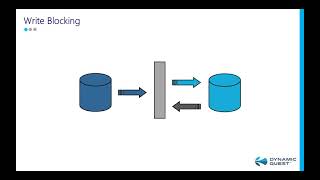
Thank you. Good morning, everyone. Digital evidence is something people are either really into or they prefer to try to act like it doesn't exist. Unfortunately, today we can't take that approach. We've got to make sure that we're on top of things and you're gonna win cases when you take command of your digital evidence. Let's see, there it goes. All right. So when we talk about digital media, we're talking about any type of media that is stored electronically versus what we traditionally have a hard copy of. There are trends in digital media. A lot of things are moving more to cloud-based than ever before, so we have to certainly realize that. But let's talk about where we came from. We've made a lot of progress from the 1980s and the huge floppy disks. And as you see the progression there from floppies to smaller floppies to CD-ROMs to USB sticks to memory chips. And the big trend is smaller in size equals larger in storage capacity. In fact, down at the very bottom that you can barely see next to those periods, it's showing you a couple of micro SD cards, and each one of those can contain more data than all of the other storage devices in the image. So we have seen over the last 25 or so years Storage capacities increase and size decrease. Why is that important? It's important because we've got to understand where the potential sources of digital evidence are. The first one is your laptop and your PC. A lot of times people are absent-minded enough— I think that's a nice way to put it— where they have things on their work machine that they shouldn't have on there and they don't think anything about it. Or if you're in a divorce case or criminal lawsuit or criminal law defense, rather, you're going to find that a lot of people store things thinking, oh, I can hide it and nobody else can find it. Now we've got tablets, we've got smartwatches and smartphones, external hard drives, USB storage devices, SD memory cards. There's still folks out there using MP3 digital players, and a lot of attorneys are using digital recorders now. Every one of those data can be stored on in addition to what they're intended to be used for. They are a storage device, and that's somewhere that we can look to find evidence when we're building a case. Digital cameras, a plethora of information, and we'll get into that in just a little bit. So where do we look? Well, we want to look at their current devices. We want to look at things at home, things at work. We want to see if there's any old or unused devices. An actual case that I worked involving sexual harassment in the workplace, a gentleman was accused by a coworker of sending her inappropriate images from his company phone. They, for some reason, they sent his current company phone to law enforcement, which had no jurisdiction in sexual harassment. However, I was able to obtain the his old phone that he had gotten rid of just a few months earlier, and lo and behold, there were the images that he said he didn't send. Old and unused PCs. Most businesses have old PCs somewhere, at least a couple of them. Homes have them. Don't forget, if you're looking for evidence, that data may be sitting there because it may not have been transferred to a newer device. Old or unused hard drives. I know for myself, I have probably 7 or 8 external hard drives. Most people have at least one. Cloud storage now, we mentioned that earlier. More and more people are using OneDrive, SharePoint, they're using Google Docs. Everything's going cloud-based, whether you're using Hytale, or you're using Dropbox or any of these providers, the media may be stored in a cloud account that you don't have access to that you need to make sure that you can get access to. So when we collect evidence, there's 3 things we have to have. We have to have authority, we need a chain of custody, and we need secure storage. So let's talk about authority first. 3 ways to get authority: permission of the owner or custodian. If it is a company device, the company can give permission, as you know. A subpoena works wonders, and sometimes search warrants, as a last resort, have to be used. When we're collecting evidence, it's important if you've got a digital device, for instance, Smartphone. You want to make sure that it gets turned off. You want to make sure you get the passcode, even if it's not locked when it's handed to you. Get every cable you can get. Get the charging cable, um, that a device may have, a power cable, USB cables to connect it to whatever you need. Some of the external hard drives One end is specialized, the other end is standard USB. If you don't have the right cable, you can't examine that. Um, also, every smartphone today has a SIM card in it. If that SIM card is not removed and the device is turned on, it can be instantly remotely wiped. That's a big consideration nowadays. When you're trying to preserve and find the evidence that you need and people have already issued through their Android device software or through Apple a remote wipe. Big issue nowadays. You want to make sure you've got a chain of custody. It needs to be very detailed. It needs to be chronological. It needs to talk about seizure, custody, control, transfer, analysis, Disposition. Treat this like it was a criminal case regardless of what kind of case it is. You may be defending an insurance company. Well, you know what? When you go into court and you've got a defensible chain of custody, you're not going to have issues with that judge. Here's an example. This is kind of based on what I used to use in law enforcement, tweaked it just a little bit, but make sure that you document a description of the evidence, who it was obtained from, when. The chain of custody has to be filled out. Also, the final disposition. What happened to it? Where did it wind up? Is it in storage? Was it given back to the owner? Very important information. Evidence tags. Even in a civil case, it's very important because it identifies with unique markings that this is the device that was examined. You've got to store your evidence once you obtain it. Everybody thinks about physical storage. You think about locks and seals. We used to put the device in a lockable box with a tamper-proof seal that was serial numbered because we wanted to make sure that we had a chain of custody there and we can— we could testify that no one has touched this device since it was sealed. But what we don't think about is environmental factors. We've got to make sure that the temperature, the humidity, and the magnetism are not issues with your evidence. It doesn't take but a really small rare earth magnet to totally wipe a hard drive. Once you get your evidence, you need to preserve it. And the 3 ways that— the 3 steps in this is you want a forensic image, you want it write-blocked, and you want the image and data on it to be preserved. I know these are daunting terms sometimes, but a forensic image is very basic. It's a court-recognized bit-level image that includes the entire media. You— on a hard drive, on a flash drive, you have unallocated space, you have slack, boot information data, and deleted data. You want to recover all of that. Some software out there like EnCase can rebuild files that have been deleted for you. The next thing you want to make sure is that when you capture this image that it is write-blocked. Why is that important? Because if you notice, the data can go through the write block device, but it can't receive anything back. When you use a computer, when you plug in any device, it instantly writes data to that device, so your evidence has changed. You want to be able to testify in court that it was write blocked, and the data is original. I worked on a non-compete case on the coast, and the gentleman was being sued by his previous employer saying that he was using his current— or previous work information and trying to obtain clients. And they said, we know he's using it because we gave him a flash drive with all the information on it. Well, I went and obtained the flash drive, filled out my chain of custody, tagged it, brought it back, put it through a write blocker, grabbed an image of it, and lo and behold, it had not been put in a computer since the day it was created. His defense attorney was able to prove in court that there's no possible way he could have been using this list because it was not accessed. The next thing is think about preservation and retention. It needs to be unalterable. It needs to be maintained for whatever your statutory time is. It also, in the event that the original device becomes damaged or— and hard drives sometimes, once they're removed from a computer and sit on a shelf, sometimes they just die. Well, guess what? Your forensic copy now becomes your original because you can prove chain of custody, that it was write-blocked, it hasn't been altered. So now that we've got our evidence, we need to process it. Well, the problem with that is we need to make sure we've got the right permissions, the same ones again: authorization, scope, and we need to report our findings. Authorization are the same ones: permission, a subpoena, a search warrant. For your scope of your examination, it needs to base— be based on authority. What is it that think— that gives you an understanding that you need to look at this device? Make sure the scope is well defined. You want a source, a date range, keywords, data types, exclusions. You think, well, why do I need that? Very simple. An attorney's representing an insurance company. Young lady has a car wreck. She's accused of texting and driving. The defense attorney says, nope, we're not giving you anything. They go to court. They get a subpoena, or a court order rather, to examine the device. However, the defense attorney very successfully argues that the only thing, because his client had photographs on there that she did not want shared with the world, that they could only obtain data on this date between these hours, strictly text messages. Very important. That way you're following the letter of the law and you don't have any issues or cases being thrown out. Part of the scope of examining the device is it's got to have very detailed information. If you're doing a phone, if you're doing a hard drive, most of the software packages that forensic examiners use are going to extract the data unique to that device. What you see here is a cell phone about 4 years ago, it looks like 5 years ago, was extracted. And it tells you the unique identifiers for this phone. It tells you the phone brand, the phone model. It tells you what cables were used. Everything that you need to identify this device is there in the report. Scope of your examination, just say you're wanting images. Okay, so all we're wanting is images. This is a sex offender, he's been charged with something, you're looking for kiddie porn or anything relevant on that computer. A case that we— that I worked was involving a high school coach, and he was accused of sleeping with his stepdaughter. We examined the computer, and what I found was images and websites that showed a propensity to go to adult sites with a teen theme. That was very important because he was accused of impropriety with a teenage girl. When you're looking at images, you can't just look at what you see. You've got to look at what you can't see as well. That's the geolocation and metadata. When you take an image on a cell phone or smartphone, it's going to tag that image with a lot of information in the background. It's going to tell you the device, it's going to tell you the date, the time, it's going to give you something that's maybe a little hard to see right here, but it's going to give you the longitude and the latitude. Let me blow that up for you. If you look on the third line there under metadata, we've got a longitude and latitude. We know where this photograph was taken. You take that information, you plug it into a geolocation Data Program, and we find out that, guess what, those bacon-wrapped scallops— the photo was taken at the Blue Water Grill in Wilmington, and yes, they were quite tasty. But we have so much information there that we wouldn't have if all we saw was an image. That sexual harassment case, we found images, we found geotags, We could tell you when and where those images were taken. That information was, was very relevant to the employer upon firing the individual. All right, we've got to know our limits. Again, we talked about the fact that you may be limited by date, by time, by keywords. You may be limited by the type of data that you can recover. You're also limited by retention limits and report limits. The judge may only want information pertaining to this. So we've got to have a report. It needs to be a detailed report. It needs to talk about the digital evidence, how it was collected, what's your authority, what was the scope of the examination. How was it investigated or processed? What are the evidentiary findings? Those findings need to be in the right format that the judge or court has preferred. It also needs to include your chain of custody. If you've got all this information together, then you're building a solid case. Let's look at some details on a report. I received a Dell laptop. Here's the service tag. It was shipped from the UPS store with a tracking number. I removed the hard drive. A forensic copy was made using this duplicator and write-blocking device with this serial number. It was then— the image was put on the server. The entire drive was acquired. It was forensically reviewed. Upon examination— now, this was a divorce case. The wife suspected the husband of putting spyware on her computer because he seemed to know everywhere she was going to be. Well, we were able to determine that it was not on her laptop. Um, we did not examine her phone, she chose not to have that done, but we were able to find a lot of information and we were able to report that back in a concise manner. You want to make sure that device information is part of your report and your findings. This is actually a cell phone that was extracted using Cellebrite software. And as you notice, it's very, very detailed. So let's talk for a minute about findings format. A lot of programs, when you examine text messages, and this is a non-private text between myself and my son. It makes— it doesn't make a lot of sense. It's not always in the correct order. It's— you have to figure out who's saying what. Well, let me show you. By simply changing the format, we get a conversation, which we're all used to seeing and reading. It's very easy to identify who said what., and it keeps it in the chronological order. If you include both of these in your report, then you're definitely going to cover what the judge in the court prefers. All right, we've talked about a bunch of stuff in a short period of time. Let's recap real quick what we've talked about. Digital evidence. Smaller devices store more information. We've got to consider all kinds of sources nowadays because it could be anywhere. We also have to look at cloud storage because everybody's using it. If you've got an iTunes account, then all of your photographs are stored in a cloud account. If you're trying to prove that your Client's better half has property that they're not admitting to the court. Cloud storage, Facebook, you can find lots of things because you know what? When the gentleman's foolish enough to put a picture of his brand new boat and yet he's told the court that he doesn't have any more property, it's pretty easy. So that's another source of digital evidence. We got to collect it with authority, maintain a chain of custody, and securely store your evidence. As we're storing it, we've got to make sure that it's all preserved, that you've got a forensic copy that was write-blocked, that it's preserved, and that you retain it for the statutory time. And as you're processing or having it processed, by your forensic examiner, make sure you've got the authorization, a clearly defined scope, and that you have a report that meets the requirements of your judge or court. I am more than glad to open this to questions if anybody has any.
Katherine? Thanks, Paul. I'm going to stop the recording and then I'll let everybody ask their questions without Being saved for perpetuity, so one moment, and thank you so much.
You're welcome.