Using Microsoft 365 to the Fullest to Scale Your Law Firm
Dallin Allison of Rooks Diem shows how law firms can use Microsoft 365 to cut manual work and scale. Tech-forward firms generate 40% more revenue. He walks through Teams, SharePoint, and other tools to automate intake, onboarding, and client management.
Chapters
So welcome everybody to today's learning objectives. And with us today is Daliel Ellison, who is a managing partner at RooksDM, which is a technology consulting group, and they are Microsoft partners. And so my friend Jessica Bednar, she's also done a program for us, had recommended I have him come and talk to us about using Microsoft 365 because she had him come for her incubator class. And so With that, I, I followed him down because I really feel like most of us could get better usage out of this tool that we're using that's, you know, relatively inexpensive for what you get. But there's so much to learn about it. So with that, Jalil, take it away.
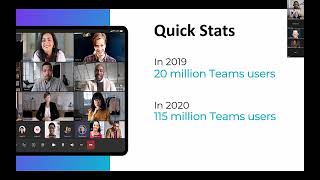
Perfect. Thank you so much for having me today, Katherine. Excited to be here. Like Katherine mentioned, feel free to jump in with any questions along the way. We can make this as interactive as you like. I do have some slides that I can walk through and I'll kind of talk about some specific items, but if you have questions along the way, feel free to drop them in the chat or come off mute and ask your question. So with that, yeah, I'll kick it off. So today I'm here to talk to you about how can you leverage Microsoft 365 to the fullest to get some more efficiencies and be able to scale your law firm as well too. A little bit about me. So my name is Dallin Allison, one of the co-founders, CEO at Rooks Diem. We do technology consulting. We primarily work in the professional services space. And so we are— our firm is very experienced with working with with not only law firms but financial service organizations, insurance agencies, so on and so forth. And all the work that we do is associated with how do you leverage technology to be as efficient as possible. My background is I've worked over 10 years in the IT space. I've been a consultant, business analyst, project manager. I worked for a variety of firms. And then a little bit about me. I love podcasts, so if you have any good podcasts, you can feel free to drop them in the chat. I am a huge fan of coffee shops, and I do travel. Quite a bit. I'm from the Raleigh area, so if you have any good recommendations on coffee shops in Raleigh, I will gladly take those. So yeah, to get started, here's a little bit about the agenda. So I'm going to talk to you about like common pain points we typically see across law firms, why Office 365 is valuable. Katherine mentioned that the cost is relatively inexpensive, so that's a huge opportunity there as well too. And then I'll kind of dig into the meat and potatoes of this presentation, which is all around some solutions of how to leverage Microsoft 365 as well as the Power Platform, and then kind of talk through some examples. And then last but not least, I'll just talk about, hey, where do you start? How do you get started? How to think through things for implementing 365 tools across your firm. So to begin, so common pain points that we typically see, and we kind of have this building up, right? So it always starts small. And we always put this on here because we always like to have it in the mind of asking the question of, hey, is there a better way for me to be able to do this type of work? So a lot of times what we see is firms typically start off, they're doing manual workaround. So it's a lot of copy and pasting from data from one system to another, a lot of processing of documents. So you receive a lot of emails with certain data and documents and processing those manually is what we see. And then Some things as simple as scheduling automation, right? So talking about, and I'll talk about this a little bit later, but leveraging a tool like Bookings or Calendly to schedule meetings, both internal, external, can make it much efficient across the firm. And then from there, what ends up happening, you have your manual workarounds, but then you start with the Band-Aid solution. So you say, hey, I'm really struggling or I'm spending too much time on the client intake process. I want to implement system A or I want to use this online form to capture some data. So then it becomes the whole process of, hey, let's throw technology at the problem to see if it solves it, or maybe we will add more staff, or we'll kind of do things a lot more manually. And then from there, what happens is it just makes it harder to scale because then what you end up having is a lot of different systems across the firm that don't talk to each other, that people aren't fully utilizing. And especially when it comes to Microsoft, Microsoft I always use the analogy, it's a mansion that you own that has multiple rooms and you have access to these rooms. So how do you leverage those different rooms across the firm so there is not as much tech overlaps as it relates to what you're using from a software standpoint? Here's a fun statistic. So based off a study that was done, 40% more revenue comes in to law firms that are more tech-forward, if you will, compared to those that are not using technology. So 365 is a great opportunity for that. There's so much you can do by leveraging this, just that one ecosystem of applications that will help you generate more revenue, save time across the firm, be more efficient, and provide ultimately a better client experience for all the clients that you guys are working with. From there, I'll jump into Office 365. I like to start with this statistic as well too. So 70% of Fortune 500 firms have a license for Microsoft 365, and the reason that I call this out is because it shows the scale at how Microsoft can be used So if these larger organizations are using it with multiple departments, thousands of employees to be able to run their operations as well, it's even powerful for small to medium-sized businesses as well to leverage the features, the functionalities, the integrations, and the different applications that Microsoft 365 has across the ecosystem. And this one is a, is a fun statistic, and I'll talk a little bit more about Teams specifically on how to leverage it for collaboration and communication across the the firm. But this one is really interesting because obviously since COVID a lot has changed and you can see the amount of people that are leveraging Teams has skyrocketed. So in 2019, it was only 20 million users. In 2020, it was 115 million users. It's significantly more now. And the reason that I call that out for a few different reasons, obviously it's going to be a core tool that you use within your firm. And a lot of times now we're still seeing this is most people are just leveraging it for virtual meetings and not really using it to its full extent. So you can do chat collaboration on Teams, you can do file sharing, there's add-ins, you can create lists, you can create custom tabs, and I'll talk about that a little bit more. But we're starting to see Teams be essentially a central point a lot of times for collaboration and communication across law firms. And so why Microsoft Office 365? So in my analogy earlier, the huge mansion that you have. 365 is a suite of tools within the Microsoft ecosystem. First and foremost, it's tech that is easy. So being able to spin up a Microsoft 365 license is very easy to do. Outlook, you have all the basic applications. OneDrive is available. You don't really need a development team to get any of those items that are set up. It's really affordable. So it's on a per-license basis, as you guys are all aware. And the suite of tools that you get with that is great. So you have document collaboration, you have communication features, you have email, you have file storage. There's so much that you get at an affordable rate with leveraging Microsoft 365. And then the last one is the ability for it to integrate easily with other tools and databases. And I'll talk a little bit more about the Power Platform specifically and using that as a hub. But Microsoft is great because you can integrate with third-party systems, pull data into Microsoft, centralize that data, and be able to run workflow automations, generate reports, do document sharing, there's so much you can do with the Microsoft ecosystem as a whole. So I'll jump in first. I always like to start with this slide, and it kind of goes back to my point of quick fixes. So our philosophy is process first, technology second. Here's a good example of the different quadrants we look at. So anytime we come in and we work with a law firm, we ask the question of, hey, where are you struggling the most within your process? Where are you spending a lot of time either copy and pasting data from one system to another, or things are just not as efficient as they can be? Um, and what we've seen in the past, it falls under one of these four quadrants. Um, so hey, for net new clients that are coming in as part of the intake process, um, capturing the data, getting those initial meetings booked is just taking a little bit more time. Or it could be on the onboarding process. A client just signed a contract, they're looking to get onboarded, you have to set them up, um, with certain access, monitor certain documents, delegate certain tasks to teams. That's the second process that we look at. And then the third one is probably where we spend most of the time is on the management of, hey, I have active clients that I'm working with right now. I have these series of matters that I'm working on. How do I make sure that I'm hitting the milestones, that the tasks are getting completed internally? And then also how do I communicate that with the client directly externally? And then last but not least, one that gets overlooked sometimes is the offboarding. And that's a key component too of of looking at that process and saying, hey, what do we need to do to offboard a client? Maybe the engagement ends and there's certain compliance regulations that are required there, but also it helps alleviate some of the clutter and keeping the data clean, if you will, across the firm to not have files that are in an active status when they should be archived or moved away. And so there's a whole process for that as well too. Any questions there so far? Nope. Okay. So I'll jump into it. So Microsoft 365. So, so here are the, the main kind of applications that I'm calling out. So everyone is familiar with the Outlook. That's where your email is. I had mentioned Teams earlier. So leveraging Teams, you can see even in the screenshot that I have here, there's certain matters. So if you look on the left-hand side, you have a Teams that is specifically for matters, and then under the matters, you can kind of organize or categorize it to be be very Matter specific. So that's one great way that you can leverage Teams there. Another thing we're seeing is on the SharePoint side. So if you are operating with a smaller or larger team, you're able to leverage SharePoint to be able to create an intranet and collaborate across the organization. So if you have a variety of departments where you need to access like HR documents, marketing documents, sales documents, whatever they may be, you can centralize a lot of that information using a SharePoint site.