10 Interview Video Tips to Prepare for Zoom & Virtual Interviews
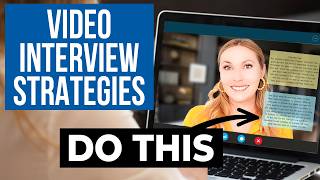
Madeline Mann shares ten tactics for virtual interviews: use sticky notes for quick reference, test your tech and lighting beforehand, position your camera at eye level, look directly at the lens to seem engaged, prepare STAR-style stories for behavioral questions, and disable notifications so nothing pings during the call.
Chapters
You have a video interview coming up and you need strategies that will immediately make you stand out from the other candidates to help you build a similar connection to being in person with the interviewer and show you are the absolute perfect fit for this role and nab the job offer. I will be sure to deliver on all of that and more in this video. These strategies to prepare for a zoom interview are psychologically prepared, proven to make you more confident and more likable and stay to the end because I will share one action you can take in a virtual interview that you can't do in any other type of interview that every time one of my clients has done this, the interviewer has been massively impressed because it's so rare. And hello, so good to see you back or see you for the first time. I'm Madeline Mann. I'm. I'm a human resources leader and job search strategist who turns job seekers into job shoppers. You may recognize me from being a top job search instructor on Spotify and LinkedIn Learning, or you may have seen me on Wall Street Journal, Bloomberg, New York Times, and more. Be sure you're subscribed to elevate your career. The first thing to do to ace your interview is to use invisible stickies. I have a Mac which comes with an application called Stickies. You can write your interview notes there, there, and make these notes translucent so that you can place them around the screen without completely blocking your view of the interview. If that app isn't on your computer, no worries. Just do a quick Google search for transparent notes apps. Now promise me you're not putting scripted answers of your interview questions on these notes. Instead, put your research that you did and quick reminders of points you want to talk about and names of this interviewer and other people at the company. Next, know that on a virtual interview, the first few moments of the call set the tone, the energy and the first impression. And if you screw this up, it's tough to come back from. So you need to test your tech ahead of time. And then flubbing with your camera, your hair, your background is going to make an awkward impression. Then practice those three throwaway questions. You thought that the question how's your day going? Is a question that's asked before the interview starts. Incorrect. The rapport building is crucial, so give it a little extra effort when they ask something like this. I painstakingly scripted out what you should say in the beginning of the job interview and the exact spiel you should give at the very end of the job interview. To make a great first and lasting impression and I put it into an adorable PDF for you to download for free. So I will link that below. Third, we need to talk about your camera setup during your zoom or video interview. I'm not messing around. Appearances are important and that's a big part of a video interview. So notice the angle that your camera is at. I remember taking a random film class in college as an elective and they showed clips of a camera looking up at a daunting figure and how that was meant to indicate that the character was superior or intimidating and then the camera looking down on the person who was weaker. Essentially, this is all to say that the same thing is true with your webcam. Don't look down at the camera and appear unapproachable. Also, don't have yourself low with the camera high because subconsciously you're commanding less respect. The good old level camera is what you want. Which huh, wouldn't you know that I have my camera level for every video. It's not an accident. I'm curious to know approximately what percent of your interviews are video interviews Instead of phone or in person or whatnot. Is it about 10%? 50%? All of them? Let me know in the comments. Write the percent Video interviews in the comments. I'm very curious to know how prevalent video interviews are for you. The next piece to ace a video interview is to take notes. What are you doing if you're not taking notes? If the interviewer is answering your questions and going deep into what the role entails and the goals and you're sitting there all glassy eyed and tight lipped, they're going to think why am I telling this person this? They aren't going to remember these details. Take notes in your notebook and reference them in this job interview. Reference them in future job interviews. Reference them in your thank you email in case you need more convincing. I asked hiring managers if they're cool with taking notes in an interview.
I would feel like that candidate was really invested in wanting to work for my company and it would make me pay even closer attention to everything they had to share.
That shows a level of preparedness. It shows that they've thought ahead of time and they want to know that they focus on the right things in the short amount of time that we have together.
As an employer, I'd be completely flattered. What bigger flattery is for someone to come in having already taken time to learn about who you are and what your company stands for.
The fifth tip is a public service announcement for Your video interviews background distractions are less distracting than you think. I see too many job seekers feel like they have to acknowledge oops, oh, that's my cat walking in the background or oh, so sorry my dog is barking when it really truly isn't that big of a deal. If it really makes you uncomfortable, then you can get ahead of it early in the call by saying something like heads up, there's a lot of construction outside today. Let me know if the noise becomes too disruptive. The sixth tip is the most common type of question you will see in a video interview, which are behavioral interview questions. I created a video and a system called a Story Toolbox that will allow you to completely ace any behavioral interview. Just check out the hundreds of comments on my previous videos on these topics. I will link a video below for you to watch. The seventh tip is how to appear more confident in the video interview. Practice looking at the camera instead of looking at the screen or that small little picture of yourself in the corner. The person on the other side will feel more connected to you because it will look more like you're looking them straight in their peepers. Smile a little more than you would normally and pep up your energy. Video may add 10 pounds, but it subtracts three cups of coffee so you will come across as less energetic. Practice your interview approach by either filming yourself or with a friend on the other end and then review the footage to see how you're actually coming across. And as someone who has to film herself constantly, I warn you, it's humbling. Tip number eight to ace your video interview is to explain any long pauses confidently. Due to the nature of video calls, people will often say things like are you there? Can you hear me? If you don't speak right away, but my dear friend, you should be pausing in job interviews to collect your thoughts. Don't let this rattle your cage. They need to chill out. Tell them if you're pausing to write down notes or collect your thoughts. This shows you're in control without them ruining your flow. You are going to be so glad you did this Next tip before your video interview, turn off all notifications. Set your phone to do not disturb. Even create a guest account on your computer so that you can log into it for interviews. And that should eliminate any notifications that normally pop up on your computer and may throw you off. Okay, tip number 10 to make sure you ace your video interview is so important because so few people do this and it will impress the raspberry beret off your interviewer. Here is what I want you to do. There's a lot of different video conferencing software out there, but most of them have a button that looks a little something like this. It's a share button or present. Now this is where you will share your screen. Not to show the interviewer your wasteland desktop of thumbnails, but to share work samples and projects to illustrate the work you've done in the past. Just like how Elizabeth followed my tips for doing this and landed an incredible job with the interviewers, citing how much this move impressed them in the interview. This is one of the many job shopping strategies if you want to learn how to be a more irresistible candidate that lands multiple job offers that has opportunities coming inbound, I will link a free job shopping workshop below. I am rooting for you in your interview. Be sure to like this video and subscribe to this channel. You've got this wifi high five.
More from Clegg

AI Won't Tell You the Full Truth | Arthur Brooks + Simon Sinek | A Bit of Optimism Podcast

How To Make the Best Decision | Arthur Brooks and Simon Sinek | A Bit of Optimism


