How to Script & Film a Video Resume - Example included!
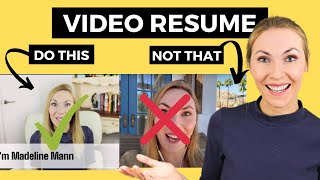
Madeline Mann shows how to make a video resume that actually gets watched. Vault Inc. found 89% of hiring managers would watch one, and she walks through scripting, filming with direct-to-camera and voiceover, and editing in InVideo to keep it under 90 seconds.
Questions this video answers
Fewer than 90 seconds.
Approximately 6 seconds.
89%.
From 62% to 91% feedback rate.
Chapters
How do I create a video resume that looks professional even if I don't have a lot of fancy video skills and tools? How do I appear on camera and show my value quickly, even if that's a bit outside my comfort zone?
This is self made Millennial.
I'm Madeline Mann and you've come to the right place. I am the top result in Google for video resumes because I have helped thousands of people make really captivating video resumes to land them jobs at top companies using my script formula in my easy editing approach for bleeding edge career and job search. Tips from a human resources and recruiting leader who has helped thousands of people land jobs, subscribe to this channel and hit the bell to get new videos on Thursdays. One job seeker Nicole Nicole, my superstar. She followed my tips and from the first video resume video that I did and then landed a job offer at Amazon, another job seeker wrote to me saying that she landed a job at TikTok and so many other powerful testimonials have been coming my way. So I will share with you exactly why video resumes can make a big difference. Four tips on how to make an excellent one even if you don't have video skills. I got you and I'll give you the exact same six part script that thousands of people have used that you can completely customize and make your own. So stay to the end because you'll also see an entire completed video resume. Example. Why create a video resume? Here's the thing. Resumes are impersonal and one dimensional. We know that a typical resume is viewed for an average of six six seconds. And so if we can get the company to watch a video resume, we capture their attention for upwards of 60 seconds as they get to know more of our story, accomplishments and personality. I mean, that's 10x value right there. According to Vault Inc's annual employer survey, 89% of employers revealed that they would watch a video resume if it were submitted to them. That's good news. Employers are open to it. And while video resumes are growing in popularity, they're still really rare to this day. In my human resources career, I have never seen a candidate submit a video resume to one of my open roles. So come on folks, please send yours to me. I want to be included. But let me be clear. A video resume is not a replacement for a traditional resume. It is so important that you have a killer resume and a video resume is more of a an enhancement. If you have any doubt that your resume might not be your absolute best foot forward, I'LL link my free Resume Revamp Masterclass in the comments and in the description. This class has completely changed the way thousands of people have written their resumes. Even if you have an unconventional path.
Or are a career changer, you'll find.
The enrollment link below. And if classes are full, be sure to get on that wait list. What makes a Great Video resume? First, make it short and sweet. Ensure your video resume is fewer than 90 seconds. Just like one year is equivalent to seven dog years, 90 seconds is equivalent to 10 minutes in recruiter time. They cannot spend a bunch of time on your application, so make sure your video resume is short and impactful. Second, make the video resume use unique to you. The key is to make sure that what you're saying is specific. If there's a sentence in your script that could be said about pretty much anyone, delete it. For example, I am a collaborative and creative person who thrives in teams. Yeah, that could be anyone. That could be little Bobby over there in kindergarten during crafts time. Let's get a wee more specific. You have unique skills that that companies are looking for. Highlight those. Third is to do your own video editing to allow yourself to make quick, minor adjustments to the video depending on who you're sending it to, such as popping in the name of the company at the beginning of the video to catch their attention. I'll show you a really easy free tool that I use, Call In Video. It's basically like Canva for videos. If you've ever used Canva and has all of these templates, music titles, stock footage that let you whip up these sleek videos really quickly with virtually no skills. I became an affiliate of Invideo because I love them so much. So go ahead and use my affiliate link, use the code and you'll be supporting this channel. So thank you in advance for doing that. Fourth, work up your courage to appear on screen. According to that same annual employer survey by Vault Inc. The primary reason why employers were would value video resumes is the ability to assess a candidate's professional presentation and demeanor AKA they want to see you. And if you're starting to feel that fifth grade musical stage fright creep in, no worries. I will teach you how to appear on camera. I will show you my effective six part script and I'll also show you how to do a lot with a little when it comes to equipment. Alrighty then. How we are going to film this video is you are going to write the six part proven script that I will teach you in this video. Then you will record yourself saying the script straight to the camera using the.
Tips I'll tell you.
Then we will edit in a video where we will easily add music, transitions, stock footage and collect any photos of yourself as well. Such as do you have any images of yourself working at events, earning awards, whatnot? Put those in now. If appearing on screen is way too far outside of your comfort zone, no worries. I totally get it. I actually made a similar video to this video on how to make a video resume without ever appearing on camera and that has been powerful. So I will link that video in the comments and in the description for you to watch next. Finally, you'll see the full finished video resume. Let's dive in for on screen setup. Here are my recommendations. If you have a phone with a decent camera, that can work great for filming. If you have headphones with a microphone on them, plug those in for an improved sound quality. You can also film from your computer's webcam. If you're going to do that, I would consider using an external USB mic or again using your headphones and if they have a microphone on them as well. Since body language is so important, consider moving back from the camera so that your upper body is showing rather than just your face, which is so often the way we do. Video calls for lighting face a window. This can make all the difference and at the very least make sure there is more light in front of you than behind you. Lastly, prop your phone or computer up to be eye level. You could do this by stacking books to get the right height. When the camera is above you, it looks like they are looking down on you that you are lower status. You don't want that if the camera is below your eyeline, it looks like you're lording over them and subconsciously may make them uncomfortable. So eye leveled is straighten the peepers. So the six recommended sections of the video resume are as follows. Introduction the type of professional you are, why you're passionate Slash interested Accomplishments Social proof Closing. You can leave certain sections out if you don't have anything to say, but I wanted to make sure you have a lot of options. So I will show you a script of each of these sections in action.
Here is the six part script. Part number one Introduce yourself. So simply saying what is your name? One thing I mentioned that is important is to personalize your video to the company. There's two ways you can do this. The first way is to simply say on the screen the name of the company through your editing, putting a title across. The second way is to say the company's name out loud.
Now, the first way is easier because.
Then you don't need to reshoot the introduction multiple times. But if you want to go above and beyond, you can record yourself saying the company's name. Next you want to say the type of professional you are. So this might be something as simple as what is your profession and in what industry is do you work in what types of companies do you work at? Then you want to go to why you are passionate. This is a great section to add, especially if you're a career changer, especially if your story doesn't make total sense of the order of why are you going to this job after having a different job before? So this is a great section to add if you have a good tidbit to add here, and it can also just show why you are a passionate person for them to hire. Then you go to speak specific accomplishments. So accomplishments are important to make your skills real. Here I put some accomplishments that I have and it's great. If you can quantify at any time, that's really helpful. If you can also make your accomplishments around types of things that are important in the job descriptions that you are reviewing, really have that focus on not necessarily what are you most proud of in your career, but what is most prevalent in the job descriptions as the most highly sought after skills that they are looking for. Then social proof. What social proof is is other people saying good things about you. So I'm not one to tell you to say I am a high performer, I am driven, I am talented. No, let other people say that for you because people will believe it so much more. So what I did here is I took a recommendation that Linda wrote on my LinkedIn profile and I put it into my script. And then finally you want to have a closing. And it's very simple. You can say, let's chat again. You can say the name of the company, or you could put it on the screen again to add that customization. And that's why I really believe that you should edit the video yourself using Invideo or whatever editing software you're using so that you can add these quick little reminders to the company that you are particularly focused on them. Next, we are going to move into you recording and editing this video. Here's how it's going to work. We want the company to hear you speak and to show your personality a bit. Help them to humanize you. That's what we learned from earlier in the video that companies are looking for. But this script is kind of tough for you to remember and say to camera without forgetting all of your lines, it's very difficult. It's difficult for even someone like me who speaks to camera quite a lot. And so I have an approach that is so much, much better. Okay, here's what you're going to do. You are going to record yourself direct to camera, doing the introduction and what type of professional you are. So you'll just have to remember these two lines that you will have to say direct to camera. Next, what I want you to do is use, you know, just an audio recorder on your computer and you can record yourself saying this middle part. You can be reading off of a script or you can have bullet points that you're speaking to, but you will be doing an audio recording where you can speak to these things by reading them, by referencing notes and you're not on screen. So it'll take so much of the pressure off. But here's the thing, they'll still be hearing your voice, they'll still be building this connection with you and so that will really matter. And then for the closing scene, I want you to again record this with your face to the camera. So this is you speaking to the camera and this will make it great because your first impression here is going to show how professional you are. They're going to hear from you throughout while we put up different images and videos throughout the video. And then it'll be closing for seeing you. So let's dive into what that is going to look like when you edit it all together. Now we'll walk you through what it will look like. To create this video. I'm using Invideo as the editor. You have three options. You can do a pre made template, text to video, blank canvas. If you have any editing skills, I recommend using one of these templates. I mean, look at how beautiful they are. If you have the attention detail to, you know, change some of these things out and use these templates. Definitely do. So look at how sleek this one looks. Oh my goodness. So you can just use a lot of these templates. You can also do text to video where you paste in your script and it basically creates the video for you, which I love. Or you can go blank canvas. You're really creative. You can start from scratch. I personally I'm going to do text to video because it's so darn easy. So choose this one.
Now all you have to do is put in your title and then paste in your script as I have here. I typically say don't have them auto suggest Images and then I go continue. Anyways.
Look at this. So they've already parsed out my entire script into different screens. And so now all we have to do is drag and drop media to make this into different scenes in our video. We've already filmed the intro. Here's my beginning clip. I'll drag it here. I'm going to use the full one but let's say I had it longer. This is actually the right exact length but you can kind of drag it, make it longer or shorter. But I'm going to use the full video and this is in the way. So I am going to make it a different label. So then boom, it's down below, not blocking my face. Now that we have our intro video in there, we go to our advanced editor because we want to add a voiceover. So we're going to import from my uploads. And here is the voice over audio. And you drag it to end right after that first clip ends. And perfect. Next we want to add media into these different sections. So these could be pictures and image of yourself or I like to add videos that they provide. So you just search for what videos that they have. And let's see, this is a nine second clip. So I might create it where we might add a few different clips here. How about this one? And we can use maybe half of this clip, how much we're using, we'll use 4 seconds of this clip.
And then you can add additional clips here as part of the scene. I add other footage here and then this one it says it was featured by best selling author Kim Scott. So what I'm going to do is add an image of Kim there. So just add images of the things that are ill illustrating what you're talking about. And as I go through editing, you know I can easily just highlight it to make it cool and orange. I could search videos for more like leadership videos just highlighted all super easy. Now for the part where I am doing the social proof. What I want to do is to make this a quote so that the formatting looks better. And then I also made sure to upload a photo of Linda so that she can appear on this slide to again show that she is a real person. And I'll go ahead and edit her to make her better fitted to this background. So I made a few edits here to make it all fit a little bit better. And you know you can even make this text bigger just like automatically all readjusts itself really simply based on how big you want to make it on the screen. This leads us to the final section, which is where we appear on screen again. So let's head over to our uploads. Let's see. It's the end clip. Put that there. Use full video. And then we'll just want to go back to our advanced editor and make sure that our voiceover ends by the time that we get to our end clip where we say goodbye. So what happened here is you can see that the, the voiceover ends over here. So what I want to do is I want to extend this to end here and then that will end exactly right in time for me to go into the closing. Okay. Now we also want to make sure that we edit our music. This music was automatically added in because I chose a template and so we want to edit this music to be whatever we want. Now, I typically go to the corporate side, you know, just because that is easiest since we're going for career oriented things. Now. I also like to go for music that is a little bit in line with my brand. So I want to find something happy.
Maybe happy and inspiring.
Okay, so that sounds good. So I think I'm going to.
Replace music and that will go in here. And then we want to make sure that it is the right length for the video, which it is. And perfect. The video is all set. Time to download it and show it to you.
Okay, let's watch the finished product. Hi, I'm Madeline Mann. I'm a human resources and talent development leader in the technique technology industry with experience at rapidly growing and international companies. I am passionate about building learning experiences that have gotten results for thousands of professionals and made true business change. At my previous role at gem, I built a program that improved feedback rates among employees from 62% to 91% and this work was featured by best selling authority Kim Scott on radicalcandor.com at my role at Inspire, I built the learning function from scratch with a suite of live and elearning courses across leadership interviewing, diversity, inclusion and company strategy. I have built thought leadership about my passion for the human resources field which has led to growing an audience of over half a million professionals and being featured by publications like Bloomberg, Harvard Business Review and Forbes. To quote Linda Souza, a marketing executive I worked with for several years, Madeline has great business sense. She understands and anticipates the needs of the business and our employees and goes above and beyond to make sure we find the right talent, keep morale high, define growth paths for team members and see stay aligned as we drive towards goals. Let's chat. Talk to you soon. Fantastic. Comment below with your video resume when it's ready. Be sure to subscribe and hit that like button so I know to make more videos like this, you've got this wifi high five.
More from Clegg

AI Won't Tell You the Full Truth | Arthur Brooks + Simon Sinek | A Bit of Optimism Podcast

How To Make the Best Decision | Arthur Brooks and Simon Sinek | A Bit of Optimism


