Video Resume: 3 Steps on How to Create a Video Resume + Example!
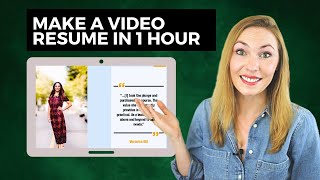
Madeline Mann walks through building a 30-90 second video resume using Invideo, no editing skills needed. Structure your script with an intro naming the company, your role, accomplishments with numbers, and a quote from someone else. Customize for each employer and let templates do the work.
Chapters
How do I create a video resume that helps me stand out in the job search when I may not be very good at video editing or speaking on camera? Hey everyone, this is self made Millennial. I'm Madeline Mann and today you'll learn how to build a video resume without having to talk on camera and without having editing skills. I'll show you how to put together the six parts of your script, how to edit it within a few hours and then send it to editing every company you apply to. To get more bleeding edge job search tips from a human resource professional who knows exactly what employers want. Make sure you subscribe to this channel and hit the bell to get new videos on Thursdays. As someone who has interviewed thousands of people, I believe I've only seen one candidate ever give a video resume and it was passed around the office. People were watching it. Simply put, this is a way to stand out. No one is doing this stuff stuff and stay to the end because I will show you a full video resume to inspire you. What is the purpose of having a video resume? It is to break up the monotony of the same old thing. I have employees who call me over and say hey Madeline, check out this candidate who created this video saying this song, wrote this letter. It's really anything that helps you to stand out among the pack. A video resume is absolutely not going to guarantee that you will get an interview but but it really helps you to stand out. So take that advantage. Make no mistake, you still need killer resume and I have a free masterclass to help you build that amazing standout resume. So I will link that in the comments and in the description. If there is a wait list, make sure you sign up to get on the next class. What are some of the attributes of a great video resume? Make it customized. Now this sounds like a huge, huge lift, but it actually isn't if you follow my steps. I recommend not outsourcing the video editing so that you can make these quick edits for different companies that you want to apply to. I'll show you a free tool to use. It's called Invideo, which is a lot like the video editing version of Canva where they have all these professional looking templates that you can use to make really sleek videos using their stock footage. So it ends up coming out looking like a really professional video but with all these of almost no skill involved. I have an affiliate link for Invideo so I will link it in the comments and description. Check that out and use the code as well. And thank you so much for supporting this channel. Also, avoid talking on camera if you're a little awkward or you don't have the right equipment. Trust me, I was awkward speaking on camera for a very long time. And if you don't believe me, I will link my bloopers in the comments and you'll see.
Thanks for going undercover with me. I need to go back into hiding now. So the approach I'm going to teach you relies a lot on text, music, stock footage so that you don't need to focus on being a superstar on camera. Alrighty then, let's walk through the six parts to your script. Then I will show you a sample script and then we'll walk through how to build out your video resume and I'll show you a completed version at the end. Let's dive in. So the six recommended sections to your script or are Introduction the type of professional you are, why you're passionate, interested, accomplishments, social proof and closing. If you have nothing to say for some of these, absolutely leave it out. I'm just trying to give you lots of options. Let's walk through an example script with these in action. But before we do, just a side note, make sure this video ends up being between 30 and 90 seconds. You go longer than 90 seconds and I'm telling you these people have stuff to do. They can't sit there watching a feature length film of your resume.
The first thing you'll want to do is to write your script. A nice concise script. So first you want to start off by introducing yourself. And the first thing you want to do is also say the name of the company that you're pursuing. You want them to know up top that you are giving them special attention. So this is really helpful. Then say what type of professional you are. I'm using Career Coach as an example here for for this. But this can be really whatever your profess is if you're a nurse or let's say you're not in that profession yet, you're still are that type of professional. So you could say I'm an up and coming nursing professional, something like that. So why are you passionate? So with this section, I think it's important to ideally if you want to customize it to each company, you could write about why are you passionate about that company. That's going to be really compelling. But I think a lot of you might want to do an approach that is a little bit more plug and play where you can use across lots of companies. So I showed you how to show that you are passionate about what you do. Now why this section is so important is because on your resume we don't really get to see why you're passionate. So then you'll want to give specific accomplishments. We're not doing buzzwords here. We're not saying, you know, collaborative, right? We're saying that we are getting results. So I listed three accomplishments here. Then it's really great if you can to have social proof. So if someone's written a recommendation or a letter of recommendation either like on LinkedIn profile or elsewhere, you could take a quote from that and put it in your video and finally have a closing of say you know the the company's name again and talk to you soon. So notice that it really just the intro and the outro are the only parts that are customized here. But I do encourage you to customize more. Let's get to building our video resume. I am here on Invideo and there's a lot of different ways to build your video resume on here. It's just so easy this platform. That's why I'm really recommending it. It's pretty foolproof. So you can choose the format that you want to use. I do recommend for this we should use a YouTube landscape. You can either use a lot of their pre made templates. They have even a template for a video resume. So you can just type that in and grab it. Then you can also do an article to video where you can basically paste in that script that we just said and it puts together for you. Or you can just start from a blank template and use all of their cool features. So before we jump into there, I just want to make sure that you are going to save so much time if you go over here first to branding presets and set your colors and set your typeface so that for every presentation, every video you create, it's going to have the right colors that match. What is your preference? There we go. That's more like it. And then hit save. So when you come back here you can search video resume and they do have some that are great video resumes. You can check them out here. But I'm going to do article to video because it is just so darn easy. We already have our script written so I will just go ahead and choose one of their templates and go for it. Then we will add our script here and paste it. And I typically like to uncheck this box Magic. We now have all of these different sentences ready to go and so now let's edit them further let's make this first one my face. And I recommend you do this as well, that you make your first one a picture of you. Like I said before, I'm not going to have you add your own video. So this is just great for them to see your face. Let's adjust it to be up here and then let's just change the colors since it is orange on orange. Orange. Let's maybe make it a light blue. Done. Great. So now let's add some video here so that we don't have to put ourselves on camera. So okay, so I typed in office and this is just a way to kind of get started. Find some good content here and we can watch a sample of it. And okay, this one looks pretty good. So I'm going to pull this in here and add it. So now here's what it looks like. Very cool. You can search for anything in this library. There are over 3 million pieces of media. You can also change the format like this. Let's make sure that we're just setting this all to look really good. And for my social proof, I'm going to change it to a quote. I'll add her photo. Looking great. And then I'll adjust. There she is. And then I'll move her over here and I will fit with transparent. And maybe I'll add a colored background.
Go layers. Get the background and that looks great.
Let's finish off with another image of ourselves to really put a face to the name. Then we'll edit. Let's go to scenes. Let's choose this one and then let's make this look a little bit better. Move this over transparent. The same thing you saw before.
Voila. Looking good. Then let's make sure that we choose our music. So let's look at our category. Say inspirational and look through. Try a few different ones. I quite like this one. So I'll choose this select and it's as simple as that. Alright, so let's preview this video.
We are all set. Let's check out the full video resume.
I'll also link a free digital download to help you answer the question. Tell me about yourself. Oh, this is the most common interview question. And you can use this worksheet to not only answer in the interview but also in your video resumes, in networking, in cover letters, all that stuff. So make sure to grab that in the comments and in the description. Thanks for watching. You've got this Wi Fi high five.
More from Clegg

AI Won't Tell You the Full Truth | Arthur Brooks + Simon Sinek | A Bit of Optimism Podcast

How To Make the Best Decision | Arthur Brooks and Simon Sinek | A Bit of Optimism


