Captifire (Landing Page Software) Review and Bonus - October 2015
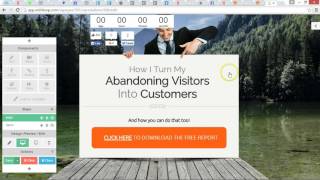
Danny Walsh reviews Captifire, landing page software by Wishloop. The tool helps you build landing pages and sales funnels with features designed to convert visitors into leads and customers.
Chapters
Hi guys, Danny Walsh here and I'm really excited to show you Captifier which is brand new software by the guys over at wishloop. If you're familiar with wishloop, you will know about engagifier. Engagifier was released earlier in the year and is a software system that allows you to build pop ups that you can put on any website. You can have pop ups appear at certain times depending on what people do, what action they take, gather loads of analytics, split, test and ultimately increase conversions. Do more, gather more leads, do more with your website. Great stuff. Fast forward to 2015 October captifier is here and it has brought forward all of the cool features, all of the drag and drop capability from Engagifier and combined all of that stuff into one of the most powerful landing page creation softwares that I have ever seen. So Captifier comes with literally hundreds of templates that you can customize yourself, but you may be thinking, well I've already got a landing page creator. I use WordPress or I use leadpages or I use Click Funnels. Well that's fine, I use all of that stuff. Captifier adds a different element and can be used in different places. For one, it's faster to actually create a landing page with captifier than any of the other four said systems, which is great for me because I like to have an idea and then turn that idea into a product and get that up online as quickly as possible. Sort of ready, fire, aim and then we will see once we've fired this thing where we need to aim it and tweak it and hopefully get some sales while people are still thinking how do they build their landing page? So captifier really quick, really effective. The drag and drop functionality means that you can actually put things anywhere on the page so you're not limited by columns and rows as you are in all of the other aforementioned builders. There are features in the Captivier system which also allow you to do really really cool interactive process based things. So for example, if you look at this template you can see that they're offering three T shirts to the visitor and the option I don't know if you can see lower down here the little buttons to actually choose which of the designs the visitor prefers. And once a visitor chooses one of the designs they will then be given another screen within the process which says you can pre order you can get a discount. Great choice. Thanks for your feedback, whatever you want to do. But straight away you can make your sales processes interactive and give people a different experience that a lot of websites are not actually doing. There's countdown timers, headlines, fonts, backgrounds, all manner of different elements that you can use in your designs. You can start from scratch, you can use the templates and if you just go down, you will see the multitude of different things that they've put together for you in the software. Guys at wishloop have worked really hard, invested loads of money, loads of time. I know these guys. I can see just how much has gone into this software. I'm a big fan of Engagifier and I think captifier is going to be something that will really take your marketing. Whether you're selling ebooks, clothing software, whether you're a coach, you want to recruit people into your list, into your customer network. Captifier will give you all of the tools you need to do the majority of online tasks. Capturing leads, serving the offer, following up, autoresponder. Everything you need is contained within this software. And I think for what you get, you're actually saving a tremendous amount of money. The infrastructure that this is built on is something that I think is a world apart and this has a lot of uses in any business. Great piece of software. Looking down different types of templates, you can see the quality of the graphics, you can see the thinking that's gone in behind this. And a lot of these elements you can actually apply to your own design. So you can see like the boardwalk at the bottom, the shadow elements. It is really is drag and drop. So if we jump into one of these templates just by clicking and the loader will open, as you can see. And once we've got inside this, this loader is finished. We get inside the actual editing software itself. Takes a few seconds to open. Once we're inside, we are able then to take a tour for start. But we know what to do. Everything looks, there are no rows, no boundaries, nothing. It really is drag and drop like you've never seen before. Now all of these elements can just be dragged in to the screen and we're probably going to mess this up a little bit, but you can see the flexibility of what we have. So we've got buttons for PayPal, you can make sales, we've got the social media buttons. You can have a raw of social media buttons. Get rid of that. There you go. So drop that in and. And you've got the different social media buttons. You can build up pages literally like lightning. You want video, just take the video in. There's a video ready for you. You can change your options in, in the Pane on the right hand side. So you just put the YouTube URL. If you want your video, you can delete things, you can clone things. Look, you press that and it will create a replica for you. You move things, put things wherever you want. Buttons are fully customizable, everything's movable. The background, you can see what it looks like on tablets, you can see what it looks like on mobile phones. And you can even use mobile specific builder to get rid of some of the things that you don't want to show on the mobile phone. For example, you might not want the social button to show on mobile phones, you might not want the countdown timer, but when they go back to the desktop view, those elements are still there. So you can customize and control what you want to happen depending on the device that people log in from. So we can create whole manner of landing pages, squeeze pages, different things in one easy to use interface. And I'm not giving you the full lowdown on the software, but you can see just by how quickly I am able to drag and drop things where your imagination could take you. Your own background image, your own PNG images, you know the backgrounds cut out, you've got your own social media stuff to add. You can drag, drop all this stuff anywhere you want and actually have pages online. In a matter of minutes. All of the text becomes editable, so you can double click, you get the full editing suite, so you can do bold, underline, italics, the usual what you would find in the word, sort of programs and platforms, font size, line height, etc, etc. All of this means that you can create landing pages in a flash. You are able to put things together to test ideas without spending money on developers, coders, designers. Everything you need is contained within the software. You want the video, you add the video, you want a form, you add a form, you want social media, you want buttons, you want text. You can even use geolocation to tell you where this cost, you know where this customer is actually coming from. So drag that into the right place you see there. So that will put, when the person sees this live, it will actually put their country flag based on their IP address which personalizes this from one page. When you think right, well we've got the first page ready, you can actually have steps. So you see how we've gone from an initial page. Once they press the button, it will then take them to step two for the email address. Things can change between the steps. So you're in a position to create as many steps as you want. Any kind of process or funnel that can go from asking a question, asking for an email address, asking or doing or creating a relationship with your customers from the very second they land on the page. The pages are high impact, very attractive, very easy to edit and change as you've just seen. You know, if you want to change some of the text, you just double click on it. Whatever you want to put new text, all text, save it, change it. There's shadow, there's border, all of the different things that you need. You can even have animations that will do cool little effects. When people land, you see a rubber band and shake and all this stuff just grabs people attention more than the standard sort of landing page that you might be used to. Now if your website's a bit stale or your landing page isn't converting, then for the sake of a few dollars, literally this product is coming out on a launch price that you will not believe for what you get. Check out look at the link under the video or around the video depending on where you see this today. But have a look, watch the sales video. Look at this with the eyes that not only is this exciting software, it's tried and tested because they use this software in Engagifier and that is very popular. Never had a problem with Wishloop software. It's not one of those things that you're going to pick up and find you need to submit a million support requests to get working. It will work straight from the box. You have my guarantee on that because I'm using it myself to build out landing pages, squeeze pages and sales funnels. You can have as many steps as you like. Step three, step four, step five, call them what you like and you can link this stuff up to your own domain names. So when the visitor visits they will not see any difference between your website, the wotc, Wish loop and all this stuff. They will be able to come on fully confident in you. They'll see that you've invested lots and lots of time and effort building your landing page and will be more inclined to buy lots of features. Brilliant piece of kit. I think it's something that you should look at. Check out the links around this video somewhere you'll find it. Go along. Check out the bonuses I've put together for you as well. I think this is a great piece of software that you can start using straight from the box and start generating more sales, more conversions, more opt ins, all of the things that you want. I will see you on the next video. This is Danny Walsh and I hope you enjoy using Captifier by wishloop.









