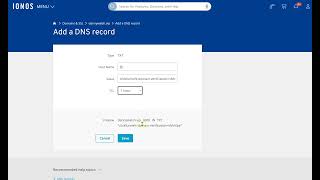
Danny Walsh shows how to validate your domain in ClickFunnels 2.0 by adding a DNS TXT record at your registrar, then clicking Validate Ownership to trigger automatic SSL setup. The whole process takes minutes.
Questions this video answers
TXT
@ (at symbol)
Ionos
One hour
Chapters
Hey, it's Danny Walsh. And as you know, we have used the domain Name setup in ClickFunnels 2.0 to easily add a domain. Now I've come back to the page and refreshed it and it's asking me to validate ownership of my domain. And that might scare you, right? And you're like, oh man, I don't know how to do that. It's dead simple. What you need to do is you click to expand this little table here and when you press that, it's going to show you what's called a DNS record. You need to put this in so that your domain name provider knows that you're authorizing this right Next. It's dead simple to do. So what you do is you go to wherever you've registered your domain, which in my case is a place called Ionos. You come into Ionos and you open up the DNS records of your domain. And what you're going to do is you're going to add a record, and in this case we're going to add a text record, because that's what if you look, ClickFunnels is asking you to do, right? It's a type is. Txt text. And what you're going to do is you're going to copy this thing here like that, go back to your record and you're going to put the horse name. This is like super simple, right? Host name is at. And if you use an symbol that just means apply this to everything in this domain, the value is that I don't even know what that means. I'm just going to leave it on one hour and press Save, right? That's, that's valid. Something's going to be disabled and something's going to be replaced, right? That sort of makes sense. Happy days. I might have to press Save at the bottom, which do. Just press that. Now, every domain provider is, is different, but if we go back to ClickFunnels now and press Validate Ownership, It's now setting up a secure socket layer SSL certificate for the domain. Clearly it's accepted that record, right? Because it's now moved on to the next step. Now if you go to your host and you buy an SSL certificate, which is the thing that puts the little padlock in the top left hand side so people know that your site is safe. If you go and buy one of these things, it could cost you $70 or $50 or $40, depending on what you're going to do. ClickFunnels is just giving you one for free, right? So you verify your DNS record and then clickfunnels just secures your site for you. Things will work from this point onwards, right? So it's like super simple way to get your domain name on the Internet. Connect it to your funnel hub and your funnels your membership area without cloud flare and without going crazy. The only little bit of technical stuff you had to do was type an AT symbol and paste a string of text. What it asked you to do. Any problems? Now you know how to do it. You can reach out to me, you can reach out to support, but it should work, right? And usually if you refresh these things, it'll kind of see where things are up to. Clearly it's still setting up. If we do need to come back, we will shoot another video. But look like in three minutes after you register your demand, you could be. You could be set up like this, verified your record and you could be live. It's Danny Walsh if you need me. You can find links around this video and happy to help. No problem at all. Let me know what the videos you want to see. But this is the second part of the domain setup in ClickFunnels 2.0 and it's easy, fast and awesome. Go and connect your domain, start building stuff. I'll see you on the next video. Bye bye.