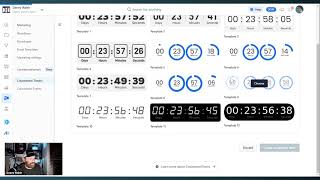
Danny Walsh demos ClickFunnels 2.0's new Countdown Funnels feature, which adds timers to create urgency in emails and sales pages. Competitors charge around $100 a month for similar tools. The timers integrate across emails, workflows, and funnels, and trigger actions when they expire.
Hey, it's Danny. And in this video I want to.
Show you one of the brand new features inside of ClickFunnels. Now this is Countdown funnels, right? These are your timers that you can use to create urgency and scarcity inside, not only your funnels, inside your emails as well.
And the way that this works means.
That when your customers see the email with the counter, the counter corresponds to the funnel. So when either hit zero or both hit zero, the customer's out of time.
And you can redirect or you could.
Just end the funnel. Does that sound like something awesome? And if you check this out, countdown timers. You see, you've got all of these different timers that you can use in your emails, right?
So you've got all these different styles.
All these different effects that you can use. And the timer will correspond to the funnel and the software on the market right now, which costs you upwards of a hundred dollars per month just to.
Use this one function.
And it's all inside of ClickFunnels 2.0, right? So you've got your timers, you can go, you can go and create a timer. You go inside of here and once this loads up and you'll see that you can set your timer, you can set your size, your labels, your background, when do you want it to expire? And you get this, this cord that you can put inside of your emails, right?
Kind of makes sense. And you can even set what it.
Looks like when it's expired. So if you set your timer up, you can then go and set up an event and your event is what actually ties in to your funnel. So you come into your events, you create a new event and you give it a name.
You can decide whether it's one time recurring or a combination of the two. All of the instructions, everything you need.
Are inside of ClickFunnels. Start time, start date, and you can say whether you want people to be able to re register after a certain period of time. Once you've got all of that stuff set up, you go over into funnels and you actually assign your timer to one of your funnels, right? So you go over into your, into your funnel and you come up into.
These three dots here and you press.
Manage event and you create a new event which then ties this funnel to the timer that you've just created. Does that sound like something you could use?
Because I know, as I said, there are softwares out there where people are already charging a hundred dollars a month.
Just to use that one feature. So if you're using Click Funnels, you.
Can get rid of that other feature and this is integrated across your emails.
Workflows, funnels, and you can trigger different actions once those timers expire.
Hopefully that's giving you some cool insight.
It's something that's available inside of ClickFunnels 2.0. It's Danny Walsh. I can't wait to see you on the next video.