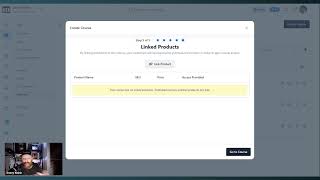
Danny Walsh demonstrates ClickFunnels 2.0’s new course wizard in a short walkthrough. He shows how the wizard guides users through course setup (selecting course type, title/description, theme, thumbnail), linking products to unlock content (membership levels), and using the revamped lesson/module editor with WYSIWYG controls and built-in media hosting (video, audio, images). He also highlights the assets/settings area and invites viewers to try ClickFunnels 2.0 or ask for help.
Chapters
He it's Danny Walsh. And in this video I want to show you inside of ClickFunnels 2.0 at the new course wizard. So if you check this out, right, so now you select the type of course that you want. So in a basic course we go to next and this little wizard is going to move you through your course setup, right? So you can put what you want in here, test course, you put your description, you get the URL, you go to the next step, and then in here you can choose the theme and the thumbnail image and get all that set up. You go to the next step inside of here, you're then going to see this thing create your course. And once you get to the next step at the end, you're able then to link your products direct from your product section and make sure that you fully control the product that unlocks the the products in the course, right? So if you're selling a membership, you've got different levels of membership, you would link those products here when people buy them, it unlocks the content in the course. And once you've done all that, you decided whether it's free or it's paid, you go through your course and inside of here, you can then have all of your modules, your lessons, you can go in there, you can edit all of this stuff and the interface has changed completely. Dead easy to do. You can choose the media, you got a thumbnail, you want video, you want audio, all hosted inside the click funnels, the page editor lot smoother, a lot nicer, a lot easier to use. You can add your description, you can choose which parent module. So module two might be the parent for this lesson, right? You can set the title for your lesson and everything is controlled in this brand new easy to use interface with this awesome little wizard that walks you through, you've got some advanced stuff as well. You can change the template, you can change the URL for the lesson, and most importantly, you can host your video, your images and your audio straight inside of ClickFunnels. And it's all just easy to add to your lessons. If you want something to appear in this lesson one, just add your section, add your rows, add your column usual, what you see is what you get. You add your headline, all that, there's no messing around with all these themes and things down the left hand side, you just go in there, you create what you want dead easy, you save the changes and, and you've got a course published in record time. All of this ties in with your. If you go into settings and showing some other stuff there, right? You go into settings, you've got your assets and inside of assets you can add all of your images and all the rest of the cool stuff that you want. Right? So look courses has been changed, it's been redeveloped. This is brand new features inside of ClickFunnels 2.0. One of the first to see these. Look around the video, there's a link, you can go and get your ClickFunnels 2.0 trial. You can sign up or you can log into your account and you can start using this stuff straight away. If you need any help with this stuff, give us a shout. We're here to help. I want you to be successful with ClickFunnels. There's so many new features. I'm gonna go and do another video, have all these ready and you can go and check all this stuff out and you can go and play and build it in your business and and make a big bunch of impact on your customers lives. It's Danny. I'll see you on the next video. Bye bye.