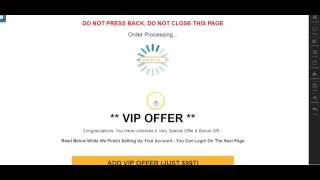
YouTube tutorial (spoken transcript) where Danny Walsh demonstrates a ClickFunnels trick: use a hidden/coloured timer on an OTO (one-time-offer) or other page to create an “order processing” pause (e.g., 15 seconds) before showing the thank-you/offer content or redirecting. He explains it requires no custom code, shows how to hide the timer by matching colors, suggests GIFs/animations for a processing spinner, and outlines practical uses (processing effect, reveal OTO, or redirect after a short delay).
Questions this video answers
ClickFunnels
15 seconds
An OTO (one-time-offer) template; alternatively any sales/misc template will work
No — he describes a no-coding method using the built-in timer and show/hide rules.
Chapters
Hi guys, it's Danny. And in this video I want to show you very quickly something that I've been working on myself for a while and that somebody else has actually flagged up in the clickfunnels group recently. This is a little clickfunnels twist that does help conversions and I've no doubt that it will help, you know, everybody who sees this video because it's interesting, not only with this variation of what I'm going to show you, but with the other possibilities that literally are endless of how you might be able to use this. So I've been thinking about this for a while and I've been experiencing, experimenting with it and I noticed this post from Monica. Hello, funnel hackers. Can somebody tell me if it's possible to do the following after someone clicks the submit button on an application or opt in form, is there a way for the thank you page response to be delayed so that when they land there on the Congratulations page or whatever, it delays as though it has taken some time to process the application? Now that's something I've been thinking of and obviously Monica's reminding me of this in this status, but I noticed when Jamie Smith has appeared on the status that he's made the comment here. You could do it with, with or without custom JavaScript coding. But the one thing that sort of reminded me and rejog this in my memory was the point about the hidden countdown timer. And clearly there's, you know, other people who've thought, oh my God, you know, a hidden countdown timer. But what and how could you use this to achieve the results that Monica wanted? So what we want to do is hit the payment button or the submit button and then have a moment of pause where it kind of says your order is being processed, then arrive at the thank you page. So I've been playing around and messing with possibilities of how this could be done. And what I've looked at is a very simple, very, very simple, no coding, just using the hidden timer as Jamie suggested, and a few other bits and pieces in clickfunnels. But I've come up with this. So after they press the button, you get order processing screen. And this in this case is set for 15 seconds. And after 15 seconds it will redirect. However, I've thought, well, what page template would we use? And did you see what we just done? Let me refresh it and start the process again. So this is 15 seconds. So I'm thinking, what page template should I use to achieve this in clickfunnels? And I Thought, well, what naturally comes after an order, so submit button and before an order confirmation page. And that would be a one time offer. So using the hidden timer, we are able to make a hidden one time offer appear after the person is convinced that they have completed the upsells and they're now going to get access to the product. And I think it kind of disarms this notion of there are too many upsells and people writing in groups. What's with all the upsells? So two or three upsells you think your order's processing and then it turns around and says you have been selected for a VIP offer. Now that I think is quite powerful. And what I want to do is give you the template for this OTO page because it slots in nicely. You don't necessarily have to use the OTO and make the offer appear, you can just make the time appear itself, redirect to the next page. So you literally just get the processing effect. But I think by having the RTO page on a template ready, you can choose whether to deploy the offer or not. So quite an interesting concept. And people are sat here now thinking, great, I'm getting access to the product, I hope my credit card goes through. And then you kind of go, you have been specially selected for something that's a bit of a disconnect and something which will make people pay attention. And if there's a video on there, you've got the opportunity to keep them in the funnel after the point where they believe the order is processing. Or indeed don't bother with the offer and just have the little cog going around and redirect them to the page that you choose. But either way, yes, it can be done and it takes two minutes. So create. I use the OTO template. You can use any, you know, use one of the miscellaneous ones, use a sales page template. Obviously there's benefit of the OTO because you can use the offer, but this is how you do it. So we'll edit the page and it's really quite simple. You see all the elements on the one page and you basically use a timer. So you'll notice the processing thing is forever spinning. It's just a GIF image or GIF image, depends how you say it, gif. And it's an animated image. So if you do, you know, a Google search or search in your stock images, you will be presented with hundreds, if not thousands of these animated GIFs which will allow you to download them, buy them, whatever you need to do, and then upload this as you would a normal image, straight into clickfunnels. So there you go. And it even spins in the image repository or library. So all I've done here is created a section and it's green section at the top. And in there I've got a headline which is red. Do not press back. Do not close the page. You can further add to that or alter that as well. You may be charged twice. That works quite well. So there's different things you can obviously use in your headlines. Order processing is obviously the key, and then the GIF image and the sort of progress bars and different kinds of animations. Choose what you want. Please don't use this one. Beneath that, you'll see now we've got another element that doesn't actually appear. And if you click that, you'll realize that this is a timer. And all you need to do to make it invisible is change the color to match the color of the page. In this case it's white, but if we make that black, you'll see there is actually a timer, and it is an evergreen timer. And what we have done is normally in the timer, it allows you to redirect to your URL, but you've also got the show and hide elements. So when the 15 seconds or 10 seconds or a minute or whatever you want have completed, and another thing I've just thought of is, well, look, your order is processing. Please watch this short video. So the thing spins around for the length of the video and at that point redirect so you have a chance to introduce your service or welcome people on board. And if you have done the cloudflare connection between a domain and Cloudflare, you'll realize when the first time you ever set that up and the first time you ever put a domain in, a little video appears. And the guy tells you what Cloudflare is and why it's great for your website. And he kind of says, well, you know, the scheduler is finishing up now. Please press the green button below. You could use this in that kind of context as well. So there's all sorts of different things you can do, but just for the general order processing, set it for three seconds, five seconds, seven seconds, whatever you show, and hide your elements. So we are going to, when the 15 seconds is completed, hide these elements, this, this, this, this and this, the timer, the image, the headline, and, and the overarching cell as well. And we are then going to show these, which is basically everything else on the page that you don't want to hide. And I left the footer alone, so that appears whether you're processing or not. So at the bottom, obviously we've got the offer and all of this will show when the timer is zero, but clearly when they first land on the page, it only shows the timer for the allotted period of time. And because we've made that white to match the page and there's not. If you run the mouse over it, look, you can actually still see it but nobody's really going to do that. It's too fast and it's kind of like what they would expect at that point. So it's a tricky way of presenting a different offer or literally just having this for two or three seconds and then allowing the redirect to send them to the next step in the funnel. So really simple, I'll give the share link, I'll give this video, everything else to go with it, modify it, use it, do as you please and I'll see you on the next video. It's done it. Bye bye.