E Coverly Review and Demo | Best Bonuses
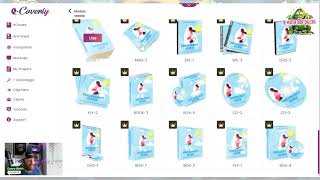
A short promotional review and walkthrough by Danny Walsh showcasing E Coverly, a software product by Adil Chowdhury for creating animated e-covers, mockups, and group shots. The video/demo highlights the template library, in-app editor, animated exports (large/medium/small ZIPs), mockups, a group-shot builder, One-Click Magic templates, agency/upsell options, and the affiliate launch (50% commission, limited-time launch pricing).
Chapters
Hey, it's Danny. And in this video I want to present to you something which is totally amazing. And this is E Coverly by my friend Adil Chowdhury who has been making moves on the Internet for as long as I can remember. Now Adil has put together some amazing software over the years and is renowned for working in this E Cover space. Can you see the difference between your traditional boring E covers and the ones on the screen? Adil and his team of cracked this equation and they've made something so cool that I can't wait to show you. And I can't wait for you to get this and use this in your business. But here's the thing. There's only a limited time to get in at the launch price, right? So this is going to be an affiliate product launch and this launch is going to show you exactly what you've been missing in your E Commerce cover design. So this is inside of E Coverly and as you can see you move across the bottom. Your E covers are now animated and this animation is going to grab the attention of your visitors. Like what? How is this even possible? And make your products look amazing. Now you can buy this thing and then you can review this thing and you can also sign up as an affiliate and you can go and sell this thing like if you're quick. Right? But we've got early access and we're bringing this to you first. Right? And you're going to use this. I use Pixel Studio FX which is one of Adil's products from years ago, right. And Pixel Studio effects are still used to this day to do all of my covers and it must have saved me thousands, if not tens of thousands in designer fees. This thing, E Coverley is like the next level of that. Let's have a look what you're going to get. Right? So, so when you come into ecoverly, you're going to get a big bunch of templates, mock ups, group shots and more. Look how awesome these things are professionally designed so you don't have to mess around with Vectors or Illustrator or Photoshop or any of this crazy stuff. You just need to come in here, drop your images in or use the amazing templates that Adil and his team have already done. Now these are ready to go the download as images. They're dead easy to use. You unzip them, you add them to your funnels, you add them to your website, wherever you need to put them and their work straight out of the box. I've been messing with this already and you can see, for example, weight loss, woman's health. These are just 2D covers, but when you get into these animated covers, you can see the magic really start to happen. Now, you'll notice some of these have got the pro banner on. There are upgrades. I'm in the professional mode. You will go through a funnel which will offer you all the different editions, Right. I would recommend you just go in there and get everything that you can. You might not need some of it, but I. I think it's all amazing. And if you look down the list on the side, you can see the levels that I've actually unlocked, right? So I've got all of this crazy stuff going on. And when you go through the process, you're also going to see the training and more that a deal has put aside for you. So the first thing you need to do, come into your software and create your E cover, either animated or you can even import your own images as well. So if we want to do an animated E cover, we can go in there and we can choose from a big bunch of topics, right? So self help or parenting. Or for example, let's look at parenting, right? Then click on this and you've got some pregnancy guide, right? And it looks amazing. You click on whichever one you want and you come through and then you choose the actual style. You see how awesome this is? Like, ah. So I could have like the iPhone mockup or the. The Android mockup or the. I could have the big screen or a combination of these things. And then you could lay them all out in your own group shot as well, which is like, fascinating. You can have books or you could have folders or you like CDs. I don't know if anybody still uses CDs, but they've got some real good impact when you use them online. You'd have thin books or thick books or different angles. You can have laptops and man, all these different things. And it's up to you what you choose, right? You can have TVs, you can just have a simple guide. Let's just do a simple guide. And when you load this, you go into this sort of like futuristic editor. Listen. That's kind of cool, right? And you see there a deal. Childry is the man. You just click on any of this text just like you're in clickfunnels, right? You go on there and you put, hey, this is Danny Walsh. You press apply and it will change that. You can reposition that and you can zoom in and out as you can zoom to Size. So, Danny Walsh. I'm gonna put Pregnancy guide. And I'm just going to leave that, right? That looks amazing. And if you want to add your own images, you can. Or background, you can. Or you can reset the thing if you get it wrong. There's a tutorial in there. There's clip art and there's shapes and there's text and all a big bunch of stuff, right? So you can go in there and you can literally change this to whatever you want. You can change the arrangements. So you've got layers, front, back, you know, in between. So you can put things on side of. On top of each other. You change the angle, you can change the width, you can change the height. You do this in pixels. You can configure this to whatever you need, can change the colors and your transparency and. And your positioning and more. But all you need to do then is go over to this generate button. You hit generate, you press proceed, and what's going to happen is it's literally then going to give you your design. I didn't generate it. It just takes a little minute, right? It's just going to show you the original one, gives you your design. You hit download, and what it's going to do is just going to pop this thing off as a. As a zip file and you go in there, you unzip it, you get three variants, you get the large, medium and the small to suit different websites, different applications. You go out there, you put it on social media, you put it on your funnel, put it on your website. It's going to look amazing. And like I said, you can actually make these group shots as well, right? So say you make a bunch of these things. What you can do is go over to group shots, and inside of group shots, you would need to make the corresponding image for each of these. But imagine you've got a big product, maybe you're doing your mifky offer, right, for the. For the fish pin or the linchpin. So you can come in here and you can create a new look at this, right? You select a theme or start from scratch. You're going to go inside of here and what it's going to do is it's going to let you choose your theme. You come inside, you choose your theme, and then you come back and you start then to build out your box shot. And your box shot that you've actually created will look just like you see on the screen, right? So you have to make the individual images so they're all different. Obviously, it's not going to be the same thing, but when you finished with this, you're going to have the most cool animated myth keys, product descriptions, bonus pages. Like, you can put like the other products that you're selling into these templates and make them all animated. And the vendor of the products could be like, how did you even do that? This is something amazing and something that you really need to get your hands on. You can see down the side. We've also got mockups, which is like more of a photograph type mock up. These are not animated, but this is like a cool way that you just go and put your like, image into a billboard or into a laptop or into a sign or like, I don't know, all these different things, right? Posters on the walls, on the side of buildings, the, the old, like, bus stop where the, the bus is going to stop. Pick people up. You ever wanted to advertise in a bookshop. Bus stop. Now you can write your bookshop. I don't know, there's billboards and a big bunch of stuff on there, right? You can go in there, you can do that. All of your projects are saved as well. So you can see it here. I've got my animated E covers that I've just created. I've got some fish pin ones that I've been using for my own funnels as a demo. And these things are amazing, right? So you can go in there and you can edit these things. You download them again, you can check out like the frames. So you can do your own animations as well. You can clone these and you can turn them into new models as well, which means you can easily make those group shots. You've also got this thing called One Click Magic. And One Click Magic is something that is you need to choose your project first, right? So you choose your project and then from there you're going to get these One Click Magic, like prime posters and downloads and things that you can use inside you. Like these things are amazing, right? They're all designed by designers and this gives you a lot of power in your business. Again, you've got a big bunch of designs to choose from. And this is just like the start. You've got the tutorials, you've got the members area and also looking at this, you've got ways to actually integrate your clients. And it's also, if you buy this, you can actually get the upsell shows you how to actually create an agency selling your covers. You've got to buy the upsell, but you could add your client to this you come inside, you add your client and you put the details in there, the, the name, the email, and then you actually share the links with your clients. How much you're going to charge. You could be the first person on Fiverr selling these things. And people are going to spend, I don't know what's one of those things worth, right? It's worth at least a hundred dollars and they're going to walk you through every single thing you need to do to become your own agency selling animated covers. And I'm like, we need to do that in Monster Academy. So we're probably going to do that. So you've got a choice. You can buy the software at the launch price, get all of this stuff and the agency and more, or you can just buy them from us for like 100 a pop. The software, you're not going to pay that much for the basic and probably for the next bit that you need with all those templates, right? So if you want a great deal, you want the templates a great deal from deal. This is the daddy of Internet marketing. I've known this guy for years. He's amazing. You may see him trolling in groups near you, just having fun with people, but he's very well respected. He's got an amazing support team. He's going to look after you. And this launch is going to crush, right? These guys are going to come in and make a million dollars in a week. So if you want to know how to make a million dollars in a week or something similar, you need to copy what these guys are doing. And if you look here as an affiliate, you can go out there and you can make 50% on every sale just by signing up and then coming through to this page. Join the affiliate program. Use our link if you like, which is also below the video. And you've got the option to sell this to your customers or just keep it for yourself and sell them the products as an agency. Whichever way you cut it. This is amazing. I can't wait for you to get your hands on it. It's E cover it by a deal Chargery and these amazing team. My name is Danny Walsh from Monster Marketing Academy. I'll see you on the next video. It's been amazing. Bye bye. What.









