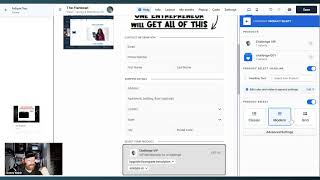
Danny Walsh walks through ClickFunnels 2.0's new built-in checkout form. You can add products, create multiple order bumps with quantities or checkboxes, preview multi-step flows, and set up one-click upsells and downsells without leaving the funnel editor.
Chapters
Hey, it's Danny Walsh. In this video, I want to show you something very, very cool, right? So you go inside of one of your funnels and you edit your page. Some new stuff going on inside the editor, right? So it's going to open up this, this page and inside of here what we're going to do is add a new element. And you'll notice if you go to order, we've now got a new checkout form inside of 2.0. And the old form is called legacy, right? So if you go into your account right now, you see this, you like, ah, in the freak out, you go and add your new checkout form, right? Now what I'll do is I'll just widen this up. You can see inside of here, you can configure your products right inside of the funnel editor. So you just go in here, you choose your products. What you're going to have you add a product and in your products, whatever it is, you choose one of your products. So we're going, hey, we'll get this product and then you might want an order bump so we can go and get the same products again. We already selected choose this one. So this one will be our order bump. So we've got our products in there, 47 and 97. And now you can say, well, actually I want multiple products with quantity so people can choose more than one. Or we can have check boxes so they can choose different, right? So you can add more products to your checkout. That exciting. Like, ah, so we're gonna have this product to a checkout now. So we've got like, they can add both of those on the bump. Or if you want more than one bump with check boxes or quantities, you can do that as well. So it's like, hey, now I could have three bumps, Three bumps and two products and that like insane. So he's going to add more products and our form will just handle that for us, right? So if you want, hey, we're going to have this product and we're going to make this a bump as well. So we've got multiple bumps, right? Multiple with quantity or multiple with checkbox. And we update, right? Everything's been saved. So we look back in the form now we've got the usual shipping and payment. We can go inside of here. You can make this three step. See how cool this is? And what we can do is we can then change the styles of this, right? So what I've done is I've actually renamed one of my products as a bump offer Right. So I want to make sure that this looks right to you. So we're going to go up in here because the VIP bump upper is kind of needs to be the bump and the challenge VIP needs to be up here. Right. So if we go and change that round now we're in the right order. See how cool that is? Now it's instant. You can just see it on the screen. So if you want a Challenge vip, you can also add challenge or one as well. So you've got a choice of adding both of those things. So this might be, I don't know, cream or you know, supplement or, or whatever kind of product you're selling, right? T shirts, whatever it is, right. Choose that stuff. People going to go next, right? So when they go next in this two or three step form, what you're able to do is see lots of different themes as well. So you can change up all the themes. So you might want this theme, right. Kind of make sense. So you can go in here and you can then not only see that, you can preview step two. So this is what it looks like on step two, right. So now they're going to put the contact details in on step one and they're going to choose the product and then they're going to go down there and they do the book. But this is like step one, general style checkout steps. Oh man, you're going to change this arrows and scale all the these different things. Look at the, the bumps and yellow. You can choose quantities for your bumps, right. This is like the coolest thing ever. And it's so customizable that you're gonna have so much fun with this. So you can preview this as a guest or you can do it as an upgrade downgrade. So it's just a one click upsell. They say upgrade downgrade, that's not an upsell and down sell. By the way, you've got the oto. That's a one time offer. You can pre can check these out and work with these in lots and lots of different ways. And you know, now that you've got everything you ever needed in your order form to make your checkout forms fully customizable without the need for any third party add ons. Right. And look, I might be confusing you here a little bit because there's so many different options. What I want you to do is actually go into your clickfunnels account right now and start using this so you can change the steps. How you get stuck, you just go through the little arrows at the Top you can check you contact form. You can change the things, you can hide things, you can add things, right? You can change the headline. You see like it's fully customizable product feed. You can have the modern. See how cool that is? You can have the grid. So there's multiple products in. In like the same thing. You can have the classic. It's like, is that like exciting? And you can change the language. You could choose which products you want. You can highlight one product, right? You see how like how cool that is. You've like put the best selling tag on it. Normally you have to get third party called to do that. It's like, oh, that's the best seller. People are going to choose the best seller. Ah, this is insane. And you can change the headlines, you can move this stuff, you can change this around and you're able to go through your payment methods, how you're going to do this. You can change the text and the size and all the rest of it. The order bumps, what do they look like? The arrow style, the animation. Animation, no animation on your order bumps. Ah, it's like insane. This is going to improve conversions like never before, right? So I don't even know what this looks like, but it's amazing. You can have the modern style and the classic styler. You can go, you can view all this stuff and you can ch. Change it around. So we have a look at the third step. Select your product. Boom, boom, boom, boom, boom. Here. Preview step two. So this one is. You put your details in preview step three. This is the bump, right? So if we go down here now to order bumps and we change this to elevate. See how the, the arrows. If you change this to breathe. See how the arrows are flashing? You change this to wooble. Is it wobble? Wow. The arrows are. This is like gonna increase conversions like you wouldn't believe. And look, you can have all these different arrows as well. You'd have double arrows like dude, bump image. You can even have the image. You didn't even have to pay extra. This one thing alone inside the clickfunnels is like the coolest thing ever. You've got it right now inside of ClickFunnels 2.0. Check it out. Get the link at the download. I go do it once, pay, spend your money, cancel everything else. Because Russell and Todd have literally changed the game again. And people who thought that clickfunnels was dead in the water or Clickfunnels is going away now or Clickfunnels is like boogie. You need to be in ClickFunnels 2.0 because your sales and conversions are going to be plummeting because lots and lots of funnel hackers right now are going to be out there using this and taking your customers. So it's what. What do you want to do? You want to stay with the inferior competitor who thinks that they're the best, or do you want to come to the best category? King click funnels 2.0. You need to go do it. You need to get in there and you need to do it right now. It's Danny. I'll see you on the next video. Bye. Bye.