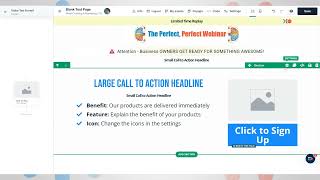
Short tutorial video (YouTube) by Danny Walsh demonstrating how to keep key page content "above the fold" when building funnels in ClickFunnels 2.0. Covers removing top/bottom padding and margins on outer/inner containers, using negative image margins for overlapping image effects, and practical guidance on balancing white space so critical elements (headline, bullets, image, button) appear without scrolling.
Chapters
Hey, It's Danny from ClickFunnels Community Outreach Team. I want to carry on with our little funnel hack that we've been working on. If we switch back into ClickFunnels 2.0, what I want to show you is how to keep all of your information above the fold. And the fold kind of comes back from newspaper printing, right? Back in the day, you'd have a fold in the newspaper, and when people got older, this thing, you'd only see what was on that first bit before you unfolded it. It kind of makes sense. So it's important that you have all of the key information, just like Russell does above that fold before. Before people scroll. Right. I'm gonna do these super fast. So switch back into ClickFunnels 2.0, and what we can start to do is look at our outer sections and make sure that we've got rid of the padding on the top and the bottom. We can also do the same in our rolls and. And get rid of the padding at the top of the bottom. So now things start to close up in our screen. Does that kind of make sense? So, again, you can do this with elements. You can make sure that you get rid of any margin above them, but you can also go into the outer containers and into the inner containers, which are blue and green, to make it kind of easy. And you can get rid of all of this padding. So. So that things move up. You do the same with your bar that we've just done. Now, don't do this for everything. Some things you do need a little bit of white space, but other things, you might want to close up that gap. Does that kind of make sense? You want to get rid of this gap so that everything stays above the fold. So when you click on a section or a row or an element, you have got these margins and padding at the top and the bottom, and. And you can close those up. Now, here's a little neat trick. If you actually go to an image element, you can make the margin negative. So what will happen is the image will actually stick up. Now, imagine you get yourself a picture of yourself on a green screen or a white background, and you remove that back background. In some, like, Photoshop or Canva or whatever app, you could actually be stood above the headline. That kind of makes sense. So when. When you're looking at this page, you've got an awesome effect on the page. And if you look, everything is now above the fold, and you've got room to put your bullet points in there to put your bigger headline, to put your image and to have your button all above the fold. So when people land on your page, everything's there, they can see what it is, they can read all the information, and they can take action without having to scroll. Is that pretty cool? Get into ClickFunnels 2.0. You can do this stuff in seconds. It's Danny Walsh. I will see you on the next video.