using the Facebook Content Engagement Custom Audiences | Danny Walsh
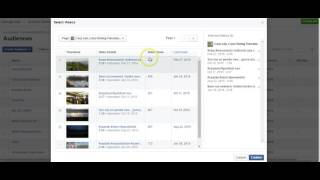
Danny Walsh walks through Facebook's custom audience tool for video viewers, showing how to target people who watched your videos for at least 3 seconds up to 95 percent. A $5 video ad generated 1,081 views, then you can remarket to those viewers with offers using a 180-day lookback window.
Questions this video answers
People who viewed at least 3 seconds, 10 seconds, 25% (quarter), 50% (half), 75% (three quarters), or 95% (almost all) of the video.
A $5 video ad that produced 1,081 video views (example showing very low cost per view).
Up to about 30 minutes (per the demo).
180 days (the demo sets the audience to 180).
Chapters
Hi guys, it's Danny here. I just want to introduce a new feature within Facebook. This is the inside of one of my many ads accounts. I do some niche stuff in this and I use it for testing. So it's not by any means a client account or something where we run ads on a day to day basis, but you can see I run stuff and get pretty good results and I sell stuff. This is like a personal account. But one of the features that's been developed by Facebook that's just literally appeared in this dashboard, as it were, is this thing. So if you go to Tools at the top and press audiences, you will hopefully be aware that in Facebook you can create an audience of people who visit your pages or visit certain pages. So we can put the Facebook pixel onto our websites or funnels or pages, whatever. And when people land on those pages, Facebook will cross match that person for a Facebook account. And if it finds that they are logged into Facebook, it will record the user ID into a custom audience. And there's many different ways you can set your custom audiences up. But until now, you've never actually really been able to target the content that you've already shared. And that is really quite powerful. So here you can see on here, there's some audiences that are big, some audiences that are small. But for example, this audience of 500 people, this is on one of our fishing websites. It's quite a low traffic website, but it's quite an expensive product and it's a physical event. And you can see there that 500 unique Facebook accounts have visited that page. So this is a custom audience. Yeah. So we can filter this and we can see that we've got these custom audiences. Some of them are big, 3000 1600. Some of them are small and somewhat too small. But there is, you know, a lot more to it. And if I just sort of show you quickly, I. You get the idea. There's a ton of accounts I'm working in. These numbers can grow quite large depending on the amount of traffic that you're running. And you can retarget people from different pages of your website. So that's the way we've kind of done things. We put the pixel on. We will build up a custom audience. For example, this one is 200 people who've entered their email into a metal detective niche site. This one is four and a half thousand people who visited one of our raffle Fishing. Raffle sites. You know, I like fishing. This one here is a brand new one that I've just created today. And this is what I want to focus on. So you'll notice here, customer list, customer list. This one is engagement from videos. And then you've got the website, website, website, like I described. But engagement from videos. Think about that for a second. Facebook video is very, very powerful. We can share videos, and we can run ads on videos, and we can actually get very, very good prices per engagement on our video. So if we just flick back to the ads manager, I'll just give you an example of this. I've got a little ad running at the moment just on. Just on a video. So hopefully this will load a second. And when it does, you should hopefully be able to see that we are getting, I think, 0.04 cents per engagement, which is very, very cheap. So you can put videos onto Facebook and put little ads on them and get tons and tons and tons of people clicking through for very, very cheap. So you can see there, there's a per video view of 0.005 or 0.005, depends how you want to say it. The point is, for $5, which is this ad, we had 1081 video views, and that's been recently completed. I put that on for a friend of mine who does the socials that we've just mentioned, the fishing socials. And the idea behind boosting that, or just giving it a little bit of a $5 push was to get more people in that niche in that community to engage with the content on the page. Right? So 1081 video views. Right? Great stuff. But until now, Facebook's not actually allowed you to target these people directly. But with the invent of this new custom audience, what we just looked at, you can now do that. And this is to answer a question I've just actually answered in a Facebook group, you can do this historically as well. So spent five minutes just explaining a bit of theory about that. Let's actually dive in and see how this thing works. So you can create an audience. And if you're familiar with this stuff, you will know that you can do custom audiences. Then you can broaden these by creating a lookalike audience, or you can look at your own saved audiences, which are a combination of different interests and demographics and things like that. But for this demo, we press custom audience. Normally, you only have three options on this page, but now you notice we've got this engagement on Facebook thing. So if we press this, you will see you open up little window as normal, and then in here, look at this. Right? So it's giving you options here. People who viewed at least 3 seconds of your video, 10 seconds of your video, or it kind of flips it round. People who viewed at least a quarter, a half, you know, three quarters or almost all of the video. So subsequently, if somebody watches your entire video, the chances are that that content was engaging and that content kept that person watching for the almost the full duration or longer. So those people are obviously more engaged with your content. People who viewed it for three seconds, chances are that they've just skipped past it in the, in the timeline. So if you was to, for example, set this up at that the higher end, people who viewed at least 95% of your video, it then gives you the option to choose the videos. So you press the videos and you will notice then that you get all of the pages across all of the accounts. Now I manage client accounts and different things, so I don't want to dwell on this too much. I've got all sorts of different accounts in here for all sorts of different clients. But if we just focus, for example, just quickly on one of the fishing pages that I run, so we'll select the cart blab one, because I know there's a few videos on there, you'll see that all the videos come up and look, this, this was February, October 2015. Some of these are going back 2015. On the other pages, when I've looked, I've actually got videos that go back longer than this. So ultimately these are little videos that we've posted to the page over the years that have had engagement. So you can see 365 views, 455 views. And the idea being that you can cherry pick which videos you want to add to your audience. And ultimately these people who have viewed the video will end up in this audience and then you can run a direct ad to them. So think about the content that you've got on your page and think about the different types of videos that you run. If you're running short, viral 10 second videos, part of the intent behind that is to get people to watch them time and time again by literally replay, replay, replay. That's, that's why they saw short. So one person might watch that three or four times, have a good laugh, and that's what puts the views up. So viral marketers are reliant on people watching it multiple times, still getting tremendous amounts of views, will still be able to glean a good audience. But if you're doing more structured demonstration type videos, videos like this, actually informative, we're going on for sort of eight and a half minutes. Now, just explaining this. So. So if I was to use the videos like this across my accounts, where we've got a longer duration and better content, the chances are of the people who've actually watched for eight, nine minutes, chances are they're very engaged with that content. So if I remarket them with another offer, that kind of takes them along the value ladder down the funnel, however you want to describe this, there's a good chance that they will respond. So regardless what your videos are, you can come in here, you can select as many as you want, you can actually switch pages. So you've got the opportunity to switch through the different pages that you actually own. And in doing that, you can create quite an interesting custom audience. So you see, we did the cart blab one there. Now I'll just pick another one. This is a client one, but it's still in the fishing niche. And again, in this case, no videos have recently been found. Maybe not a good example. But ultimately the point is by choosing carefully from your list of pages. So where's my fishing magazine? Let's bring up the fishing magazine. So see, look, this one had 16,000 views. So clearly there's a big number there. So if I was to stick that one into my audience as well, and then we just confirm this, we give it, we can actually look at that. We've made sure it's 180 there. So it takes it back historically like custom audiences would do. And then I'll just call this carp test. So we save this. Facebook does its thing. It takes a little while to go out there and actually cross match the account. So you can see it take up to 30 minutes for the audience to be ready for use. So you press next. Ultimately you've got the choice of being able to create an ad or expand the audience through a lookalike. Great, done. That will then be dropped into your audience list. Carp Test 2 is there, but obviously it's still saying it's too small. But when we refresh this, hopefully it will start to process the numbers and we come back in a little while and we'll see where we're up to. So that in a nutshell is the crux of it. That's what you are able to do. You can now target or retarget people who have watched your videos. And because you can get video views for such a low amount, I. E. 0.00, even.001, you know, this is possible using Facebook. So for a small amount of spend a few dollars, you can get a tremendous amount of people to watch a video and, and then very cleverly through this system, remarket them with appropriate offers. The video could be a funny viral thing linked to the niche, but when they see the retargeting ad that could be a product linked to the niche, you see so lots of opportunities to get stuck in, to figure this out, to roll it out across your projects. I hope this has been helpful. It's Danny Walsh and I will see you on the next video. Thanks very much.









