video marketing blaster - video marketing blaster pro review for youtube video marketing
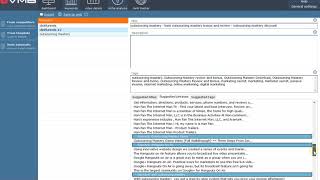
Danny Walsh presents a hands-on review and walkthrough of Video Marketing Blaster Pro, a desktop/web tool that pulls competitors’ YouTube/Google titles, descriptions, tags and keyword data to help users craft optimized video metadata and improve rankings. He demonstrates searching a keyword, generating suggested titles/phrases/tags, assembling descriptions, and using niche-analysis and rank-tracking features; he positions the tool as a time-saving shortcut for creators who want to outrank competitors and drive sales via YouTube traffic.
Chapters
Hey, it's Danny Walsh. And in this video, I would like to introduce to you Video Marketing Blaster Pro. Now, this software is something that will help you to rank your videos much higher on YouTube and Google by finding out what all of the competitors are using for their keywords, titles, and description. So that's pretty cool, right? You're able to spy ethically on, on all of your competition and make your own titles, descriptions and keywords using those that are Highest ranking on YouTube and Google. So, for example, if we wanted to look at something in any niche, any sort of category imaginable, we can just search that keyword. And this system, this software, Video Marketing Blaster Pro, will pull the information together in one interface and then allow us to create our own customs, titles, descriptions and keywords that we can then copy and paste straight into YouTube and help our videos rank much higher and in some cases higher than the actual competition. Now, I've just landed inside the software. My good buddy Ali G has just provided me with access, right? And you may know that I've been over to Portugal a few days ago to the Marketing alliance event, and this software was something I was speaking to Ali G about. Now, this software is actually a game changer, and I'm overly excited to get going with it myself. I've done some keyword research in some of the niches that I'm actually operating in, and I know that I can get my videos much higher in the rankings organically. Now, let me just tell you a little thing about videos. I use YouTube videos to drive a lot of traffic to my offers. If you know me, you know that I sell things like click funnels, I sell other affiliate marketing products, and I sell a bunch of stuff, and everything requires a video. All right, so I'm recording a video right now for you about Video Marketing Blaster Pro. And I will need this to appear on YouTube. Right. This morning, I put out Outsourcing Mastery by Sam Bakker. You may have seen this on my wall. Again, I needed a video. When I do click funnel stuff, I need a video. And the amount of times the that people message me or contact me or come into one of my funnels or websites through these videos is unbelievable. In fact, I've made a tremendous amount of money just by doing YouTube videos, putting them on YouTube, tagging them, writing the description, and a creative title than I've ever made in my entire life. So I've made a lot of money from YouTube videos, right? And people ring me up and say, hey, Danny, I've seen Your video. I really like what you're doing. I really like what you're talking about. Can I give you money? Of course, the answer is usually yes, right? So if you want people to ring you, contact you, get into your funnels, get into your websites and give you money, then this software is really going to help. Now, I seem to have a bit of a gift that not everybody has got. I can write very good, effective titles, descriptions and keywords, right? Because my mind works over time and I've been doing this for a long time. But. But you may not have that ability. You may not have that gift. Well, Video Marketing Blaster Pro is your shortcut and your easy route to getting the keywords, the descriptions, the titles in place that you need. So we're inside the software and there's a bunch of stuff here. There's some training videos that you can look at. It explains about keyword research. Everybody's heard of keywords and, and you know that you need these keywords for people to find you on the Internet. And these tutorials are short, they get straight to the point and they give you some really useful information. But what I want to show you is just some of the sections in here. This is the one that I've been messing around with, this one and this one, and I've also been looking at in this as well. And this one is quite a unique one. So you can see there's a Click Funnels one, and this is one that I was looking at for Outsourcing Mastery. I've been doing a few experiments with this software and I've only had it for a few moments, right? So this is how easy it is to use. If you go in here and you say you want to look for keywords from competitors, right, this is how it's going to work. You type in your keyword. So, for example, let's type in the Outsourcing Mastery one and just pretend that we've typed it in. And. And then what we do is we press start generating. What it does is it gives you all of this stuff. So you can go in here and you can choose new titles. You see how this works, right? So what it's done is it's gone out and it's found all of the titles all of your competitors are using, right? So I've spun that off a few times and you can see that everybody's doing different titles, right? So Outsourcing Mastery. Outsourcing Mastery Review and Download. You change new title. Best Outsourcing Mastery Bonus and Review. Outsourcing mastery discount. Now that could be quite an effective title, right? But then it gives you this description box. So what you can do is clear this and then go down here and it gives you titles, suggested titles. This is where it's getting them all from. Then it gives you these phrases, right? And you can see there's a big, big bunch of different phrases at the bottom. And these phrases can be combined to create the perfect description. So double click and it starts to load these into the description. So have a look, see what's in the, in the thing at the bottom. And you can start to add sections of other people's stuff that we already know is ranking on Google and YouTube, right? So what you do is you put a bunch of these in and then once they're in there, you go and fill in the blanks. But you can see like Hanfam, the Internet man is cool guy, he does a big bunch of affiliate marketing stuff. You can literally take the keywords from these people and combine them into your own description. So say we end up now with all of this stuff in our description. It's not meant to be read word for word. What we do is, is we go in here and we start to add our own keywords. So get it here and then you put like your link in there. I'm not going to write my link. Then you get a set by system that lets you find the best freelancers because you can take some information from the actual page of whatever it is that you're selling or you must know something about the product, but you fill in the blanks, right? So buy some back here. Boom, boom, boom. I just add a little bit of creativity to this stuff and before you know it, you're building up perfect descriptions. And the same again comes with your tags. You can take a bunch of these tags and you can add them up top. So the tags are competitive. They're already being used to help people rank, right? Pretty cool, your descriptions, you get a bunch of inspiration based on what other people are using in the existing videos that are already on there. You can remove some of this stuff, you can spin some of this stuff, you can change it. And there's a thing here that says spin and copy to clipboard, which means that you can just reorder some of these words, just check that it's right. But what it's doing is it's giving you suggestions to help you get ranked sooner and faster. So once you've created a title, and you might want to get a new title in there, whatever you know, you see how people are doing this stuff. You're able to imitate and modify yours to help outrank these people. So you get a title, a description and a bunch of tags and it saves you loads of time. Pretty cool, right? So from there you can copy and paste this stuff into your YouTube video and go ahead and post it as normal and. And it will start to outrank the other people that are doing this stuff. Now if you look in these sections, for example, in the keywords, it gives you a bunch of stuff shows where things are ranking. So these keywords are from the tags and they're ranking in this sort of less than top 10. So they're above the top 10 fold. So that means you know that these keywords are really useful to use in your titles, your descriptions and your tags, right? You can see where they're listed. And what you can do is you can do some other stuff which is explaining the tutorials to help you really drill down. Now there's this niche analysis thing and what you can see is that how many views people get in, so you can get a view of where people are. Now the green boxes come up green show that it's difficult to outrank. But if something comes up orange or red or sort of green or sort of yellow, what it means is it's as it moves down to a darker color, moves towards the red, it's easier to beat these guys. So with a little bit of research, understanding what's going on in the rankings already, taking what other people using in the video details that I've just shown you to create your own custom tags, description and title. When you put this stuff together in your video in YouTube, you've got a really good chance of beating the competition. And this sort of analysis screen allows you to see what's going on. And everything has got a tutorial video so you won't get lost. You can see what's going on and you can start to put your videos above all of the others that are out there. You can see what videos are out there. So you can go and click on these things and you can watch what other people are saying in your niche. You can watch the videos. You don't have to go trolling through YouTube to try and find this stuff individually. It's all in one screen. Now if you're new to this and you've just been putting random titles and tags on YouTube videos, then this is a must for you. So as always, to help you incentivize you and help you get going I put together a bunch of cool bonuses and everything is available on this page. If you enter your email, it'll take you straight through to the sales page. You'll be able to grab a copy of this video Marketing Blaster Pro software, which I must say got product of the day on JVZoo. And if you think that there are around 46,000 transactions every single week on JVZoo to get the product of the day, say something right? Ali G is my buddy, my friend, the person who I bought my first ever digital marketing product off many years ago and, and he is a legend in the Internet marketing world. None of us put out software that doesn't work. If you don't like it, you can get your money back. But I don't recommend it. I recommend you go in there, you analyze some keywords. No matter what niche you're in. It could be fishing, golf, you know, outdoor activities, sports, food, drink, dogs, cats, whatever it is. You can see what the competitors are doing and you can use the training that's inside this software to enable you to go out there and really, really crush it in your niche. Now I'm excited to do some of the stuff for clickfunnels. There's also a rank tracker where you can actually put your video link and some keywords and some notes. And what it will do is it will help you to see where Everybody's ranking on YouTube, who's got the best rank on Google. And you can again use this information when planning and marketing your campaigns. If this sounds good, if this sounds awesome, go and click below this video. You'll get access to everything. I've put a big bunch of bonuses. Ali G's given me some bonuses to give you too. This is one of the best pieces of software I've seen in a long time to enable you to rank above your competition in Google, in YouTube. And remember, I get paid a lot of money from the Internet for promoting things via video. It works, guys. And if you're not using proper keywords, proper descriptions, proper titles, you're leaving money on the table. It's Danny Walsh. I'll see you on the next video. And I look forward to hearing your success with Video Marketing Blaster Pro. I'll take care. Bye bye.









