How To Master Chat GPT (2024)
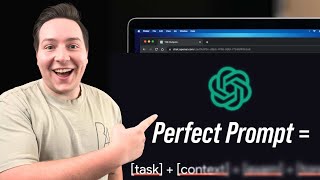
Darren demonstrates practical ChatGPT uses for business owners: drafting client emails, building a two-week content plan for a restaurant in Alex Hormozi's style, and generating a wind-turbine inspection business plan. He shares Jeff's six-component prompt framework (task, context, exemplars, persona, format, tone) to get better outputs from the AI.
Chapters
All right, what is up, livestream? Welcome. Today we're going to be talking about ChatGPT, the AI. Everybody, you either love it or you hate it. I personally love it, but I've got some slides, I've got some information, some use cases that you can use. And if you can hear me, let me know in the chat because I haven't sound checked anything. Boom, I think we're good. But welcome to the Howdy Media Insiders Group livestream. I hope you are ready to learn. Let me test out this little system we've got going. Look at that, Google Slides for the win, everybody. What are y'all up to today on this lovely Friday? We go live every single Friday at 1 o'clock. And so if you are just hopping on for the first time, welcome. If you're— if you've been here before, welcome as well. I'm pumped to get to talk about this today because there's a lot of people who have no idea about ChatGPT yet, and it blows my mind because I use it every single day. In my business, in my personal life. It is the greatest assistant that you could possibly ask for, especially for business owners, especially for content creators. Like, any sort of research, any questions you have, go to ChatGPT. So welcome everybody, and there's a couple people on right now. Go ahead and leave in the comments where you're watching from. I want to know where you guys watching from. We're going to give it a few more minutes so some other people can hop on if they want. Where are you guys from? I might have to pull this up on my phone. My office. What's up, Whitney? Thanks for watching from the office. All the way across town in Abilene, Texas. Welcome to the live stream. Have you used ChatGPT very much, Whitney? What's up, Julian from Midland, Texas? Welcome to the live stream. Glad to have you on. Glad to have you on. Have you guys used ChatGPT very much? I want to know. I want to know. All right, so let's go ahead and get into it. Uh, if you're watching this after the live stream, make sure to join the Howdy Media Insiders group because you can watch it live, you can ask questions, you can engage. Currently writing a description right now in ChatGPT. Yes, Whitney! Yes, I love it, love it. All right, let's get into it a little bit here. Um, before we dive in, uh, if you have never used any sort of AI, any sort of ChatGPT, um, I really want you to open your mindset. Be open to these new ideas. There's no reason to be scared of it, okay? Some people are like, oh my gosh, it's going to take my job. Now, if you were strictly like The only job I could see it taking right now is if you're strictly a writer, or like— and even then, you can still utilize it to make yourself more efficient in that job. But be open, have a positive mindset, be willing to learn and adapt to these new ideas, new things for your business, for your personal life, all of the above. So a lot of people forget sometimes how to learn. So I'm going to make sure and recommend to you and encourage to you, make sure to grab a notebook, make sure to open up your notes app, whatever it is, and write these things down. If something sticks out to you, make sure to write it down, because whenever you write it down you're way more likely to remember. So if you're ready to go with a notebook, type I'm ready in the chat. Let's get into it. Application uses. Okay, let's go ahead and talk about the different use cases, um, And if you're wondering why I'm looking up, it's because my screen is up higher. So there's lots of different use cases, okay? You can do it for business. You can use it for building a strategy for literally anything. It could be for marketing. It could be for, um, developing a strategy for your content plan, developing a whole system, a whole program over what your business does. Okay, so you can use it like any question that you have. The limit is literally your ability to imagine these questions. And so there's always ways to be creative. Uh, we're gonna kind of go over some of those today, and I'm gonna do a couple questions live And if you have any questions you want me to ask ChatGPT while we're here, put them in the comment section and I'll, I'll do that. That's going to be one of the last slides that we go through. But application uses, like I said, you can use it for business, your strategy, your content, your marketing, drafting emails, all of the above. You can even have it write songs if you want to write songs. They're not very good. They're very robotic, but you can have it write songs. Hey y'all, I wanted to hop on here really quick and remind you guys about our 24-hour podcast setup services. So if you have a space in your office, in your church, at your house that you want to transform into something similar like this, we've perfected the technique. We've got the whole list of everything you need. We'll personally look at your space, we'll do some interior design work set up all the cables, make a trip out to your location and set it all up for you and train you how to use it. So if you're interested, I'm leaving a link in the description for you to check out. Hope to work with you guys soon. So what is ChatGPT? So ChatGPT is an AI language model. So it's the computer. It's developed on what's called a neural network. It's machine learning, so it generates human-like text. It's, it's a way for us to communicate with the computer as if we were communicating with another human with our English language. And that's why it's been such a game changer because this opens up the use case for every single person. You no longer have to know how to code, how to say certain things, how to give certain prompts. It can take any prompt that you give it, and it will spit out an answer. So it uses reasoning, information, and context to serve you and your situation. That's one of the cool things about ChatGPT, and one that I've utilized the most, is it knows your context, it knows your situation. You can tell it every single thing you could think of about your business So like for Howdy Media, for example, it knows who our target audience is already. It knows what age group we're trying to reach. It knows the best— our current strategy. It gives us new ideas, new markets that we could tap into, which we'll test that out here in a little bit. Like it knows everything about us. It knows that we're faith-based. And so whenever it's writing these emails, whenever it's doing these things and programs and assisting with helping write books even. Like, it implements all of that because I have told it this is who we are. So that would be the first thing you need to do is say, hey ChatGPT, um, this is my occupation, this is my business, this is what we stand for, these are the type of people we want to reach, um, remember my tone for future reference, uh, and then it'll store it away. Like, give it as many details as possible because the more information you have, the more input you give it, the better output you'll get. So your situation, that's because, because everybody can go Google the answers, right? But it delivers it to you in a way that applies to your situation. So here's some more use cases Um, mine asked me tons of questions to learn who I was. Yes, exactly. And, and if you're ever in doubt, ask ChatGPT. Say, hey, what are the best ways to utilize you in my current situation? And it will give you answers. Say, hey, I need like 10 ways that I could utilize you. What are the best ways? I'm a realtor, whatever it is. And it'll spit them out, and then you can go off of that. You can literally have it teach you how to become what they call a prompt engineer. And whenever you can figure out how to manipulate the way you're wording things to give you the most accurate answers, you— the sky's the limit, man. The sky's the limit. So you can use it for content writing. What is content writing? It's emails, that's descriptions, That's ideas that you're be— blogs, even books, anything that is written text that you're going to be putting on the internet. You can throw it in there. You can start from scratch. You can say, hey, I'm writing a blog about the current market. Here are the trends. Give it the trends. Can you write me a 5-paragraph blog over this using my tone? Which that'll only work if you've given some examples of what your tone is and how you speak and the words you say. And then it'll spit it out. And then you can say, for example, hey, can you revise that and change it from Abilene to Merkel, Texas? Whatever it is, you can change anything after the fact. And, and the cool thing is it remembers. It remembers everything. So you can use it for that. You can use it for brainstorming. I was driving to Lubbock, Texas one day, and it's about, I think, a 2.5-hour drive from Abilene. And straight up the whole time there, there's a little headphone button in the app, which we'll get to there here in a little bit, but there's like a little voice button And what this does, it allows you to talk to it like you're talking to a human, and you don't have to text, you don't have to type the words, and it'll talk back to you. It's kind of crazy. I'll do a live demonstration here in a minute. But for 2 and a half hours, I was able to research markets. I was able to develop a whole business plan for a new branch that I'm wanting to do for Howdy Media. And I'll give you an example of that here in a second. It was just crazy to me that I was doing all that research. It had citations, it gave me contact info, which it's kind of weird on contact info just because of some privacy laws. But if you word it right, you can kind of get some general information on where to start contacting people. And that 2.5-hour drive where I would usually be either listening to music or a podcast, I was able to drive and develop a whole entire business plan and make an insane, like, development in that. So, and that kind of goes along with, like, customer inquiries. If you're responding to an email, if you're responding to a text, there's what we call the copy and paste method. So you can copy the whole email, paste it into ChatGPT, say, hey, can you give me a good response? To this email in the tone of me, and then it'll spit one out. And usually it's pretty good. You can even tell it to include details as far as like pricing and make sure to be very specific. So business plans, like I said, offer creation, and so much more. So anything that you could think of, you can probably use ChatGPT for it. So how do you get to ChatGPT if you don't already know? You can go, and these are just a couple of the options. These are the options that I use the most. One of them is going to chat.openai.com, and there's a free version that you can use, which is fantastic. The only reason I bought the paid version is because I use the mess out of it, and I think it limits you to a certain amount of prompts per day. Like maybe 30, could be wrong, but it, it's free. You can use it whenever you want. You can open it up on your browser, go to chat.openai.com, or you can download the app. It's just called ChatGPT on the App Store. If you didn't know about it, it looks like this. It's a little white square Go download it and you can talk to it whenever you want, on the go, while you're driving, while you're running errands, whatever it is. It's a huge help. Some people, I've heard stories, they go to the grocery store, they'll put their headphones in and they'll just be having a conversation. It looks like you're on the phone, but you're just talking to ChatGPT. It's crazy. So I want to know, have any of you done that? In the grocery store, while you're getting gas, whatever you're doing, have you just sat there and talked to ChatGPT before? If you haven't, I would say at least try it on your evening walk, in your workout in the morning. Just talk to it for a little bit and it will probably blow your mind. Ask for advice too. My husband wants to use it for church. He wants to set it up to listen to the sermon and see what kind of notes it provides for him. So that's a great idea, um, if it will pick up the words from the speakers. Um, the better option would be to do it after the fact, and if you can somehow— so here's what I would say on that, because it's kind of loud and weird in a live room, go to the live stream afterwards on your computer, on your TV. Hold your phone up to the TV speaker and then say something, or probably go to Google Docs and just hit the microphone button and it will write it out for you, and then copy and paste that into ChatGPT and then say, give me a breakdown, give me a summary, give me the sermon in 5 bullet points with references to the scripture. That would probably be the easiest way to do it. Um, nope, but about to be that person. Yeah, Jody, talk to ChatGPT for like 30 minutes whenever you have some free time and it will blow your mind. Ask it any question that you could possibly think of. Whether it's about business, whether it's about health, developing a plan, a workout plan, um, anything. So on the note of meetings, on the mo— on the note of like if you get on a Zoom call, if you get on a Google Meet meeting, there's an application called otter.ai, and I'm going to put it in the comment section, otter.ai. This AI platform, it's separate from ChatGPT. Okay. But speaking of meetings, you can install it on your computer and it will take notes for you. That way, after the meeting, otter.ai will summarize everything. It'll list bullet points. It will give you an exact transcript if you want. Whenever you're wanting to reference it. So like, you really don't even have to take out a notebook anymore. Otter.ai utilizes like the transcript and makes a summary out of it, which I haven't used it for my own stuff yet. I'm going to. I think you had to pay for it. I'm not sure, but I've had other people who utilize this and will hop on a call and and Otter.ai joins the call on its own and it, and it's like another person. Does Otter.ai only work for online meetings, i.e., Zoom, or can you turn on the microphone for in-person team meetings? So you can use it. I'm pretty sure I haven't got to play with it a ton, but I'm pretty sure you can record anything and then upload the file afterwards. Kind of like the sermon thing. Um, if you have a recording of it, upload it to otter.ai. If, if it doesn't work there, there are other platforms that you can do that on. ChatGPT is pretty much just a text base. You can upload PDFs. If you get a PDF or have a quote sheet built out, you can upload it to ChatGPT and have it critique it. Um, I've used it for Zoom calls in the summer. Yeah, it's honestly insane because it's like having a personal note-taker and you can refer back to it whenever. And it really doesn't make any mistakes. Probably does every now and then if it can't hear you very well, but it's just crazy to me. But right now we're gonna go ahead and do a live demonstration. We're gonna do a couple different things and I'm gonna have it read off of my phone into the microphone. Let's get it started. So the first one we're gonna do is draft an email response and we'll just do a short 1-minute email response. Let's just pretend it's for somebody who wants to use our wedding videography services. All right, ChatGPT, we are on the Howdy Media Insiders Group livestream, and I wanted to get your take on this specific response that we should send to our client.
Great, Darren. What's the specific response you're considering for your client? Let's make sure it hits all the right notes.
So I had a client, a pretend client named Jacob. I need to write a response email because they are asking for a quote on their video, on their wedding for videography. Please include like, um, a time to chat, maybe Tuesday at 1:30 or Thursday at 4:30.
Here's a draft for your email response. Hello Jacob, thank you for considering us for your special day. We'd love to capture the moments of your wedding. To provide an accurate quote, it would be great to discuss your vision and specific needs. Would you be available for a quick chat on Tuesday at 1:30 PM or Thursday at 4:30 PM. Please let me know which time works best for you, or if another time is more convenient. Looking forward to speaking with you. Best regards. How does that sound?
Great. So you can X out of that and it writes everything down for you. You can then copy and paste that into the email. You can change it however you want. That's just one example, ideally you can take that inquiry, that message, that email, copy that, put it into ChatGPT, and then just two spaces below your email, say, hey, can you please respond to this using specific names? These are the times I'm going to be available. Write me a good email response. Boom. It'll write you a good email response. So that's one of the things that can save you a lot of time. You won't have to worry about things being misspelled. You won't have to worry about anything being said wrong, um, or the times being typed wrong. None of that. It saves you a lot of time. So the next one we're going to do: come up with a 6-week content plan for your business. So if you're watching, what is a good— what is a business that you would want to see a content plan developed for live on the stream right now. We have restaurants, we got physical therapy, we have real estate, we have media companies, we have banks, we have accountants, anything that you could possibly imagine. Also, I hope you guys have learned something so far. Um, make sure to like the video, make sure to leave a comment of what you learned if you're having a good time. So let's go ahead and just do one for a restaurant, okay? We're gonna develop, uh, just to make it short, we're gonna develop a 2-week content strategy. All right, ChatGPT, let's pretend we are restaurant owners in downtown Abilene, Texas. Can you please develop a 2-week content strategy plan that will allow for maximum engagement and reach on Instagram and TikTok, and do it in the style of Alex Hormozi?
Let's dive into an Alex Hormozi-inspired 2-week content strategy for your restaurant. Week 1: Behind the Scenes. Showcase the kitchen hustle with a quick, high-energy video of your chefs preparing a signature dish. Day 2: Customer Testimonial. Capture a short interview with a happy customer, emphasizing what they love about your restaurant. Recipe Reveal. Share a simplified version of a popular dish, inviting followers to try it at home. Day 4, team spotlight. Introduce a staff member sharing their story and role. Day 5, user-generated content.
That's enough of that. It'll go on and do the whole thing. And you can tweak it if you want to do it in a different style. You can do it in a different style. You can say, make it fit more of our vibe at our company. Oftentimes I have to say, hey, put it in the tone of like a high schooler so everybody can understand it. And it'll re-spit it out. That's one of the things. If you feel like you're getting a very generic response, make sure to give it more context and tell it what tone you want it in. And part of giving more context is giving it information on how you speak, how you talk, what kind of words you use, how you phrase your sentences. And if you've done all that up front, then you won't have to really worry about it. It'll just know. So there's, there's one more live demonstration, and I might have to not do it on stream, but it was the example that I talked about whenever I was driving to Lubbock for 2 and a half hours on the road. The very multi-level problem-solving question was, I'm thinking about opening up a branch of Howdy Media that involves wind turbines. I'm, in other words, I'm wanting to inspect wind turbines with drones. Can you please gimme the biggest pros and cons to doing this in Abilene, Texas? Also develop a system for Howdy Media to successfully pull this off in the most efficient way. So this was all one prompt. This whole prompt gave me the greatest foundation of knowledge that I could have. It would have taken me like 5, 4 or 5 hours to even start thinking about researching all this stuff. And so it spits it out right off the bat, and it's insane. It gave me all the pros and cons. It did everything I asked it. It gave me citations. It gave me top companies. It gave me numbers to reach out to. It gave me permits and certifications that I would need. It gave me where there, there are the most wind turbines around the big country area. Like what city has the most wind turbines, the names of the farms, like all of this stuff from one prompt. And you can just keep asking and asking and digging for more information. It is insane. But that one would have taken forever to spit out, um, on stream at least. But we only have a few more minutes left, um, and if you have any questions, this is your time to drop them in the chat, drop them in the comments, because I'll ask it live on the stream, whatever you want, as long as it's PG. If you're not on the stream, if you're watching this after, make sure to hop into the Howdy Media Insiders group so you can view these live streams every single week for free. We'd love to have you part of the group, man. I think there's 137 people here. Majority of them are business owners or creatives who are aspiring to be business owners. It's the greatest community, community you could ever even think of. And as it continues to grow, I think the more value that we're just going to continue to give. So let's go ahead and move on to the next one. Make sure to be specific with your questions if you're trying this at home, which I would encourage you to do. Don't just stop here on this video. Go and try these things out for yourself and give it a lot of information. The more input, the better the output. Remember that. So it can develop strategies, um, like I said earlier, with context. I already told ChatGPT exactly what Howdy Media is about. And the amount of business plans and responses that I've had it develop is crazy. I use it every single day. Um, copy and paste method. This is the one I was referring to earlier with the emails. Um, if you have a message come through, if you have an email, if you have an inquiry come through on your website, copy and paste it. Um, if you're writing a blog, copy your blog in there, say please revise it and make it better. I did use this. If you don't know, I have a book called Content That Converts, A Guide to Building Your Personal Brand Through Video. It's on Amazon. And I mean, it was only 14 pages, but I wrote the thing. I wrote it. ChatGPT did not write it. There's a lot of people who use ChatGPT to write the stuff. All I did was copied what I had originally. Put it into ChatGPT and said, can you please revise this? Make it grammarly— I see I can't even— grammarly correct. Make sure it is correct as far as the grammar goes, as far as the spellings. Make sure it is all correct and get it ready and put in a format for an ebook. And then that's exactly what it did. It put it into the format. And then I put it back into Google Docs, put it on Amazon, and boom, I had an ebook. And I didn't, I didn't need an editor. I didn't need a publisher. It did all of it for me. So, um, the last thing that we're gonna do, it's called the Perfect ChatGPT Formula. We're gonna watch it. It's about 8 minutes. So which I need to— I need to find it. So I don't even have it pulled up. It's not letting me click that link. Um, let's see. Here it is. Boom. Everything's perfectly organized. All right, stick with me, boys and girls. We're getting this video pulled up. You're going to want to see this. Um, let me share that screen real quick. Share screen. Boom. Goodness, why do I have so many? Here we go. Boom. Might have to change— there you go, it's a little bit bigger. All right, check this out.
In this video, we're going over the only formula you will ever need to master prompting on ChatGPT and Google Bard. So let's get started. Hey friends, welcome back to the channel. If you're new here, my name is Jeff. I work full-time.
Hello Jeff, thanks for the ChatGPT.
You know prompting is an important skill to learn, but you're not exactly sure why some prompts generate outputs that are super generic while others give you precisely what you're looking for. Since then, I've spent hundreds of hours taking prompt engineering courses and applying what I've learned in my daily life. And so this video, I'm sharing the 6 building blocks that make up a good prompt so that you can use this formula to consistently generate high-quality—
so we have persona, we have context, we have task, format, exemplar, which is an example, and the tone. All of these things put together allows ChatGPT to give you the best possible response. Let's keep watching.
First, it's critical to not only know what the 6 components are—task, context, exemplars, persona, format, and tone—but also know that there's an order of importance to these 6 components. To show you what I mean, let's use this simple example. I'm a 70 kg male. Give me a 3-month training program. The first part is context followed by the task. The reason why the task is high—
see, if you would have given that prompt to ChatGPT without the 70-kilogram part and without the male part, it would have given you a completely different answer. So if you would go even further, I'm a 70-kilogram male, uh, which I don't even know how many pounds that is, that's awful, but I'm a 70-kilogram male, this is my diet, um, This is where I live. This is how many times I want to work out per week. It'll give you exactly what you're looking for.
Pair up in the form of hierarchy is if we just input the task without the context, there's still some sort of meaningful output. But if we just give ChatGPT the context, nothing really happens. Put another way, it's mandatory to have a task in your prompt. It's important to include relevant context and exemplars, and it's nice to have persona format and tone. So when you think of writing your prompt, go down this mental checklist. So this formula will act as a constant reminder for you to include just enough relevant information when writing prompts. And as you'll see in this next part, you do not need all 6 components in every prompt to have a good output. Now let's break down each building block with specific examples, starting with the task. The rule of thumb is to always start the task sentence with an action verb. Generate, give, write, analyze, et cetera, and clearly articulate what your end goal is. It could be one simple task like generating a 3-month training program or a complex 3-step task like analyzing hundreds of user feedback, sharing the top 3 takeaways, and categorizing the feedback based on the team responsible for following up. The second component, context, is the trickiest to get right because technically there's an infinite amount of information. Information you can give. So I found asking myself these 3 questions to be super helpful in coming up with just enough information to get a good result from ChatGPT. First, what's the user's background? Second, what does success look like? And third, what environment are they in? Back to the workout example, we now have: I'm a 70 kg male looking to put on 5 kilograms of muscle mass over the next 3 months. I only have time to go to the gym twice a week, and for one—
there's the more context that I was talking about.
Training program to follow. Could I have added more background information? Of course. Only prioritize the muscle groups that make me look good at Instagram. But the key to staying productive with ChatGPT and Bard is giving just enough information to constrain the endless possibilities. By the way, although this video is not sponsored, it is supported by those of you who subscribe to my paid Pong TV newsletter on Google Workspace tips. Link more. Moving over to the exemplars component, it's just a fancy way of saying examples. Basically, all the research on large language models, LLMs, have shown that including examples within the prompt drastically improves the quality of the output. Starting with a simple example, this is a poorly written bullet point from a resume. We can now ask ChatGPT to rewrite this bullet point using this structure: I accomplished X by the measure Y that resulted in Z, which is actually best practice, by the way. So actually do this in your resume. For example, I lowered hospital mortality rate by 10% by educating nurses in new protocols, which translates to 200 lives saved per year. Here's a slightly more complicated example for interview prep. Based on my own resume, write me an answer to the interview question, what's your biggest weakness?
And you can upload your, your resume. So if you're like, man, how does he know what my resume is? You can either copy and paste it, or you can upload a PDF into ChatGPT.
Our answer framework: situation, task, action, and results. Here, instead of using a full-blown interview answer as an example, which would be overkill, the STAR framework acts as an example structure for ChatGPT to follow. Last example, let's say you need to write a job description. You give some context around the opening and ask ChatGPT to reference an existing job description. If I use this one I found on LinkedIn, the output will follow the same formatting and use the same professional HRE language, saving me a bunch of time. Main takeaway here: exemplars are not necessary for every prompt, but including a relevant example or framework will greatly improve the quality of your output. Moving along, the persona component is basically who you want ChatGPT and Bard to be, and the pro tip here is to think of someone you wish you had instant access to with the task you're facing. If you injured yourself working out, that person might be a physical therapist with experience helping athletes recover. If you're a job seeker, that person might be a recruiter or hiring manager. If you're working on a creative brief, that person might be a senior product marketing manager who's great at storytelling. Pro tip: you can also name specific individuals, but I found the results to be good only when they're famous enough, like Warren Buffett, Steve Jobs, Jeff Su—
advertisement. We were facing is done. Thanks, Connor Sheffield. By the way, I just have to share this.
We have a team offsite with a superhero theme, so I asked ChatGPT to draft an email from Batman, and it even included things like, please let Alfred know, and signed off as the Dark Knight. So fictional characters work as well, and I'm actually going to use this. The fifth component, format. The pro tip here is to literally close your eyes and visualize how exactly you want the end result to look like. A million likes on my thirst bomb Instagram photo. Damn it, didn't work. Back to the user feedback example, I don't want to read each sentence, so I asked ChatGPT to take all the feedback and output a table with 3 headers: the original feedback, the team responsible for following up, and priority. And now I can copy this directly and paste it into a Google Sheet, sort by priority and filter by team. Other common formats include emails, bullet points, and code blocks, but the one I found to be the most useful as a full-time working professional is paragraphs and markdown. For example, I just received a lengthy industry report from my director. First, give me the 3 key takeaways, then summarize based on topic.
Use H2 as section headers. See, that's very specific.
Whenever I use ChatGPT to proofread any document, I specify that all changes need to be bolded so I can easily see exactly what has been changed. Let's quickly go through the last component, tone, before we put all this together in one example. The good news is tone is easy to understand. Use a casual or formal tone of voice. Give me a witty output. Uh, show enthusiasm. Sound pessimistic.
Witty output. Some of these outputs, if you say, give me a witty output, expect a cheesy answer because It's not, it thinks it's funny, but it's not that funny.
Mystic. The bad news is we're usually not very good at recalling the thousands of potential adjectives and adverbs at a moment's notice. So here's a pro tip. Tell ChatGPT the feeling you're going for. For example, I'm writing an email to a team I haven't worked with before and I wanna be taken seriously without coming off as too stuck up and cringey. Can you please gimme a list of 5 tone keywords I can include in a prompt for ChatGPT? And look, now the actual prompt I can say, Use clear and concise language and write in a friendly yet confident tone. Putting all this together, let's look at this comprehensive prompt. You are a senior product marketing manager at Apple, persona, and you have just unveiled the latest Apple product in collaboration with Tesla, the Apple Car, and received 12,000 pre-orders, which is 200% higher than target, context. Write email to your boss, Tim Cook, sharing this positive news, task and format. The email should include a TL;DR (too long; didn't read) section, project background (why this product came into existence), business results section (quantifiable business metrics), and end with a section thanking the product and engineering teams. Example structure. Use clear and concise language and write in a confident yet friendly tone. Tone. Note that if I had an existing email to reference, I could delete the instructions around the structure and simply tell ChatGPT the email should follow the exact same format as the one I will share below and paste the email from before. By the way, you can compare the output from this prompt to that of a simpler prompt. I just launched a new product, the Apple Car. I received 12,000 pre-orders. Please write an email to my boss with this update. There's a pretty big difference in terms of how generic and usable the end result is. Now that you know the basics of prompting, my next video is going take you from beginner to pro, so make sure you're subscribed for that.
So this guy was able to describe it way better than I could have. Um, I basically use the same formulas, but he just— the way he put it together was way better than I could have. So that's pretty much it for the live stream today. Um, I just put a poll up. I want to know, do you use ChatGPT? Um, make sure to vote. But if you plan on using this in the future, make sure to watch this video back. I'm going to be putting it up, um, on the YouTube channel here in a couple of days. If you're watching this on YouTube, this already happened. If you want to be a part of it live, make sure to be in the Insiders group. We go live like this every single week. If you learned something today, make sure to put it in the comments, make sure to like the video, make sure to hit the subscribe button on YouTube, and be watching the group. Next week I'll put up another poll and make sure to vote about what you want to learn about. This is the best framework that I've come up with so far, and I want to teach on what you guys want to actually learn about. The ChatGPT thing, I've heard people talk about this for months. A lot of people didn't know about it. Hope this was able to help you, inspire you, give you some ideas on how to utilize ChatGPT within your business, within your context, within your content. Um, and I hope it's useful to you guys. So that's the livestream for today. Thanks for joining. Thanks for watching. Um, we will see you next week, or we'll see you on the YouTube channel. We'll put— we're putting videos up every single week up there as well. So we'll see you guys in the next one. Hope you have a wonderful Friday.
More from Daron






Entitled Woman Tries Suing Man For LEAVING Her Mid Date, Instantly Regrets It

This Is Why More People REGRET Buying Their Electric Vehicle Than Ever Before