The TRUTH About The Sony FX30 (2025)
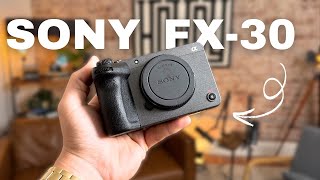
In this video, the host, a member of the Howdy team, shares a year‑long hands‑on experience with the Sony FX30 used in a podcast studio in Abilene, Texas. He breaks down the camera’s strengths—compact FX3‑style magnesium‑alloy body, 27 MP APS‑C sensor that records 6K and downscales to 4K, 10‑bit color, robust in‑body stabilization, internal fan allowing up to 13 hours of continuous recording, dual card slots (SD and CFexpress), full‑size HDMI, front record button, tally lights, touchscreen UI, and excellent autofocus. He also notes limitations: APS‑C crop factor affecting ultra‑wide shots, reduced low‑light performance versus full‑frame, and the lack of an internal ND filter. The host discusses practical implications for various workflows—YouTube creators, corporate video, podcasting, and B‑cam work on Netflix productions—while recommending lens choices to mitigate the crop. He promotes Howdy’s 24‑hour podcast setup service and the free Howdy Media Insiders Facebook community. The overall conclusion is that the FX30 offers cinema‑grade video at a fraction of the price of the FX3/FX6, making it a strong entry‑level or secondary camera for creators who can work within its crop and low‑light constraints.
Chapters
Hey guys, in today's video we're going to be going over the truth about the Sony FX30. We're going to be going over the goods, we're going to be going over the bads, and I'm going to show you some examples of what I'm talking about. Let's go ahead and get into it. So the first thing I want to know— I've been using these cameras for about a year now for our podcast studio here in Abilene, Texas, and They've worked incredibly well, especially for the price point. I believe I spent around $1,600 whenever I bought the bodies alone, and that was used. That wasn't even new, which if you're a videographer, photographer, buy your cameras used. Like, there's no point in buying new stuff whenever you can save a few hundred bucks, sometimes a thousand bucks on these used cameras. So let's go ahead and start off with some of the pros that I have absolutely loved while using the Sony FX30. So right off the bat, the first thing that I absolutely use all of the time and am thankful for is the size of the actual camera body. This, if you know what an FX3 is like, it's about— no, it is— it's not about— it is exactly the same body as an FX3. The only difference is what's inside. The sensor is an APS-C size sensor, which means you do get a crop whenever you use certain lenses. And so it'll be closer than a full-frame camera like an FX3 would be. But the portability of this thing, like, it is for real tiny. And people ask, like, how do your videos look so crisp and so clean? These guys. And it doesn't take that long to set up. And I show up to shoot sometimes and they're like, oh, that's your camera? I'm like, yeah. And then they see the result, they're like, oh, we don't care anymore what the camera looks like. It's not very heavy and I can fit it into basically any bag or storage or compartment that I need to whenever I'm traveling to locations for shoots. Hey y'all, I wanted to hop on here really quick and remind you guys about our 24-hour podcast setup services. So if you have a space in your office, in your church, at your house that you want to transform into something similar like this, we've perfected the technique. We've got the whole list of everything you need. We'll personally look at your space, we'll do some interior design work, set up all the cables, make a trip out to your location and set it all up for you and train you how to use it. So if you're interested, I'm leaving a link in the description for you to check out. Hope to work with you guys soon. The material that this thing is made out of is extremely solid. It is actually made out of magnesium alloy, which is a strong metal-like feel when you're holding it in your hand. It comes with plenty of buttons on the back and the top of the camera, and even the front, which is another reason I love— there's a record button that is right here. And so whenever the camera is facing you, you can actually hit the record button from the front side of the camera, which is absolutely clutch. Another thing to note that I love, whenever you hit record, these little tally lights You can see here there's one, and there's one on the back as well, right here in the middle. And I'll give you close-up shots of this, but there's tally lights and it turns red whenever you're recording. So you always know 100% whenever you're recording, whether you're facing the camera or whether you're on the back side of the camera recording something else or somebody else. I do know that has come up multiple times on my Sony A7III. Which does not have tally lights, and I thought I was recording multiple times and turns out I wasn't. And I wouldn't have known, there's no lights or anything. The only thing that indicates is that little tiny red circle on the screen. And so it can kind of get confusing, but with these being cinema cameras, I think it's super important that you know when you're recording. So the sensor that comes with this, I mentioned it before, it's an APS-C sensor, and so it's a little bit smaller, but there is 27 megapixels. That you get out of the sensor, and it actually films in 6K and then downscales it to 4K. So a lot of people are saying and testing this that the FX3, this bigger brother of the FX30, shoots in 4K. And so the FX30 actually has a higher— or let me say, clearer— resolution whenever you're looking at the files in post-production. So this camera, I think, is phenomenal for honestly anybody who's looking to get into the the Sony world and who is big into videos, this can do pictures, but it's not necessarily a photo camera. It's not like the hybrids, it's not like the Alpha series of the Sony. It is specifically targeted towards video, and I think it's fine because if you make videos like this all the time, then you don't necessarily need to be taking burst shots or anything. You can just take regular single shots. There's no viewfinder, so all you have is this screen. A lot of people like to use the viewfinder, but you do not get this on this camera. There is in-body stabilization built in, and it works honestly really well. There is an active mode, there's a normal mode, and there's an off mode. And so I usually keep it on the normal mode if I am running or if I am filming any sort of thing that needs to be steady, um, that's quick. I usually turn it on the active mode. The only thing with that, it crops in even more. So you're already getting a crop from the APS-C, then you're getting another crop with the active stabilization. And if you film in 120 frames per second, you get another slight crop. So that's something to think about if you are super into filming slow motion stuff. You can film 4K 120 on this. Uh, the SD card slot accepts regular SD cards and CFexpress A-type cards, which are a pretty penny, and I really haven't even had to use any. Um, but it does accept that, which is good for a cinema camera. Now, these are the first cinema cameras that I have actually purchased for my business. I've been using hybrids for the last 2 years before I got these guys, but whenever I decided to go all in on this podcast studio thing, I was researching, and one of the things that I decided was a non-negotiable was the overheating issues. So for an example, we filmed a lot of weddings, especially here in Texas in the summer, outside, wherever it's 115 degrees, and some of the Alpha cameras, they overheat. Now the A7 III, I haven't necessarily ran into this issue, but Whenever it comes to podcasting, you sit down for 3 hours at a time sometimes, and, and some of these episodes go really long, and we're gonna need cameras that don't overheat. And so one of the things that this camera offers, it has an internal fan, and you can record technically up to 13 hours at a time before it stops. On majority of other cameras, it's a safety feature so it doesn't melt the inside, but you can only record either 30 minutes or 60 minutes at a time before it turns off. These, you can go 13 hours, which is basically as long as you want. Nobody's going to be recording 13 hours straight. So that was a huge perk. They never overheat. I've never experienced this thing overheating. I've used it for hours upon hours upon hours at a time, and it held up phenomenally. So whenever it comes to using this thing for a long time, the battery is also something you have to consider. The Sony Z series battery is the newest battery that the Sony cameras use, and if you have a Sony A7 III, A7S III, or even an FX3, they all use the same battery, which I've had zero problems with. I can use one battery for honestly sometimes a couple days depending on how much we're actually filming. So this camera also comes with a full-size HDMI port, which is very helpful, especially whenever you're having to use monitors. And with the podcast setup we have, we feed everything into a switcher, which is HDMI, so there's no conversions having to happen like with the micro HDMI. It goes straight full HDMI to full HDMI, which is just one less cable you have to carry around. There's also a microphone slot and a headphone slot on the sides. And then you have a USB-C and a multi-use port, which is a USB— I think it's a micro USB that you can plug in accessories and other things that you want to rig up on this camera. On top you have a regular hot shoe, just like a normal camera, and a lot of times the microphones we use plug directly into there, and so we don't even need to use the microphone input on the side of the camera. Whenever it comes to the layout of the actual software that you're using, I find that it is significantly better than the older generation of cameras. And that's been a big thing that has come out and Sony has had to fix because people were not liking the menu setup on these cameras. It's also touchscreen now, so you can touch and change settings however you would like. And it is extremely efficient. As soon as you open up the menu, this first screen pops up and it gives you the basic stuff that you need whenever you're out in the field, and you can just do the touch thing. So the screen is phenomenal. It, it does pivot out and you can rotate it, which is very handy. So if you want it to be on the back of the camera, you can. If you need to tilt it up while you're using it, you can tilt it up. And so it's very handy when it comes to that. And the screen resolution is honestly incredible. Like, I wouldn't say there's any time that I've— or any scenario that I've been in where it's like, I wish it was a little bit higher scenario or resolution. Whereas the Sony A7 III, I have come across times where I'm like, man, there's just not enough pixels for me to be able to tell what's going on. And so we'd have to use external monitors. But those are the main factors that I find super helpful whenever using the FX30, and it has been an absolutely incredible camera. I don't even know that I would even necessarily use an FX3, or if, if it would be any better for me, because this is just as good if you can handle the crop, but it's half the price. One of the only things that I have been struggling with using this camera is whenever it comes to doing any sort of like really wide angle projects or real estate videography, I have to buy like a 9mm. I'm going to get a 9mm Laowa lens that's like zero distortion because it is so wide. In order to match a full frame 16mm, I have to get like either a 9 or even an 11mm would be perfectly fine. But if you can afford to buy the extra lens, I would say go for it. Okay, y'all, real quick, I feel like I totally have to bring this up, but it's the 10-bit color. And this gives you the flexibility and the capability, especially when shooting log, to really dial in the colors that you want. It's incredible. Just thought I would put this little clip in here after the fact. I forgot to do it while I was filming. So anyways, let's get back to it. Whenever it comes to low light situations, it's not going to perform as good as a full frame was just because the sensor is smaller. I ran into this situation at a wedding a few weeks ago whenever it was really dark. We were doing the send-off and they had sparklers going, but it was still really dark and the footage, it came out usable but it wasn't as good as probably an FX3 or a full-frame camera would have turned out. It was pretty grainy, and I'll pull it up here so you can see it. But those two things are really the only cons that I have, and it's the crop factor for wide-angle shots and the nighttime use or in low-light scenarios. But if everything else— if you have good lighting, if everything else is set up exactly how you want it, if you can even semi-control your light in the room, the picture out of this thing is phenomenal. Sometimes I think it's even better than the FX3 or even the FX6. So to sum it up, if you're looking for a ultimate video camera that can pretty much do anything you want and you're not needing extremely wide shots, like if you just make YouTube videos, it's phenomenal. If you're wanting to get into doing corporate work get this camera because I've done massive corporate jobs with this camera and people are like, man, that little camera produces that good of an image? And I'm like, yeah. And then you could even throw in there like, hey, these are Netflix approved. They've used these on Netflix movies. And so I'm not lying, like that's the truth. They have used these as B-cams on Netflix sets if they need an extra shot and The fact that they even are talking about this within Netflix movies is insane with the price point. One of the last things to note is the SD card slots. There are two of them. I forgot to mention this earlier, but there are two SD card slots. So whenever you're doing these bigger jobs, whenever you're filming these weddings or whatever it is, you can put two SD cards in there and you'll have a backup file for those moments that only happen once. This is pretty crucial, and I've used the mess out of this feature in these certain times and scenarios. The autofocus is obviously phenomenal. Like, all of the new Sony autofocus stuff that they're coming out with has been incredible and massive leaps, honestly, um, from what their previous generation of cameras had. And so I haven't ever had any autofocus issues or anything of that nature unless we're filming on a black background where it's hard for it to contrast what is the subject and what is the background, which that will happen with any camera. And so in those cases, I just set it to manual and it doesn't move, it doesn't breathe. It rarely breathes on autofocus. Like, breathing, if you don't know, it's kind of like trying to find— so it goes into focus, out of focus, into focus, out of focus until it finds a spot. This really doesn't do that unless, like I said, you're in a very dark room or you have a dark black background. One thing I wish they would have included, which obviously it would have upped the price, but to put an ND filter on the inside of the sensor, kind of like the FX6 has, that would have been absolutely incredible because you can open up your aperture all the way and get those clean bokeh shots with the blurry background, even if you're outside. Right now I have to put on a matte box with an ND glass filter on the front, which is fine. It's just another step that you have to do and takes more time to set up when you're trying to, to grab a shot on the go. If you're wanting to film outside at all and you want it to look decent, you're having to set up these ND filters on the outside. But like I said, if you're making YouTube videos, if you're getting an entryway into the corporate video world making high production videos, this is the camera to get. Like, don't spend the money on the FX3 unless you're going to be shooting in the dark a lot or you're needing those really wide angle shots. Some of the lenses I recommend will be linked in the description of the video. A lot of them are Sigma, some of them are Tamron. If you want to go out, you can get the Sony G Master. I would always recommend going a little bit lower if you don't have the budget, because those lenses are honestly just as good. You can barely tell the difference, and they're a third of the price, sometimes a quarter of the price. All right, so that pretty much concludes the entire video. I just wanted to share my experience honestly and show you guys some examples of things that I've done with the FX30 that have worked and that have not worked. If that's a deal breaker with you, like if that's a deal breaker for you, I hope this video helps. If you are a content creator, a YouTuber, or if you're wanting to get some higher quality footage from your camera, this is definitely the camera to get. I probably wouldn't spend the money on the FX30 if you're just doing— you can honestly even get away with those corporate jobs like I had mentioned before. So if you're wanting an entry camera to get into the video production world and consider yourself a professional videographer or filmmaker, whatever it is, this is a great camera to have, even if it's not your A cam. Like, make it your B cam and you'll get phenomenal results. I use it both for A and B right now, and my corporate clients are blown away by the results. So I don't know if that says anything to you, but it speaks volumes to me because you don't always have to have the best gear to get the best video. So use what you have. If you have a hybrid camera, keep using the hybrid camera. It's all about, honestly, your lighting, how you frame your shots, and how you tell your story that are way more important than the actual body itself. When it comes to the body, the things you want to look at is the ease of use. How quick can you change settings? How easy— how accessible are the buttons that you can use? That sort of thing, and you'll be just fine. So if you want to learn more things like this, make sure to leave a comment in the comment section. Let me know if you have questions about the camera, if you're thinking about buying it, if you're on the fence. If you want to learn about other gear, other equipment, let me know in the comments what kind of equipment that you want to learn about, because I am here to serve you and help you, the viewer, figure out exactly how to make better videos, how to make better content. And so don't be shy. This is all about community. This is all about getting people to connect and letting the Howdy team help you guys out, because that's what we love to do. So if you want to join a community beyond that, that's actually free. We have a Facebook community called the Howdy Media Insiders Group. And so make sure to join that. It is 100% free. We are going live every single Friday, and it's going to be Q&As, it's going to be master classes, and a lot of them are business owners and content creators just like you if you're watching. So make sure to join, make sure to be a part, introduce yourself, and let's get the conversation going. Hope you guys enjoyed watching today's video, and we will see you in the next one.
More from Daron






Entitled Woman Tries Suing Man For LEAVING Her Mid Date, Instantly Regrets It

This Is Why More People REGRET Buying Their Electric Vehicle Than Ever Before