Ultimate Podcast Studio Setup (2025)
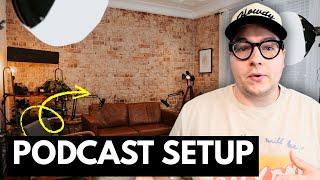
A tour of a 400-square-foot podcast studio with two desks, four Samson Q9U microphones, a Blackmagic ATEM switcher, and two Amaran 100D LED panels. The host shows how to route audio via XLR into a camera unit, then HDMI to the switcher for direct drive recording, and explains why sturdy Neewer tripods protect expensive cameras.
Chapters
Yo, welcome to the Howdy crib, everybody. I'm gonna be giving you a tour. I'm gonna be showing you how we put this thing together. Come on in, come on in. All right, so this is it. This is a 400 square foot loft. I'm gonna be kind of bringing you through how exactly we put it together. So for storage, we started over here with this Yukon tool chest. We got this from a place called Harbor Freight. Now the last video we did about podcast studio, it was pretty basic as far as what we did, what it looks like, and what we use. This is gonna be a little bit more in-depth. We're gonna go into what kind of cameras, how we run things, and I'm gonna try to do it in a timely manner. So the first thing is the storage. Look at this honker, by the way. Look at this. This was for our shoot. Yesterday we did some B-roll, cinematic B-roll. Um, looks like a monster. It's sick. So we have our storage here. You can open it up. It's kind of messy, but this is where we keep all our lenses whenever we're not using it. A bunch of gear, equipment, cables, that sort of thing. Now for storage, as far as like files go, we have this bad boy over here. It's sitting— it's just a server. No, not the Windex. Just the server, and we are wired in from all of the other desks in the studio. So over here we have my personal desk. This is where I film a lot of the YouTube videos and we go live on the Howdy Media Insiders group every single Friday. By the way, join the Insiders group. This is where we go live. This is where we listen to Spotify, etc., do our editing. I can access all of our files from the server. Directly from my desk. Same thing goes for this desk over here, which is the production desk. Mike, I hope it's clean because this is going on the World Wide Web. But here we have Mike's desk, or the production desk, who's at— whoever's sitting here. We take notes while we're recording. We have our Blackmagic switcher, which we'll talk about here in a second. We're running a Mac Mini with an M2 chip in it, I believe, um, We had another Mac Mini, didn't cut it, had the Intel chip. Don't get those computers, invest in an M-Series chip. On this monitor, if we move our Howdy Media cup out of the way, we can see each channel. We can plug in 4 cameras at a time. Right now there's nothing plugged in because we're not filming anything, but we sit here, we can switch back and forth. The switcher is awesome because it merges the video and merges the audio, puts it together and throws it straight into a drive at the end of the recording, which is how we edit all our podcasts. Over here we have the fun side. Okay, this is the side that you film. We film everything we do over here. It's not huge. We only have 2 lights. These lights are Amaran 100Ds. They don't change color. You can change the brightness. I think they're like at 20% brightness right now and it's plenty. I might even be a little bit pale looking because of it. But we have 2 of these on these awesome tripod stands. Now all of this, you don't have to go all out as much as we did, but since we're offering this as a service, we wanted to go all out, make sure it looks and sounds amazing. So we have another one over here. They all have wheels. So we can take these on to shoots, no problem. These tripods, let's talk about these tripods. Some Neewer, how do you say it? Neewer, Neewer, Neewer tripods. These are video tripods. You want to invest in good video tripods because from experience, I dropped a camera one time that was about $3,000 worth. Had to order more parts, cost me about $500 or $600 just because I didn't have a good tripod. So make sure to get a good one. These have a fluid head, so it's real smooth whenever you go left to right, real smooth when you go up and down. I'll put the links to all of these things in the description if you want to buy it. It helps us out here on the channel, get a small cut from Amazon. But over here we have Amazon furniture for our seats. We have a chair. I don't remember the exact cost of it. It wasn't too expensive. We have another $250 faux leather couch. It does the job, all right? And we wanted to get something that was comfortable enough to sit on for an hour plus, but also didn't break the bank, and something that we could easily move towards the other side of the room. So that's what we have for the furniture. This was a donation that I need to give back to one of our Howdy employees. Uh, over here we have little side tables they can put their drinks on. We're planning on getting bigger side tables. That's on me. I just haven't ordered new ones. For the microphones, we have Samson Q9U microphones. These are a great alternative if you're looking for something that isn't the Shure microphones that are $500. You don't need a Cloudlifter with these. You can go straight in the camera, straight in your mixer. Or the cool thing about these two, there's a USB-C port on the bottom. So we have 4 of those. And within this studio, we can hold up to 4 people at one time. Most of the time it's usually 2 or even 3 people. That's what we have it set up for right now, which is a 3-person podcast. Um, back here, show back here real quick. We have backlighting. Um, this is just a panel light we got off of Amazon. We have 2 of those. They also double as wedding lights, so whenever we go film weddings, we throw those guys on the dance floor. If it gets dark, we can still see everything, looks good on camera. We have a Amazon lamp. Shout out to Amazon. They, they literally— we bought everything off Amazon except for the Howdy sign. We bought this poster, and my wife is the genius behind the design of this. I'm not gonna lie to you, I can do all the tech stuff all day, but picking out furniture is not my forte. We got this poster and we were gonna go frame it, so we went to— I think we went to Hobby Lobby It was gonna be almost $100 to build a custom frame for this. And then we were walking around the aisles, I was like, there has to be another way. So I found this canvas, which was the exact dimensions that we were needing, and it was like $30. And I was like, wait, wait, wait, what if we just glue the poster to the canvas? That's what we did. Uh, the set is pretty important, having some cool staple things. One of the staple things of the studio is this shelf. It's an antique shelf. It used to be an oil shelf. You can see right there it says Wicks on top. That's all magnetic so we can hang things up there. We bought a bunch of cool cameras, um, old cash registers. I don't know how that makes sense. We got a 3D printed microphone. Uh, it's just a cool vibe, just something to give the background texture and something to make it interesting. The brick does an okay job of that in here. I think it gives a very industrial— we call it an Abilene vibe because that's the vibe of the entire city of Abilene. So for other projects that aren't podcasts, this doubles as a content studio too. So if you have a space and you're already filming podcasts, might as well film everything else there. So what we have for that, it's the C-stand. It's kind of hard to see, but basically it's just a stand that sticks out. If you're sitting down, uh, it sticks out. You can put a microphone over you, you can clamp lights to it, and it'll be out of the frame. That's for a bunch of interview videos that we do. We use this exact C-clamp. So over here, say you're the person sitting here about to do the podcast. You're like, man, I want to know what I look like. Okay, and look, what do you know, there's a screen right there. It's a confidence monitor. We have it set up to where you can see exactly what you look like right here. A lot of females come into the studio and they're like, we want to check our hair, and they don't want to go to the restroom, make a big scene about it. They just want to make sure they look Good. So that's pretty much it. All of these cameras run via HDMI. So here's how it works. It goes from the microphone XLR to this audio unit that attaches directly to the Sony cameras. There are options for Canon cameras and Nikon, but they're usually third party. So you just connect this thing on There's controls here that you can control all the gain and the volume, and then that puts it directly into the video footage. Then via HDMI, you run it all the way to the switcher, and now you're getting all the feed like I was talking about earlier directly into the switcher, and you don't actually physically record in the camera body. So there's no SD cards that we use most of the time. Uh, just depends on the project. If we're filming an hour-long podcast, most of the time we just run it through the switcher. Um, takes up way less storage. We don't have to buy as many SD cards. It's just a lot more convenient. If you're just doing this for yourself at home, I would probably just use an SD card, um, or use a platform like StreamYard. If you want multiple camera angles, you can use this with StreamYard. Anyways, with that being said, that's a tour. It was a little bit more in-depth. Uh, you really loved the podcast studio tour that we did last time, and I felt like we could just do a little bit better. Um, so if you like this video, make sure to comment down below, subscribe. We're at 129 subscribers today. Shout out to the new subs. If you're not subscribed, make sure to hit that button. If you learned something, let me know. If you want to learn something new, also let me know so I can make that in a future video. All right, thanks you guys, we'll see you in the next one.
More from Daron




Entitled Woman Tries Suing Man For LEAVING Her Mid Date, Instantly Regrets It

This Is Why More People REGRET Buying Their Electric Vehicle Than Ever Before