Zoom Demo for Online Mediations and Arbitratons
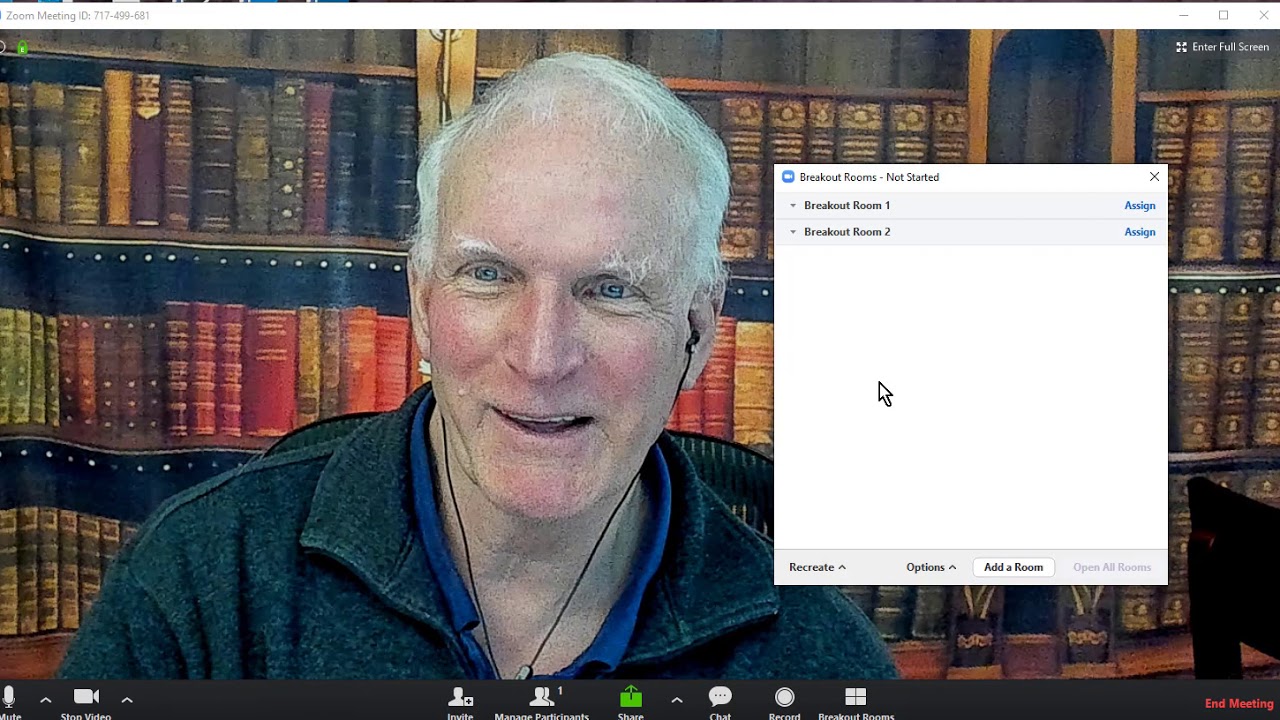
Doug Noll demonstrates how to conduct mediations and arbitrations on Zoom, covering invitations, audio setup, screen-sharing, and breakout rooms for private caucuses. He emphasizes that remote dispute resolution saves costs, offers geographic flexibility, and is now a permanent shift in the field.
Chapters
Hi, I'm Doug Noll, and I'm recording this video to show you how Zoom works on online mediations and arbitration. So the first thing I want to do is bring up, uh, let's see if I've got it here. Well, I'm going to have to do this again. So I'm going to bring up this Zoom, and you'll see that it has a basic check-in. Give me one moment here as we All right, and this is my basic screen. Typically what I'll have here is when I schedule a mediation, it will have its own personal meeting ID for the mediation, but what you will get from me is something that looks like this in terms of, in terms of an email. So it'll say, it'll be from me, Doug Noll at nollassociates.com, to you I'm scheduling, inviting you to a scheduled Zoom meeting. The topic will be the name of the case, whether it's a mediation or arbitration, the time that we're going to be starting, and then here, this link right here is the link that you put into your browser in order to get access to the room. Now, if you don't have a browser, not to worry. These are all the telephone numbers you can use to call in, and telephone, showing up by telephone works just fine. I prefer that people show up by video because seeing people's facial expressions and being able to see them and having them be able to see me, I think, facilitates the process. But I also understand that people may not be comfortable with video or they may not have a video camera available, and so that's why we have the telephone option. So it's really going to be pretty much up to counsel and their clients, parties, and experts how they wish to appear. You can also appear by telephone, I mean mobile. You can get onto Zoom via mobile. I would— that takes a lot of bandwidth, so my recommendation is you use a tablet or a desktop in order to get in. And you will get this invitation from me when we've scheduled the hearing, whether it's a mediation session or an arbitration hearing. So that's that, and we've seen this. And here we are in the Zoom, uh, platform, and you can see me in my studio with my library backdrop. So let's just walk through the screen, and some of the controls you will not have, some of the controls you will have. But first of all, you will have a microphone control, and over here you can mute yourself By clicking that microphone button on, you can also choose which microphone and which speaker you want to use. I typically use earbuds on Zoom calls to reduce echo, and I strongly recommend that you use something like that to make the audio stronger and better. We have the video controls here. You can see that I can choose which videos I'm using, settings, and all that sort of stuff. I can stop the video by clicking on that, and there's a picture of me. You'll still have the audio, but you'll see me there. And I can restart the video, and I'm back again. The invitation for me is that I can invite other people in. That probably will not occur in any sessions that you engage with me that we do online because I will have sent you out the Zoom information ahead of time. In managing participants, I'll open this dialog box. You can see over here on the left, if we had other Participants, I can mute people, so be on your best behavior because I can mute you and you can't unmute yourself. You can mute yourself and unmute yourself, but if I mute you, then you don't talk until I unmute you. So again, it gives me control, especially if things get in mediation might get a little tense or typically doesn't happen, but just so you know, I can control this. And then The next thing that is really cool is we can share. And so I'm going to go into this and show you. Here is, uh, I'm going to share this screen. This is my other computer. I've got two, like most of us, two computer screens showed up. So here's the screen that's showing up, and you can see I can, I can stop the share up here. And you'll all be able to share screens as well. Another thing we can do is I got a whiteboard. You've got that. I can share the whiteboard. And scribble, scribble, scribble, scribble. So that's kind of a cool, cool little part of it. You can— and so you can basically share all kinds of other stuff. I've got all these different programs that are open. Those could all be shared. I mean, it really depends upon what's going on. If you want to look at advanced, it will show you other stuff that you can do. I could have two cameras on. I've only got one camera on right now. And we can share files from all these different places. So for example, if I wanted to go to Dropbox or Box.net or Google Drive, get a Google Docs file out, I could do all of that too. So just whenever you want to share something, all you've got to do is click Share down here. So that's, that's a pretty cool thing, and it might be— it's going to be useful in both mediations and arbitrations because you may have exhibits that that you want to share with me or have me look at in mediation. And, and of course, using the share screen means that you don't have to— all you have to do is have them in some sort of PDF or Word format, and you can share it with me. And, and, you know, it's simple. And in arbitration, if it's a hearing exhibit, then when you're cross-examining, you can pop the exhibit up using share, and everybody can look at it at the same time. Quite powerful, quite effective. The next, the next, you can see here I can control who shares and when they share and all that sort of stuff. That's what that arrow is. This is the chat function, just like any chat function, Messenger, whatever it might be, and you'll be able to, you'll be able to send chat messages to individuals, to groups, or to everybody, depending upon what you want to do. The record function is my function. I typically will not record mediations or arbitrations unless people really want it. It takes up a lot of memory, a lot of storage, not useful. I do use that function a lot in my— I'm going to slide this over— I use it a lot in my teaching because I'll do a lecture or have a session and I'll record the session, then I can send it out the next day to the but in online mediations, arbitration, not that important. And then finally we have the one thing that I think makes Zoom really unique and useful in this kind of work, and that is we can do breakout rooms. So what I can do is I can create as many breakout rooms as we have sides. So let's just say it's a typical two-party mediation, so I'm going to create two rooms, and then basically I can manually assign people to the room. So if I create the rooms, I now have 2 rooms and let's just— I'm going to get this out of the way— let's just assume that I had people in the room. I can rename the room. I can say Plaintiff or Defendant, for example, and then from the Assign, I'm going to have the list will come up of people that I can assign to the breakout room. Now once you're in the breakout room, it's totally confidential. I mean, no one can hear you. No one can talk to you. It's a completely confidential private room. And just like it would be in a caucus room in a regular mediation. Obviously when I step in, then I'm there, but if I'm not there and you don't hear me, nobody else will hear you either. And that means that you can consult with your clients or co-counsel if everybody's remote. It doesn't matter where you are on the planet, you can all be in the same breakout room and you can consult and talk and, and work with each other. And typically in distributed mediations of the type that we do, you know, I'm shuttling back and forth between the breakout rooms depending upon how many parties there are. Is there any limit to this? Not that I'm aware of. I know a colleague of mine down in LA reported that he did a Zoom mediation and he had like 15 different parties, had 15 different breakout rooms. So that gets me kind of to the next point, which is This is all new and there are very few mediators who really have done much online mediation. I have. I've probably done 20 or 30 mediations, no arbitrations, uh, over the last 10 years using this platform and I'm very comfortable with it. I use Zoom probably at least 2 times a week in teaching my online courses and stuff like that. There are going to be a lot of mediators for a while who are going to be really uncomfortable with this technology. And I know that this last week in an organization that I belong to, the International Academy of Mediators, people were panicking because of the lockdown orders in LA and San Francisco and Chicago and New York. And there everybody's being driven to online mediation, and all these senior people, mediators who are in their 50s, 60s, and 70s, were technophobes. Were just panicking because they had no idea how to use this stuff. And so there were all kinds of online seminars teaching people basically what I'm explaining to you today. It's just not that difficult, but you might just recognize that, that most mediators, unless they have experience with this platform, may not be comfortable with it in the beginning. It's going to be a bit of a learning curve, but once you've done a couple of them, it's no big deal. I also think that when this is all over, which it will be someday, but who knows whether it's going to be a month or 2 years. This is the way we're going to be doing business because people will learn, counsel and parties will learn that it's cheaper. You don't have to travel. You can do it in your pajamas if you want, from the, from your porch in Hawaii, and you can be anywhere in the world as long as you've got internet and you can do this kind of work. So And once people see the ease of this and have confidence in the system, I think they're going to be— a lot of people are going to adopt this, and the mediators that don't get it figured out are just not going to get the business. So that's pretty much it. I'm going to close this out. Uh, like I said, the, um, the key here is to work with mediators You may have your favorite mediators, may not be me, but it really doesn't matter. If they don't know how to use Zoom, this is really the best platform. Skype is not so good for a lot of different reasons, but this is the best platform. If they don't know how to use it, then, you know, it's going to be an issue of how fast are they going to adapt to the technology. And just like buggy whips and horses and horseless carriages, those that adapt to the technology survive and those that don't don't, don't do the work. So that's it. Oh, there's one other thing I wanted to show you. Here's my calendar on my website. The address is nollassociates.com/wordpress/calendar. I'm going to be reworking my website here in the next week or two because the theme is old and it's gotten hacked, and so I just want to clean it up. It's, you know, you can see I don't even have an SSL certificate. So, but I don't keep any data on here. So I don't worry about that. It's just people want to see what's going on, but you can see that you can go, let me move this. Actually what I might do is just pull this and pull this down. And you can see down here, if I pull it down, here's my calendar. And, Basically what you can do, this is updated frequently. You can see the last calendar update was yesterday, so it's very current, and you can email me here and give me the case name, the date, the time. We don't need the place anymore. I got to change that because it's going to be online. Who the counsel, contact information, give me, uh, information about, uh, who the clients are so I can do a quick conflict check. If it's an arbitration, of course it's going to be a little different. We'll have a have to go through all the orbital disclosures and then have a scheduling call to schedule the thing out, whether this is administered through JAMS or— well, I'm not a JAMS member— but through AAA or privately. So arbitration is a little different, but the scheduling is still pretty much the same. And that is pretty much it. Very simple, very straightforward. You can see that we're recording my recording time up here. And please feel free to email me or call me anytime if you have any questions, have information, I mean you want more information or— huh, what's going on here? Oh, I see, I moved this stuff. There we go. So yeah, call me and I hope you'll consider engaging me and I hope to see you soon in the mediation or arbitration where you need some online help. Take care, stay healthy, and we'll talk to you soon. Bye.
More from Doug


When the Amygdala Fires, Talking Is the Worst Thing You Can Do (Here's What Works)

Every Difficult Conversation Is Actually Two Conversations (Most People Miss the Second One)



Why Traditional De-Escalation Makes Emotional Flooding WORSE (Prison-Tested Neuroscience)