Getting started in ANY WEB DESIGN Project!
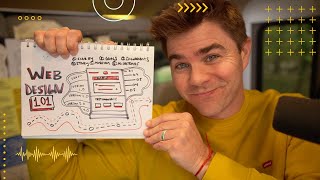
Drew Bridewell walks through starting a web design project in Figma. Get clarity on goals and timeline first, map existing pages with screenshots, sketch layouts, then build wireframes and multiple design versions. Never jump to visual design without a plan.
Questions this video answers
Drew Bridewell (head of product & design at Grove Day; founder of Next Level UX).
October 16, 2022.
Figma (figma.com).
15 minutes.
Chapters
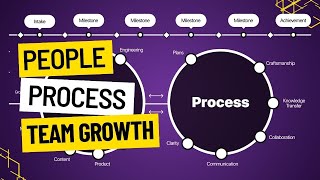
What's up? Drew Bridal here, head of product and design over at Grove Day and founder of Next Level ux. Today we are going to do something super fun. We are going to do a design Web Design Class 101. So I'm going to teach you a fundamental course and it's going to probably be, let's say, let's time box this, because time boxing is important. You don't have endless amounts of time in your day. So we're going to do this for 15 minutes and then we. What you're gonna get out of this course is a really good understanding of. You're gonna be understanding how to start a website, how to rebuild it or redesign it, and just really get after it. So let's just say you're just starting out a new project, you're just starting out in design. You're really trying to figure out, like, where to start. Now, obviously we're gonna be using Figma today. Figma is a really just incredible tool. Go to figma.com if you need to download it. And let's just, without further ado, get started. So the first thing that I'm thinking about whenever I want to start a new project is I want to understand, get, and get clarity. So obviously there's tons of questions that you could be asking yourself. And I'm just going to draw, let's just say, a couple boxes here. I'm going to write down clarity. So the big thing about clarity is you're going to have a lot of things that you're going to need to figure out about the thing that you're doing. Like, for example, what are the goals? Goals? Yes. What are the priorities? Yes. What are the ingredients? Ingredients, yes. You're going to need to know all these things, right? And let's see what else you're going to need to know the story. Like what's the story or narrative of the project or business or whatever it is that you're redesigning. Ingredients. And you're going to need to know a timeline. All right, so you make these even smaller. So I'm just clicking K on my keyboard to make these smaller. And when we're first starting out a project, it's not about just jumping into screen design and getting ready. What we're doing is organizing our thoughts, getting clarity. We're building an understanding. And. And then obviously we also need a mission. Like, what is the mission of this? What are we trying to do? What is the purpose of the thing? What is the purpose? Right. So we have all these different Things. And I. And I could call them ingredients. I'm just going to make this, like, let's just say 10. And I'm a big fan of just going with the flow, y'. All. Like, just really creating, feeling it and having fun and going and getting after it. So we can. We can learn about what clarity is for this, right? We can learn about the goals, we can learn about the priorities, we can learn about the ingredients we need. We can learn about the story, the timeline, the mission, the purpose. Great. Now, what is the first thing that we can do after we understand these things and how do we get these things? We gotta ask questions. You gotta go in and ask a ton of questions. So the second thing we could do, we could start mapping out the product. So if I was gonna map out the product, the first thing that I would probably go do is I would go take a ton of screenshots. Screenshot, screenshot, screenshot. And let's just say that I'm redesigning a website. I would go and take a screenshot of every single page on the product. Every single page. Just go. And you could do Command Shift, Option 4 and take a screenshot, drag it. You hear that noise? And then you can command V and paste it in to the area or paste it into the page. And now you're mapping out all the experiences. Now, I know I'm doing this really fast because like I said, I'm doing in 15 minutes. I'm trying to give you a really quick crash course here, so. And I'll add a little bit of a drop shadow. There we go. Right? You got it. Cool. So we've mapped a product. We understand all the pages. So that mapping the product also means, like, document the documentation, right? You're documenting the pages, you're documenting the pages, you're documenting the ingredients, and you're pulling the ingredients, you're pulling all of it out. So as you go through and you're understanding the page, you're understanding what it is, you. You're starting to do this. Now, if you're starting from scratch, you don't have a page that you need to redesign, then go out and look at your competitors, go out and look at the people that are also doing something very similar and use that as a jump start. And don't copy everything they're doing, but go look at what they're doing and observe and really break down what it is that they're doing well and what it is that you don't really, like, pull the things that they're doing well. Drop them on your Figma file again, Command Shift Option 4. Take screenshots and this is a part of the process. All right, cool. We got all the things, now we're going to be mapping it out. Then what we need to do is start building out our pages. So what we could do here is, hey, you could open, you could grab a piece of paper and start drawing out here. Let me actually just do that really quick. I'm going to go over into my aerial view, bring my camera here. Let's just see here. Camera, camera, camera. Which, let's see. I'm just trying to see which camera I have on here and bring it over. Alright, so in this scenario, let's just say I wanted to start sketching out what I need on the page. I could just draw a box and I want you to overthink this. Your box has different sections, right? Because your page is going to be very vertical. So you have probably have a nav, nav, nav, nav, nav nav. You have your core thing that your product is doing. Maybe it's like text with an image on the right side, like a little message, little values. Then depending on what your story is, you might have like testimonials, you might have sections. But down from here down, there's probably going to be like, maybe like five sections. So it'll be like oh, one. And they could keep building it out. And this is your part for building out the story, building out the narrative and you could do like four or five different versions of this and then you build out the sections. So you might have testimonials, you might have examples of your products or the services that you provide and you might have like a footer that has links, support links, whatever it is. So essentially like all webpages have this sort of framework where if you go in and you look at what are your competitors, what are the best people doing, and then you start breaking down these things and then what we're going to do inside of Figma, we come back over to you. What we're going to be doing inside of Figma is literally taking this little sketch and building out the scaffolding for it. So if I was to do that, I would literally just build wireframe of all these different pages and start building it out. And again, I don't want you to overthink this. There's so many examples out on the Internet where you can just go and just go and copy the frameworks for the pages, but then add your uniqueness to it. Go in and really like just, you know, copy and paste your text that you already have in your site and bring it in and just keep asking the questions, what's, you know, based on the answers that you have from your goals, based on the priorities of your, I mean the priorities. This is going to help you actually execute. The ingredients are going to help you. These are essentially the ingredients. So you have documentation, you have the ingredients, you're going to have the goals, the story. You want to make sure your story is aligned here. Because as you tell the story, like what is this site about? What does it do, what does it mean, how does it work? The timeline is about like when your timeline and priorities are going to probably be down here, here, we'll draw something too to help you with that. You have the purpose, the making sure that your purpose of this is being tied with your story. And the mission is also like making sure that these three, three things are tied together. You might have four different goals. You know, you could have less goals, you could have any goals, but these are the things that you need. Like this is a crash course, right? We're just getting started, getting these things going. And, and I want to encourage you to reach out if you feel like you're. Oh my gosh, I don't know where to start. Like, you got this, you got this. You just got to go in and start building this out. So what I would do for the timeline is like draw out a window of time. What does a window of time include? Well, my friends, a window of time is you have your, let's see, it's October 16th, right? Now you have two weeks left in the month. So you have two blocks of time. Two blocks and I tent I'm going fast because I know that you can do this, I know that you can keep this. You have two blocks of time, right? You have the second, the third week of October and the last week of October. What can you accomplish inside of this? This is like what we would do in action planning inside of the next level UX framework. We'd break down these big rocks and smaller chunks and smaller chunks. Then you're gonna have November, alright? November is gonna have four blocks. So imagine what you can accomplish in four blocks, right? Imagine all the things like the big giant needle moving things that you can do inside of these. November. Then you would do the same thing in December, right? So now you have four elements and you start thinking, wow, what can I do in these four, these windows of four? I can do a lot. I can achieve so much inside that windows and. Right. I'm just giving you a visual representation of what it could be. And then inside of each of these windows of time, you're gonna have what I would call, like, little priorities. Little priorities. They're going to be. Just say they're white. They're going to come in here now, each of these weeks, you're going to have like four or five priorities that you do. And then you're just going to crank on these four or five priorities every single week and make sure you're moving things forward. You know, you got your goals, say 1, 2, 3, 4 goals. Let me just do this. So we're organizing all of our setup. You have clarity, which is all the questions and things that you have to decide on. You have kind of like your storyboard and the elements of the webpage that you're redesigning. And then, guess what, you might have a lot of different page types. So inside this, you might have, you know, a version, version 1, version 2, version 3. And then you can keep going through all these different versions, which is totally, like, natural, until you get to a desired outcome that works for you. Right. And you could have so many different variations of this landing page and of this experience. And then you also have milestones that you're working towards every single. Here, let me bring these over. Because each one of these little things are like milestones. And then what you're doing week over week in your timeline is you're working towards these over a period of time. So you have the first start. Okay, I got understand my product with mapping, the product you're mapping to learn, you have clarity about all the things that you need to do. You have goals, you have the different actions and timeline that you need. And then you start, you start go rebuilding that webpage, you start designing it. Right. We haven't even started, like, actually putting any design work to this, because you can go to a web page and you can be like, oh, yeah, this is what I need to look like. And I'm going to actually go in and start building all these things inside of figma. But you got to understand the framework and the actual, the actual. All the ingredients and things that you need to do before you actually go that. And we just have a couple more minutes of this, of this quick little crash course. So after you do that, you have your landing pages. You know, you could, you could do. You. You push it into, like, the priorities, which are, you know, the top one to five things that you're doing every single week to move forward. So if, like, we had one big, giant circle here, and this is you. Let's go. We're gonna make you. Let's just say we're gonna make you green. And you're starting here, and you're like, oh, my gosh, there's so much for me to do. It's not if you break it down into small, little meaningful chunks, right? You start with clarity. Boom, you're here. Then you go to the goals. What are the goals of the project? Oh, we want to get more people to sign up for our thing. We want to get more people to come through. Okay, great. You've mapped experience. And then you go and you start building, like, a very basic wireframe. A wireframe is like a scaffolding of the site, like a skeleton. Then you start building out, you know, fidelity one, fidelity two, fidelity three, fidelity four. And this. If these other boxes are like V1, V2, V3, V4, you test it, you get feedback, you measure it. And then while you're doing that, you're moving your. Your timeline, your priorities forward every single week, week one, week two, week three, week four, week one, week two, week three, week four of each of these months until you get to a desired outcome and you're looking and you're monitoring your priorities along the entire journey, and bada bing, bada boom. Like, that's it. That's it. That's what we're doing. And I love this because it simplifies, you know, what it is you're trying to do. And you always come back to, are we on our mission? Are we on our story? Are we on our purpose? Do we understand the business? Do we understand what we're trying to do? Do we have our goals? And then we'll get into, like, the weeds of really understanding, you know, how to build out a website and how to design something, like, beautiful. But you got to have these basic fundamentals done and how to actually plan it, how to execute it, and how to work it through. And then you can start building out, you know, like clicking A and starting, like, literally going through a website. And if I was to even just go. Let me go really quick to this website that I'd want to redesign. Just come up. So let's just say I wanted to redesign this web page. This is one of my son's school. I could copy the image, bring it in, right? And then let's just say I want this real estate to be. I want my landing page to be. Let's see here, let's see here. I want to be yeah, 12. Let's say 1200 by 7 1. Should I do 1500? All right, so there's my landing page, and I got my links here. And I got my pages. Got my pages, got some content ingredients. And obviously this isn't what it would look like. Final. But I'm going to show you how easy it is. Just get going on this. Oh, they have a little, like, YouTube video that's embedded. But you know what? I want people to watch this right away. It's like kind of like a blog format here almost. And then I got all these cool. All these really cool images pulling from. From Instagram. And, you know, so I know that there's three. Okay. So maybe instead of that, I'll have more of like a, you know, Instagram grid where I'm pulling the latest Instagram shots and I have home. Let's see, it's orange is the other color. So let me grab an orange. Now. I don't want you to sweat it. You know, like, there's so many. There's so many different ways to build and to design a website. And, you know, even if this is your first. Your first version of this, you know, there's so much opportunity to improve this over the long term. And I just want you to believe in yourself and know that you can do this. You can design something that is going to help impact your customers and help reimagine, you know, what this could be. You know, this might need more, like, a little bit more of a hierarchy, you know, But I kind of like this. I kind of like this grid right now that I'm looking at where you have the logo. And then you could basically change out the. The page. The page depending on all the content. And you have the programs, the classes, and everything that's showing up. You immediately are getting exposed to the great culture inside of this school. You're immediately getting notes and information, and you can gum through and be able to connect to what this is all about. Maybe I'll add a little bit more leading. And you know what? There's just so many ways to approach a web design project. But I think if. And there you go, you have, like a version one, I could start building that out. But the key is I need to have clarity about what it is. I need to understand the goals of the project. I need to map it and understand all the other ingredients. So I. I could come in here and take a screenshot of all the pages of the site that I want to redesign. I have the programs, I have the classes. I have the enroll. I could go through every single page, take screenshots, build up my inventory, then come in and start building out the scaffolding and then have like, you know, versions 1, 2, 3 and 4. And each of those versions could have different styles and have different like, essence to them. So you can do all those things inside of, inside of a web design project. And I want to encourage you to do it. I want to encourage you to have some fun with it the next time you got to start a project. Start with the question, start with understanding the basics and then work through your timeline to make it happen. Do not, and let me say this with, with this grace and encouragement, do not start designing until you have a plan. If you start designing without a plan, then you're going to be spending the spinning your just spinning your mind and working on something for about four, four weeks to a month, but actually not getting anywhere because you've got to have a deadline in your mindset. You got to have milestones where you're making progress every single week. You need to know what those milestones are and you could do it in your next project. So I want to encourage you to do that. Hope you enjoy this and I'll see you next time later.