GrowthDay Advanced Personal Development Tool Training
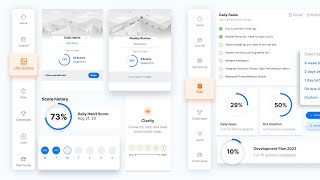
Drew Bridewell walks through GrowthDay's core features: a daily dashboard with journaling prompts, life scoring that tracks progress across categories, and a plan tool with reusable systems. The app also includes courses, growth groups, and challenges with coins and achievements.
Chapters
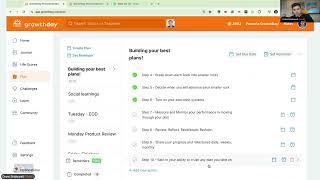
Happy Thursday. Good morning, everybody. My name is Drew Bridewell, head of Product and design here at Growth Day and today we're going to walk through the entire system. I hope you came with a couple questions, a couple maybe ideas about what it is that you want to get out of the tool. Today we're going to cover it all. Hope everybody's doing fantastic. Go ahead and introduce yourself in the chat. If this is your first growth group or, or if this is your first time getting into the Growth Day app too, that would be really interesting to know. So everybody should see the dashboard right now. This is my dashboard. You have your own dashboard. You have two columns that you need to bring your awareness to. You have the right sidebar that has the Daily Fire, it has your upcoming workshops, kind of the last replays courses that you maybe have started that you want to continue watching your recommendations. And then if you haven't yet done a tour, you'll have the Torpoint system right there too. So I'll show you that as well while we're on this page. Then you have the main column on the homepage, which here I'll zoom in just a tad bit more so you can see this a little bit bigger. Now the main column is like where we put all the latest news and elements that are happening. For example, next Wednesday we have a huge lineup from 10 to 1pm if you're viewing it on in the app, you'll be able to tune in and watch Brendan and open it up for the growth of LA for our November 1st session. That is really exciting. We have a huge lineup there. That's going to be just a spectacular show. Great. And you can always just click through these items as you see different elements. And if this is your first time into the Growth app, you might not have claimed your growth group coaching session. So this is a group coaching experience with, hosted by a chpdc, a certified High Performance Coaching individual. And just so you know too, like this week is cert week, so we have a lot of coaches getting certified this week. So you might see that out in the news and out in the buzz around the Internet. Other things that you'll notice as you scroll down on the dashboard, if you join a challenge, like if you come to the challenges and you join, you'll end up getting this challenge component that shows up on your dashboard and that's just to be able to help you stay motivated and keep you on track. You might also notice that there's a little timer here. That timer is just for the time you have to complete all the tasks in that one day. So if there's a five day challenge, you got five days of tasks that you need to complete. Each day you have a little timer that helps you stay on track to keep keep you finishing those things. But you can actually do those things in one sitting. Yeah. Cool. There was a question about how does the group coaching work? So essentially you follow this link, you put in your contact detail information so that you can just basically subscribe to a call and that call will just literally on the phone and you'll be able to listen in and participate by engaging with the keypad. And it's just a system that's created and you talk to somebody or listen to a group coaching session. So give it a try and check it out just in case you didn't know too. Before I even joined Growth Day, I was a part of a was actually over my time when I was at Facebook and I ended up going through the coaching program, I ended up getting a 16 week certified high performance coach to coach me so I could take my ambition to the next level as well. So it's a great program if you haven't yet been able to go through it. It's just a great experience to do if you need that, that next level of coaching. So check that out if you haven't yet done that. All right, so we keep going. So we have the challenges. This little cool little widget there. Then as we keep going down, there's the other aggregated tools from the rest of the platform. So you have your journal, which you can click through and go through different prompts. And if you click on any of these prompts, it'll just take you right to the journal where you can just start answering this specific prompt. Now we have a plethora like so many different prompts depending on what you're into for that day or what you're feeling or what you want to reflect on. So if you're not really feeling the prompt, you can go to the next prompt and just keep going until you find what you need. Then down below, if you have RSVP'd or subscribed to other growth groups, you'll have a My Growth Group section where you'll see all the growth groups that you have RSVP to. And this is if you're host or if you're just attending, you can know what's upcoming next. And even the group that I'm in right now, I can see that it's live right up here with the upcoming workshop and it's ongoing, so I could see that right there as I keep scrolling down the page. I also if you bought video courses or audio courses from when you've signed up, you'll also see those on the dashboard, just so you have a quick entry point. But these are also available on the Learn Pillar as you go to Learn Pillar. So no worries. If you just go straight to Learn Pillar and go right into the courses, you'll be able to access all of your past courses. And then there's the Life Scores aggregate, just keeping you on track with your daily, weekly and monthly Life Scores. And I'll talk a little bit more about this since if it's your first time coming to the app, you might be like, what's a Life Score? What is a scorecard? And these are things that were originally created High Performance Planner. If you haven't seen the planner, you can search High Performance Planner by Brendan Burchard on Amazon. You can see what this is all about. But this was our analog version of the basically the scorecards, which was right down here below, where you can see like how would you score yourself from a 1 to 5? And then at the beginning of the month and the end of the month you can score yourself, which is a pretty cool planner if you still like the analog version. But that's why we built the app, so you don't have to, you don't have to be buying these every single month. You can actually just do it in the app and it's all organized and saved there. Plus we'll show you the recommendations and everything that comes along with it. But it's pretty cool. And there was one question in the chat about how you can print your journal and go back and read it. If you want to go back and read it, you can just go back to the history, which is why it's in a digital app. But you can also just do Command P or file print. And it's just one long page history of your journal. So you can just probably just Command P if you wanted to be able to print it at a later time. It's gonna be a lot of paper there for you. But you can do that no problem. All right, so keep going down. And then we have like our plan section, which is also an aggregate of your plan. And just in case you all didn't know this as well, you can drag and move these components up and down on the page. So if you wanted to have your my growth groups at the top, you can just drag that up to the top and be on your way. So this will save on the desktop, it won't replicate on mobile because this is like a web only feature here. So you won't be able to do that too. So this is your dashboard. It's super helpful way for if you're trying to figure out what you need to do for the day. You can just go right through on all these components and just create a daily plan, journal about, journal about something that you are doing or use one of our prompts, do your life scores. All of those things are definitely recommended on the dashboard. Also one of our, one of our most popular experiences and features in the app is the daily fire. So every day Brennan's dropping a new audio about this but obviously I'm in a growth group so I can't play that right now. So what I want to do now we've looked at the dashboard. You have your entire like ecosystem of what you can do in the app. Now I want to do is travel to the journal. So if you're following along with me, feel free to just follow along. Jump into the journal. And this morning I did a journal around the morning mindset. Morning mindset is literally if you click this first big button on the page and I'll zoom in just a little bit more this morning mindset. Now the morning mindset is a series of by eight questions and these questions help you just prepare and lead into the day. So an example of how I answered these and some of the things I went through this morning was I even went through. One thing I can get excited about today is this workshop. This specific workshop and then the team advancements finishing the week strong. These are things that I'm excited about on my Thursday. And then if I could do one, if I one word that could describe the kind of person I want to be today, I just use the word intentional. Yesterday we come off a big training in our internal teams about building a culture of design intention and building a culture of feedback. So we were sharing while I was sharing a deck that I did in previous teachings around just what this means to me. So recently this week I just am encouraging a lot of high intention with the team and focus, focus on that. Cool. Cool. And then somebody that needs me on my A game today I was thinking about my family, I was thinking about my team, I was thinking about my son. So I got them listed in there a situation that might stress me out. We have a lot of projects going on too. So just staying focused on the rhythms and bringing that intention and being prepared for all of it. It's kind of like where I was at and where I'm. Where my focus is. You can keep going through and you can see, like just answering some of these questions is just bringing another level of intention into your day. And that's really what it's all about. Bring through. So we can keep going through and showing you those things. Another idea that you might not be aware of is if you go through and you start selecting these prompts and you don't really like them, you can always clear them up in the top. So if I open this one up, I can always clear it. And then I can also go to the growth prompts. And if I don't really like what I'm seeing, I can just keep clicking this growth prompt button and it will keep loading new growth prompts for me. So it's a nice little tweak there. Also, in case you want to be able to search back, like there was a member in the chat that was talking about wanting to print out their journal, you could also just search a journal. So if you were searching, like confidence or searching something that you had written, like maybe you written like a T, like a certain tag that you were tagging your journal on, you could just search that pound sign and then whatever the keyword is that you wrote, and then that will find. And you hit return and it will find all of the keywords that you had written. So it's searching exact matches of the things that you writ, you wrote. And then you can also still sort by the history of all the elements. So if you don't end up using any of these prompts, you can still go to custom. And then that custom filter is just like any of your standalone entries where there's no prompts selected. So there's a question too, about accessing previous daily fires. Today, that is not possible. Today. The daily fires are only up for 24 hours, and then they go away and then they get archived at this time. The answer to that is not right now, but definitely keep giving us. If this is something that's super important to you, you want to be able to capture that. Let us know in the feedback so that we can keep collecting that and we can share that with with Brennan and team. So there's another question. Is there a way to add your employment responsibilities and somehow to help with your day planning? Absolutely, Harriet. That's a really great segue. And we'll talk about that specific how to add employment responsibilities. You can actually do that in the plan. You can set a system up so you can get reminded about those actions and responsibilities. You can just get reminded about that as much as you want. So we can dive into that question a little bit deeper too, if you want to dive deeper into it. All right, cool. So is everybody feeling good about the journal? Beyond having this ability to do these prompts, you can still add images to your journal. Let me show you how to do that. So you could literally just click this button, browse an image from your local computer, or if you're getting fancy and you want to be able to take a screenshot, say I want to take a screenshot of what I just did. I can take that screenshot and just drag that right in here and be like, my growth group today with the strivers, and I can submit that. And then I'm in business. So just some other ways that you can use the journal for uploading your images, and then I can actually see the people that are in my growth group. The digital journal is exactly the same as the paper one. So the paper one, like this plant, this is more of a planner. There's also a journal that Brennan has sold in the past or given away in the past that has. So journal prompts, they can be outside the product or in the product. We've just been building this inside the product so that you have all of your digital private journal in one place so that you can use that later or you can search that later on, or you can have that archive for yourself. So you're reflecting, you're moving through things and just helping you in your personal development. All right, cool. So we went through the journal. Let's keep this momentum going and keep the questions coming because we're going to get to plan questions here in a second, Harriet, and let's just dive over into the Life scores. So Life Scores is a really fun tool as well. And it's also something that was originally in an analog form that you could fill out through that high performance planner. Or it was typically like its own individual or form that you would fill out and then you would get the assessment scores. And it was like, like a one time thing. And what we learned from the research was that this is something that we need to be able to give to our strivers so that they can do this every day, every week and every month. But we wanted to take it a step further. And to take it a step further, we wanted to be able to give you recommendations based on your scores. So we're already providing suggestions based on your scores, which you can access in a couple different Ways. So the first way, if you want immediate, like just what should I watch, what should I learn, what should I get recommended? Today you can go to your previous daily habits and click the word Suggestions. It's a blue link. And if you click that blue link, you'll just get a recommendation for the day. Really simple, straightforward. And that's one way to get your recommendation. The second way to get your recommendation is to go to the View History. So each daily, weekly and monthly Life score has a View History button. If I click View History for my daily habits, what it's going to do is it's going to give me a history gonna get, let me know how I've progressed over the last month, then I'm gonna see each category that I get scored on for my daily habits. Then I can click on any of these elements and I get this little orange play button on top of each of these titles. And if I click that, it's gonna give me a recommendation based on that topic and I can keep going through and work through all of these scores. Now the good news is we are updating and adding new recommendations all the time. And if as you cycle through, we will be improving the recommendation recommendations so that you can keep watching and keep learning. So stay tuned for more of those updates. But just to get into the feedback and into these videos, you can just click on any of these and get right into it. Does the app have the same features, views as the desktop version? I only use the app. Greetings from Switzerland. Awesome. Thanks for coming from Switzerland. So the mobile and web app are completely cross platform. So all the functionality that you get in the web experience is paired with what you can get in the mobile app. However, because the mobile app is designed for iOS or the app Store or the Android Store, there is a couple affordances that are a little different, but holistically and overall in the total product you can get recommendations from mobile app, you can do your journal, you can do all the things that you can do on the web experience. You just have more real estate on the web and I'm showing you experience on the web right now just because I'm hosting a growth group. I prefer hosting growth groups on the web. When I'm presenting and if I'm on an audio or if I'm just listening in and or if I'm participating as a guest, then mobile growth groups are awesome, then I can just be on the go and I can be moving around when I have my growth group. But since I'm presenting today, just wanted to be able to have the web experience up. So there's another question as we keep going here and. But let me actually finish this Life Score tutorial for how to get the most out of this. So we had the blue link suggestions. You also have the C suggestions based on your scores, which also will give you a recommendation. And then you can also click on individual titles. And then as you scroll down to the very, very bottom, you'll see this timeline of your progress. Now, the cool thing here that you might not know because I've been using this for about three years and you might be in your first week, so you might not see any data here because you haven't been doing it over a long period of time. But the key is the Life scores allow you to have an anchor and a benchmark for how you're progressing in your personal development. It's not a tool to make you feel bad about your scores being low. It's a tool for you just to have an anchor point or a benchmark of where you're currently at. And that way over time, you can see how you're scoring across different areas. For example, for sleep, and in my sleep, it dipped a little bit maybe at between March and May, but overall it's pretty consistent. That's not just so I have this view. It's just really important, but I also am just being aware and being intentional about how my sleep is. And that's really what it's doing. It's helping me have some accountability for how I'm performing. So if I can do these scores every day, every week, every month, then I can have a solid benchmark as I move through my personal development. Now, on both the Journal and the Life scores, you'll notice this sidebar, and this sidebar is a smart sidebar. What it does, it has the date, but it also allows you to track what you've been doing on those days. Now we do this more of a visual reflection back on your performance and what you're doing. For example, I see that I journaled my morning mindset today. And I see that I journaled another journal, which I just showed you. So there's two journals for today. Now, if I go to my Life scores, I can also see that I haven't done any Life scores yet for today. I typically save this for about 8, 9 o' clock at night before I'm winding down. And when I do that, I'll also have a new Life Scores marker here. And even if I click back from the previous days, I can see that Yesterday I got a 92% on my daily habit life score. So you can keep going back to previous days or previous months and see your activity. So this is more of an anchor for you. And I just wanted to make sure y' all saw the sidebar and were able to access it. All right, cool. So now we go back to this other question. There was a question about the five day Transformation Week Challenge two days ago, and since I didn't know what I was doing, I didn't do any of the tasks and now I'm already two days behind. Is there a way to start it over from today? There is actually a way for you to start over today, and I can show you how to do that. And if you're inside the Transformation Week challenge, just know that all the challenges, you can retake the challenges as many times as you want. And if you feel like you messed it up and you want to start fresh, then you could just come up here to leave the challenge up in the very top. And if you leave the challenge, then you can just rejoin the challenge and start completely fresh. So now I've joined the challenge, I've enrolled, and now I can immediately start getting into each of the questions and go through. And then as I complete each of the tasks, I can mark them done. I have my time limit. And then as I do each of these tasks, I can just mark this complete. Now there are things like, for example, this task for where it's like the honor system, considering how you do this, if you're leaving comments in there or sharing it, then you can come back in and share it. But it's essentially tracking what you've done. But for the goals and for the journal and for the watching video, these things happen when you complete them. So just make sure that you're marking things complete and moving forward, if you want to collect the growth coins that you get from each of the. The different tiers are just a way for us to celebrate your achievements going through each of this work. Because it's a lot of work, 14 tasks to get through a gold. But the idea is like you're doing the work and performing and doing it. This is why we've created this achievement system. And then you can get some cool badges which also will end up showing up on your growth profile, which if you click your coins up in the very top right, it'll take you down to it. And what this looks like is at the very bottom, it shows you all of your achievements, the badges that you've earned, the certificate, certificates of completion from the courses that you finished. And you can also learn about your history of activity and what you've actually done in the platform. So another thing to consider, another thing to dive into. And no big worries. If you make a mistake, you can also delete. If you made a mistake on your journal entry, you can delete that. There's all these little dot which are like ellipses, and those just allow you to be able to delete those things. So even if I was to go back to the journal, if I wanted to delete one of my previous journal entries, I could just click and hit delete and then it would delete that entry. There we go. Simple as that. Cool. All right, so I'm just going to read through the rest of the comments and we'll keep the momentum going. So good to hear that. Thanks for the feedback, Jen. And you can use the Apple pen for like wayfinding and navigation. I do have an iPad and I have tested it, but it's not like a native pen app. Like if you use Procreate or like another drawing apps, it's not as native like that, but you can still browse the app and use the app both on mobile web and on the iOS app store. So give those both a shot. You might actually like the web version looking on iPad because the density is a lot more. You have a lot more affordance because the website is actually a responsive website, meaning when you resize the browser, the whole everything resizes. So it's a really nice experience too, on the iPad. Okay. And there's a question around. Is the life scores the same content in the high performance planner? The life scores content is the exact questions, the prompts, the sidebars of each side. It is exactly the same. It's exactly the same order. And can I make all this? Yes, you can make all this a to do list and check it off. We'll show you the plan right this second. I know there's a couple of things about that I'm just making my way through. So now what I want to do is walk through the plan and we're making good on time. We're about halfway through today. Oh, nice. Okay. Bravo. Bravo. All right, cool. So there was a question early on in the chat about how do I set up plan for all my responsibilities at or. Now the thing that I do want to call out about the plan tool is the plan tool. It can be a to do list. It could be a simple to do list of things that you need to complete, but it could Also be a system of record for your most important systems that you create on a daily, weekly and monthly basis. I'm talking like the things that you know that you need to do to be successful in your days. Maybe it's your routines, your morning routines, your evening routines. Maybe it's like the things that you just, you want to get really good at on a recurring basis. You can set up those actions and those labels or systems here inside the plan tool. And then you can set reminders for the top tier of the plan and for the individual line items that you can get reminded about every single day. You could get reminded about these things even by the hour. And that's the one thing I love about the plan tool. Because you're building systems, you're not just building to do. Lists might be something that you throw away after you're done with it. But I like building systems because systems are things I can reuse, things are I can help me get into a rhythm, into my routines, into my schedules. So I want to encourage you to maybe take that today and I'm going to show you right now how to do that. If you wanted to create a plan, you can just go in and create a plan, name it. For the example that one of the strivers in the chat had around creating it for their business responsibilities. It could be like literally business my or my responsibilities and every week or every day. So if you do that, then you can set a due date, could be at the end of the year, could be anytime. But you could also set a reminder for this that I want to get every hour, every day, every week. So maybe it's every day at 11am so you can save that, create that plan now that you have the plan in place. Now a really important first step is to create an intention around the purpose of this plan. Add some notes, write out what you want to get out of this. What do you want to do with this plan? That way when you're seeing this every day, you're getting reminded about it. Now that you have that, then you can come in and start putting in your. Maybe it's your responsibilities. You know, if you have like a Monday through Friday or Monday through. Yeah, Monday through Friday schedule of responsibilities. You could do that high level. And then you could tap in and add some sub items. You can keep these super high level or you can go super specific. Maybe it's morning standup with the team priorities for the week. Big rocks to focus on this quarter. There's probably things that you just know that you need to do every single day. And you can build out the system and then you can get reminded about just this line item. I could get reminded just about this daily at. Even at, say, 11:15. So maybe I'm getting a reminder about the plan, but I'm getting reminded about these three things, about what my schedule is and my responsibilities for those days. And then you're immediately engaged. You're immediately getting those push notifications, as long as you got it set up on your phone to get push notifications from the app. And then if you don't even want to use the plan and you just want to get reminded about, like, a line item, then you can set up reminders and manage your reminders here. But you can also to set up a new reminder, you can just go set reminder. And this is just like a standalone reminder just to be like, I want to be reminded to be X, Y and Z for anything. It could be like, I want to. I have a couple keywords, for example, like creative, innovative, inspired, motivated. I wanted to be reminded about these words because these are my words for this specific time when I set this up. So I just wanted to get that reminder every day about these things, about how I want to show up, how I want to be and interact with other people, how I wanted to strive today. So you can do that as well. Let me come back to the chat, make sure I'm all caught up with all of y'. All. So let's see. Did you. Yeah. Oh, the recording. So, Marella, I would absolutely email support day.com to figure out, like, what actually happened, but those sessions are. They. They are live. And so it might have sounded like a recording, but you could actually dive back in and try it again. Or you can reach out to our team if you're getting stuck or anything's like, quirky there. Not working. Oh, sweet. Okay. I'm just reading through, looking at the rest of you. Absolutely. Mel. You could totally do that. For planning reminder or complete a finishing course like I've actually used. And let me show you a couple examples of ways that I've used the plan in the past. Like, I had one for ramping up November. So we're getting ready. This is the last week in November or October. Right. So it's. I want to build up a lot of momentum for what's happening in November on top of having an incredible November 1st event in LA. That's top priority. Second thing is, like, just helping align the team and build a lot of momentum heading into November, December, January, because it's the, you know, end of the year people are on vacations and on holidays. So it's even more important that we're all super laser focused on what's most important to improve, to, to elevate the product, but also elevate our team. So I'm thinking about that at high intention. I'm also thinking about all the rituals, routines and habits that because we just moved back to the Bay Area, we were on like a year and a half big adventure trip where we were exploring the country, exploring new places to potentially live. But we ended up coming back to the Bay Area. We were living here for quite a bit of time. So I'm coming back and I'm building these new rituals, routines and habits with my family because we're just starting a bunch of new things. And so that's a really something that I'm prepared, I'm preparing for. And I even have a bunch of sub Items. I have four sub items for that and then for Q3, Q4 for products design. We're working through a lot of initiatives right now, so I'm working through those. And we have campaigns and things that we're running too. So you can keep this in any way that you want to manage your, your time, your space, your intention. You can use the plan to really ramp that up. Other thing, like I had a huge meeting with some of their executive team. So I was preparing just for that meeting, just for that day. I had all my line items of things I wanted to cover for that meeting and I was just going off and going through each of those to make sure I didn't miss anything. Same thing I had one for finishing October strong. I even use this for a teaching rhythm for the things I want to teach for an upcoming course, an upcoming training, and all the things I want to include inside of that as I teach and go through that. Even had different things that I'm doing for things that are completely like new concepts. Friday to dos Thursday resets, Thursday lineups. Different things that I'm doing throughout the weeks. You can have it for one on ones. You could have it for trips that you're going to. You could pretty much. We made plans super agnostic. So you can use them for anything you want. Love it, love it, love it. If you upgrade to the full version, when you say full version, can you clarify full version? Because there's Pro and there's Mastery memberships right now. You can do monthly or annual and if you upgrade to Mastery, then you unlock all the courses. So I, I swam through the challenges really quick. But let me actually dive into growth groups and we can keep opening up for questions, meal plans. Yeah, you could do that too. Yes. So good. All right, so you're in the learn experience right here. And the big thing to know about the learning experience, you have two par, like two ways of learning and growing here at growth day. Beyond working on your personal development with your intention, building your own growth loop through journaling, live scoring and planning. One of the big parts of finishing a growth loop or finishing your growth loop is learning. And learning can come through these sorts of interactions that we're having right now where you could be hosting a growth group, teaching something that you're really passionate about, or teaching some or just exploring something with other professionals and networking with other professionals that know maybe what you're trying to learn and you can have conversations about that through growth groups. That was the whole intention for growth groups was to bring more intentional conversations to the platform so that anybody can host a growth group. And with this said, you can actually easily schedule a group just by clicking on schedule group. Fill out your form, make it public or private. If it's private, you just have to make sure that your people RSVP to get the link. If it's like for company or something, you want to be private. If it's public, everybody in growth day can see it. And if you don't have any growth groups left because you maybe use them or trial, you can upgrade to get a hosting plan because it's just similar to a zoom experience. You have to. We have you get up to 120 growth groups a year and then you can pay as you go after that for use them all. But I just wanted you to to know that exists also. If you want to host growth groups but you don't know what to talk about, you can go to the templates and actually look through the templates that we've curated for you that can help facilitate the conversation. And you can just go through each of these questions with your, with the people that subscribe to the R or RSVP to the growth group and then they can immediately get. You can facilitate this conversation. Now, one thing you might not know that's coming in the later months is that we are improving this entire creation experience, so making it a lot easier to schedule growth groups, but also a lot easier to host. So we're building and evolving that whole entire system after a good solid year of learning. And you can see my growth groups, you can see past replays. So we're talking about growth groups. These were all past live events so you can actually go. You have to have at least a pro membership to watch these replays and for courses you have to have at least a mastery membership to watch all the content. But just so you know, the first video of every course or the first lesson is typically it is unlocked. So if you are trying to. Let's see here, I'm going to another if I was to go to productivity masterclass. If you are coming in here, the first, the first video is typically free. So you can go see if you want to actually dive into this content a little bit later. All right, all right. Just checking the comments. My, my personal opinion is like just mastery is the mastery depending if you can afford the month, monthly or annual, it unlocks everything for the full year. So if you're thinking like my personal development is it's your full membership for the full year unlocking all the content, unlocking all the all the Ed Mylett Monday motivations. That's 4.99 for a year for your entire from hearing from the world's the top five performance coaches in the world. So Ed Mylett, Brennan Burchard, you got Mel Robbins, you got a lot of other coaches that are in here every week and then starting on the first of the month we're just bringing on a lot other coach a lot more coaches into the live events that show up on the first of the month. So I'd encourage you just to go Mastery, like just really go all in for the full year and you'll see huge benefit from getting access to all this content and be able to actually go start doing the training. The 120 per year is per calendar year. Yes, per year annual subscription. Growth group members all have to be members of Growth Day. Yes. To join a growth group they do have to, they do have to have a membership to rsvp but they can have a free membership. If they don't want to sign up for pro or mastery and they just want to listen to you, that's completely fine. They just need to be able to create an account through the link that you share with them. So for example, I'm hosting a growth group. Let me just show you example here. I'm hosting a growth group. I'm hosting one right now but let me show you another one that I'm hosting privately so how I manage and grow teams. So I'm doing a growth group on how, how I like Tomorrow it's at 3:30 and I'm going to talk about how I Manage and grow teams. I'm going to go through my frameworks, I'm going to teach about some systems that I do there. So if I want to get people to this growth group, what I need to do is I need to invite them to this, right? So what I need to do is I need to grab this link and share this across social media, get them in here, give them context. I could write an article or post about this and then I just copy this and send that link and then I can start seeing people RSVPing to that growth group. But I haven't promoted this because I want to just, I just want to do teaching and then I can take notes about what I'm going to be talking about and then I can go and facilitate that session. Same thing. If you're a coach, a high performance coach, or if you're trying to get more people into your, into your groups, then you got to promote them on top of people getting exposed to what the community is doing here. And I know a couple of you have already hosted and are continuing hosting, so that's pretty good. The 300 yearly is the Pro membership, so that's the 299 flat. Or you can do the $29 a month for Pro, which if you just want to pay less on a monthly basis, but paying for the year gives you a discount since you're paying for the full year. Thank you, Matt. Thank you, thank you, thank you for hosting. And yeah, hosting is like an art. You get to bring people in, you get to meet them, you get to have conversations. Right now I'm hosting a growth group that's more what we would call like a live stream because I'm not, I don't have you all up on stage right now and we're not all looking at each other right now. I'm just presenting. So it's this type of workshop that I'm giving you right now is more about me presenting to you. But if I was to host my own individual growth groups that aren't official growth groups like official growth groups, then I would be seeing you up on the stage and we'd bring everybody up on the stage. But this one can support a lot more people. So we're using that. Yeah. And Matt's doing a little tip to make sure using Chrome, Chrome is just updated browser and we just encourage you to use, use, use Chrome. So we looked at growth groups, we looked at courses. We're getting ready to come in. I just want to make sure if you have any more questions about anything, I'VE shown today, we can dive into it a little bit deeper. So keep the questions coming in the chat. So here what you're seeing is learn experience. So the learn experience is all about getting you back into the courses and content that you have available. So you can come in through. You can see all of our masterclasses that we have. You can also, if I come back, you can see my continue watching. If I hit history, it's going to give you a view all page of all the history that you've been watching. You can also sort by video or by topic for any of the content. You can also do that in the replays as well. And then this is like a repo of all the courses, all the content in the platform. We do add about a course a month, a new masterclass every month, and we keep acquiring content and making new content and uploading it. So stay tuned for that. And the other thing that we didn't get to dive into last week was community comments, questions and get people into the tool. But also if you're hosting a growth group, this is a great place to share a growth group, get people into the product and you can even message people if you wanted to be able to find a search for them. If you got questions about the app and what to do, you can always go to the help or feedback button down the bottom left. And this is also eight on your keyboard. And then as you complete and give feedback in the tool, you can earn coins. And later on in our development we'll also be able to actually buy things with the coin. So keep earning those, keep doing that. And you can also even attach screenshots, which is a really nice way of just keeping us informed about what's going on. There's just things that pop up in web browsers and there's all quirky up all sorts of quirky updates that happen all the time. So let us know what's happening so we can go and try to resolve it. And then the last thing that I'm going to do is just walk you through the settings area and then the profile. So we have two ways beyond you like getting people into the product to to do like to get people into the product. You can actually share your growth group links and actually start earning money if you are hosting by getting people in. So let me show you what I mean by that. So if you come over the referral program, which is our app site, app.growthday.com profile forward/referral, you can see our referral stats of what you get from getting people into the product. So if you haven't yet entered in your PayPal email address, this is what allows you to connect your referral link, the referral program, so that if you're sharing this link, then you can earn earn up here up to 25% for people who signed up for monthly or people who signed up for the annual subscription. So we're being generous here with 25% if people come in through your link. What you can also do is if you do set this up, you can go to your growth groups. And if you're just sharing a growth group link, you actually see the people coming in through your growth groups and how much earning you're earning from these things. Now I'm hosting free growth groups and so people can just come in and experience these things for free, which you can also do. And just as a heads up, mastery is 4 99. Oh and if you're looking for growth groups to join, just go to the Learn tab, Lisa, and go to growth groups. It's the first tab. And just scroll down, you'll see a ton of community events. Thanks everybody for helping out in the chat. You guys are awesome. All right, we're moving along and come back up. So you get these little examples. This is a referral program. I'd highly encourage just setting this up super easy. Just put in your PayPal email address and then you can start collecting. The other thing that you can do during, since this we're close to the holidays, is you can actually give people and gift them a subscription to the platform and you can pay for their membership, which is if you're doing it for your friends and then you can just own that in the membership and billing. So after you do make a purchase for a friend, you'll end up getting a little button right here, right across from my purchases. It will be right there that says gift purchases and then you can manage your gift purchases right there in the settings of membership and billing. Down the road, we are going to be slowly introducing a recording feature. So I know Matt, you're really curious about this. So after you. If you have a hosting plan, an annual hosting plan, you'll get access to be able to see your recordings and you'll also, yeah, just be able to download your previous recordings. So this is still in development and still working out. You're seeing it behind the scenes a little bit. So this is coming soon. There's also the privacy. So if you needed to for get a download of your data or wouldn't encourage you to do this because we want to keep you here. But if you did need to cancel and delete your account, you could do that. And then the sign in security for how you need to manage your account and then the profile information. Your growth profile is accessible from the navigation up in the top. And the cool thing about your profile is you're going to get a little snapshot of all of your previous notes, like all the things we actually covered today. You can see right here on the right side, these are all the things that I wanted to talk to you about today. And then in your, your main profile you can add a background image, you can add a photo of yourself, you can add your big why. So I added some of my big whys and the things that are most important to me. I'll be the, the first to learn how to take care of my mind, body and spirit. That's my, you know, I want to support the people I love, the team I strive with and the outcomes I'm shooting for. So you can add anything that you want here that's going to really help anchor you for that intention that you want to bring every day as you show up in the app. There's also these focus areas that things that you just want to make sure that you're working on. These are the high performance habits over here from the whole life scores. So you can just work on those things as well. And then there's a goal section where you can put some of your high level goals, your life like life goals. These are a little bit bigger than maybe what you would put in your plan, but you can put them, you can put your plan and then there's ways to actually link things up. So I had one before where it was like being consistent and excellent. So if I like wanted to add a focus area, a date or select the plan that this links to, I can do that. But I'm just going to mark this complete, be on my way. And then I showed you achievements earlier for the things that you're working towards and you can see the progress and the tracking of all that. So now what I'm going to do, I'm going to stop sharing and come back to you. And now I'm back. All right, cool. So I know we covered so much much today and you probably are like, wow, I can do all this in the growth app. It really is like the home for your personal development. It's a one stop shop for with the tools, the community, the live coaching, the support. A lot of research went back into these tools and this is what Growth Day is all about, right? Creating these incredible tools for you, creating this incredible learning experience where we can support you every week or even every day. And you got the Daily fire for that on Monday. You got the Monday motivation. I just hope that as you head into the weekend, you think about how you're using the tool, what you could be doing to get more out of it. And if you're. You got more questions, and I'll see you back here on Thursday next week and we can get after it. So I'm going to read through the comments one more time, make sure we get all these things covered, and then we'll close the group for today. Just want to thank you all for being here too, and just taking an hour out of your day to spend it with me and to learn a little bit about Growth Day. So thank you so much for that. Yeah. So if you will, you get credit if you upgrade from starter to mastery. There'll be a proration from you going from starter to mastery just so you're not paying double, if that's what you're asking. Yeah. Cool, cool, cool. Thanks, thanks. Thanks. Nice, Jesse. Nice, nice, nice. Thank you all so much. Hopefully, too, we'll get a chance to meet each other if you're ever in Growth Day la. I'm really excited. I think I'm going to be heading to the December January event. And yeah, we're just so lucky that you're here and so grateful that you're. You're a striver here. We're all in the same boat. And yeah, it's just a really great opportunity to be here striving with all you. It's 2023. Let's go. And hope this was helpful. If you did enjoy this session, please leave some feedback in the tool, but you can also hit me up on Instagram. Drew Bridewell on Instagram. And I do typically share a lot of my tips too, from Growth Day and how to use it on my Instagram. So if you want to check that out, that's great. And yeah, be nice to meet you all. Let's go. All right, thanks. All right, that's it for today. I'm gonna. I'm gonna play some music to get. Roll us out here some Hans Zimmer and let's see what we got here. Whoa. Let's go. All right, see y' all next time.