GrowthDay Mobile App Fundamentals
A recorded live walkthrough (hosted by Drew Bridewell) demonstrating the GrowthDay mobile app. The speaker orients viewers to the dashboard and top navigation (profile, community, notifications), then demos core tools: Daily Fire (audio), video/audio courses (with TOC, notes, timestamps), journal (typing & auto-dictation, images), plan (goals, subtasks, reminders), challenges, Life Scores (daily/weekly/monthly), recommendations, certificates/sharing (LinkedIn), and reminders. The session includes live interaction and a brief example Life Score entry.
Chapters
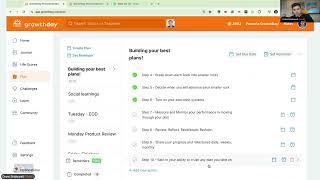
Welcome, welcome, welcome. We're about to get started for this Friday growth group. Let's go. Welcome, welcome, welcome. Morning, morning, morning. Hope everybody's having a wonderful Friday. Oh, my gosh. It's another beautiful day on the Growth Day app. Let's go. Welcome, Bray. Welcome, Patrick. Welcome, Jacqueline. Good morning. Good morning. Just gonna wait a few minutes to get people in the door and then we will kick it off. And I have a special view. I've kind of set up my rig in my. Where I'll be showing the mobile app, like, real mobile app. I won't be, like, trying to display it on the. On a. On the screen. You know, there's technical challenges with that, but it's going to be fun. Here, let me give you a little bit of a show on what that's going to look like. So boom. And let me know right now if it's actually mirrored. If it's backwards, then. If it is backwards, then what I'll do is I'll flip it around. So just let me know in the chat if it's backwards. Okay, it is backwards. All right, so let me just change that real quick. Welcome, Yocasta. Welcome, welcome, welcome. All right, so let me just kind of run through. I'm gonna wait like two more minutes, and we got about a good 20. We got a good 26 minutes that you can see it in the countdown in the bottom left. But what we're gonna do today is we're gonna talk about the mobile app. And if you haven't yet had an opportunity to use the mobile app, I think it's one of the. One of the greatest companions. And I was just talking to one of my friends last night. He was like, you know, I just got. I just got into the web. I got into the experience, and I started getting. Getting all these ideas of how to use the planner and how to use the journal. And he's really kind of striving towards building a kind of a financial plan for the rest of his. The rest of the year so he can retire earlier. And he's just like, wow, this is all accessible on my mobile phone as well. And I'm like, yeah, it is. It's cross platform. So this is a really great way to kind of keep your learning and growth on the go and not like, lose a beat if you have to travel or if you're transitioning or if you're on a commute or a bus, you know, I recently had moved from the Bay Area, but in the Bay Area, you know, the BART or the Transportation system. When you're on that transportation system or the ferry, it's so nice just to be able to, you know, if you're sitting back and you're like, what am I? What are my priorities for the day? What am I trying to achieve today? Just. And that's a perfect time to be able to open up the mobile app. So Yokasa, this is not powered by Zoom. This is actually built inside of the Growth Day app. So we built this internally and this is just the kind of. We just came out of beta around this tool, but this is the ability for us to learn and grow together inside the app. So welcome, welcome, welcome. All right, well, you know, it's five after, so I'm ready to get started and I hope you are, too. And so just as far as the agenda goes, today we're going to dive into the mobile application, which I just showed you. I'm going to be sharing the, you know, the visual for this and walk you through it. If you want to join me and do this alongside me, I would love for you to just get your phone out. And I want to go through all the pillars today and I want to talk about them and how I use them on mobile app for versus I use them on mobile web because. Or on. Not mobile web, but on desktop because there's some. There's some kind of power tips that I use when I'm creating this on mobile and I'm going to show you how to do it today. It's going to be pretty cool. All right. And just so you know, I am personally recording this session just so I can share back with my team later. So if you're also interested in accessing it later too, that's totally cool. All right, so let's get this show started. So the first thing I'm going to do is I'm just going to switch my screen to my aerial view. And I do want you just be vocal in the chat, in the comments if you. If you have any questions along the way. But I'm just going to start with the dashboard and then we'll work our way through the app. And we have about 23 minutes to do this, so it's going to be a good time. So first off the bat, how many of you, if you can say in the chat, how many of you, like, use the app or the actual native phone, or if you use Android or iOS, how many? Okay, okay, great, great, great. And okay, great. Three. Three for three. That's awesome. Well, four for four, counting me. I'm gonna count myself too. So that's cool. Alright, so what you're seeing over here is like an aerial view of my computer or, you know, my studio space here. And I even set a little time timer for us so we know how much time we got to kind of work through the session today. So the first thing that I do when I come in and I open up the app and just turn it a little bit sideways and I'm going to shift my chair just a tad bit to the right here and move this a little. There we go. Sweet. All right, so I have my, my app. And the greatest thing about the app, when you first get going inside the app, is to understand and orient yourself with the entire experience. Now just that on the top of the dashboard you'll have your profile up at the top left. And your profile allows you to access your home. Let me move my mic a little bit over for your home, your profile, which is your growth profile, where you have your goals, you have your big why you have your other ambitions and things that you're working towards. And then alongside the profile you have your notes. You can earn $100 with the referral program. The referral program is pretty cool. And it's, it's just one of those things where if you share a link, if you attach your PayPal account to the, to the product, then you can actually share this link and get paid every time somebody signs up. There's the settings, privacy, feedback, which is if you ever want to give feedback about the product and then you're good. So that's always accessible from the very top. Navigation, pretty easy. And my wife just texted me. Okay, alright, so the next thing is the community is the community icon. The community icon is up in the top right and we put this here so you can access it pretty much from anywhere just coming into the app. And then there's the notification bell on the far right. So notifications allow you to see all the notifications you've set up in the product. And if I come back over here, I can come back to my home icon just like that. So the home is always accessible from clicking your face. Okay, then I have the community. Now the community is your entryway into seeing what the community is doing and all the unique things there. You can search, you can write a new post, you can do notifications, it looks like to sign in for me to sign in to post because it needs my account. So I would do that probably separately there and then notifications and those things would show up if I sign in so come back. But I can still read without having to sign in. But if I want to comment because it needs my identity to know who you are, then I can actually access that. Pretty cool. So I'm going to come back to the homepage. Alright now so we oriented ourselves with the top part of the nav. Then we have all the tools down at the very bottom and now the tools just like you have inside the web experience where you have, you know, home, you have journal plan, life scores, learn and challenges. Now all of these are always linked up with all of your data and everything that's on side the web experience. But what I really like to do when I open up my app in the morning is I love listening to the Daily Fire. So I can see I've already listened to the Daily Fire. And after you listen to the Daily Fire, Brennan usually writes a little message and the little message down at the bottom is kind of that quick call to action to go do something. Now you know, we all know that reflection is great and getting learning, learning is great like in listening to these coaching tips. But really what takes that to the next level is going and doing something afterwards. Like doing something the next meaningful action that you can take. So we often recommend what to do right after that. Right after that Daily Fire, which is pretty cool. This replay button up at the top just allows you to replay or you could just, you know, move it back and be back in business. You can rewind it 15 seconds or 4 seconds which is pretty self explanatory. And the cool thing too. If you open the app during nighttime, the whole entire mood of the app is going to change. We have a night mode. Yes, Yokosta on mobile and web. After you listen to the whole Daily Fire, there will be a little message underneath the Daily Fire that will display and that message is kind of like a CTA to go do something now not all the time does it show up. Just depends on the Daily Fire and what the message is. But typically we have them in there. Alright, cool. So with the Daily Fire super helpful. But you know what's even more helpful is your access to all your tools. Now that's what the dashboard is all about. The dashboard is it's like your daily feed of personal growth and that daily feed of personal growth and we'll evolve this over time. But right now in our first version of this, it's really about exposing all the activity and systems that we that you are participating in in the product. So Life scores is one of them. You know your daily life Scores, your weekly Life scores and your monthly Life scores. And we'll do this too towards the end of the call. And we can even do it together. We can do a Life score together. So you can see how easy it is to do on the mobile app, which it only takes less than a minute to do. And it's just nice to have that quick calibration so that you can have a better redirection of how you could spend the rest of your day to be back on track. All right, so we have the dashboard with the Life Scores. Now what I want to show you is kind of the recommendations and the content that you have throughout the experience. So every week we have a Wednesday workshop. And this Wednesday workshop we just recently had this week where Koya Web and Jonathan Fields went live when we were talking about life changing habits this week or this whole entire month. And then in the end of the month, Glo is going to be bringing us home to talk about that as well. And now if I click on this, it would just take me to that live events page where I could set a reminder. And setting a reminder is just adding it to your calendar and just so you'll get notified when you do that. So I just kind of quickly did that. And it's super easy coming down to your video courses. So if you've subscribed to all Access or which is a plan, or if you've taken one of our offers to just get courses alone, you will have a feed also of all the video courses that you purchased. So inside of here, this is just a quick entry path into all of your video courses that you have. And, and it's just really nice to have them at your fingertips and to be able to let me come back to you. Oops, I just swiped it to my other. Let me just let some other person in. And then we're back. Okay, here we go. Welcome, welcome, welcome. Lori just joined. Welcome, Lori. We're just going through the mobile app right now and just let us know if you have any questions. So we have our live scores. Now we're going to come down. We talked about the court, the live event, we talked about the video courses. Now one really cool tip about the video courses. I'm going to just pause it real quick once it plays is that you have about, you have an outline which about basically the description of the course or video. You have the outline which is your TOC table of contents. And this is where you know everything that's going on inside the product. You can slowly swipe it down if you need to, you have comments which are about social learning. So like the community and, and, and like hearing from other people or if you have a reflection from, from the content, you can come back in and share your insights. Then we have notes. So if you're watching the course and you wanted to be able to have a timestamp note be like I'm hosting growth group right now and then I could save that and that's going to be at the timestamp of where I'm at in the video and if I clap tap that it would take me right back to that part of the video so I could continue that note. I really like doing this for the habit builder course because the habit builder course has basically the foundations of the high performance habits which I just brought here just to show you. You know we built the whole product based around a lot of these principles of habits. And you know, since it is the month of habits, it's just like great to just keep practicing these things and elevating them and getting them better. So I said a his thing, but you get the idea. Alright, so let's go back to the homepage. I'm gonna come back out minus this down because you can still be on the go and still be listening to the course. But I'm just gonna exit it out to continue the demo. Alright, so then not only do we have those video courses, right, we have those audio courses. The audio courses are really helpful if you're, you know, if you just want to put it on, put your headphones on and start doing a workout or running or just, you know, what you're trying to do for learning. And these are just really just an exceptional collection of audio courses that you have. If you upgrade to all access or if you buy the all courses offer, then after the videos we have our journal and our plan. So these are kind of like journal prompts or write so you can see the prompts or you can just go right in and start writing from the prompts and then it will take you over into the journal if you've already done that. So I'll come back over to the homepage because we're just working our way through. So these are just really quick ways for you to get into the product and get into reflecting and getting examples of. These are all high performance props. They're research backed. We've done a lot of research on the types of questions that we should be asking and just also to make sure that we're, you know, helping you get examples of things that you can reflect on because it's not always present what you could do there. All right, then we have our plan. So our plan is like, you know, all the, all the things that we're creating inside the desktop or in a mobile experience. Like here I have examples of my different, My top three edited plans will show up here and then I can always go back and just tap on my plan to see all of them. But we're just giving you a little snapshot on this homepage or this dashboard. Then we have the challenges. So we have three challenges. We're going to be continually releasing new challenges. But the challenges are great because after you, after you join a challenge, it will show in your dashboard and then you can go and participate and get after that and go do that. So it's pretty nice. Then we have recommendations that are based on your life score. So after you take all those life scores either daily, weekly and monthly, definitely encouraged to do that. Then you can actually still see your recommendations just from the homepage and if you just tap on it, you're just getting into that content right away. So how to optimize and then rethinking, rethinking your productivity and then how to achieve growth. Mindset, High performance habits. Welcome to practice number four of generating more energy. This practice is called forming your pro health team and then just getting right into it. Now one of the big things that I just wanted to show you here because I've already completed this course, if you notice, down the very bottom right of this app, I have a certificate little icon. Now this certificate icon is showing proof that I've completed this in January of 2022 and I can download a certificate of completion or I could share it to social media. Now I just recently finished a course on. It was high performance habits, advanced mindset or advanced habits. And during that, at the end of that course I decided to share it to LinkedIn. So when I shared it to LinkedIn it was as easy as, okay, well I want to share this certificate to LinkedIn and then I can share it in a post and I could write, I just finished this high performance habit and I loved watching and learning in this course. Just spell check myself and then I'll write check it out, check it out. Alright. And then if I post this and let me come back, gonna post it again. And then I'm just making sure that I'm not sharing anything personal here. And then it's gone. I shared it and now it's up on, now it's up on LinkedIn pretty easy. Pretty cool if you haven't done that. Definitely want to encourage you to share your achievements when you do that. So I'm gonna move this right back down, hit my X. And now I'm back in business. Now we showed our recommendations. Now we also have those past replays. So every single time you watch a past live event, you'll be able to see the rewatch or you'll be able to see those quick little actions where you can go and click those. You can view all those by just clicking see all. And then you can just go through all of those coaches from the last three months. You can even filter by those coaches as well. So you can get to the coach that you want to listen to or the topic that you're most interested in. Very, very cool stuff here. Come back down, come back. And now I've kind of gone through the entire dashboard. Now just in the dashboard alone has so much value. But now let's break it down. So you got that high level awareness, you have that high level reflection. And we also have 10 minutes left. So we're gonna kind of swim through this really quick. So we have our journal. Now I love how we designed this journal because this is like kind of a quick little snapshot of what, what kind of intention do I want to show up today with? You know, is it my morning mindset, is my evening review, is it my growth prompts, weekly review? And then we have all the examples. And then I can also see like, you know, my history and I can filter by my history as well over the 3, 6, 6 in, in a total year. Now you might not know this because if I was to do like one of my growth prompts and if I was just to tap into a growth prompt, if I can motivate or push others around me to higher standards of excellence, I would first start with. And I'm just going to like journal about this right now with you. Now you could type it out, which is totally fine. You just type, type, type, type, type. Or if you want, you could use the auto dictation. Now I like to use the auto dictation because it's just easier to talk out loud and do this if I'm on my mobile app. Now, if I'm on the desktop, I just like to type because it's super fast. So if I was. Now if I was to reflect on this, if I could motivate or push others around me at higher standards of excellence, I would start with role model mindset, starting with intention and bringing a Positive attitude to all of my engagements, period. Now I have that. I'm going to submit it. And now I can see that I earned a growth coin. I can continue. I can see that I wrote that on Friday the 19th and I could even view my history tap back in if I wanted to make any adjustments. And I could even add an image if I wanted to add an image. Now I did like I went on a really fun run here, let me just add a. I went on a beautiful run this morning, so I'm going to add a little image to it and I'll show you the image. So a little lake and this is going to remind me just of this magical day that I had. It's a reflection and now it's inside my digital journal forever. Hey, thanks Bray. Yeah, it was beautiful, man. It was so much fun. Yeah, yeah, totally agree about that. Bray was just saying about the flow and the thought of dictating. It's very fluid, it's very fast and we'll continue to improve that over time. Alright, so we have our journal. Hope the journal makes perfect sense. Now let's go to the plan. Now inside the plan is. I mean the plan is just. I just love using the plan. And I'm going to go to one of my favorite plans, which is my talk lineup. These are the things that I like to talk about and the things I like to teach, things I like to train on. And what I'm going to do is I made a high performance talk about habits and I want to just kind of click into that and show you an example of it. So I set a deadline for August 19th and it's this first one. Let me just come up a little bit closer for you. Let me know if you can kind of see it a little bit better. Now I'm gonna click high performance. Now I made a sample high performance system management because it's something I'm really passionate about, y'. All. Now inside this tool, if you have a high level intention of something that you're trying to learn or something you're trying to grow in, what you can think about is like what are the five or six needle moving actions or learning lessons or insights that I'm picking up from this training that I'm watching or from just like what I need to go and execute and what I need to do. So I will. I typically think about these plans as my not just like to do list, but what are my high level 5 to 10 most important things that are gonna really change the game for how I'M gonna show up, how I'm gonna interact, what's my identity, how do I want to like behave? Like, what is that? What is that fight and power inside of me that I want to make sure that I'm modeling that experience here. So I will go in and I'll just fill those things out. An example of that is like mastery skill level development. So I made this one also just to show you an example of that. So if I wanted a mastery level skill development, what would that look like? Well, to me that looks like getting clarity, mapping to learn, building a development plan, building an execution plan, building routines, rhythms, integrating the big rocks and purpose driven pursuits that I want to include. Build in and integrate design impact. And I want to build in growth loops, like what are my growth loops for success? And then I'm going to focus, I'm going to create wellness. I'm going to understand my maps and I'm going to build systems. I'm also going to integrate Joy, adventure, pleasure and my projects. And then I'm also going to make sure that I'm reflecting and training because teaching something back of what you. Oh, sorry, my screen's a little bit off there. Teaching things here. I'll come back through in case you kind of missed it. Come back through, come back through. Get clarity, map to learn. Build, build a development plan coming through again. Design impact, build growth, focus on wellness, Joy, adventure, pleasure, projects, reflections. And I have a four minute warning and yeah, yeah, yeah, Bray we should totally do that sometime. And then I have the bottom course. The bottom area is like what are the three tools that I really like going back to every day? And I'm going to break it down to 3. And that's growth day for learning and personal development for all my growth and high performance habits, tools, community and training. I use masterclass for more of that inspiration from the world's best professionals in the market. You know, from acting to all the things that I really deeply care about and want to grow in over my career and just life like I just love getting exposed to the best of the best and getting that exposure. Then I have LinkedIn learning, which was one of my old companies that I was a product designer for. And you know, they have incredible business, creative and technology courses that I helped build that platform out and I just love it. And I think it's just another great thing. So literally this week I was. Because we just moved to a new location. One of my goals was to help Jude, my son, understand what mastery level skill development looks like. And he's right now learning about YouTube and about streaming and about all these other, you know, writing and keywords. And he's, you know, he's 12 but he's still really passionate about learning these things. So he's leveraging these three platforms so that he can start developing those habits, those rituals, those routines, those. Those really important things that we all need. Alright, so that's an example of using your. This is just inside of one plan that has a subtask that has micro actions that I can take. Now I do that for a lot of different things. Like even I have, you know, I do that for my Mondays, my Tuesdays, my Wednesdays, my Thursdays and my Fridays. I have specific things that I really want to have intention in and I use those when I create that. Now inside this tool, it's a very powerful tool, right? So you can do these plans but you can also set reminders and you can manage your reminders from the very top here. So if I come back, the manage little bell icon, it's a little like reminder icon here. You can come in and set some reminders and you can always see your completed. And the rest of it is pretty self explanatory. Now I know there's only a minute and 47 seconds left. So what we're gonna do now is I'm gonna jump over into life scores because I know that you can all do this with me in less than a minute. So what we're gonna do now is and it looks like I missed my life score yesterday. Oh man, I'm pretty sad about that. But that's okay. We all miss days. So I'm going to come in and go to my daily habit. So energy. I am fired up, I'm fired up. My productivity, because I've been moving, it's a little bit lower. My influence high, my courage high. The movement. I have been moving quite a bit. I'm going to put a four because I can always get better there. My mood has been positive. My sleep, oh man, this place has a really great bed. So I've been sleeping really good. My nutrition, I'm on a vegan and athletic workout. My wife's got me on this training regimen for the next like I'm gonna try to do like 30 days and I'm gonna try to, you know, so my nutrition has been pretty on point. Eating super clean and then my clarity about what I want, what I need, what I desire because I have the plans, because I have the that journal and because I've been doing these life scores. I have incredible amount of clarity right now. So I got my score and now I'm ready to go. And look, we did that so quick. We have 30 seconds to go. And I know that I missed learn and I missed challenges, but guess what? This afternoon, I'm going to be going live again at 2:30pm Eastern Standard, and I'm going to do the exact same thing, walk through all of these tools. And I just really appreciate you being here. And thank you so much, so much. Please feel free to DM me. Reach out if you have questions. We have 5 seconds left. Have a beautiful Friday. If I don't see you later, I'm Drew Bridewell, head of Product and design. See you later.