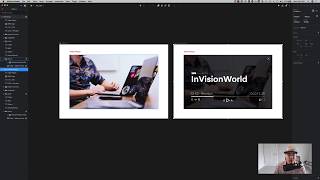
A short InVision Studio quick-tip video by Drew Bridewell demonstrating how to create keyboard-press interactions on an artboard. Drew shows assigning the spacebar (key down) to toggle play/pause on a two-state video player inside a prototype and then previews it using the launcher. The tip highlights that any keyboard key can trigger motion effects to enhance prototype navigation.
Chapters
Hey, everybody. Drew here, your friendly senior design specialist. And last Friday, I shared a little bit of a new update on Studio. But there's something even cooler that I wanted to share and that I forgot to share last week. So here's what it is. So I have this video player. It's a video player. It's two different states. And what I want to do is just create an action where when I want to pause this video, I just hit space bar. And when I want to to play, I can just hit spacebar again, and it can play on top of my mouse over and other effects. So now, inside of Envision Studio, you can do just that. So let me show you how it works. So all I need to do is come over here to my artboard and create an interaction so I can set C on my keyboard. Come over here. And now all I need to do is go over to my keyboard actions right here. Now, once I select key down, all I have to do is select this element, hits my space bar to create that. And I want to be a motion effect. So I'm going to save that. Come back over here, hit C, come back around again. It's set to that motion. Come back, key down. Spacebar. Save. I'm going to hit command S to save it. Now I'm going to hit my home screen, hit command P, which opens up my launch menu. Now, I already had a hover effect showing up here, but now when I hit spacebar, boom. Now, I promise you, I am hitting spacebar. You can kind of hear it. Let me do it again. Boom. Now, I think this is really, really cool because you can create a lot of effects by any keyboard press on the keyboard. So this is going to be helpful for a lot of your prototypes regarding how you want to navigate somebody through your entire experience. So now you can do it. So I hope you enjoyed this, and I will see you next time.