Drew Bridewell walks through InVision's Design System Manager, showing what to include in a design system portal: foundations like spacing and typography, reusable components and templates, contribution workflows, and design tokens that connect designers to engineers. The tool lets teams publish principles, accessibility guidelines, version history, and component usage data in one searchable place.
Chapters
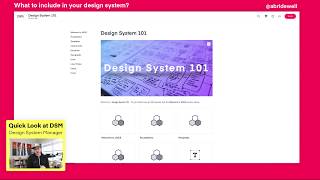
Hey everybody, drew here your friendly senior design specialist from Envision and author of Practical ux weekly on lynda.com and LinkedIn learning. So I just wanted to share something that I think is really cool right now that's, that's happening around Design System and this tool called Design System Manager. And I have a course on Design System Manager. It's an essential training course. It talks about the end to end experience of using DSM and also it's just a really nice tool for managing your design systems when you use a tool like Sketch. And if you've already used craft Manager by InVision, it's also pretty helpful. So yes, I work for InVision and yes, I talk about the product quite a bit, but I do believe that DSM is, is, is the best tool right now to manage design systems if you're managing a design team. So what I want to do is show you the product and show you what it's all about and just give you a little bit of if you haven't yet been able to check it out or checked out my course. So right now what you see is what you get. So right now you're looking at Design System Manager. This is one of the pillars. There's three pillars. There is the web view, there is the plugin experience and the API, the Design Token API which allows you to access the, the design tokens which allow your engineers and designers to be able to bridge that gap and work better, closer together. So right off the bat, in this first pillar of dsm, the DSM Webview, you can see that you can customize this to any you're liking. All this is WYSIWYG image editable except these icons that are created down here. But I can also create the hierarchy that I want to create inside of my design system. So in this case I have the welcome to uxds which is my made up design system name. And then I just have in this DSM web view an example of how to use and how to best get the most out of building out design systems. So in this first section, it's like the welcome section on my introduction, my roadmap of what's included in my design system, I also have developing within the system. So this helps my engineers understand who, who is actually responsible for doing what. And it also lets other people know if they have questions about the working with engineers inside of a design system, they know where to go. All right, there's also the Design Starter kit which is other things that you could include to help designers get onboarded into your system. And the contribution model, which is in this case contribution model is how as a designer and inside of an organization, how am I going to go from point A to point Z or from stage one to stage four in building out a design component. So this is an example of a typical workflow that you could create for that. And you know what, there's. There's probably a million answers for this, but this is the way I would approach it. And I'm sure there's ways to improve it, but this is my, my preferred practice. Then there's a usage level. So thinking about how often that component is going to be used across the different platforms or devices that will help you prioritize whether or not you should focus on that first. Then the design. Org meeting. So thinking about what kind of meetings you have. Maybe you have horizontal meetings, which is things that everybody can get involved with. And you have multi, multi different divisions like show and tells, design previews, product reviews, essentially ways to know what's going on inside the organization as a whole. Because when you get big, you need to kind of scale up. There's also the. That's unique to teams is you know, what kind of redesign reviews do you have? What do those mean? What kind of sprint retrospectives do you have with your team? What do those mean? Daily standups, what do you do? And kickoff meetings. So this is a way to norm with your team how you should set up your structure. And you could have two, only two meetings that everybody knows about. But at least documenting what the purpose of those meetings are ahead of time can make sure you drive focus into the executing and help you drive to executing those meetings. Sorry. Cool. All right, so there's foundations inside my foundations I like to think about like the design principles, the voice and tone of, of how something should be communicated. The accessibility. So what does accessibility mean inside your organization? What are the do's and the don'ts? And how should you approach accessibility when you design inside your company? Spacing, how spacing is working? Grids. Like what? All the grids that you can use inside the system. Links, logos and even go as far as templates. So what kind of templates do you have inside the system that you could utilize? Now a template is not a component. A template to me is a combination of multiple things that you do need to be able to repeat. So in this case I have box studies for the old course page that I designed@lynda.com so basically these, these modules and these things I wanted a template for Building out those, those as well. I also created some box studies of different product layouts and different ways of how things are represented. And again, you can access those many different ways. Components is another thing. There are so many different components that you can have and I would encourage you to just create the ones that you need and then branch out from there. Because not everything needs to be a component or not everything needs a super high fidelity level of documentation. So just understanding what those things are. I also encourage teams to have design education inside of their design system so designers can know where to go to learn more about up leveling their skill set up leveling their thoughts around design systems and how to design inside the design system. That's also very important. There's other things around like what were some previous audits that we have done? Where were they mapped? What was the structure of those? Even doing a design audit. One sheet to help promote why you should do it and what should be included in that design audit. So, so this is some additional resources that you can include. And in this example I'm including other things to work with, you know, work with other design education around design systems and so forth. What does typography look like inside the system? Icons, layer, styles. You get the idea. There is, there is so many things that you can add to the system to be able to show what you need and to be able to at a high level, at a quick glance, be able to invite product management, engineering design to this site so you can evangelize design systems inside your organization. So this is just wanted to show DSM's webview. It's pretty cool, pretty cool stuff. What you can include in there. It's also inviting people, you know, inviting different people in your organization. The design tokens and the version history. Being able to come in here and just edit version history is awesome. If I come back out, be able to go back to my system, search for content. Even if I wanted to search like buttons, you know, being able to get a button search. This is powerful stuff, you guys. This is, this is really cool. So I hope you enjoyed this quick little video. And if you haven't yet checked out dsm, then give it a look. If you have questions about it, feel free, feel free to message me or message me on my course and then I have a comment. Be able to comment and answer your questions. And if also on Envision's website there's also a huge list of frequently asked questions and things that you can go to as well to get that. I'll try to find that link for you. And if you have any questions, feel free to reach out to me. And, you know, I hope you enjoyed this, and I'll see you next time.