A walkthrough of the HTC EVO 4G's FM radio app and Square card reader. The FM radio needs a headset plugged in as an antenna and supports presets, but has a power button that sometimes fails. Square's card swipe is difficult and often doesn't work, so you end up entering details manually instead.
Chapters
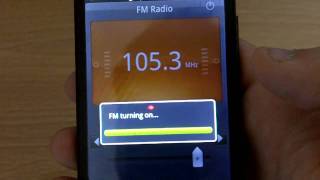
Alright, we're going to show you quick couple features of the Evo 4G on Sprint, made by HTC. One of the cool things people wanted to see was the FM radio. We'll show you that here. First thing you need to do is plug in a headset. Theoretically any kind will work. I'm going to use an old iPhone one here. One of the things I want to mention is it's kind of awkward when you first plug it in. You can see it's still sticks out quite a bit, but it looks like it does work. So I guess keep that in mind. So here the RDS does work on this application. This is a sense application made by htc, it looks like. And got a couple presets in here. Delete and you can actually name the presets whatever you want. Tapping on it will change the channel to that. One thing I didn't know was a feature that I found on my own was you can actually change it to speaker mode and listen to things on your own and then control that speaker volume via the media volume. So that's a cool feature. That's basically the FM radio app. You can kind of move this slider around to change the channel and then you know, more specifically adjust the frequency with these two arrows here. And I believe these just move in between presets. The plus adds a preset and that's basically it. And then supposedly that turns it off, but every time I hit that button it doesn't end up turning off. So I don't know. And it's kind of cool. You can actually multitask with it. So you can actually be doing a bunch of your other stuff while using the radio. And then of course going back here, you can see the frequency it's on. There we go. That worked that time. So we'll turn it off and then we'll go back home. I want to show you guys one more quick thing. I don't know if you guys have heard of the application or the company called Square. It's basically like best way to explain it is sort of like PayPal on the go. So if your friend owes you money or if you're actually selling something, you can actually get someone to slide their card. Now the readers supposedly are like in big backorder, but I was able to pick one up. I'll show you here. When you do plug it in for some reason, swipe failed. I haven't even swiped but. But I believe that it does. Let's see. It does detect that I have the reader in so you can click pay. We need to put in a minimum of $1 here. I'm sure you guys have seen videos on this, but I just want to show you on the Evo, on the nice large screen, it does look pretty good. I guess the UI kind of is a little bit awkward because it totally looks like it's ported from the iPhone. As you can tell with these kind of iPhone ish buttons, I don't think they should be having that sort of UI for Android, but it looks like that's what the developers want, so. Cash card, click card, Slide the card. It's very difficult to slide cards. I don't know if you guys have seen the videos. Even the founder, Jack Dorsey, can't even in one of the earlier videos, couldn't even slide the card properly. But it's very difficult to get it swiped. But when it does, it does work. If you key it in yourself, they charge you more, which is really silly. But the card reader itself is fairly small. It does protrude out from the port like the headphones does, but that's basically it. That's a Square on the Evo 4G from Sprint and HTC, along with the FM radio. Thanks a lot.